
Information Processing N6 www.futuremanagers.com
LV
Published · 31 slides · 0 views

1 / 1

Description
Information Processing N6 www.futuremanagers.com KEYBOARD REVISION Module 1: Keyboard revisions www.futuremanagers.com Module 1: Keyboard revisions (continued) A - Z Each of the following sentences is a tool to improve speed and accuracy as
Related Topics
Share
Embed code
Download this presentation From Below
"Information Processing N6 www.futuremanagers.com" is the property of its rightful owner. Permission is granted to download and print the materials on this website for personal, non-commercial use only, and to display it on your personal computer provided you do not modify the materials and that you retain all copyright notices contained in the materials. By downloading content from our website, you accept the terms of this agreement.
Presentation Transcript
01
Information Processing
N6<br>
N6<br>
02
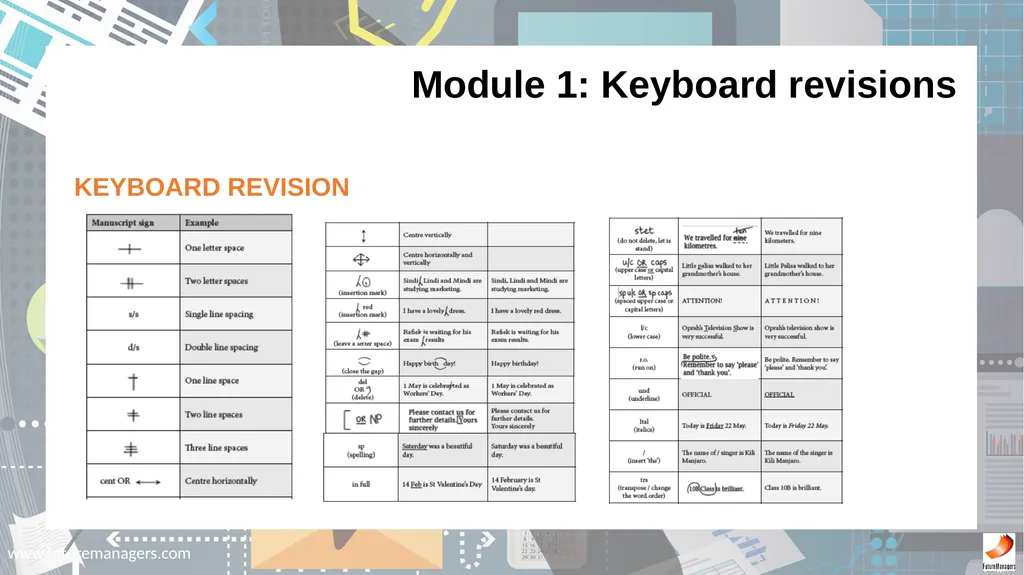
www.futuremanagers.com KEYBOARD REVISION Module 1: Keyboard revisions<br>
03
www.futuremanagers.com Module 1: Keyboard revisions (continued) A - Z
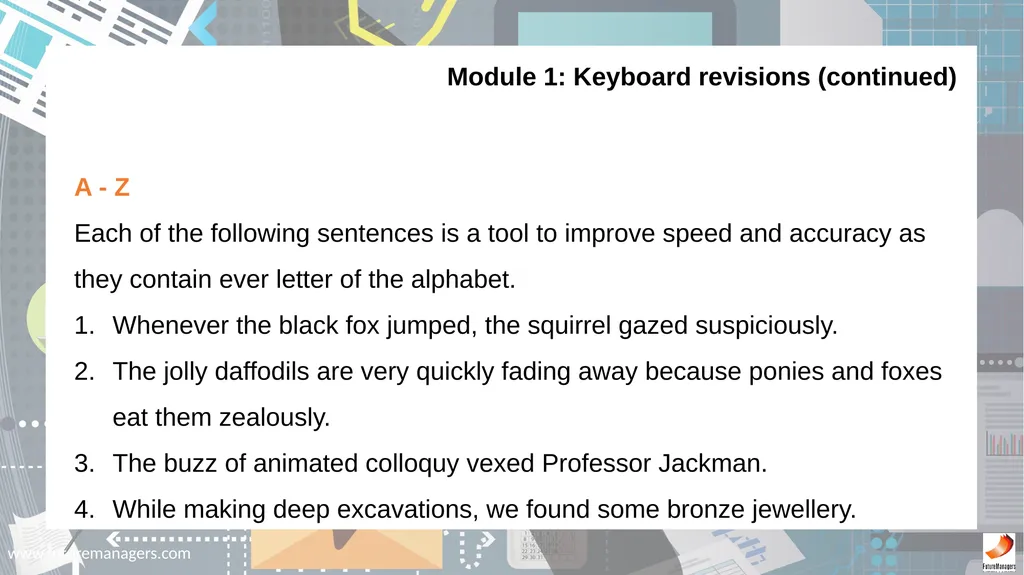
Each of the following sentences is a tool to improve speed and accuracy as they contain ever letter of the alphabet.
Whenever the black fox jumped, the squirrel gazed suspiciously.
The jolly daffodils are very quickly fading away because ponies and foxes eat them zealously.
The buzz of animated colloquy vexed Professor Jackman.
While making deep excavations, we found some bronze jewellery.<br>
Each of the following sentences is a tool to improve speed and accuracy as they contain ever letter of the alphabet.
Whenever the black fox jumped, the squirrel gazed suspiciously.
The jolly daffodils are very quickly fading away because ponies and foxes eat them zealously.
The buzz of animated colloquy vexed Professor Jackman.
While making deep excavations, we found some bronze jewellery.<br>
04
www.futuremanagers.com Module 1: Keyboard revisions (continued) KEYBOARD REVISION: LETTER ASSOCIATION
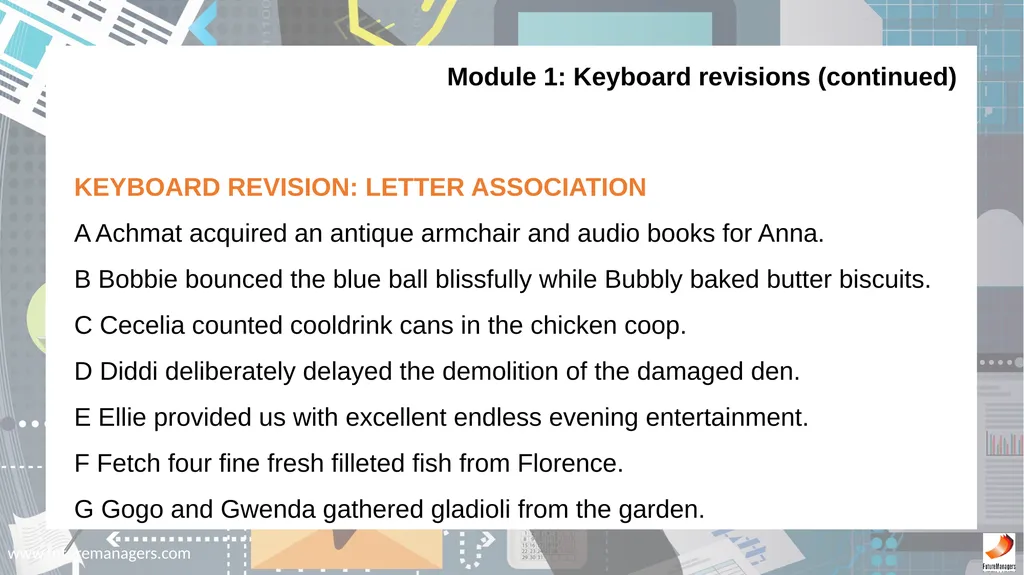
A Achmat acquired an antique armchair and audio books for Anna.
B Bobbie bounced the blue ball blissfully while Bubbly baked butter biscuits.
C Cecelia counted cooldrink cans in the chicken coop.
D Diddi deliberately delayed the demolition of the damaged den.
E Ellie provided us with excellent endless evening entertainment.
F Fetch four fine fresh filleted fish from Florence.
G Gogo and Gwenda gathered gladioli from the garden.<br>
A Achmat acquired an antique armchair and audio books for Anna.
B Bobbie bounced the blue ball blissfully while Bubbly baked butter biscuits.
C Cecelia counted cooldrink cans in the chicken coop.
D Diddi deliberately delayed the demolition of the damaged den.
E Ellie provided us with excellent endless evening entertainment.
F Fetch four fine fresh filleted fish from Florence.
G Gogo and Gwenda gathered gladioli from the garden.<br>
05
www.futuremanagers.com Module 1: Keyboard revisions (continued) KEYBOARD REVISION: LETTER ASSOCIATION (CONT)
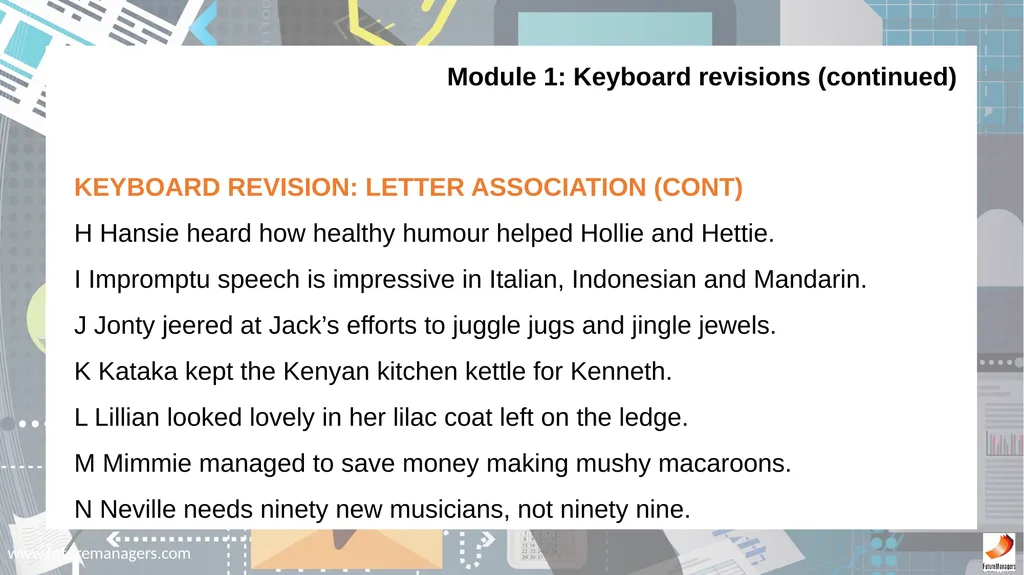
H Hansie heard how healthy humour helped Hollie and Hettie.
I Impromptu speech is impressive in Italian, Indonesian and Mandarin.
J Jonty jeered at Jack’s efforts to juggle jugs and jingle jewels.
K Kataka kept the Kenyan kitchen kettle for Kenneth.
L Lillian looked lovely in her lilac coat left on the ledge.
M Mimmie managed to save money making mushy macaroons.
N Neville needs ninety new musicians, not ninety nine.<br>
H Hansie heard how healthy humour helped Hollie and Hettie.
I Impromptu speech is impressive in Italian, Indonesian and Mandarin.
J Jonty jeered at Jack’s efforts to juggle jugs and jingle jewels.
K Kataka kept the Kenyan kitchen kettle for Kenneth.
L Lillian looked lovely in her lilac coat left on the ledge.
M Mimmie managed to save money making mushy macaroons.
N Neville needs ninety new musicians, not ninety nine.<br>
06
www.futuremanagers.com Module 1: Keyboard revisions (continued) KEYBOARD REVISION: LETTER ASSOCIATION (CONT)
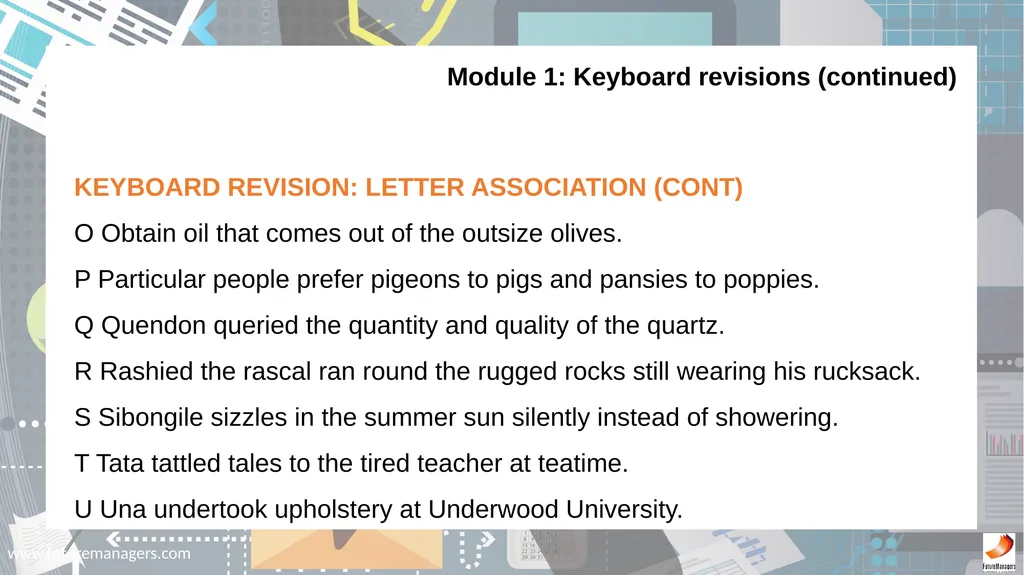
O Obtain oil that comes out of the outsize olives.
P Particular people prefer pigeons to pigs and pansies to poppies.
Q Quendon queried the quantity and quality of the quartz.
R Rashied the rascal ran round the rugged rocks still wearing his rucksack.
S Sibongile sizzles in the summer sun silently instead of showering.
T Tata tattled tales to the tired teacher at teatime.
U Una undertook upholstery at Underwood University.<br>
O Obtain oil that comes out of the outsize olives.
P Particular people prefer pigeons to pigs and pansies to poppies.
Q Quendon queried the quantity and quality of the quartz.
R Rashied the rascal ran round the rugged rocks still wearing his rucksack.
S Sibongile sizzles in the summer sun silently instead of showering.
T Tata tattled tales to the tired teacher at teatime.
U Una undertook upholstery at Underwood University.<br>
07
www.futuremanagers.com Module 1: Keyboard revisions (continued) KEYBOARD REVISION: LETTER ASSOCIATION (CONT)
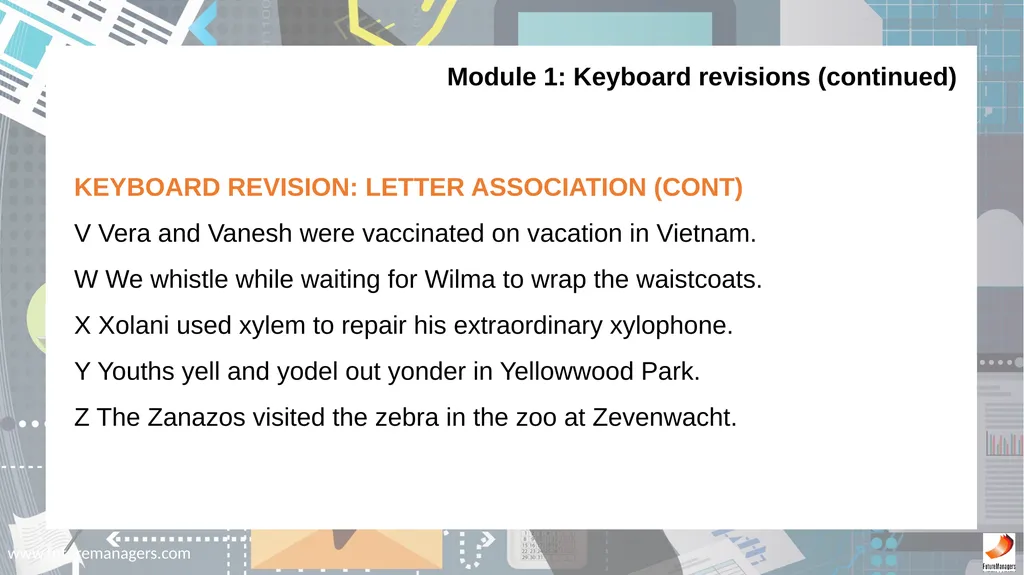
V Vera and Vanesh were vaccinated on vacation in Vietnam.
W We whistle while waiting for Wilma to wrap the waistcoats.
X Xolani used xylem to repair his extraordinary xylophone.
Y Youths yell and yodel out yonder in Yellowwood Park.
Z The Zanazos visited the zebra in the zoo at Zevenwacht.<br>
V Vera and Vanesh were vaccinated on vacation in Vietnam.
W We whistle while waiting for Wilma to wrap the waistcoats.
X Xolani used xylem to repair his extraordinary xylophone.
Y Youths yell and yodel out yonder in Yellowwood Park.
Z The Zanazos visited the zebra in the zoo at Zevenwacht.<br>
08
www.futuremanagers.com Module 1: Keyboard revisions (continued) KEYBOARD REVISION: ONE MINUTE DRILLS
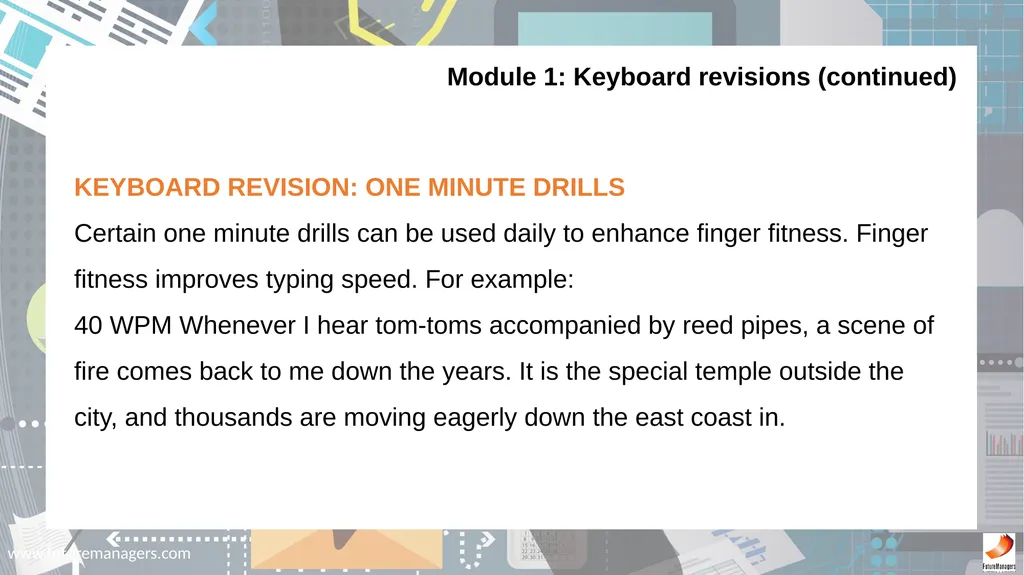
Certain one minute drills can be used daily to enhance finger fitness. Finger fitness improves typing speed. For example:
40 WPM Whenever I hear tom-toms accompanied by reed pipes, a scene of fire comes back to me down the years. It is the special temple outside the city, and thousands are moving eagerly down the east coast in.<br>
Certain one minute drills can be used daily to enhance finger fitness. Finger fitness improves typing speed. For example:
40 WPM Whenever I hear tom-toms accompanied by reed pipes, a scene of fire comes back to me down the years. It is the special temple outside the city, and thousands are moving eagerly down the east coast in.<br>
09
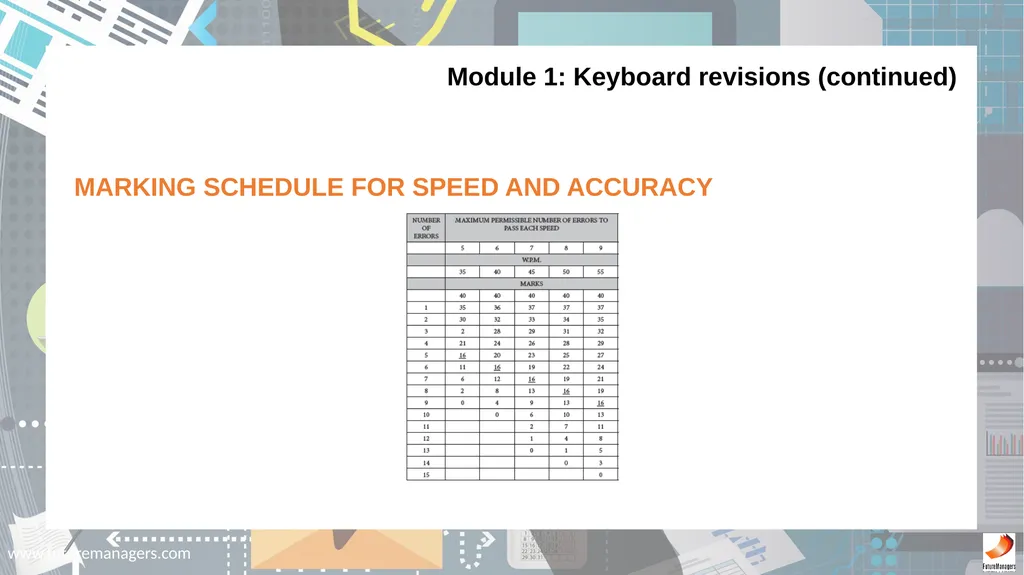
www.futuremanagers.com Module 1: Keyboard revisions (continued) MARKING SCHEDULE FOR SPEED AND ACCURACY<br>
10
www.futuremanagers.com Module 1: Keyboard revisions (continued) WHAT IS THE PURPOSE OF TYPING TIMED ACCURACY/SPEED TESTS?
The purpose of accuracy and speed tests is to develop keyboarding skills in order to prepare one to attain keying-in excellence. It is necessary to practise speed to become sought-after competent secretaries. The importance of having a good typing speed enables one to secure a very good position in the work place.<br>
The purpose of accuracy and speed tests is to develop keyboarding skills in order to prepare one to attain keying-in excellence. It is necessary to practise speed to become sought-after competent secretaries. The importance of having a good typing speed enables one to secure a very good position in the work place.<br>
11
www.futuremanagers.com Module 1: Keyboard revisions (continued) PAGE LAYOUT FOE THE TYPING OF SPEED TESTS
Page Layout: all margins 2.5 cm/1”
Paper orientation: A4 Portrait
Line-spacing: 1.5 or double
Font: Courier New, 12 pt
Check spelling after completion of the speed test and correct any errors before saving and printing. (This function will mark incorrect spelling by underlining in red.)<br>
Page Layout: all margins 2.5 cm/1”
Paper orientation: A4 Portrait
Line-spacing: 1.5 or double
Font: Courier New, 12 pt
Check spelling after completion of the speed test and correct any errors before saving and printing. (This function will mark incorrect spelling by underlining in red.)<br>
12
www.futuremanagers.com BUSINESS LETTER ON A LETTERHEAD
A commercial business letter is a letter written in formal language, usually used when writing from one business organisation to another, or for correspondence between such organisations and their customers, clients and other external parties. Module 2: Business letters<br>
A commercial business letter is a letter written in formal language, usually used when writing from one business organisation to another, or for correspondence between such organisations and their customers, clients and other external parties. Module 2: Business letters<br>
13
www.futuremanagers.com Module 2: Business letters (continued) TAKE NOTE OF THE FOLLOWING
It is incorrect to have the conclusion of a letter separately on a page i.e. the only text on a page.
At times a personal assistant will be authorised to sign a letter on behalf of her employer. The abbreviation p.p. (per procurationem) is used as shown below.
Display of business letters varies according to the preference of the business.<br>
It is incorrect to have the conclusion of a letter separately on a page i.e. the only text on a page.
At times a personal assistant will be authorised to sign a letter on behalf of her employer. The abbreviation p.p. (per procurationem) is used as shown below.
Display of business letters varies according to the preference of the business.<br>
14
www.futuremanagers.com Module 2: Business letters (continued) TAKE NOTE OF THE FOLLOWING (CONT)
Before posting a letter it is to be signed by the appropriate person.
If the letter carries on to a second or third page insert a page break at an appropriate place.<br>
Before posting a letter it is to be signed by the appropriate person.
If the letter carries on to a second or third page insert a page break at an appropriate place.<br>
15
www.futuremanagers.com Module 2: Business letters (continued) HOW TO DETERMINE THE TOP MARGINE WHEN PRINTING A LTTER ON A LETTERHEAD
Measure the required distance from the top edge of the letterhead plus an extra two line spaces.
Set the top margin as follows: Click on the Page Layout tab
Click on Margins.
Click on Custom margins which displays the Page Setup dialogue box.
Key in the size of the Top margin.<br>
Measure the required distance from the top edge of the letterhead plus an extra two line spaces.
Set the top margin as follows: Click on the Page Layout tab
Click on Margins.
Click on Custom margins which displays the Page Setup dialogue box.
Key in the size of the Top margin.<br>
16
www.futuremanagers.com Module 2: Business letters (continued) PREPARING AND PRINTING ENVELOPES IN WORD 2010
Create and print a single envelope.
To change the fonts of return and delivery address.
Select an envelope size.<br>
Create and print a single envelope.
To change the fonts of return and delivery address.
Select an envelope size.<br>
17
www.futuremanagers.com SHORT LETTERS
Short letters include:
Acknowledgement of letters/documents received.
Answer to enquiries.
Enquiries.
Letters of thanks, sympathy, congratulations, etc.
The content of the above letters must be brief.
The rules for Business Letters apply. Module 3: Drafting of short letters<br>
Short letters include:
Acknowledgement of letters/documents received.
Answer to enquiries.
Enquiries.
Letters of thanks, sympathy, congratulations, etc.
The content of the above letters must be brief.
The rules for Business Letters apply. Module 3: Drafting of short letters<br>
18
www.futuremanagers.com CIRCULARS/LETTERS OF PROMOTION
The purpose of a circulars/letters of promotion of sales is where retail merchants look to improve sales, bring new product releases to the attention of the consumer. Rather than sending higher volumes of flyers to consumers, they are instead including more information in a circular letter to bolster sales. Module 4: Circulars/letters of promotion<br>
The purpose of a circulars/letters of promotion of sales is where retail merchants look to improve sales, bring new product releases to the attention of the consumer. Rather than sending higher volumes of flyers to consumers, they are instead including more information in a circular letter to bolster sales. Module 4: Circulars/letters of promotion<br>
19
www.futuremanagers.com CREATING ADVANCED DISPLAY WORK
When a brochure is designed keep in mind that this brochure is going to “talk on your behalf ”, so ensure that the brochure gets the correct message across, to sell or explain products or services offered which is the ultimate goal. Module 5: Advanced display work<br>
When a brochure is designed keep in mind that this brochure is going to “talk on your behalf ”, so ensure that the brochure gets the correct message across, to sell or explain products or services offered which is the ultimate goal. Module 5: Advanced display work<br>
20
www.futuremanagers.com ITINERARIES
A planned route or journey.
A travel document recording these.
Includes important travel details.
Can be a final itinerary, a proposal or a provisional one. Module 6: Itineraries<br>
A planned route or journey.
A travel document recording these.
Includes important travel details.
Can be a final itinerary, a proposal or a provisional one. Module 6: Itineraries<br>
21
www.futuremanagers.com Module 6: Itineraries (continued) METHOD
In paragraph form.
In column form.
On A4 portrait.
A5 folded booklet form.<br>
In paragraph form.
In column form.
On A4 portrait.
A5 folded booklet form.<br>
22
www.futuremanagers.com FANFOLD BROCHURES
Brochures and flyers are known as effective marketing tools, with a format that showcases products, services with style, effectiveness and readability. Fan fold, Z-fold, Barrel fold, Accordion fold all have two or parallel folds that result in the sheet opening like a fan which “reveals” the brochure content well. These brochures are represented by “back and forth” folds into three panels. Module 7: Fanfold brochures<br>
Brochures and flyers are known as effective marketing tools, with a format that showcases products, services with style, effectiveness and readability. Fan fold, Z-fold, Barrel fold, Accordion fold all have two or parallel folds that result in the sheet opening like a fan which “reveals” the brochure content well. These brochures are represented by “back and forth” folds into three panels. Module 7: Fanfold brochures<br>
23
www.futuremanagers.com Module 7: Fanfold brochures (continued) WORKING WITH COLUMNS
Click on the Page Layout tab.
Click on Columns.
The Columns Dialogue box will appear.
Click on More Columns.
Click on three.
Set the Spacing between columns.
Select Equal Column Width.<br>
Click on the Page Layout tab.
Click on Columns.
The Columns Dialogue box will appear.
Click on More Columns.
Click on three.
Set the Spacing between columns.
Select Equal Column Width.<br>
24
www.futuremanagers.com TABLE OF CONTENTS
A Table of contents, or simply referred to as “Contents” is a list of the parts of a book or document organized in the order in which the parts appear. The contents usually includes the titles or descriptions of the first-level headers, such as chapter titles in longer works, and often includes second-level or section titles within the chapters as well, and occasionally even third-level titles. Module 8: Table of contents<br>
A Table of contents, or simply referred to as “Contents” is a list of the parts of a book or document organized in the order in which the parts appear. The contents usually includes the titles or descriptions of the first-level headers, such as chapter titles in longer works, and often includes second-level or section titles within the chapters as well, and occasionally even third-level titles. Module 8: Table of contents<br>
25
www.futuremanagers.com FLOW CHARTS
A flow chart is a type of diagram that represents an algorithm or process, showing the steps as boxes, and their order by connecting these with arrows or lines. This diagrammatic representation can give a step-by-step solution to a given problem; or can depict the Organisational Structure of an Enterprise. Process operations are represented in usually rectangular boxes, and arrows connecting them represent flow of control. Module 9: Flow charts<br>
A flow chart is a type of diagram that represents an algorithm or process, showing the steps as boxes, and their order by connecting these with arrows or lines. This diagrammatic representation can give a step-by-step solution to a given problem; or can depict the Organisational Structure of an Enterprise. Process operations are represented in usually rectangular boxes, and arrows connecting them represent flow of control. Module 9: Flow charts<br>
26
www.futuremanagers.com Module 9: Flow charts (continued) METHOD
Flow charts can be processed in Word using textboxes or Excel.
The distance between the boxes must be the same.
The joining lines must be the same height.
(The height is the same as that of the “I-beam” of the mouse).
Use insert shapes to draw the lines.
Insert – Text Box – Draw Text Box – for the rectangular boxes.
It is easy to copy (use the Ctrl key) the textboxes.<br>
Flow charts can be processed in Word using textboxes or Excel.
The distance between the boxes must be the same.
The joining lines must be the same height.
(The height is the same as that of the “I-beam” of the mouse).
Use insert shapes to draw the lines.
Insert – Text Box – Draw Text Box – for the rectangular boxes.
It is easy to copy (use the Ctrl key) the textboxes.<br>
27
www.futuremanagers.com Module 9: Flow charts (continued) METHOD (CONT)
To move the boxes either up/down/sideways press down the Ctrl key and use the direction arrows.
Keep the flow chart as uniform as possible.<br>
To move the boxes either up/down/sideways press down the Ctrl key and use the direction arrows.
Keep the flow chart as uniform as possible.<br>
28
www.futuremanagers.com FINANCIAL STATEMENTS
A financial statement (or financial report) is a formal record of the financial activities of a business, person or other entity. The objective of financial statements is to provide information about the financial position, performance and changes in financial position of an enterprise that is useful to a wide range of users in making economic decisions. Module 10: Financial statements<br>
A financial statement (or financial report) is a formal record of the financial activities of a business, person or other entity. The objective of financial statements is to provide information about the financial position, performance and changes in financial position of an enterprise that is useful to a wide range of users in making economic decisions. Module 10: Financial statements<br>
29
www.futuremanagers.com TYPING TABLES
Procedure for typing tables:
Choose the correct paper size – A4 (landscape or portrait).
Set Left and Right margins of 1.25 cm / 0.5”.
Set Top and Bottom margins of 2.5 cm / 1.0”.
Determine the number of columns and rows needed to key in the table. Module 11: Revision<br>
Procedure for typing tables:
Choose the correct paper size – A4 (landscape or portrait).
Set Left and Right margins of 1.25 cm / 0.5”.
Set Top and Bottom margins of 2.5 cm / 1.0”.
Determine the number of columns and rows needed to key in the table. Module 11: Revision<br>
30
www.futuremanagers.com AFRICAN LANGUAGES
The purpose is to develop keyboarding skills, particularly accuracy. It forces one to concentrate on the keys even if perhaps one may not necessarily comprehend the passage one is typing. This is a broad statement, as some fortunate students understand more than one language. Once again, accurate fingering enhances typing speed which is a door to good work opportunities and higher salaries for a competent typist/secretary. Module 12: African languages<br>
The purpose is to develop keyboarding skills, particularly accuracy. It forces one to concentrate on the keys even if perhaps one may not necessarily comprehend the passage one is typing. This is a broad statement, as some fortunate students understand more than one language. Once again, accurate fingering enhances typing speed which is a door to good work opportunities and higher salaries for a competent typist/secretary. Module 12: African languages<br>
31
www.futuremanagers.com MAIL MERGE
A mail merge consists of the following steps.
Prepare and set up the main document.
Connect the document to a data source containing the information to be merges into the main document.
Refine the list of recipients to be merged.
Add placeholders/merge fields to the main document.
Preview and complete the merge and finish the process. Module 13: Mail merge<br>
A mail merge consists of the following steps.
Prepare and set up the main document.
Connect the document to a data source containing the information to be merges into the main document.
Refine the list of recipients to be merged.
Add placeholders/merge fields to the main document.
Preview and complete the merge and finish the process. Module 13: Mail merge<br>