
Microsoft Scenario Library Discover industry and
A
Published · 36 slides · 0 views

1 / 1




Description
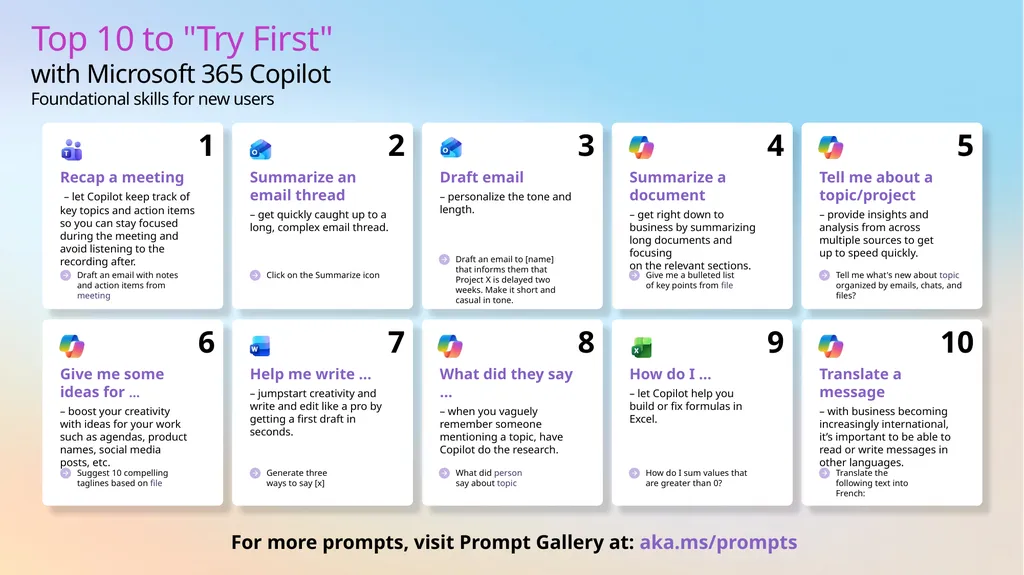
Microsoft Scenario Library Discover industry and role-based use cases Top 10 to Try First with Microsoft 365 Copilot Foundational skills for new users For more prompts, visit Prompt Gallery at: aka.msprompts AI value journey Org Value
Related Topics
Share
Embed code
Download this presentation From Below
"Microsoft Scenario Library Discover industry and" is the property of its rightful owner. Permission is granted to download and print the materials on this website for personal, non-commercial use only, and to display it on your personal computer provided you do not modify the materials and that you retain all copyright notices contained in the materials. By downloading content from our website, you accept the terms of this agreement.
Presentation Transcript
01
Microsoft Scenario Library Discover industry and role-based use cases<br>
02
Top 10 to "Try First" with Microsoft 365 Copilot
Foundational skills for new users For more prompts, visit Prompt Gallery at: aka.ms/prompts<br>
03
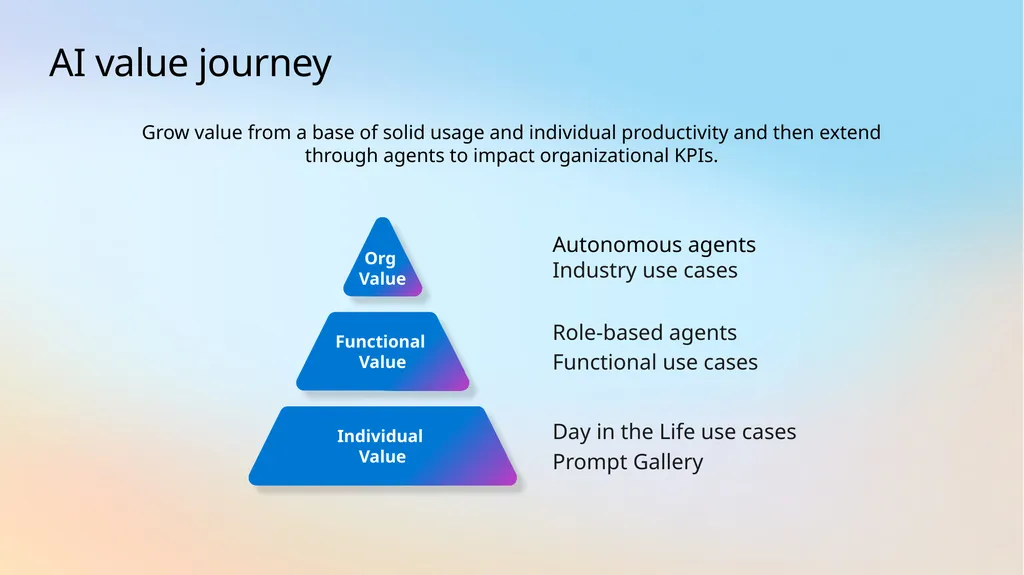
AI value journey Org
Value Functional
Value Autonomous agents
Industry use cases Role-based agents
Functional use cases Individual Value Day in the Life use cases
Prompt Gallery Grow value from a base of solid usage and individual productivity and then extend through agents to impact organizational KPIs.<br>
Industry use cases Role-based agents
Functional use cases Individual Value Day in the Life use cases
Prompt Gallery Grow value from a base of solid usage and individual productivity and then extend through agents to impact organizational KPIs.<br>
04
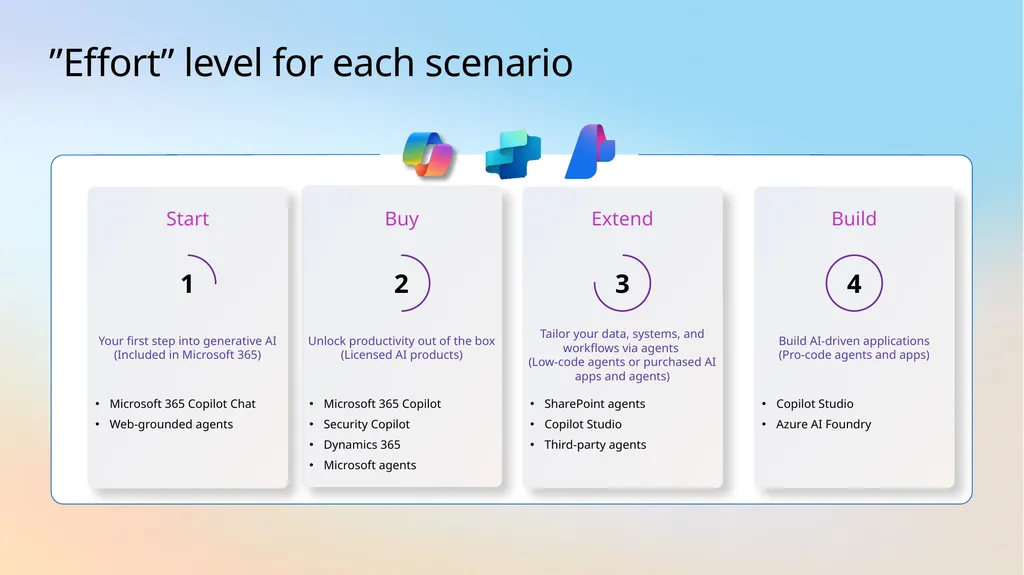
”Effort” level for each scenario Buy Microsoft 365 Copilot
Security Copilot
Dynamics 365
Microsoft agents Unlock productivity out of the box (Licensed AI products) 2 Extend SharePoint agents
Copilot Studio
Third-party agents Tailor your data, systems, and workflows via agents
(Low-code agents or purchased AI apps and agents) 3 Start Microsoft 365 Copilot Chat
Web-grounded agents Your first step into generative AI (Included in Microsoft 365) 1 Build Copilot Studio
Azure AI Foundry Build AI-driven applications
(Pro-code agents and apps) 4<br>
Security Copilot
Dynamics 365
Microsoft agents Unlock productivity out of the box (Licensed AI products) 2 Extend SharePoint agents
Copilot Studio
Third-party agents Tailor your data, systems, and workflows via agents
(Low-code agents or purchased AI apps and agents) 3 Start Microsoft 365 Copilot Chat
Web-grounded agents Your first step into generative AI (Included in Microsoft 365) 1 Build Copilot Studio
Azure AI Foundry Build AI-driven applications
(Pro-code agents and apps) 4<br>
05
AI use cases for
Finance<br>
06
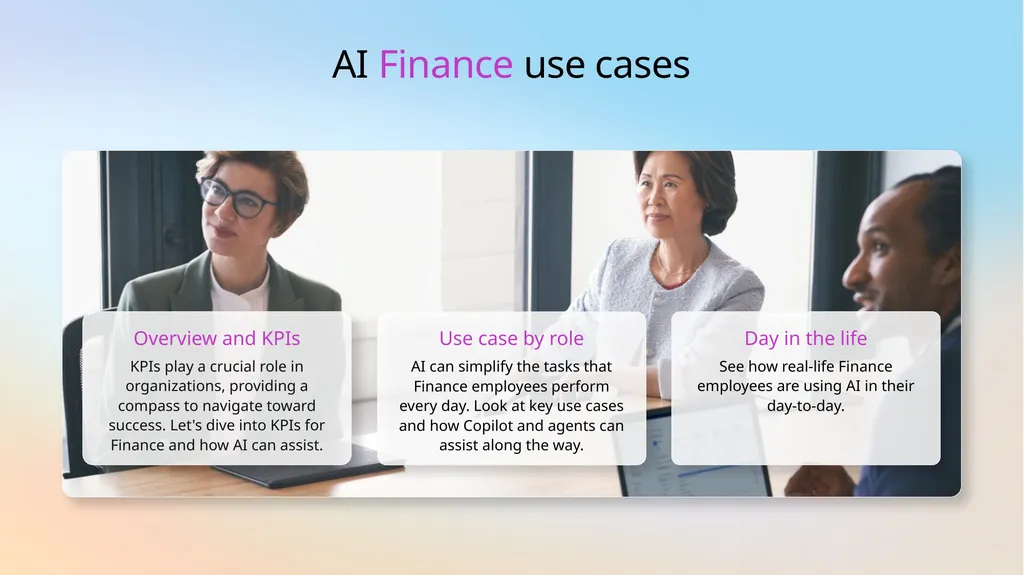
AI Finance use cases Overview and KPIs KPIs play a crucial role in organizations, providing a compass to navigate toward success. Let's dive into KPIs for Finance and how AI can assist. Use case by role AI can simplify the tasks that Finance employees perform every day. Look at key use cases and how Copilot and agents can assist along the way. Day in the life See how real-life Finance employees are using AI in their day-to-day.<br>
07
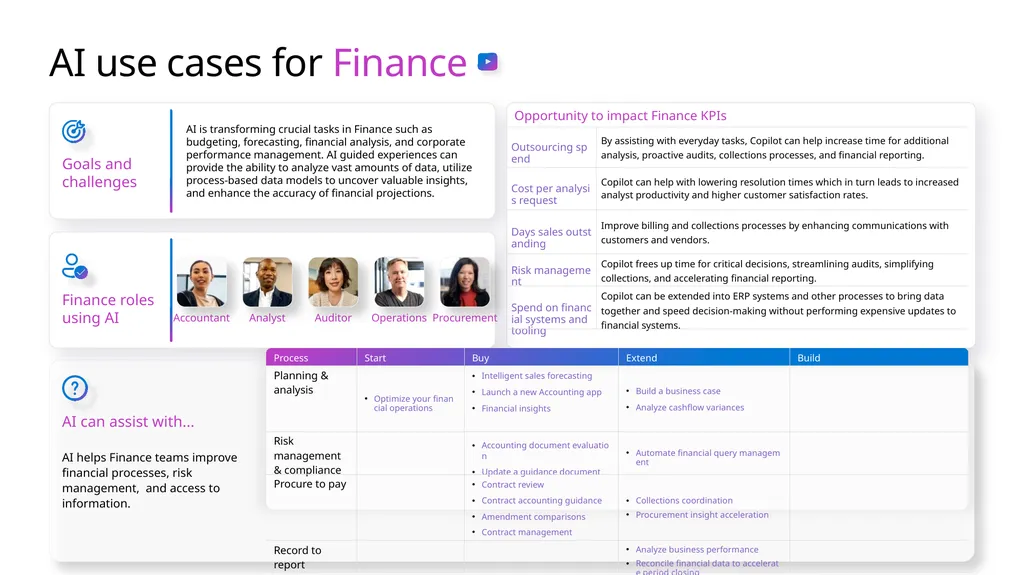
AI use cases for Finance Goals and challenges AI is transforming crucial tasks in Finance such as budgeting, forecasting, financial analysis, and corporate performance management. AI guided experiences can provide the ability to analyze vast amounts of data, utilize process-based data models to uncover valuable insights, and enhance the accuracy of financial projections. AI can assist with... AI helps Finance teams improve financial processes, risk management, and access to information. Finance roles using AI Accountant Auditor Analyst Operations Procurement<br>
08
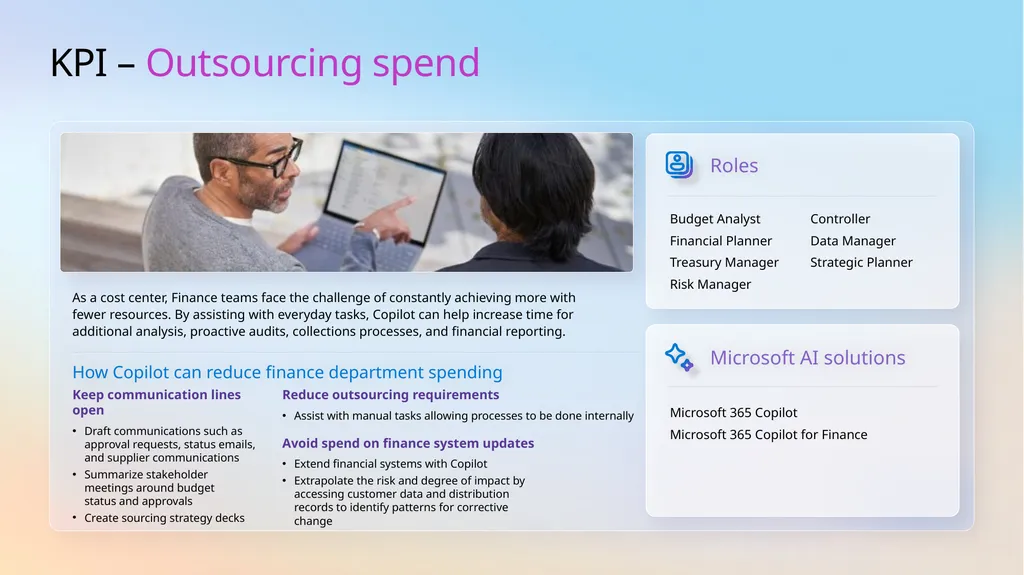
KPI – Outsourcing spend As a cost center, Finance teams face the challenge of constantly achieving more with fewer resources. By assisting with everyday tasks, Copilot can help increase time for additional analysis, proactive audits, collections processes, and financial reporting. Roles Microsoft 365 Copilot
Microsoft 365 Copilot for Finance Microsoft AI solutions How Copilot can reduce finance department spending Keep communication lines open
Draft communications such as approval requests, status emails, and supplier communications
Summarize stakeholder meetings around budget status and approvals
Create sourcing strategy decks Reduce outsourcing requirements
Assist with manual tasks allowing processes to be done internally Avoid spend on finance system updates
Extend financial systems with Copilot
Extrapolate the risk and degree of impact by accessing customer data and distribution records to identify patterns for corrective change Budget Analyst
Financial Planner
Treasury Manager
Risk Manager
Controller
Data Manager
Strategic Planner<br>
Microsoft 365 Copilot for Finance Microsoft AI solutions How Copilot can reduce finance department spending Keep communication lines open
Draft communications such as approval requests, status emails, and supplier communications
Summarize stakeholder meetings around budget status and approvals
Create sourcing strategy decks Reduce outsourcing requirements
Assist with manual tasks allowing processes to be done internally Avoid spend on finance system updates
Extend financial systems with Copilot
Extrapolate the risk and degree of impact by accessing customer data and distribution records to identify patterns for corrective change Budget Analyst
Financial Planner
Treasury Manager
Risk Manager
Controller
Data Manager
Strategic Planner<br>
09
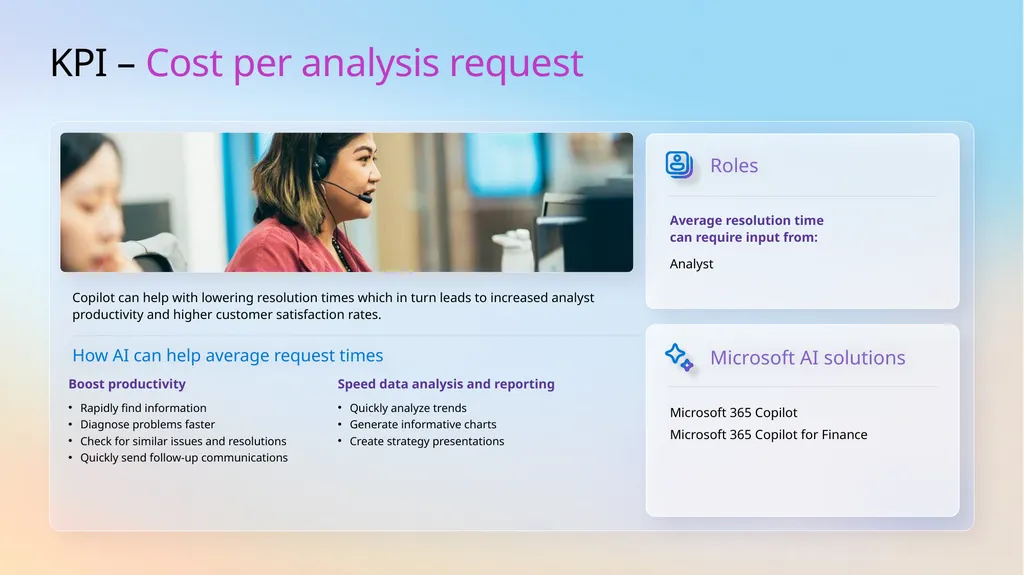
KPI – Cost per analysis request Copilot can help with lowering resolution times which in turn leads to increased analyst productivity and higher customer satisfaction rates. Roles Microsoft 365 Copilot
Microsoft 365 Copilot for Finance Microsoft AI solutions How AI can help average request times Average resolution time can require input from: Analyst Boost productivity
Rapidly find information
Diagnose problems faster
Check for similar issues and resolutions
Quickly send follow-up communications Speed data analysis and reporting
Quickly analyze trends
Generate informative charts
Create strategy presentations<br>
Microsoft 365 Copilot for Finance Microsoft AI solutions How AI can help average request times Average resolution time can require input from: Analyst Boost productivity
Rapidly find information
Diagnose problems faster
Check for similar issues and resolutions
Quickly send follow-up communications Speed data analysis and reporting
Quickly analyze trends
Generate informative charts
Create strategy presentations<br>
10
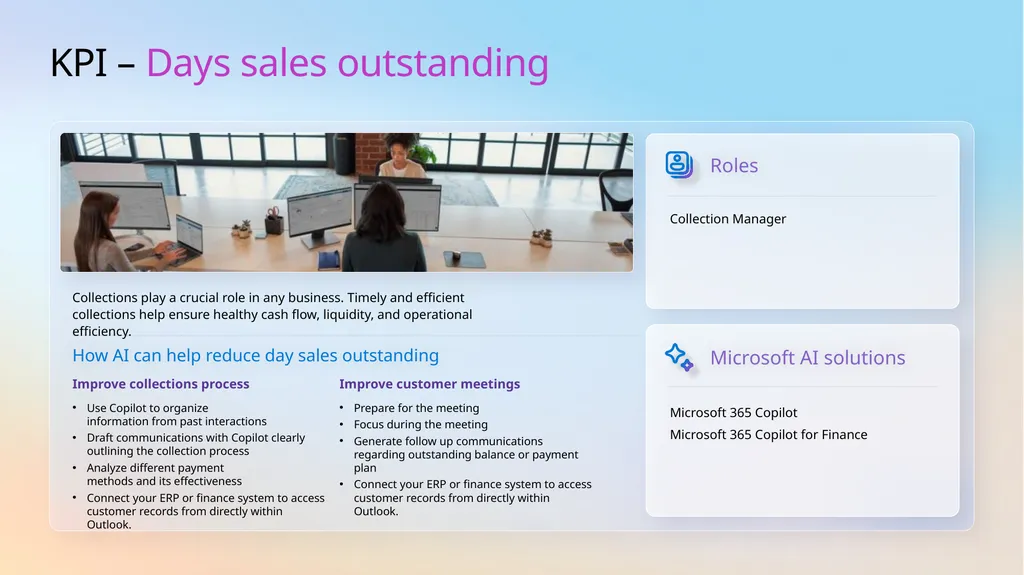
KPI – Days sales outstanding Collections play a crucial role in any business. Timely and efficient collections help ensure healthy cash flow, liquidity, and operational efficiency. Roles How AI can help reduce day sales outstanding Collection Manager Improve collections process
Use Copilot to organize information from past interactions
Draft communications with Copilot clearly outlining the collection process
Analyze different payment methods and its effectiveness
Connect your ERP or finance system to access customer records from directly within Outlook. Improve customer meetings
Prepare for the meeting
Focus during the meeting
Generate follow up communications regarding outstanding balance or payment plan
Connect your ERP or finance system to access customer records from directly within Outlook. Microsoft 365 Copilot
Microsoft 365 Copilot for Finance Microsoft AI solutions<br>
Use Copilot to organize information from past interactions
Draft communications with Copilot clearly outlining the collection process
Analyze different payment methods and its effectiveness
Connect your ERP or finance system to access customer records from directly within Outlook. Improve customer meetings
Prepare for the meeting
Focus during the meeting
Generate follow up communications regarding outstanding balance or payment plan
Connect your ERP or finance system to access customer records from directly within Outlook. Microsoft 365 Copilot
Microsoft 365 Copilot for Finance Microsoft AI solutions<br>
11
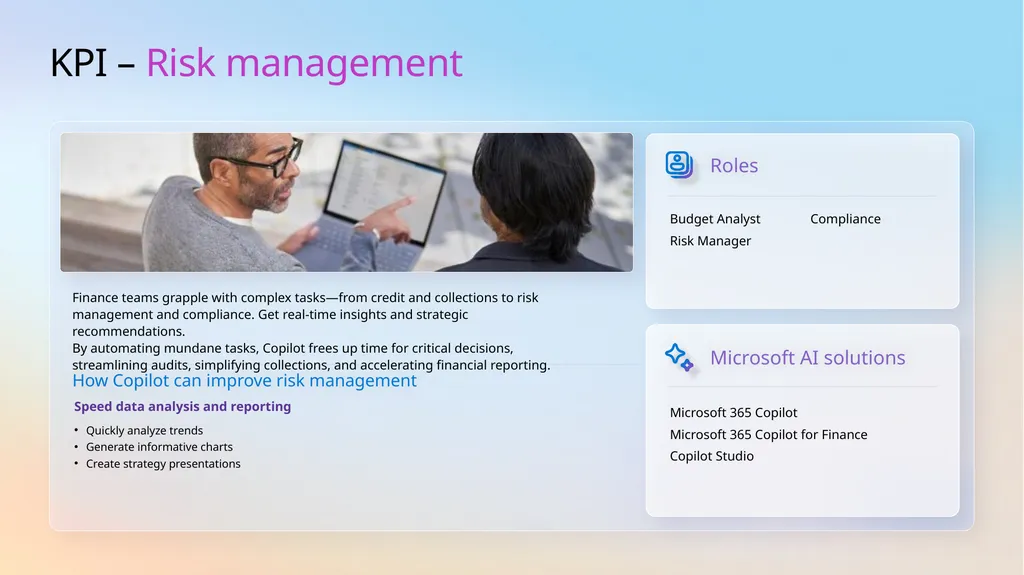
KPI – Risk management Finance teams grapple with complex tasks—from credit and collections to risk management and compliance. Get real-time insights and strategic recommendations.
By automating mundane tasks, Copilot frees up time for critical decisions, streamlining audits, simplifying collections, and accelerating financial reporting. Roles Microsoft 365 Copilot
Microsoft 365 Copilot for Finance
Copilot Studio Microsoft AI solutions How Copilot can improve risk management Budget Analyst
Risk Manager
Compliance Speed data analysis and reporting
Quickly analyze trends
Generate informative charts
Create strategy presentations<br>
Microsoft 365 Copilot for Finance
Copilot Studio Microsoft AI solutions How Copilot can improve risk management Budget Analyst
Risk Manager
Compliance Speed data analysis and reporting
Quickly analyze trends
Generate informative charts
Create strategy presentations<br>
12
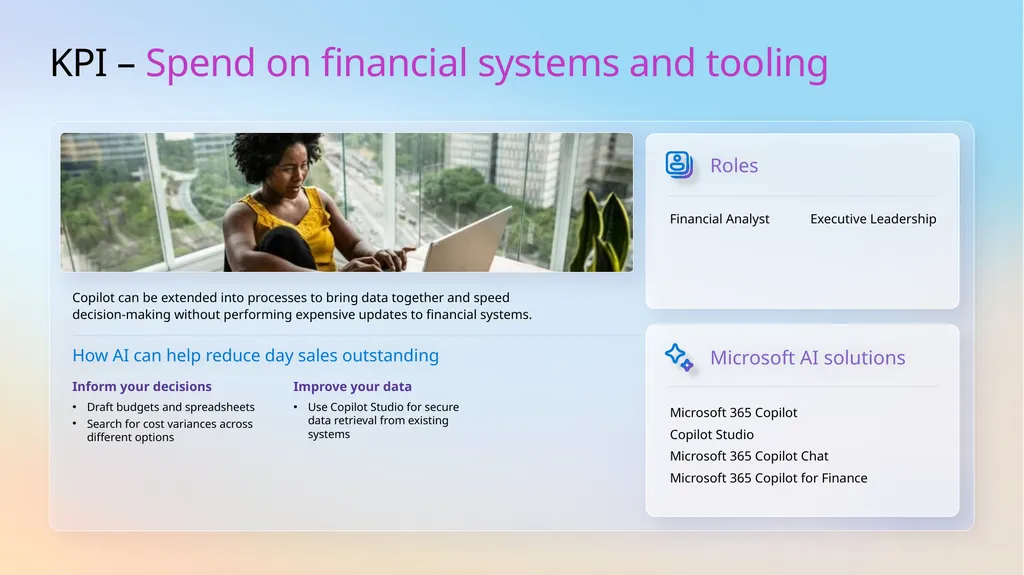
KPI – Spend on financial systems and tooling Copilot can be extended into processes to bring data together and speed
decision-making without performing expensive updates to financial systems. Roles Microsoft 365 Copilot
Copilot Studio
Microsoft 365 Copilot Chat
Microsoft 365 Copilot for Finance Microsoft AI solutions How AI can help reduce day sales outstanding Financial Analyst
Executive Leadership Inform your decisions
Draft budgets and spreadsheets
Search for cost variances across different options Improve your data
Use Copilot Studio for secure data retrieval from existing systems<br>
Copilot Studio
Microsoft 365 Copilot Chat
Microsoft 365 Copilot for Finance Microsoft AI solutions How AI can help reduce day sales outstanding Financial Analyst
Executive Leadership Inform your decisions
Draft budgets and spreadsheets
Search for cost variances across different options Improve your data
Use Copilot Studio for secure data retrieval from existing systems<br>
13
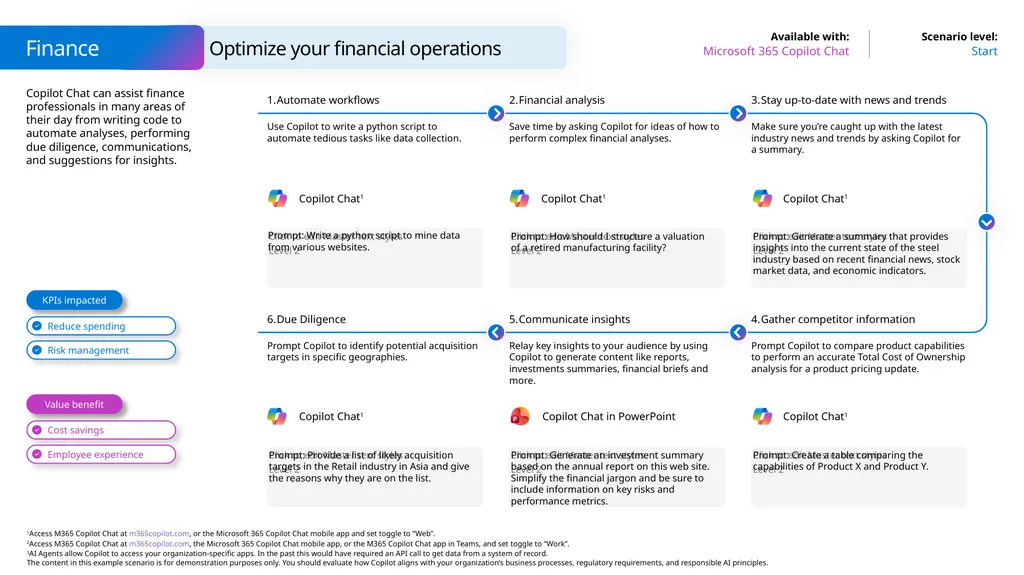
Copilot Chat can assist finance professionals in many areas of their day from writing code to automate analyses, performing due diligence, communications, and suggestions for insights. Finance Start Microsoft 365 Copilot Chat Optimize your financial operations Prompt: Write a python script to mine data from various websites. Automate workflows Use Copilot to write a python script to automate tedious tasks like data collection. Financial analysis Save time by asking Copilot for ideas of how to perform complex financial analyses. Prompt: Generate a summary that provides insights into the current state of the steel industry based on recent financial news, stock market data, and economic indicators. Stay up-to-date with news and trends Make sure you’re caught up with the latest industry news and trends by asking Copilot for a summary. Prompt: How should I structure a valuation
of a retired manufacturing facility? Prompt: Provide a list of likely acquisition targets in the Retail industry in Asia and give the reasons why they are on the list. Due Diligence Prompt Copilot to identify potential acquisition targets in specific geographies. Communicate insights Relay key insights to your audience by using Copilot to generate content like reports, investments summaries, financial briefs and more. Prompt: Create a table comparing the
capabilities of Product X and Product Y. Gather competitor information Prompt Copilot to compare product capabilities to perform an accurate Total Cost of Ownership analysis for a product pricing update. Prompt: Generate an investment summary based on the annual report on this web site. Simplify the financial jargon and be sure to include information on key risks and performance metrics. Value benefit KPIs impacted Copilot Chat1 Copilot Chat1 Copilot Chat1 Copilot Chat1 Copilot Chat1 Copilot Chat in PowerPoint<br>
14
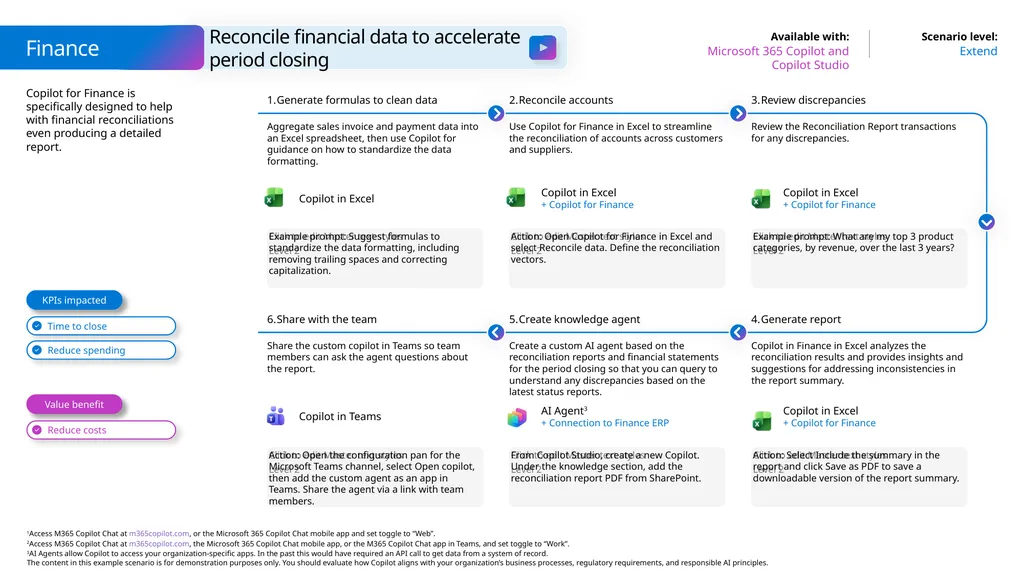
Copilot for Finance is specifically designed to help with financial reconciliations even producing a detailed report. Finance Extend Microsoft 365 Copilot and Copilot Studio Reconcile financial data to accelerate
period closing Example prompt: Suggest formulas to standardize the data formatting, including removing trailing spaces and correcting capitalization. Generate formulas to clean data Aggregate sales invoice and payment data into an Excel spreadsheet, then use Copilot for guidance on how to standardize the data formatting. Reconcile accounts Use Copilot for Finance in Excel to streamline the reconciliation of accounts across customers and suppliers. Example prompt: What are my top 3 product categories, by revenue, over the last 3 years? Review discrepancies Review the Reconciliation Report transactions for any discrepancies. Action: Open Copilot for Finance in Excel and select Reconcile data. Define the reconciliation vectors. Action: Open the configuration pan for the Microsoft Teams channel, select Open copilot, then add the custom agent as an app in Teams. Share the agent via a link with team members. Share with the team Share the custom copilot in Teams so team members can ask the agent questions about the report. Create knowledge agent Create a custom AI agent based on the reconciliation reports and financial statements for the period closing so that you can query to understand any discrepancies based on the latest status reports. Action: Select Include the summary in the report and click Save as PDF to save a downloadable version of the report summary. Generate report Copilot in Finance in Excel analyzes the reconciliation results and provides insights and suggestions for addressing inconsistencies in the report summary. From Copilot Studio, create a new Copilot. Under the knowledge section, add the reconciliation report PDF from SharePoint. Value benefit KPIs impacted Copilot in Excel Copilot in Excel
+ Copilot for Finance Copilot in Excel
+ Copilot for Finance AI Agent3
+ Connection to Finance ERP Copilot in Teams Copilot in Excel
+ Copilot for Finance<br>
+ Copilot for Finance Copilot in Excel
+ Copilot for Finance AI Agent3
+ Connection to Finance ERP Copilot in Teams Copilot in Excel
+ Copilot for Finance<br>
15
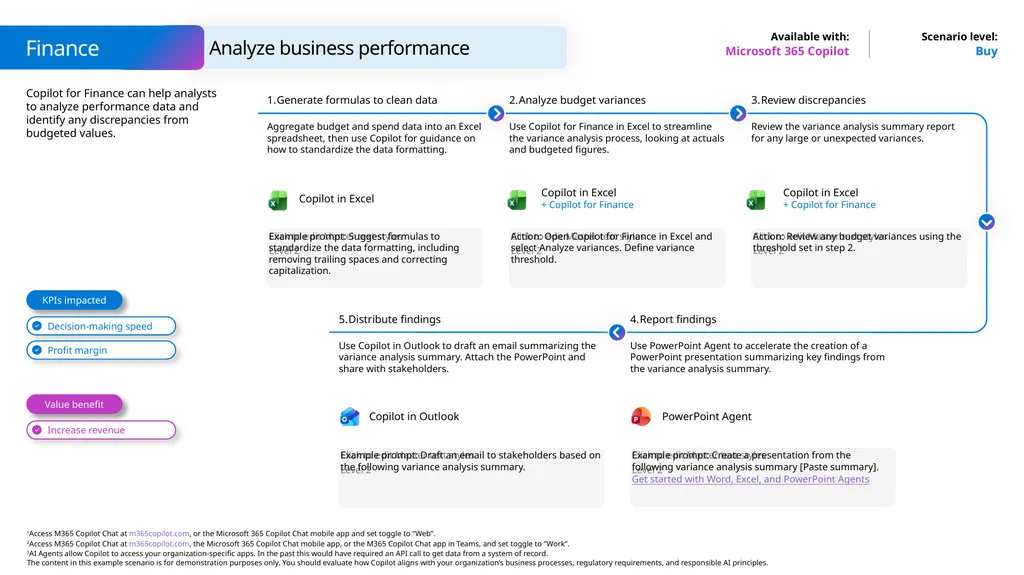
Copilot for Finance can help analysts to analyze performance data and identify any discrepancies from budgeted values. Buy Microsoft 365 Copilot Example prompt: Suggest formulas to standardize the data formatting, including removing trailing spaces and correcting capitalization. Generate formulas to clean data Aggregate budget and spend data into an Excel spreadsheet, then use Copilot for guidance on how to standardize the data formatting. Analyze budget variances Use Copilot for Finance in Excel to streamline the variance analysis process, looking at actuals and budgeted figures. Action: Review any budget variances using the threshold set in step 2. Review discrepancies Review the variance analysis summary report for any large or unexpected variances. Action: Open Copilot for Finance in Excel and select Analyze variances. Define variance threshold. Distribute findings Use Copilot in Outlook to draft an email summarizing the variance analysis summary. Attach the PowerPoint and share with stakeholders. Example prompt: Create a presentation from the following variance analysis summary [Paste summary].
Get started with Word, Excel, and PowerPoint Agents Report findings Use PowerPoint Agent to accelerate the creation of a PowerPoint presentation summarizing key findings from the variance analysis summary. Example prompt: Draft an email to stakeholders based on the following variance analysis summary. Value benefit KPIs impacted Finance Analyze business performance PowerPoint Agent Copilot in Outlook Copilot in Excel Copilot in Excel
+ Copilot for Finance Copilot in Excel
+ Copilot for Finance<br>
Get started with Word, Excel, and PowerPoint Agents Report findings Use PowerPoint Agent to accelerate the creation of a PowerPoint presentation summarizing key findings from the variance analysis summary. Example prompt: Draft an email to stakeholders based on the following variance analysis summary. Value benefit KPIs impacted Finance Analyze business performance PowerPoint Agent Copilot in Outlook Copilot in Excel Copilot in Excel
+ Copilot for Finance Copilot in Excel
+ Copilot for Finance<br>
16
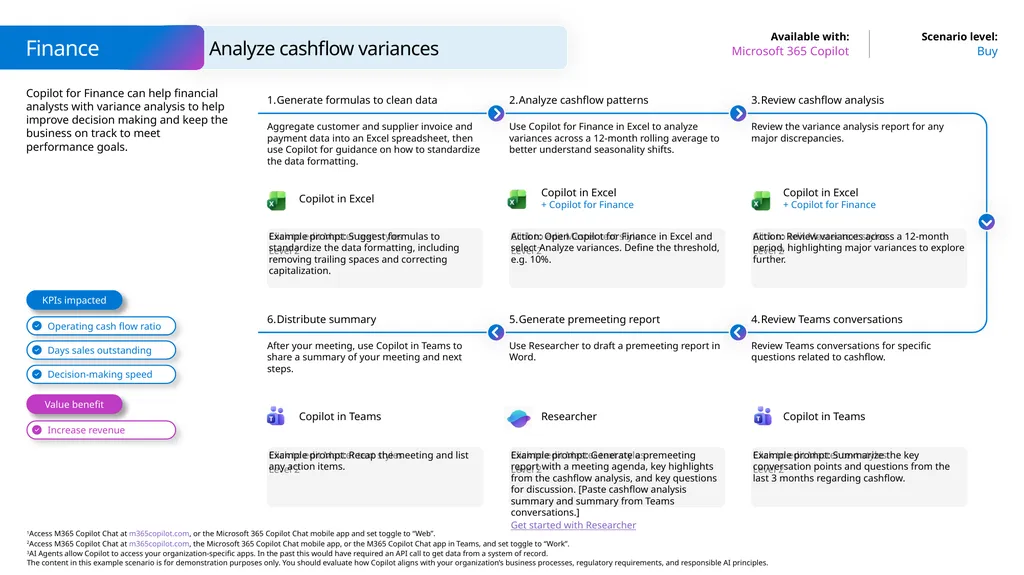
Copilot for Finance can help financial analysts with variance analysis to help improve decision making and keep the business on track to meet performance goals. Finance Buy Microsoft 365 Copilot Analyze cashflow variances Example prompt: Suggest formulas to standardize the data formatting, including removing trailing spaces and correcting capitalization. Generate formulas to clean data Aggregate customer and supplier invoice and payment data into an Excel spreadsheet, then use Copilot for guidance on how to standardize the data formatting. Analyze cashflow patterns Use Copilot for Finance in Excel to analyze variances across a 12-month rolling average to better understand seasonality shifts. Action: Review variances across a 12-month period, highlighting major variances to explore further. Review cashflow analysis Review the variance analysis report for any major discrepancies. Action: Open Copilot for Finance in Excel and select Analyze variances. Define the threshold, e.g. 10%. Example prompt: Recap the meeting and list any action items. Distribute summary After your meeting, use Copilot in Teams to share a summary of your meeting and next steps. Generate premeeting report Use Researcher to draft a premeeting report in Word. Example prompt: Summarize the key conversation points and questions from the last 3 months regarding cashflow. Review Teams conversations Review Teams conversations for specific questions related to cashflow. Example prompt: Generate a premeeting report with a meeting agenda, key highlights from the cashflow analysis, and key questions for discussion. [Paste cashflow analysis summary and summary from Teams conversations.]
Get started with Researcher Value benefit KPIs impacted Copilot in Excel Copilot in Excel
+ Copilot for Finance Copilot in Excel
+ Copilot for Finance Researcher Copilot in Teams Copilot in Teams<br>
Get started with Researcher Value benefit KPIs impacted Copilot in Excel Copilot in Excel
+ Copilot for Finance Copilot in Excel
+ Copilot for Finance Researcher Copilot in Teams Copilot in Teams<br>
17
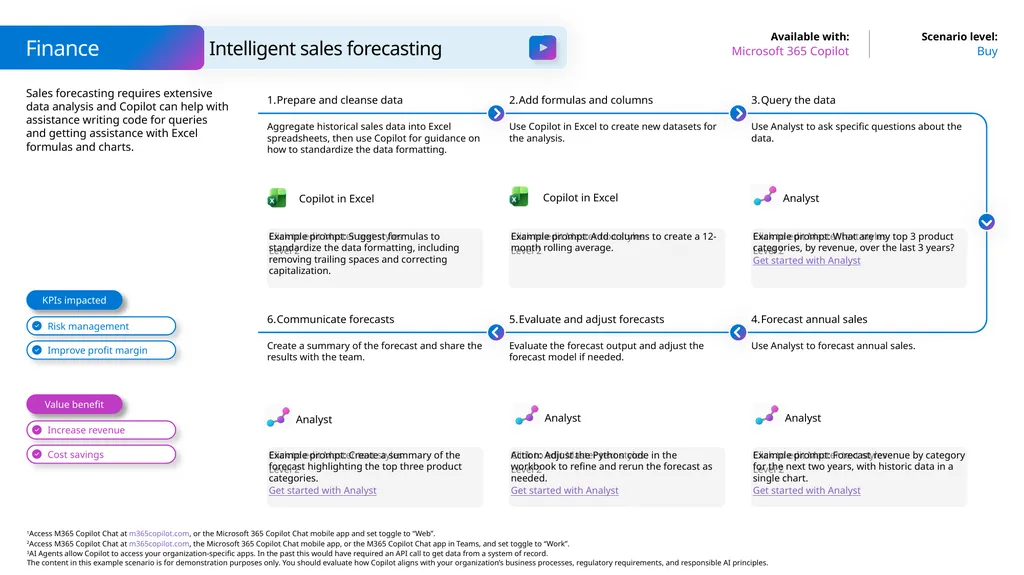
Sales forecasting requires extensive data analysis and Copilot can help with assistance writing code for queries and getting assistance with Excel formulas and charts. Finance Buy Microsoft 365 Copilot Intelligent sales forecasting Example prompt: Suggest formulas to standardize the data formatting, including removing trailing spaces and correcting capitalization. Prepare and cleanse data Aggregate historical sales data into Excel spreadsheets, then use Copilot for guidance on how to standardize the data formatting. Add formulas and columns Use Copilot in Excel to create new datasets for the analysis. Example prompt: What are my top 3 product categories, by revenue, over the last 3 years?
Get started with Analyst Query the data Use Analyst to ask specific questions about the data. Example prompt: Add columns to create a 12-month rolling average. Example prompt: Create a summary of the forecast highlighting the top three product categories.
Get started with Analyst Communicate forecasts Create a summary of the forecast and share the results with the team. Evaluate and adjust forecasts Evaluate the forecast output and adjust the forecast model if needed. Example prompt: Forecast revenue by category for the next two years, with historic data in a single chart.
Get started with Analyst Forecast annual sales Use Analyst to forecast annual sales. Action: Adjust the Python code in the workbook to refine and rerun the forecast as needed.
Get started with Analyst Value benefit KPIs impacted Copilot in Excel Analyst Analyst Analyst Analyst Copilot in Excel<br>
Get started with Analyst Query the data Use Analyst to ask specific questions about the data. Example prompt: Add columns to create a 12-month rolling average. Example prompt: Create a summary of the forecast highlighting the top three product categories.
Get started with Analyst Communicate forecasts Create a summary of the forecast and share the results with the team. Evaluate and adjust forecasts Evaluate the forecast output and adjust the forecast model if needed. Example prompt: Forecast revenue by category for the next two years, with historic data in a single chart.
Get started with Analyst Forecast annual sales Use Analyst to forecast annual sales. Action: Adjust the Python code in the workbook to refine and rerun the forecast as needed.
Get started with Analyst Value benefit KPIs impacted Copilot in Excel Analyst Analyst Analyst Analyst Copilot in Excel<br>
18
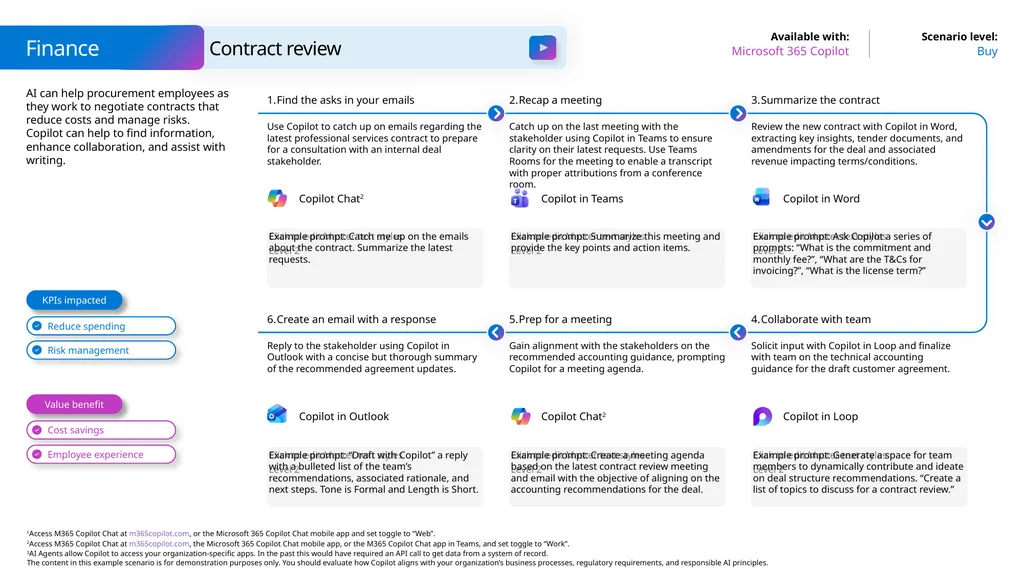
AI can help procurement employees as they work to negotiate contracts that reduce costs and manage risks. Copilot can help to find information, enhance collaboration, and assist with writing. Finance Buy Microsoft 365 Copilot Contract review Example prompt: Catch me up on the emails about the contract. Summarize the latest requests. Find the asks in your emails Use Copilot to catch up on emails regarding the latest professional services contract to prepare for a consultation with an internal deal stakeholder. Recap a meeting Catch up on the last meeting with the stakeholder using Copilot in Teams to ensure clarity on their latest requests. Use Teams Rooms for the meeting to enable a transcript with proper attributions from a conference room. Example prompt: Ask Copilot a series of prompts: “What is the commitment and monthly fee?”, “What are the T&Cs for invoicing?”, “What is the license term?” Summarize the contract Review the new contract with Copilot in Word, extracting key insights, tender documents, and amendments for the deal and associated revenue impacting terms/conditions. Example prompt: Summarize this meeting and provide the key points and action items. Example prompt: “Draft with Copilot” a reply with a bulleted list of the team’s recommendations, associated rationale, and next steps. Tone is Formal and Length is Short. Create an email with a response Reply to the stakeholder using Copilot in Outlook with a concise but thorough summary of the recommended agreement updates. Prep for a meeting Gain alignment with the stakeholders on the recommended accounting guidance, prompting Copilot for a meeting agenda. Example prompt: Generate a space for team members to dynamically contribute and ideate on deal structure recommendations. “Create a list of topics to discuss for a contract review.” Collaborate with team Solicit input with Copilot in Loop and finalize with team on the technical accounting guidance for the draft customer agreement. Example prompt: Create a meeting agenda based on the latest contract review meeting and email with the objective of aligning on the accounting recommendations for the deal. Value benefit KPIs impacted Copilot Chat2 Copilot in Teams Copilot in Word Copilot Chat2 Copilot in Outlook Copilot in Loop<br>
19
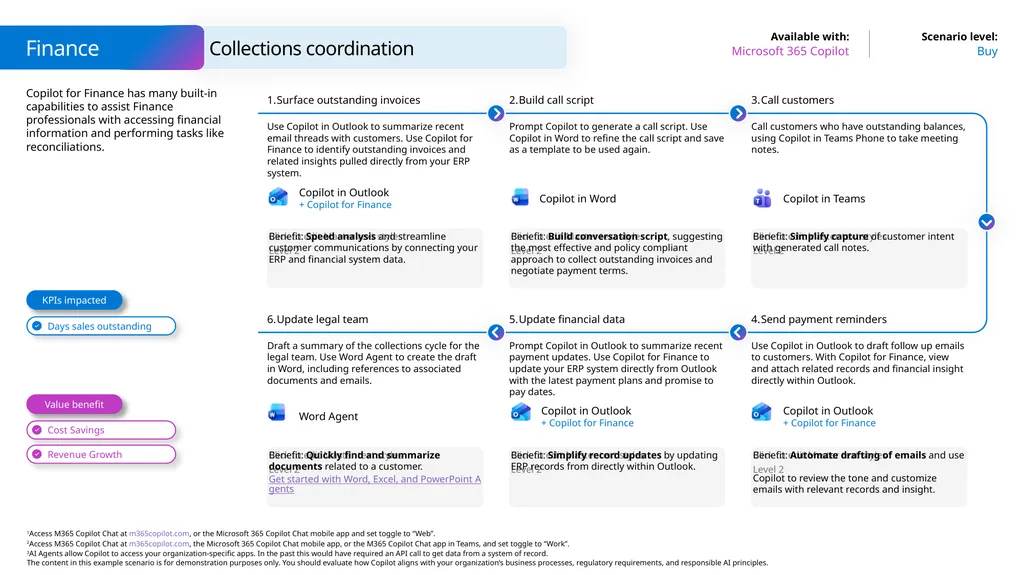
Copilot for Finance has many built-in capabilities to assist Finance professionals with accessing financial information and performing tasks like reconciliations. Finance Buy Microsoft 365 Copilot Collections coordination Benefit: Speed analysis and streamline customer communications by connecting your ERP and financial system data. Surface outstanding invoices Use Copilot in Outlook to summarize recent email threads with customers. Use Copilot for Finance to identify outstanding invoices and related insights pulled directly from your ERP system. Build call script Prompt Copilot to generate a call script. Use Copilot in Word to refine the call script and save as a template to be used again. Benefit: Simplify capture of customer intent with generated call notes. Call customers Call customers who have outstanding balances, using Copilot in Teams Phone to take meeting notes. Benefit: Build conversation script, suggesting the most effective and policy compliant approach to collect outstanding invoices and negotiate payment terms. Benefit: Quickly find and summarize documents related to a customer.
Get started with Word, Excel, and PowerPoint Agents Update legal team Draft a summary of the collections cycle for the legal team. Use Word Agent to create the draft in Word, including references to associated documents and emails. Update financial data Prompt Copilot in Outlook to summarize recent payment updates. Use Copilot for Finance to update your ERP system directly from Outlook with the latest payment plans and promise to pay dates. Benefit: Automate drafting of emails and use Copilot to review the tone and customize emails with relevant records and insight. Send payment reminders Use Copilot in Outlook to draft follow up emails to customers. With Copilot for Finance, view and attach related records and financial insight directly within Outlook. Benefit: Simplify record updates by updating ERP records from directly within Outlook. Value benefit KPIs impacted Copilot in Outlook
+ Copilot for Finance Copilot in Teams Copilot in Outlook
+ Copilot for Finance Word Agent Copilot in Outlook
+ Copilot for Finance Copilot in Word<br>
Get started with Word, Excel, and PowerPoint Agents Update legal team Draft a summary of the collections cycle for the legal team. Use Word Agent to create the draft in Word, including references to associated documents and emails. Update financial data Prompt Copilot in Outlook to summarize recent payment updates. Use Copilot for Finance to update your ERP system directly from Outlook with the latest payment plans and promise to pay dates. Benefit: Automate drafting of emails and use Copilot to review the tone and customize emails with relevant records and insight. Send payment reminders Use Copilot in Outlook to draft follow up emails to customers. With Copilot for Finance, view and attach related records and financial insight directly within Outlook. Benefit: Simplify record updates by updating ERP records from directly within Outlook. Value benefit KPIs impacted Copilot in Outlook
+ Copilot for Finance Copilot in Teams Copilot in Outlook
+ Copilot for Finance Word Agent Copilot in Outlook
+ Copilot for Finance Copilot in Word<br>
20
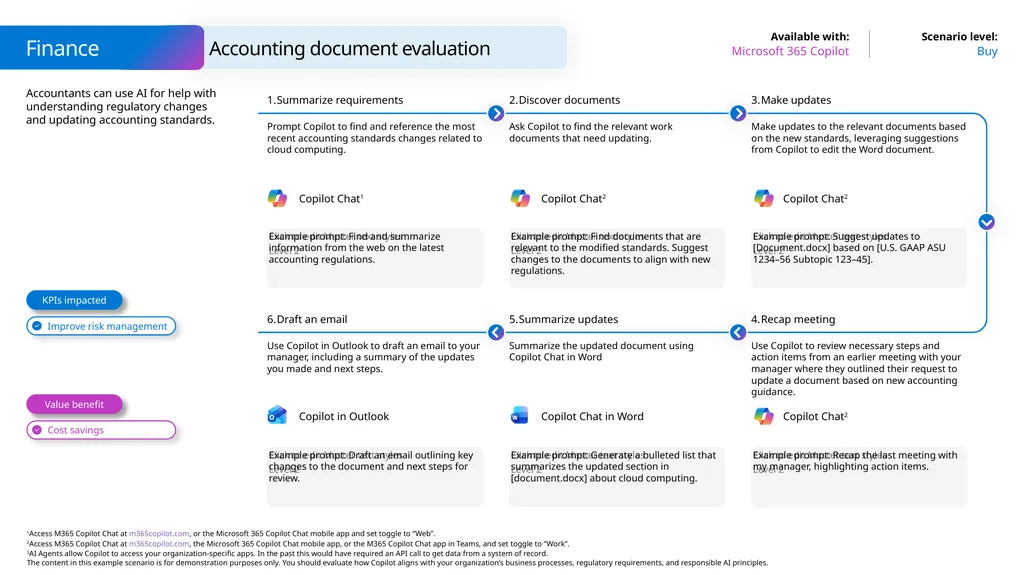
Accountants can use AI for help with understanding regulatory changes and updating accounting standards. Finance Buy Microsoft 365 Copilot Accounting document evaluation Example prompt: Find and summarize information from the web on the latest accounting regulations. Summarize requirements Prompt Copilot to find and reference the most recent accounting standards changes related to cloud computing. Discover documents Ask Copilot to find the relevant work documents that need updating. Example prompt: Suggest updates to [Document.docx] based on [U.S. GAAP ASU 1234–56 Subtopic 123–45]. Make updates Make updates to the relevant documents based on the new standards, leveraging suggestions from Copilot to edit the Word document. Example prompt: Find documents that are relevant to the modified standards. Suggest changes to the documents to align with new regulations. Example prompt: Draft an email outlining key changes to the document and next steps for review. Draft an email Use Copilot in Outlook to draft an email to your manager, including a summary of the updates you made and next steps. Summarize updates Summarize the updated document using Copilot Chat in Word Example prompt: Recap the last meeting with my manager, highlighting action items. Recap meeting Use Copilot to review necessary steps and action items from an earlier meeting with your manager where they outlined their request to update a document based on new accounting guidance. Example prompt: Generate a bulleted list that summarizes the updated section in [document.docx] about cloud computing. Value benefit KPIs impacted Copilot Chat1 Copilot Chat2 Copilot Chat2 Copilot Chat in Word Copilot in Outlook Copilot Chat2<br>
21
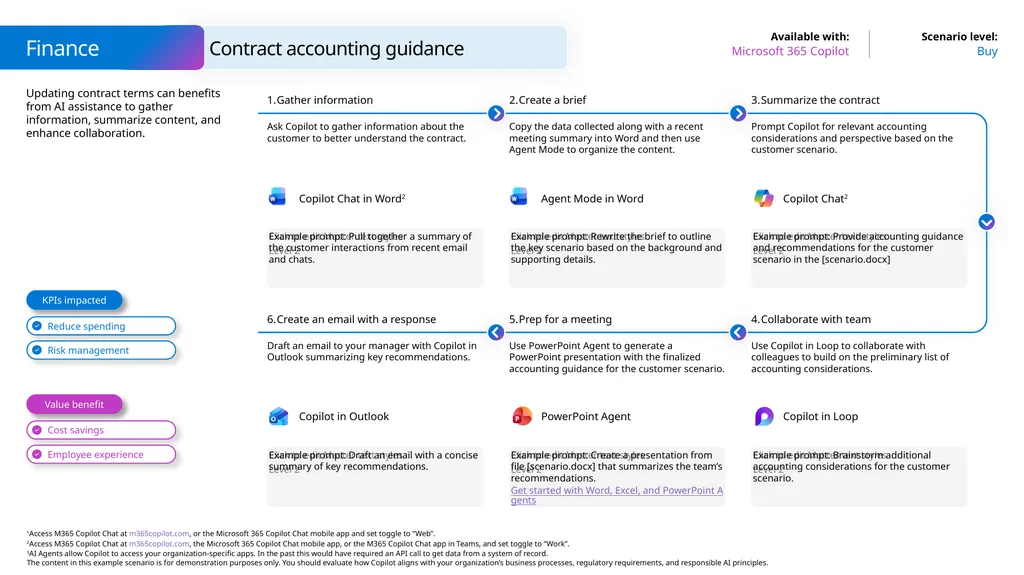
Updating contract terms can benefits from AI assistance to gather information, summarize content, and enhance collaboration. Finance Buy Microsoft 365 Copilot Contract accounting guidance Example prompt: Pull together a summary of the customer interactions from recent email and chats. Gather information Ask Copilot to gather information about the customer to better understand the contract. Create a brief Copy the data collected along with a recent meeting summary into Word and then use Agent Mode to organize the content. Example prompt: Provide accounting guidance and recommendations for the customer scenario in the [scenario.docx] Summarize the contract Prompt Copilot for relevant accounting considerations and perspective based on the customer scenario. Example prompt: Rewrite the brief to outline the key scenario based on the background and supporting details. Example prompt: Draft an email with a concise summary of key recommendations. Create an email with a response Draft an email to your manager with Copilot in Outlook summarizing key recommendations. Prep for a meeting Use PowerPoint Agent to generate a PowerPoint presentation with the finalized accounting guidance for the customer scenario. Example prompt: Brainstorm additional accounting considerations for the customer scenario. Collaborate with team Use Copilot in Loop to collaborate with colleagues to build on the preliminary list of accounting considerations. Example prompt: Create a presentation from file [scenario.docx] that summarizes the team’s recommendations.
Get started with Word, Excel, and PowerPoint Agents Value benefit KPIs impacted Copilot Chat in Word2 Agent Mode in Word Copilot Chat2 PowerPoint Agent Copilot in Outlook Copilot in Loop<br>
Get started with Word, Excel, and PowerPoint Agents Value benefit KPIs impacted Copilot Chat in Word2 Agent Mode in Word Copilot Chat2 PowerPoint Agent Copilot in Outlook Copilot in Loop<br>
22
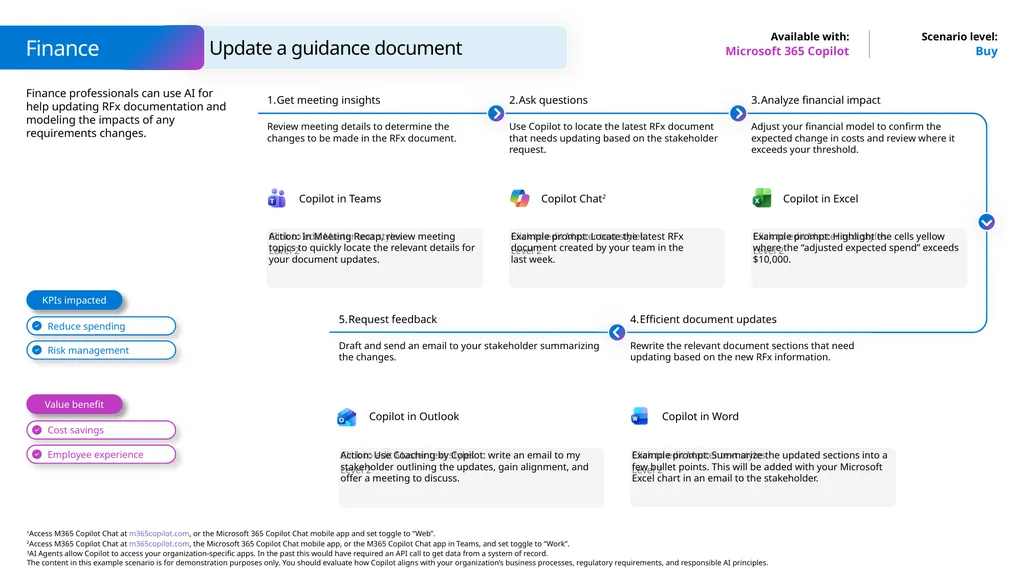
Finance professionals can use AI for help updating RFx documentation and modeling the impacts of any requirements changes. Buy Microsoft 365 Copilot Action: In Meeting Recap, review meeting topics to quickly locate the relevant details for your document updates. Get meeting insights Review meeting details to determine the changes to be made in the RFx document. Ask questions Use Copilot to locate the latest RFx document that needs updating based on the stakeholder request. Example prompt: Highlight the cells yellow where the “adjusted expected spend” exceeds $10,000. Analyze financial impact Adjust your financial model to confirm the expected change in costs and review where it exceeds your threshold. Example prompt: Locate the latest RFx document created by your team in the
last week. Request feedback Draft and send an email to your stakeholder summarizing the changes. Example prompt: Summarize the updated sections into a few bullet points. This will be added with your Microsoft Excel chart in an email to the stakeholder. Efficient document updates Rewrite the relevant document sections that need updating based on the new RFx information. Action: Use Coaching by Copilot: write an email to my stakeholder outlining the updates, gain alignment, and offer a meeting to discuss. Value benefit KPIs impacted Finance Update a guidance document Copilot in Word Copilot in Outlook Copilot in Teams Copilot Chat2 Copilot in Excel<br>
23
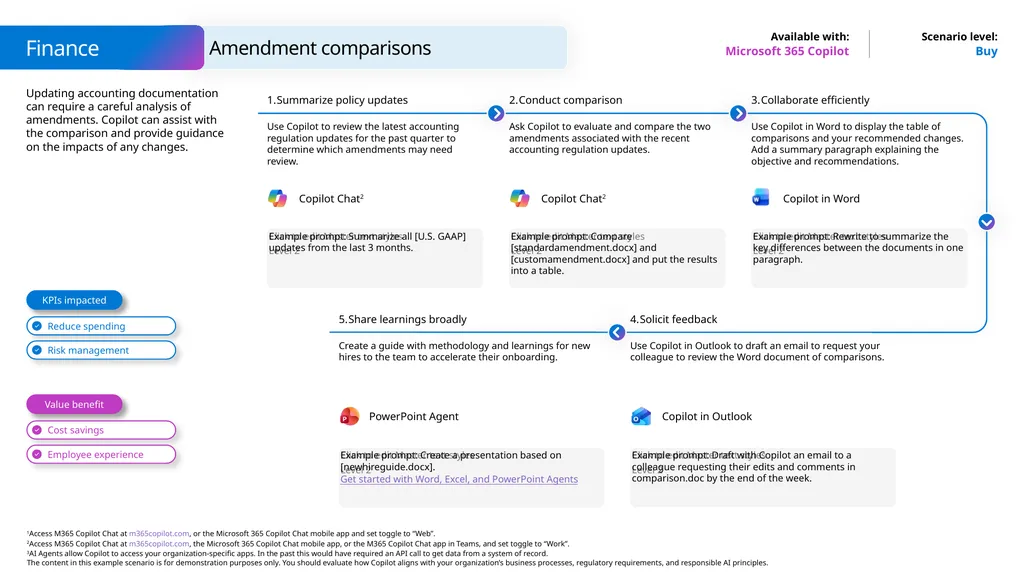
Updating accounting documentation can require a careful analysis of amendments. Copilot can assist with the comparison and provide guidance on the impacts of any changes. Buy Microsoft 365 Copilot Example prompt: Summarize all [U.S. GAAP] updates from the last 3 months. Summarize policy updates Use Copilot to review the latest accounting regulation updates for the past quarter to determine which amendments may need review. Conduct comparison Ask Copilot to evaluate and compare the two amendments associated with the recent accounting regulation updates. Example prompt: Rewrite to summarize the key differences between the documents in one paragraph. Collaborate efficiently Use Copilot in Word to display the table of comparisons and your recommended changes. Add a summary paragraph explaining the objective and recommendations. Example prompt: Compare [standardamendment.docx] and [customamendment.docx] and put the results into a table. Share learnings broadly Create a guide with methodology and learnings for new hires to the team to accelerate their onboarding. Example prompt: Draft with Copilot an email to a colleague requesting their edits and comments in comparison.doc by the end of the week. Solicit feedback Use Copilot in Outlook to draft an email to request your colleague to review the Word document of comparisons. Example prompt: Create a presentation based on [newhireguide.docx].
Get started with Word, Excel, and PowerPoint Agents Value benefit KPIs impacted Finance Amendment comparisons Copilot in Outlook PowerPoint Agent Copilot Chat2 Copilot Chat2 Copilot in Word<br>
Get started with Word, Excel, and PowerPoint Agents Value benefit KPIs impacted Finance Amendment comparisons Copilot in Outlook PowerPoint Agent Copilot Chat2 Copilot Chat2 Copilot in Word<br>
24
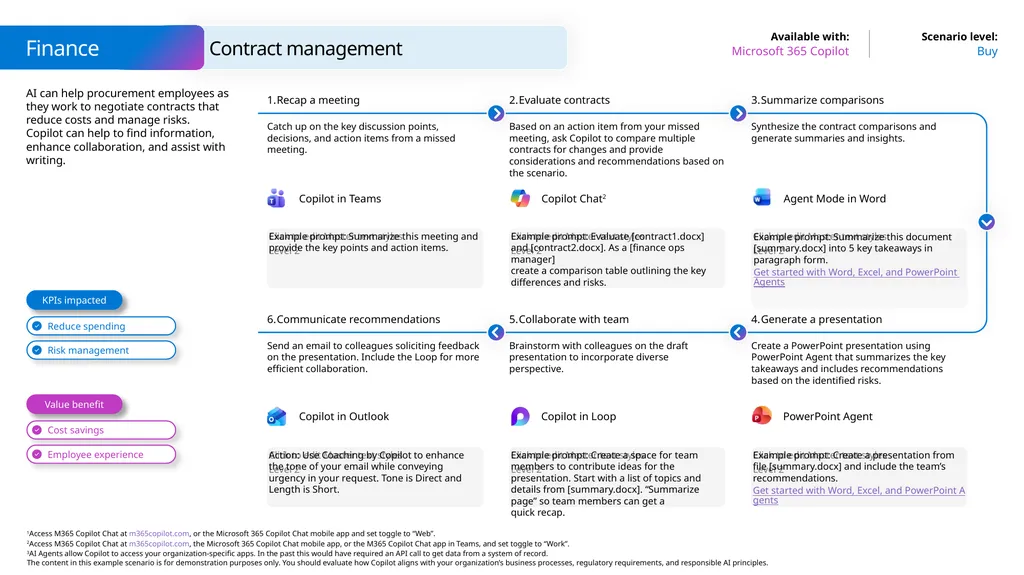
AI can help procurement employees as they work to negotiate contracts that reduce costs and manage risks. Copilot can help to find information, enhance collaboration, and assist with writing. Finance Buy Microsoft 365 Copilot Contract management Example prompt: Summarize this meeting and provide the key points and action items. Recap a meeting Catch up on the key discussion points, decisions, and action items from a missed meeting. Evaluate contracts Based on an action item from your missed meeting, ask Copilot to compare multiple contracts for changes and provide considerations and recommendations based on the scenario. Example prompt: Summarize this document [summary.docx] into 5 key takeaways in
paragraph form.
Get started with Word, Excel, and PowerPoint Agents Summarize comparisons Synthesize the contract comparisons and generate summaries and insights. Example prompt: Evaluate [contract1.docx] and [contract2.docx]. As a [finance ops manager] create a comparison table outlining the key differences and risks. Action: Use Coaching by Copilot to enhance the tone of your email while conveying urgency in your request. Tone is Direct and Length is Short. Communicate recommendations Send an email to colleagues soliciting feedback on the presentation. Include the Loop for more efficient collaboration. Collaborate with team Brainstorm with colleagues on the draft presentation to incorporate diverse perspective. Example prompt: Create a presentation from file [summary.docx] and include the team’s recommendations.
Get started with Word, Excel, and PowerPoint Agents Generate a presentation Create a PowerPoint presentation using PowerPoint Agent that summarizes the key takeaways and includes recommendations based on the identified risks. Example prompt: Create a space for team members to contribute ideas for the presentation. Start with a list of topics and details from [summary.docx]. “Summarize page” so team members can get a quick recap. Value benefit KPIs impacted Copilot in Teams Copilot Chat2 Agent Mode in Word Copilot in Loop Copilot in Outlook PowerPoint Agent<br>
Get started with Word, Excel, and PowerPoint Agents Summarize comparisons Synthesize the contract comparisons and generate summaries and insights. Example prompt: Evaluate [contract1.docx] and [contract2.docx]. As a [finance ops manager] create a comparison table outlining the key differences and risks. Action: Use Coaching by Copilot to enhance the tone of your email while conveying urgency in your request. Tone is Direct and Length is Short. Communicate recommendations Send an email to colleagues soliciting feedback on the presentation. Include the Loop for more efficient collaboration. Collaborate with team Brainstorm with colleagues on the draft presentation to incorporate diverse perspective. Example prompt: Create a presentation from file [summary.docx] and include the team’s recommendations.
Get started with Word, Excel, and PowerPoint Agents Generate a presentation Create a PowerPoint presentation using PowerPoint Agent that summarizes the key takeaways and includes recommendations based on the identified risks. Example prompt: Create a space for team members to contribute ideas for the presentation. Start with a list of topics and details from [summary.docx]. “Summarize page” so team members can get a quick recap. Value benefit KPIs impacted Copilot in Teams Copilot Chat2 Agent Mode in Word Copilot in Loop Copilot in Outlook PowerPoint Agent<br>
25
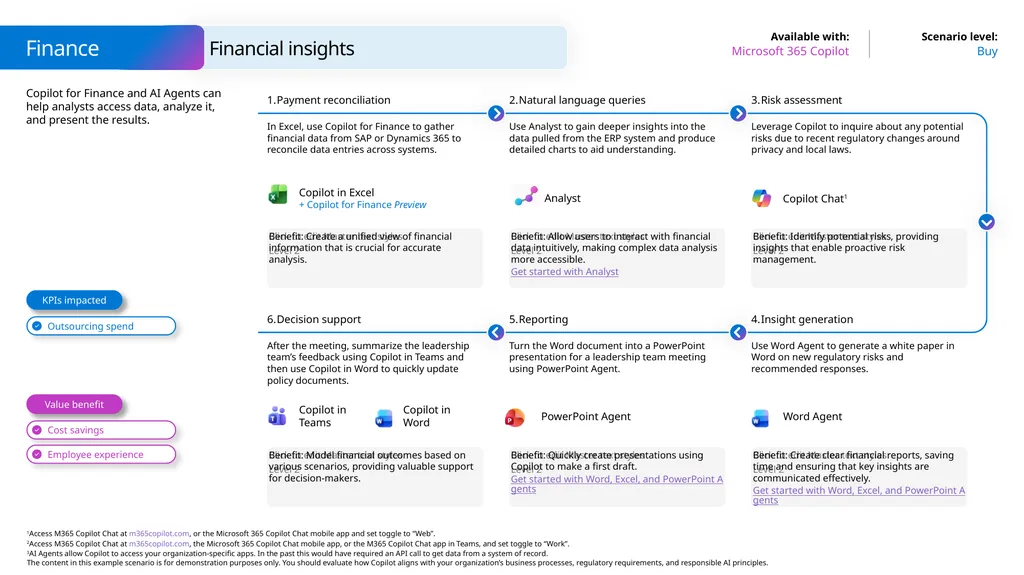
Copilot for Finance and AI Agents can help analysts access data, analyze it, and present the results. Finance Buy Microsoft 365 Copilot Financial insights Benefit: Create a unified view of financial information that is crucial for accurate analysis. Payment reconciliation In Excel, use Copilot for Finance to gather financial data from SAP or Dynamics 365 to reconcile data entries across systems. Natural language queries Use Analyst to gain deeper insights into the data pulled from the ERP system and produce detailed charts to aid understanding. Benefit: Identify potential risks, providing insights that enable proactive risk management. Risk assessment Leverage Copilot to inquire about any potential risks due to recent regulatory changes around privacy and local laws. Benefit: Allow users to interact with financial data intuitively, making complex data analysis more accessible.
Get started with Analyst Benefit: Model financial outcomes based on various scenarios, providing valuable support for decision-makers. Decision support After the meeting, summarize the leadership team’s feedback using Copilot in Teams and then use Copilot in Word to quickly update policy documents. Reporting Turn the Word document into a PowerPoint presentation for a leadership team meeting using PowerPoint Agent. Benefit: Create clear financial reports, saving time and ensuring that key insights are communicated effectively.
Get started with Word, Excel, and PowerPoint Agents Insight generation Use Word Agent to generate a white paper in Word on new regulatory risks and recommended responses. Benefit: Quickly create presentations using Copilot to make a first draft.
Get started with Word, Excel, and PowerPoint Agents Value benefit KPIs impacted Copilot Chat1 Copilot in Teams Copilot in Word PowerPoint Agent Copilot in Excel
+ Copilot for Finance Preview Word Agent Analyst<br>
Get started with Analyst Benefit: Model financial outcomes based on various scenarios, providing valuable support for decision-makers. Decision support After the meeting, summarize the leadership team’s feedback using Copilot in Teams and then use Copilot in Word to quickly update policy documents. Reporting Turn the Word document into a PowerPoint presentation for a leadership team meeting using PowerPoint Agent. Benefit: Create clear financial reports, saving time and ensuring that key insights are communicated effectively.
Get started with Word, Excel, and PowerPoint Agents Insight generation Use Word Agent to generate a white paper in Word on new regulatory risks and recommended responses. Benefit: Quickly create presentations using Copilot to make a first draft.
Get started with Word, Excel, and PowerPoint Agents Value benefit KPIs impacted Copilot Chat1 Copilot in Teams Copilot in Word PowerPoint Agent Copilot in Excel
+ Copilot for Finance Preview Word Agent Analyst<br>
26
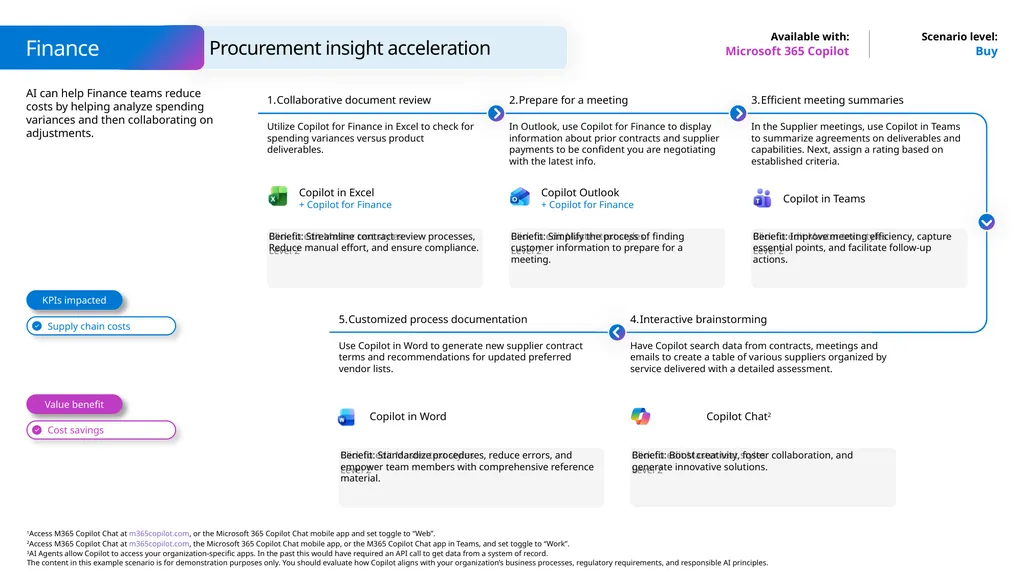
AI can help Finance teams reduce costs by helping analyze spending variances and then collaborating on adjustments. Buy Microsoft 365 Copilot Benefit: Streamline contract review processes, Reduce manual effort, and ensure compliance. Collaborative document review Utilize Copilot for Finance in Excel to check for spending variances versus product deliverables. Prepare for a meeting In Outlook, use Copilot for Finance to display information about prior contracts and supplier payments to be confident you are negotiating with the latest info. Benefit: Improve meeting efficiency, capture essential points, and facilitate follow-up actions. Efficient meeting summaries In the Supplier meetings, use Copilot in Teams to summarize agreements on deliverables and capabilities. Next, assign a rating based on established criteria. Benefit: Simplify the process of finding customer information to prepare for a meeting. Customized process documentation Use Copilot in Word to generate new supplier contract terms and recommendations for updated preferred vendor lists. Benefit: Boost creativity, foster collaboration, and generate innovative solutions. Interactive brainstorming Have Copilot search data from contracts, meetings and emails to create a table of various suppliers organized by service delivered with a detailed assessment. Benefit: Standardize procedures, reduce errors, and empower team members with comprehensive reference material. Value benefit KPIs impacted Finance Procurement insight acceleration Copilot Chat2 Copilot in Word Copilot in Excel
+ Copilot for Finance Copilot Outlook
+ Copilot for Finance Copilot in Teams<br>
+ Copilot for Finance Copilot Outlook
+ Copilot for Finance Copilot in Teams<br>
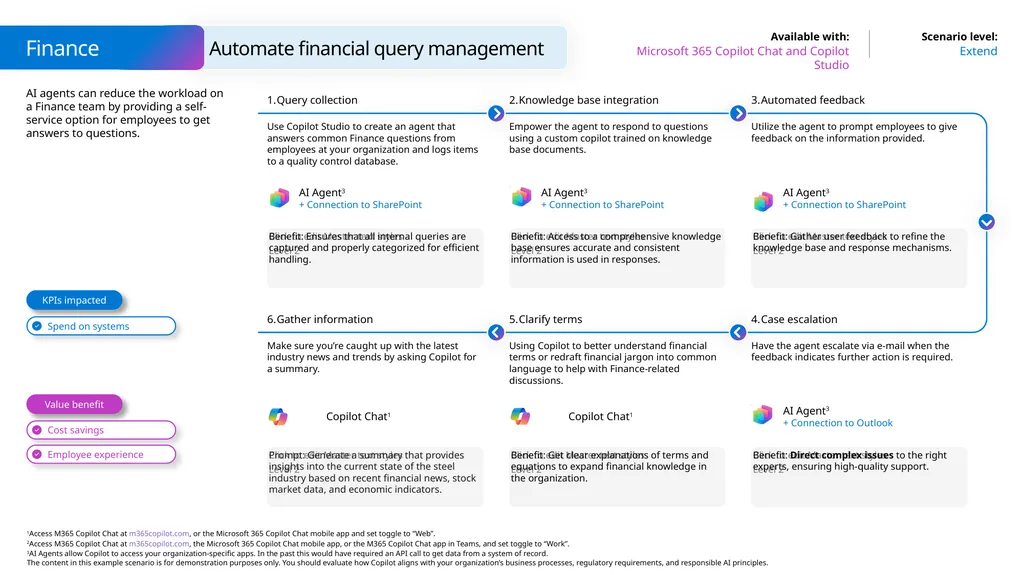
27
AI agents can reduce the workload on a Finance team by providing a self-service option for employees to get answers to questions. Finance Extend Microsoft 365 Copilot Chat and Copilot Studio Automate financial query management Benefit: Ensures that all internal queries are captured and properly categorized for efficient handling. Query collection Use Copilot Studio to create an agent that answers common Finance questions from employees at your organization and logs items to a quality control database. Knowledge base integration Empower the agent to respond to questions using a custom copilot trained on knowledge base documents. Benefit: Gather user feedback to refine the knowledge base and response mechanisms. Automated feedback Utilize the agent to prompt employees to give feedback on the information provided. Benefit: Access to a comprehensive knowledge base ensures accurate and consistent information is used in responses. Prompt: Generate a summary that provides insights into the current state of the steel industry based on recent financial news, stock market data, and economic indicators. Gather information Make sure you’re caught up with the latest industry news and trends by asking Copilot for a summary. Clarify terms Using Copilot to better understand financial terms or redraft financial jargon into common language to help with Finance-related discussions. Benefit: Direct complex issues to the right experts, ensuring high-quality support. Case escalation Have the agent escalate via e-mail when the feedback indicates further action is required. Benefit: Get clear explanations of terms and equations to expand financial knowledge in the organization. Value benefit KPIs impacted AI Agent3
+ Connection to SharePoint AI Agent3
+ Connection to SharePoint AI Agent3
+ Connection to SharePoint Copilot Chat1 Copilot Chat1 AI Agent3
+ Connection to Outlook<br>
+ Connection to SharePoint AI Agent3
+ Connection to SharePoint AI Agent3
+ Connection to SharePoint Copilot Chat1 Copilot Chat1 AI Agent3
+ Connection to Outlook<br>
28
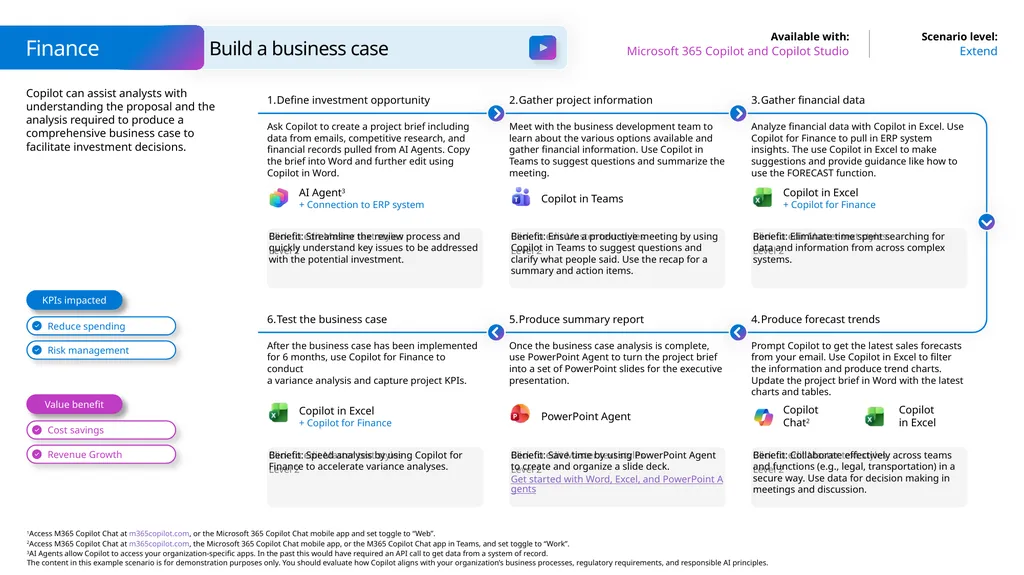
Copilot can assist analysts with understanding the proposal and the analysis required to produce a comprehensive business case to facilitate investment decisions. Finance Extend Microsoft 365 Copilot and Copilot Studio Build a business case Benefit: Streamline the review process and quickly understand key issues to be addressed with the potential investment. Define investment opportunity Ask Copilot to create a project brief including data from emails, competitive research, and financial records pulled from AI Agents. Copy the brief into Word and further edit using Copilot in Word. Gather project information Meet with the business development team to learn about the various options available and gather financial information. Use Copilot in Teams to suggest questions and summarize the meeting. Benefit: Eliminate time spent searching for data and information from across complex systems. Gather financial data Analyze financial data with Copilot in Excel. Use Copilot for Finance to pull in ERP system insights. The use Copilot in Excel to make suggestions and provide guidance like how to use the FORECAST function. Benefit: Ensure a productive meeting by using Copilot in Teams to suggest questions and clarify what people said. Use the recap for a summary and action items. Benefit: Speed analysis by using Copilot for Finance to accelerate variance analyses. Test the business case After the business case has been implemented
for 6 months, use Copilot for Finance to conduct
a variance analysis and capture project KPIs. Produce summary report Once the business case analysis is complete, use PowerPoint Agent to turn the project brief into a set of PowerPoint slides for the executive presentation. Benefit: Collaborate effectively across teams and functions (e.g., legal, transportation) in a secure way. Use data for decision making in meetings and discussion. Produce forecast trends Prompt Copilot to get the latest sales forecasts from your email. Use Copilot in Excel to filter the information and produce trend charts. Update the project brief in Word with the latest charts and tables. Benefit: Save time by using PowerPoint Agent to create and organize a slide deck.
Get started with Word, Excel, and PowerPoint Agents Value benefit KPIs impacted AI Agent3
+ Connection to ERP system Copilot in Teams Copilot in Excel
+ Copilot for Finance PowerPoint Agent Copilot in Excel
+ Copilot for Finance Copilot Chat2 Copilot in Excel<br>
Get started with Word, Excel, and PowerPoint Agents Value benefit KPIs impacted AI Agent3
+ Connection to ERP system Copilot in Teams Copilot in Excel
+ Copilot for Finance PowerPoint Agent Copilot in Excel
+ Copilot for Finance Copilot Chat2 Copilot in Excel<br>
29
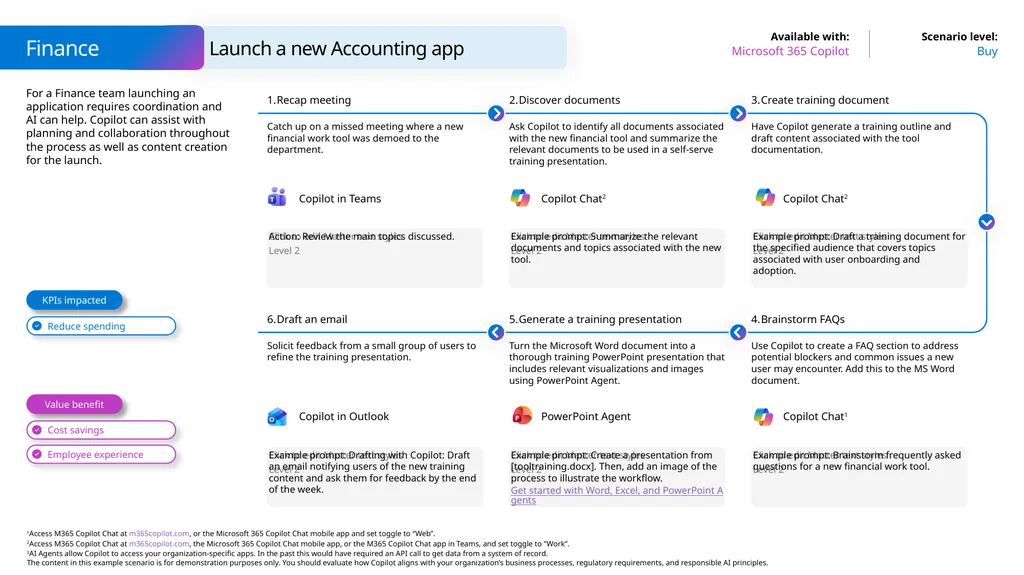
For a Finance team launching an application requires coordination and AI can help. Copilot can assist with planning and collaboration throughout the process as well as content creation for the launch. Finance Buy Microsoft 365 Copilot Launch a new Accounting app Action: Review the main topics discussed. Recap meeting Catch up on a missed meeting where a new financial work tool was demoed to the department. Discover documents Ask Copilot to identify all documents associated with the new financial tool and summarize the relevant documents to be used in a self-serve training presentation. Example prompt: Draft a training document for the specified audience that covers topics associated with user onboarding and adoption. Create training document Have Copilot generate a training outline and draft content associated with the tool documentation. Example prompt: Summarize the relevant documents and topics associated with the new tool. Example prompt: Drafting with Copilot: Draft an email notifying users of the new training content and ask them for feedback by the end of the week. Draft an email Solicit feedback from a small group of users to refine the training presentation. Generate a training presentation Turn the Microsoft Word document into a thorough training PowerPoint presentation that includes relevant visualizations and images using PowerPoint Agent. Example prompt: Brainstorm frequently asked questions for a new financial work tool. Brainstorm FAQs Use Copilot to create a FAQ section to address potential blockers and common issues a new user may encounter. Add this to the MS Word document. Example prompt: Create a presentation from [tooltraining.docx]. Then, add an image of the process to illustrate the workflow.
Get started with Word, Excel, and PowerPoint Agents Value benefit KPIs impacted Copilot in Teams Copilot Chat2 Copilot Chat2 PowerPoint Agent Copilot in Outlook Copilot Chat1<br>
Get started with Word, Excel, and PowerPoint Agents Value benefit KPIs impacted Copilot in Teams Copilot Chat2 Copilot Chat2 PowerPoint Agent Copilot in Outlook Copilot Chat1<br>
30
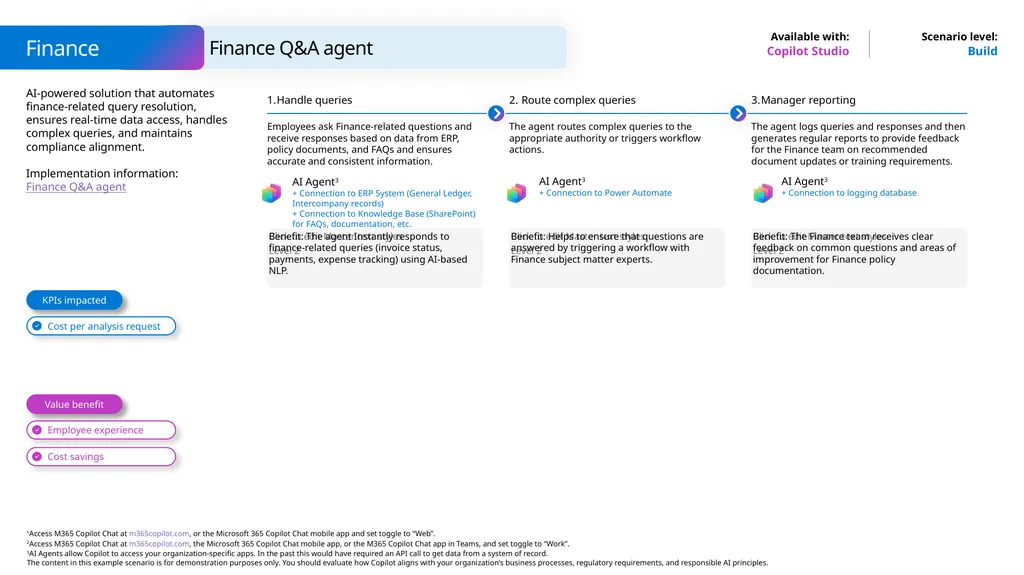
Finance Q&A agent Finance Copilot Studio Build AI-powered solution that automates finance-related query resolution, ensures real-time data access, handles complex queries, and maintains compliance alignment.
Implementation information: Finance Q&A agent KPIs impacted Value benefit Handle queries Employees ask Finance-related questions and receive responses based on data from ERP, policy documents, and FAQs and ensures accurate and consistent information. Benefit: The agent Instantly responds to finance-related queries (invoice status, payments, expense tracking) using AI-based NLP. Route complex queries The agent routes complex queries to the appropriate authority or triggers workflow actions. Benefit: Helps to ensure that questions are answered by triggering a workflow with Finance subject matter experts. Manager reporting The agent logs queries and responses and then generates regular reports to provide feedback for the Finance team on recommended document updates or training requirements. Benefit: The Finance team receives clear feedback on common questions and areas of improvement for Finance policy documentation. AI Agent3
+ Connection to Power Automate AI Agent3
+ Connection to ERP System (General Ledger, Intercompany records)
+ Connection to Knowledge Base (SharePoint) for FAQs, documentation, etc. AI Agent3
+ Connection to logging database<br>
Implementation information: Finance Q&A agent KPIs impacted Value benefit Handle queries Employees ask Finance-related questions and receive responses based on data from ERP, policy documents, and FAQs and ensures accurate and consistent information. Benefit: The agent Instantly responds to finance-related queries (invoice status, payments, expense tracking) using AI-based NLP. Route complex queries The agent routes complex queries to the appropriate authority or triggers workflow actions. Benefit: Helps to ensure that questions are answered by triggering a workflow with Finance subject matter experts. Manager reporting The agent logs queries and responses and then generates regular reports to provide feedback for the Finance team on recommended document updates or training requirements. Benefit: The Finance team receives clear feedback on common questions and areas of improvement for Finance policy documentation. AI Agent3
+ Connection to Power Automate AI Agent3
+ Connection to ERP System (General Ledger, Intercompany records)
+ Connection to Knowledge Base (SharePoint) for FAQs, documentation, etc. AI Agent3
+ Connection to logging database<br>
31
A day in the life of an Income Tax Compliance Manager Extend Microsoft 365 Copilot 8:00 am – Summarize emails Emma has several new emails from 3rd parties in relation to tax returns. Instead of reading through each email, she uses Copilot to summarize recent emails about tax returns. Example prompt: Summarize recent email threads about tax returns and list action items. 8:30 am – Explain a formula Emma reviews the final tax analysis using Copilot for Finance in Excel to check for any inconsistent formulas. Example prompt: Explain the formula used to calculate deprecation for Contoso. 9:00 am – Summarize a topic Emma requests Copilot to create a list of all the emails and chats related to the Contoso tax return. She uses Copilot in Outlook to draft replies to an email thread with the tax preparation team. Example prompt: Summarize all the conversations about the Contoso return in my emails and Teams messages. 11:00 am – Extract information Emma receives an email to say the Tax Returns are ready for her review. Emma verifies the accuracy of tax return data using an OCR model she built in AI Builder instead of manually retyping it. Example prompt: Extract the information from a structured document. 2:00 pm – Add a calculation Emma uses Copilot for Finance in Excel to highlight any differences between the financial analysis and tax return. She asks it to highlight the variances and then adds the table to an email. Example prompt: Add a formula column in ‘Section D: Total Assets’ showing the difference between the financial analysis and tax return data. 4:00 pm – Search for information Emma uses Copilot in SharePoint to get answers about previous tax returns without having to open the large pdf files. Example prompt: What was the opening cash balance on the US income tax return for Contoso? Emma
works in Tax & Customs. Benefits AI Agent3
+ Connection to SharePoint Copilot in Excel Copilot in Outlook Copilot in Excel + Copilot for Finance<br>
+ Connection to SharePoint Copilot in Excel Copilot in Outlook Copilot in Excel + Copilot for Finance<br>
32
A day in the life of an Audit, Risk and Compliance (ARC) Data Solution Manager Buy Microsoft 365 Copilot 8:00 am – Plan your day Shali starts her day using Copilot to catch up on action items from the previous day. She also asks Copilot to prepare her for her upcoming meeting. Example prompt: Help me prep for my upcoming meetings I have today; including action items from the meeting. Draft follow up meeting agenda from meeting. 9:30 am – Draft a project proposal Shali later starts drafting a proposal for senior leadership review using the Meeting Recap and relevant files. She uses Copilot in Word to revise the draft to be more concise. Example prompt: Write a project proposal using meeting notes in concise tone. List the pros and cons of solution from meeting notes. Visualize as a table. 10:00 am – Create a dashboard Shali updates the reporting for stakeholders. She asks Copilot in Power BI to create an Intro tab and additional insights tab for her to explore other ideas. Example prompt: Create a page to monitor the project scheduled hours, resource availability, and identify any gaps or overloads. Create DAX measure in Suggestions with Copilot. 11:00 am – Get a SQL query After reviewing the reporting, Shali wants to set up automated alerts for potential overloads. She asks Copilot in Power Automate to create a flow to automate the process and analyze the automation activities. Example prompt: Write a SQL query to list all the audit projects in FY24.Create an automate flow that send alerts to users about Power BI reporting. Ask Copilot about which flow had the most run failures today? 2:00 pm – Create a Power App She uses Power Apps to collect insights from various sources either text input or uploaded files. She asks Copilot in Power Apps to first suggest relevant fields then create an app based on the ask. Example prompt: Create an app to collect insights from files or text input box. Add a screen to display all insights with dropdown boxes on submitter. 4:00 pm – Summarize emails Shali uses Copilot in Outlook to summarize new emails and draft the project status update emails to the stakeholders. Example prompt: Summarize the email and reply to confirm action items. Coaching with Copilot. Shali
is an ARC Data Solution Manager. Benefits Copilot in Outlook Copilot in Word<br>
33
A day in the life of a Vendor Engagement Manager Buy Microsoft 365 Copilot 8:00 am – Summarize emails Kim has several new emails from vendor companies and internal teams. Instead of reading through each email, he uses Copilot to summarize recent emails. Action: Summarize this thread. 9:30 am – Suggest formulas Kim uses Copilot for Finance in Excel to analyze a vendor’s compliance data. Example prompt: Suggest formulas for this column. Show insights in charts. 10:00 am – Get key points During a meeting with the vendor, Kim uses Copilot in Teams to keep track of the discussion. After the meeting, Copilot helps identify next steps. Example prompt: Summarize key discussion points. Identify agreed-upon next steps. 11:00 am – Draft a report Kim uses Word Agent to draft a report in Word, prompting it to bring in specific information from other documents. He then uses Copilot in Word to improve the clarity of his report. Example prompt: Draft content from these documents. Suggest ways to rewrite this content.
Get started with Word, Excel, and PowerPoint Agents 2:00 pm – Create a presentation Kim needs to create a presentation for a potential vendor. He uses PowerPoint Agent to create a new PowerPoint presentation from this Word file, and he uses Copilot in PowerPoint to improve the layout of his slides. Example prompt: Create a new presentation from this Word file.
Get started with Word, Excel, and PowerPoint Agents 4:00 pm – Create an agenda Kim uses Copilot to manage his tasks. He creates a meeting agenda based on this chat history to prepare for his meetings. Example prompt: Create a meeting agenda based on this chat history. Kim is a Vendor Engagement Manager in Finance. Benefits Word Agent Copilot in Excel Copilot in Teams<br>
Get started with Word, Excel, and PowerPoint Agents 2:00 pm – Create a presentation Kim needs to create a presentation for a potential vendor. He uses PowerPoint Agent to create a new PowerPoint presentation from this Word file, and he uses Copilot in PowerPoint to improve the layout of his slides. Example prompt: Create a new presentation from this Word file.
Get started with Word, Excel, and PowerPoint Agents 4:00 pm – Create an agenda Kim uses Copilot to manage his tasks. He creates a meeting agenda based on this chat history to prepare for his meetings. Example prompt: Create a meeting agenda based on this chat history. Kim is a Vendor Engagement Manager in Finance. Benefits Word Agent Copilot in Excel Copilot in Teams<br>
34
A day in the life of a Financial Analyst Buy Microsoft 365 Copilot 8:00 am – Sort data Hillary begins her day using Agent Mode in Excel looking at the latest COGS estimates for a new product. She uses it to filter the data to get the view she wants. Example prompt: Sort the data by product feature and then filter out the Priority 2 features. 9:30 am – Recap a meeting She later meets with her manager and IT to discuss reporting requirements updates from the sales organization. She asks Copilot in Teams to summarize the requirements. Example prompt: Summarize the meeting and be sure to list all he reporting requirements that were mentioned. 10:00 am – Summarize a document Hillary finally gets to her main project for the day and reviews the due diligence information on a potential acquisition target. She asks Copilot to create a summary of the content. Example prompt: Summarize the information in [Fabrikam financial data], [Fabrikam operations analysis], [Fabrikam integration plan]. 11:00 am – Create a presentation After creating an overview of the acquisition in Word, she asks PowerPoint Agent to turn the document into a PowerPoint presentation for the business development team. Example prompt: Create a presentation from [Fabrikam acquisition overview.docx]
Get started with Word, Excel, and PowerPoint Agents 2:00 pm – Summarize a chat Hillary needs to catch up on a chat she started in the morning. She prompts Copilot to summarize the thread. Example prompt: Summarize this thread calling out where my name was mentioned and any action items for me. 4:00 pm – Get insights Hillary heads back into Agent Mode in Excel to update the acquisition numbers with the latest what-if scenarios and create some charts to go into the business planning presentation. Example prompt: What is the impact of doubling the IT integration budget on the revenue per month? Hillary is a Financial Analyst at Contoso. Benefits Copilot in Excel Copilot in Teams Copilot in Excel<br>
Get started with Word, Excel, and PowerPoint Agents 2:00 pm – Summarize a chat Hillary needs to catch up on a chat she started in the morning. She prompts Copilot to summarize the thread. Example prompt: Summarize this thread calling out where my name was mentioned and any action items for me. 4:00 pm – Get insights Hillary heads back into Agent Mode in Excel to update the acquisition numbers with the latest what-if scenarios and create some charts to go into the business planning presentation. Example prompt: What is the impact of doubling the IT integration budget on the revenue per month? Hillary is a Financial Analyst at Contoso. Benefits Copilot in Excel Copilot in Teams Copilot in Excel<br>
35
A day in the life of a Finance Manager Extend Microsoft 365 Copilot and Copilot Studio 8:00 am – Create a presentation Jack wants to deliver a presentation on the first quarter earning report to his team. Example prompt: Create presentation from [First quarter earnings report.docx] 8:30 am – Add a slide He wants to start with a slide that provides a short introduction to the organization. Example prompt: Add a slide with an organization overview 9:00 am – Summarize a document Jack is tasked with analyzing an earnings report from a key competitor. Action: Summarize this document 11:00 am – Add calculations Jack needs to update some financial numbers that are in a table in Excel. He uses Copilot to add some calculations and make the data easier to read. Example prompt: Add a column for YoY sales increase and Add a color scale to the column 2:00 pm – Show insights Jack new needs to create some charts for a presentation based on the data in the Excel. Action: Show Insights 4:00 pm – Pull data from SAP Jack needs to see the balance in his team’s travel budget. He uses Copilot to access an AI Agent to get that information from the organization’s SAP system. Example prompt: How much budget is available this quarter for travel to customers? Jack
is a Finance team manager. Benefits Copilot in Excel Copilot in Word Copilot in Excel<br>
36
A day in the life of a Modern Work Revenue Finance Manager at Microsoft Buy Microsoft 365 Copilot 8:00 am – Recap the day Yesterday was filled with many calls, so Brandon’s email piled up. He starts his day by asking Copilot to recap yesterday, helping to remind him he owes his VP, Javier, a compete report. Example prompt: Summarize my email and Teams messages from yesterday into a table. List the topic, a summary, and follow-ups. If I have been directly mentioned, make the font of the topic bold. 8:30 am – Recap a meeting Brandon sets up a call with his manager, Gillian, to align on the deliverable. Brandon wants to ensure he captures everything that Gillian suggests. He asks Copilot in Teams to recap the meeting after. Example prompt: Create a meeting report that includes an in-depth summary of everything that [Gillian] recommended. Remind me how she felt about my initial approach. 9:00 am – Get help in Excel After the call, Brandon works in Excel to model compete insights. When building his model, he encounters a formula error, so he asks Copilot to troubleshoot and rebuild the formula as intended. Example prompt: Add a column to the table that subtracts the Annual Run Rate (Revenue x 12) from the Max Annual Run Rate. Title the column “ARR Delta”. 11:00 am – Summarize an email Now that Brandon has completed his modeling, he wants to pair the data with insights from a recent email. He asks Copilot to summarize revenue projections from Wall Street shared to him via email. Example prompt: Summarize the compete email and extract the most important bullet points to understand the revenue projections for each of our competitors. 2:00 pm – Format a PowerPoint slide Brandon must aggregate the insights now. He builds a summary slide compiling the work from Excel and Outlook but needs help formatting the content. He asks Copilot to help him. Example prompt: Format this slide to align to [Q2CompeteInsights]. Make sure all fonts besides the title are the same size. Bold the key summary points. 4:00 pm – Draft an email As the day comes to an end, he needs to respond to Javier. Brandon asks Copilot to help draft an email summarizing the key points from his PowerPoint slide. Example prompt: Draft an email responding to Javier, summarizing content from [Q3CompeteInsights]. Make this email brief and in a formal tone. Add a link to the deck. Brandon
is a Finance Manager at Microsoft. Benefits Copilot in Excel Copilot in Teams Copilot in Outlook Copilot in Outlook<br>