
Microsoft Scenario Library Discover industry and
PC
Published · 21 slides · 0 views

1 / 1


Description
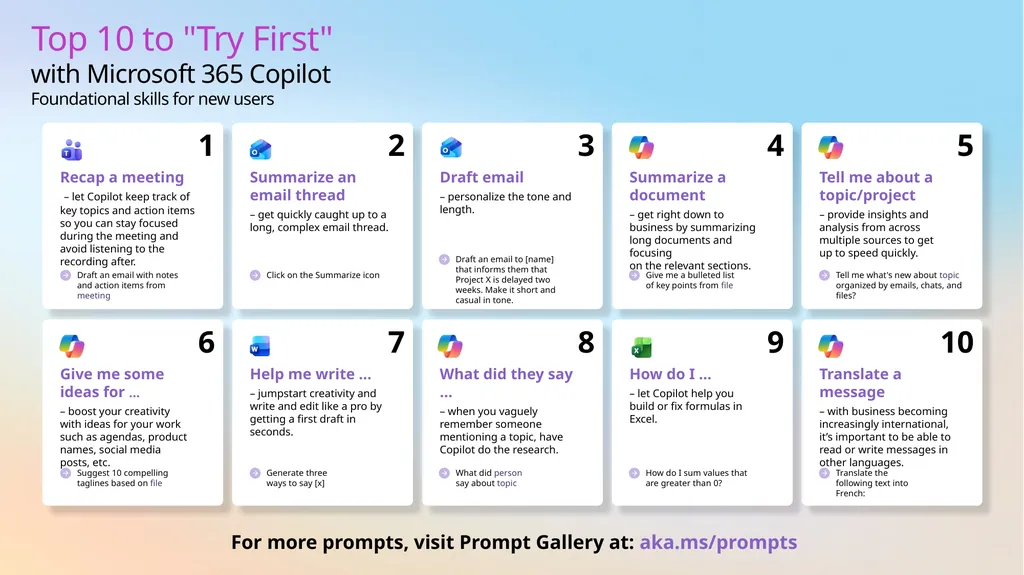
Microsoft Scenario Library Discover industry and role-based use cases Top 10 to Try First with Microsoft 365 Copilot Foundational skills for new users For more prompts, visit Prompt Gallery at: aka.msprompts AI value journey Org Value
Related Topics
Share
Embed code
Download this presentation From Below
"Microsoft Scenario Library Discover industry and" is the property of its rightful owner. Permission is granted to download and print the materials on this website for personal, non-commercial use only, and to display it on your personal computer provided you do not modify the materials and that you retain all copyright notices contained in the materials. By downloading content from our website, you accept the terms of this agreement.
Presentation Transcript
01
Microsoft Scenario Library Discover industry and role-based use cases<br>
02
Top 10 to "Try First" with Microsoft 365 Copilot
Foundational skills for new users For more prompts, visit Prompt Gallery at: aka.ms/prompts<br>
03
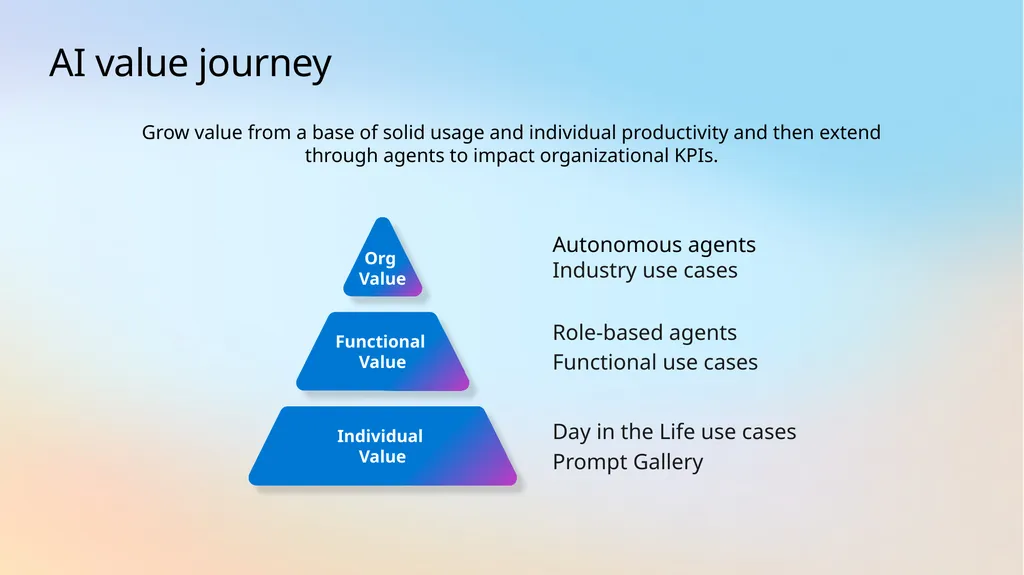
AI value journey Org
Value Functional
Value Autonomous agents
Industry use cases Role-based agents
Functional use cases Individual Value Day in the Life use cases
Prompt Gallery Grow value from a base of solid usage and individual productivity and then extend through agents to impact organizational KPIs.<br>
Industry use cases Role-based agents
Functional use cases Individual Value Day in the Life use cases
Prompt Gallery Grow value from a base of solid usage and individual productivity and then extend through agents to impact organizational KPIs.<br>
04
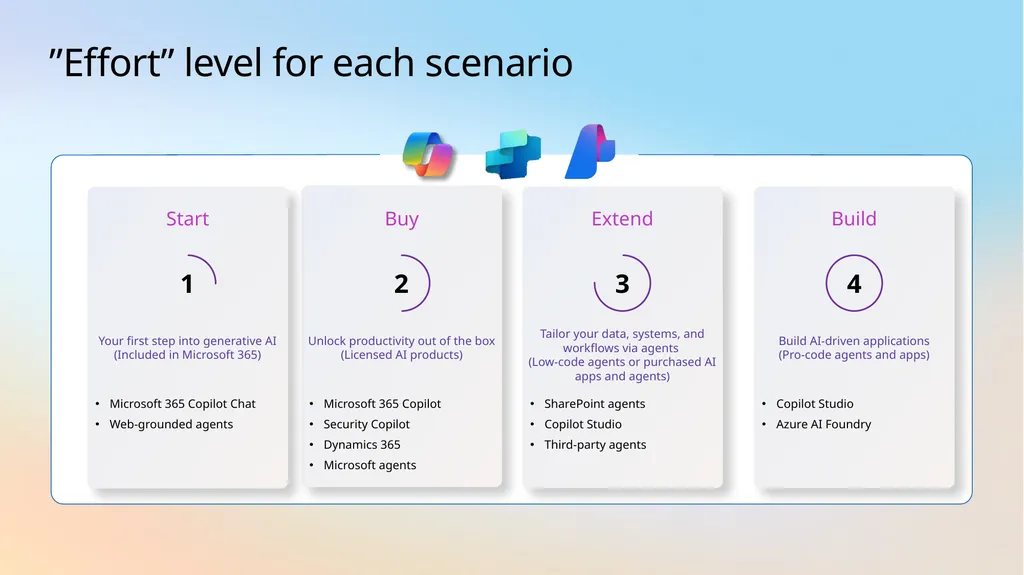
”Effort” level for each scenario Buy Microsoft 365 Copilot
Security Copilot
Dynamics 365
Microsoft agents Unlock productivity out of the box (Licensed AI products) 2 Extend SharePoint agents
Copilot Studio
Third-party agents Tailor your data, systems, and workflows via agents
(Low-code agents or purchased AI apps and agents) 3 Start Microsoft 365 Copilot Chat
Web-grounded agents Your first step into generative AI (Included in Microsoft 365) 1 Build Copilot Studio
Azure AI Foundry Build AI-driven applications
(Pro-code agents and apps) 4<br>
Security Copilot
Dynamics 365
Microsoft agents Unlock productivity out of the box (Licensed AI products) 2 Extend SharePoint agents
Copilot Studio
Third-party agents Tailor your data, systems, and workflows via agents
(Low-code agents or purchased AI apps and agents) 3 Start Microsoft 365 Copilot Chat
Web-grounded agents Your first step into generative AI (Included in Microsoft 365) 1 Build Copilot Studio
Azure AI Foundry Build AI-driven applications
(Pro-code agents and apps) 4<br>
05
AI use cases for
Customer Service<br>
06
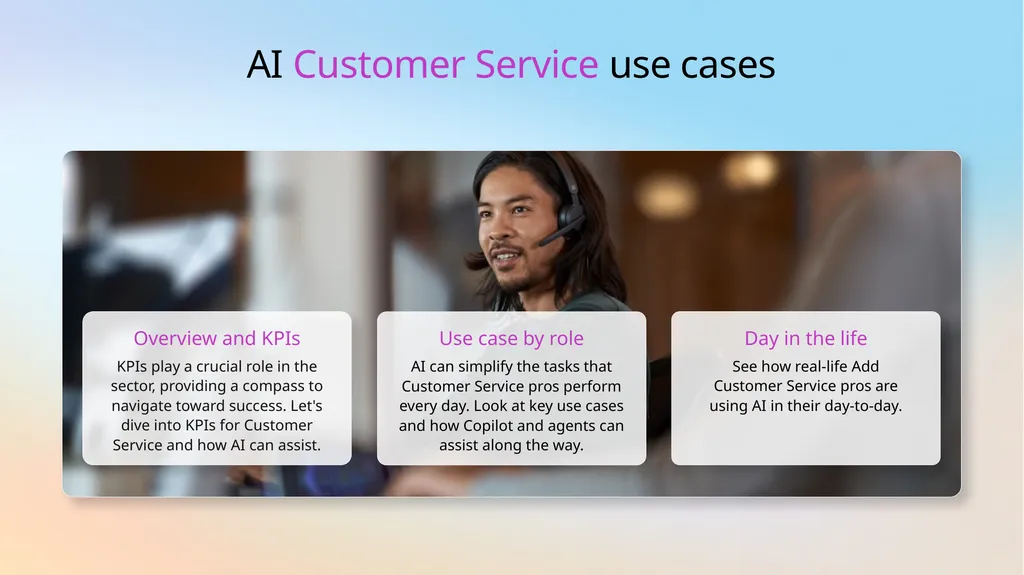
AI Customer Service use cases Overview and KPIs KPIs play a crucial role in the sector, providing a compass to navigate toward success. Let's dive into KPIs for Customer Service and how AI can assist. Use case by role AI can simplify the tasks that Customer Service pros perform every day. Look at key use cases and how Copilot and agents can assist along the way. Day in the life See how real-life Add Customer Service pros are using AI in their day-to-day.<br>
07
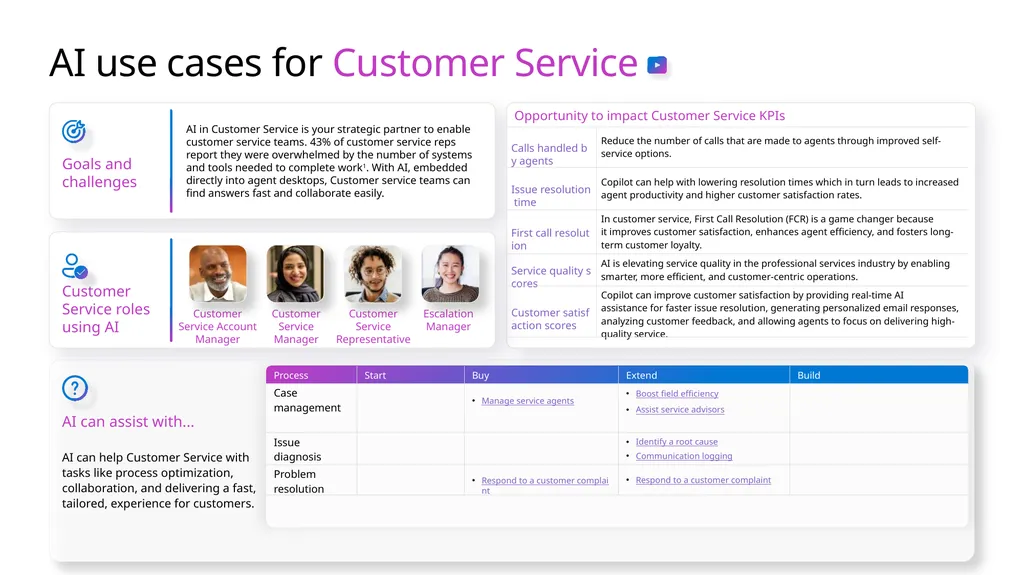
AI use cases for Customer Service Goals and challenges AI in Customer Service is your strategic partner to enable customer service teams. 43% of customer service reps report they were overwhelmed by the number of systems and tools needed to complete work1. With AI, embedded directly into agent desktops, Customer service teams can find answers fast and collaborate easily. AI can assist with... AI can help Customer Service with tasks like process optimization, collaboration, and delivering a fast, tailored, experience for customers. Customer Service roles using AI Customer Service Manager Customer Service Account Manager Customer Service Representative Escalation Manager<br>
08
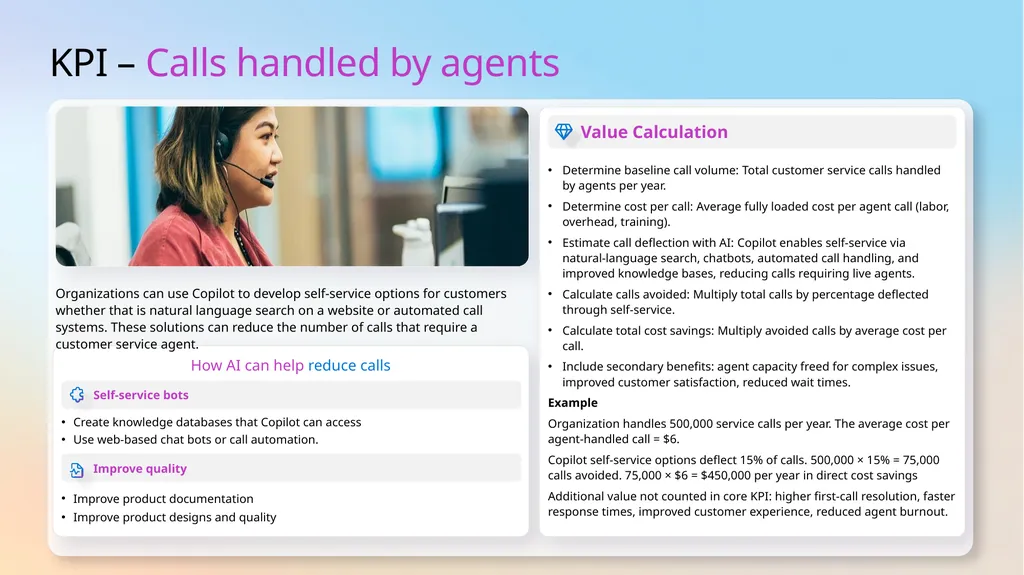
KPI – Calls handled by agents How AI can help reduce calls Organizations can use Copilot to develop self-service options for customers whether that is natural language search on a website or automated call systems. These solutions can reduce the number of calls that require a customer service agent. Value Calculation Determine baseline call volume: Total customer service calls handled by agents per year.
Determine cost per call: Average fully loaded cost per agent call (labor, overhead, training).
Estimate call deflection with AI: Copilot enables self‑service via natural‑language search, chatbots, automated call handling, and improved knowledge bases, reducing calls requiring live agents.
Calculate calls avoided: Multiply total calls by percentage deflected through self‑service.
Calculate total cost savings: Multiply avoided calls by average cost per call.
Include secondary benefits: agent capacity freed for complex issues, improved customer satisfaction, reduced wait times.
Example
Organization handles 500,000 service calls per year. The average cost per agent‑handled call = $6.
Copilot self‑service options deflect 15% of calls. 500,000 × 15% = 75,000 calls avoided. 75,000 × $6 = $450,000 per year in direct cost savings
Additional value not counted in core KPI: higher first‑call resolution, faster response times, improved customer experience, reduced agent burnout.<br>
Determine cost per call: Average fully loaded cost per agent call (labor, overhead, training).
Estimate call deflection with AI: Copilot enables self‑service via natural‑language search, chatbots, automated call handling, and improved knowledge bases, reducing calls requiring live agents.
Calculate calls avoided: Multiply total calls by percentage deflected through self‑service.
Calculate total cost savings: Multiply avoided calls by average cost per call.
Include secondary benefits: agent capacity freed for complex issues, improved customer satisfaction, reduced wait times.
Example
Organization handles 500,000 service calls per year. The average cost per agent‑handled call = $6.
Copilot self‑service options deflect 15% of calls. 500,000 × 15% = 75,000 calls avoided. 75,000 × $6 = $450,000 per year in direct cost savings
Additional value not counted in core KPI: higher first‑call resolution, faster response times, improved customer experience, reduced agent burnout.<br>
09
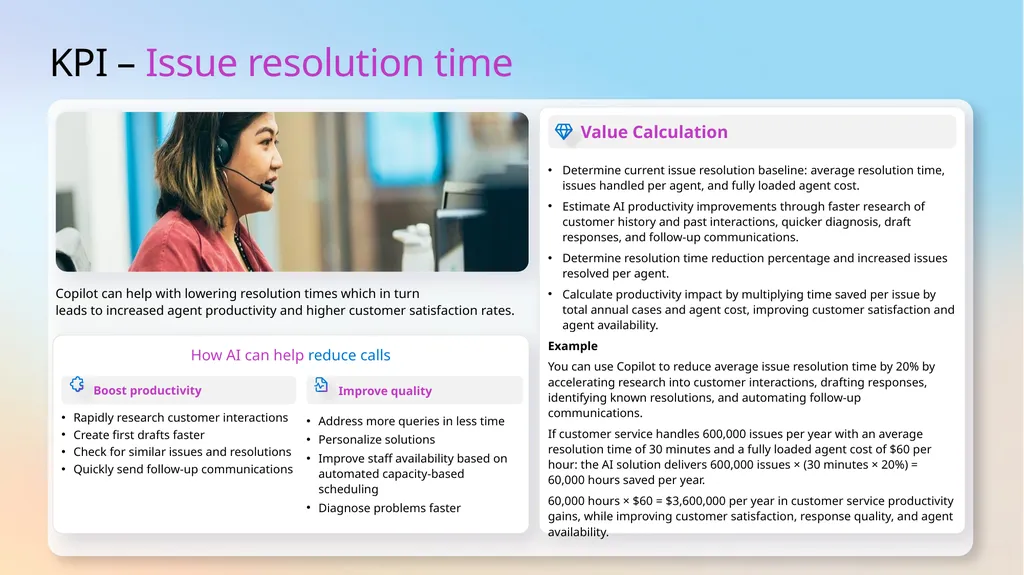
KPI – Issue resolution time How AI can help reduce calls Copilot can help with lowering resolution times which in turn
leads to increased agent productivity and higher customer satisfaction rates. Value Calculation Determine current issue resolution baseline: average resolution time, issues handled per agent, and fully loaded agent cost.
Estimate AI productivity improvements through faster research of customer history and past interactions, quicker diagnosis, draft responses, and follow‑up communications.
Determine resolution time reduction percentage and increased issues resolved per agent.
Calculate productivity impact by multiplying time saved per issue by total annual cases and agent cost, improving customer satisfaction and agent availability.
Example
You can use Copilot to reduce average issue resolution time by 20% by accelerating research into customer interactions, drafting responses, identifying known resolutions, and automating follow‑up communications.
If customer service handles 600,000 issues per year with an average resolution time of 30 minutes and a fully loaded agent cost of $60 per hour: the AI solution delivers 600,000 issues × (30 minutes × 20%) = 60,000 hours saved per year.
60,000 hours × $60 = $3,600,000 per year in customer service productivity gains, while improving customer satisfaction, response quality, and agent availability.<br>
Estimate AI productivity improvements through faster research of customer history and past interactions, quicker diagnosis, draft responses, and follow‑up communications.
Determine resolution time reduction percentage and increased issues resolved per agent.
Calculate productivity impact by multiplying time saved per issue by total annual cases and agent cost, improving customer satisfaction and agent availability.
Example
You can use Copilot to reduce average issue resolution time by 20% by accelerating research into customer interactions, drafting responses, identifying known resolutions, and automating follow‑up communications.
If customer service handles 600,000 issues per year with an average resolution time of 30 minutes and a fully loaded agent cost of $60 per hour: the AI solution delivers 600,000 issues × (30 minutes × 20%) = 60,000 hours saved per year.
60,000 hours × $60 = $3,600,000 per year in customer service productivity gains, while improving customer satisfaction, response quality, and agent availability.<br>
10
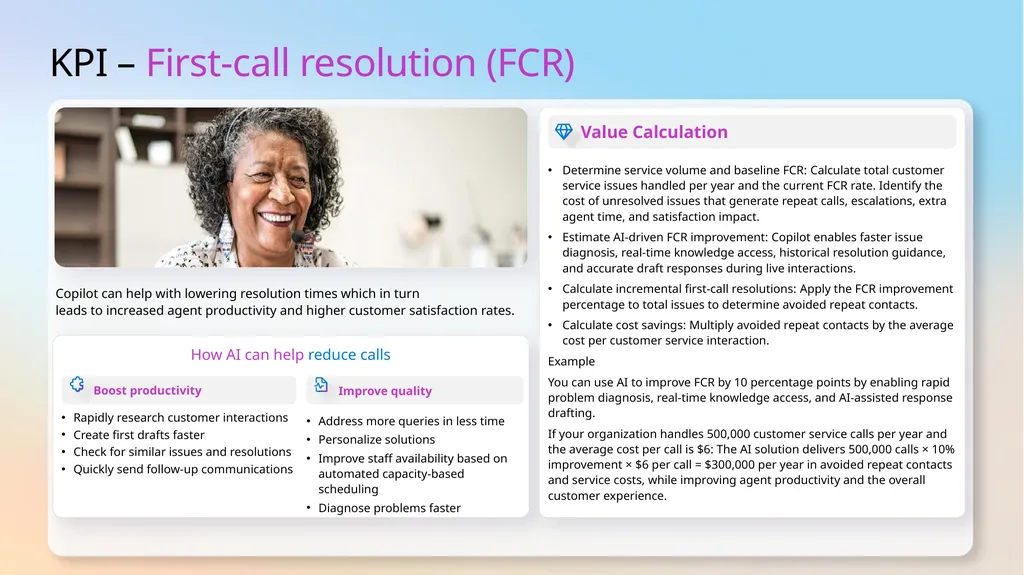
KPI – First-call resolution (FCR) How AI can help reduce calls Copilot can help with lowering resolution times which in turn
leads to increased agent productivity and higher customer satisfaction rates. Value Calculation Determine service volume and baseline FCR: Calculate total customer service issues handled per year and the current FCR rate. Identify the cost of unresolved issues that generate repeat calls, escalations, extra agent time, and satisfaction impact.
Estimate AI‑driven FCR improvement: Copilot enables faster issue diagnosis, real‑time knowledge access, historical resolution guidance, and accurate draft responses during live interactions.
Calculate incremental first‑call resolutions: Apply the FCR improvement percentage to total issues to determine avoided repeat contacts.
Calculate cost savings: Multiply avoided repeat contacts by the average cost per customer service interaction.
Example
You can use AI to improve FCR by 10 percentage points by enabling rapid problem diagnosis, real‑time knowledge access, and AI‑assisted response drafting.
If your organization handles 500,000 customer service calls per year and the average cost per call is $6: The AI solution delivers 500,000 calls × 10% improvement × $6 per call = $300,000 per year in avoided repeat contacts and service costs, while improving agent productivity and the overall customer experience.<br>
Estimate AI‑driven FCR improvement: Copilot enables faster issue diagnosis, real‑time knowledge access, historical resolution guidance, and accurate draft responses during live interactions.
Calculate incremental first‑call resolutions: Apply the FCR improvement percentage to total issues to determine avoided repeat contacts.
Calculate cost savings: Multiply avoided repeat contacts by the average cost per customer service interaction.
Example
You can use AI to improve FCR by 10 percentage points by enabling rapid problem diagnosis, real‑time knowledge access, and AI‑assisted response drafting.
If your organization handles 500,000 customer service calls per year and the average cost per call is $6: The AI solution delivers 500,000 calls × 10% improvement × $6 per call = $300,000 per year in avoided repeat contacts and service costs, while improving agent productivity and the overall customer experience.<br>
11
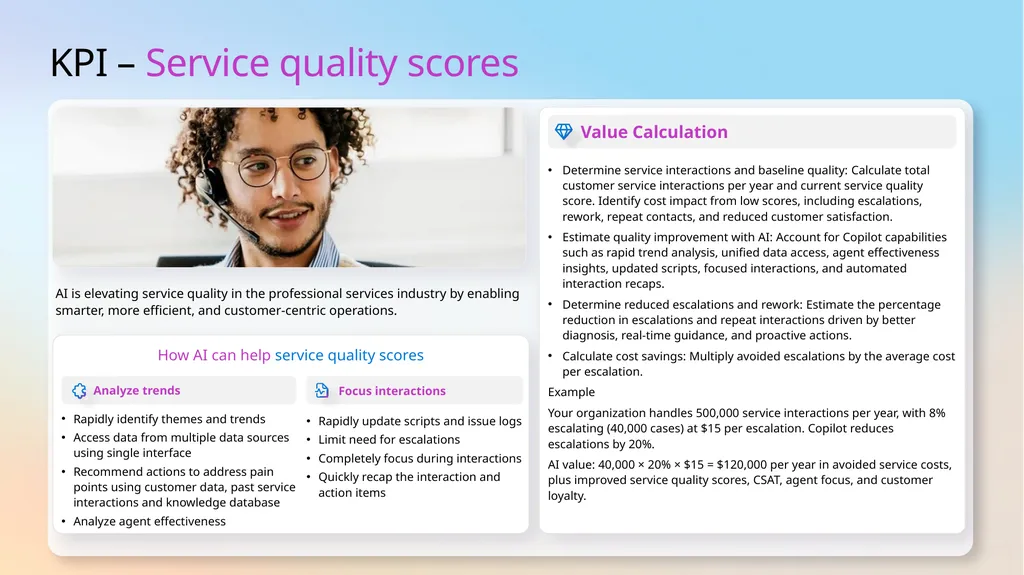
KPI – Service quality scores How AI can help service quality scores AI is elevating service quality in the professional services industry by enabling smarter, more efficient, and customer-centric operations. Value Calculation Determine service interactions and baseline quality: Calculate total customer service interactions per year and current service quality score. Identify cost impact from low scores, including escalations, rework, repeat contacts, and reduced customer satisfaction.
Estimate quality improvement with AI: Account for Copilot capabilities such as rapid trend analysis, unified data access, agent effectiveness insights, updated scripts, focused interactions, and automated interaction recaps.
Determine reduced escalations and rework: Estimate the percentage reduction in escalations and repeat interactions driven by better diagnosis, real‑time guidance, and proactive actions.
Calculate cost savings: Multiply avoided escalations by the average cost per escalation.
Example
Your organization handles 500,000 service interactions per year, with 8% escalating (40,000 cases) at $15 per escalation. Copilot reduces escalations by 20%.
AI value: 40,000 × 20% × $15 = $120,000 per year in avoided service costs, plus improved service quality scores, CSAT, agent focus, and customer loyalty.<br>
Estimate quality improvement with AI: Account for Copilot capabilities such as rapid trend analysis, unified data access, agent effectiveness insights, updated scripts, focused interactions, and automated interaction recaps.
Determine reduced escalations and rework: Estimate the percentage reduction in escalations and repeat interactions driven by better diagnosis, real‑time guidance, and proactive actions.
Calculate cost savings: Multiply avoided escalations by the average cost per escalation.
Example
Your organization handles 500,000 service interactions per year, with 8% escalating (40,000 cases) at $15 per escalation. Copilot reduces escalations by 20%.
AI value: 40,000 × 20% × $15 = $120,000 per year in avoided service costs, plus improved service quality scores, CSAT, agent focus, and customer loyalty.<br>
12
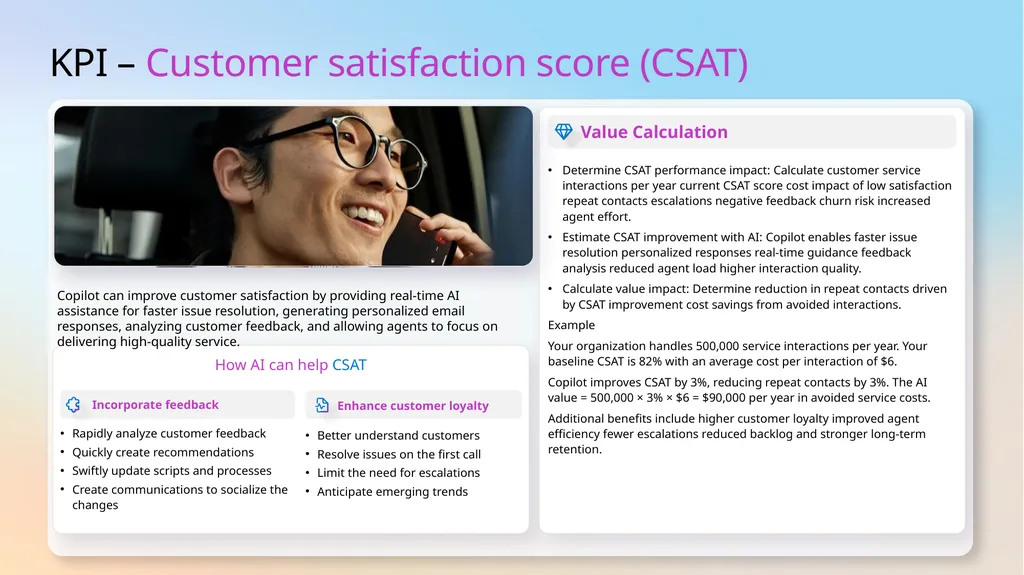
KPI – Customer satisfaction score (CSAT) How AI can help CSAT Copilot can improve customer satisfaction by providing real-time AI assistance for faster issue resolution, generating personalized email responses, analyzing customer feedback, and allowing agents to focus on delivering high-quality service. Value Calculation Determine CSAT performance impact: Calculate customer service interactions per year current CSAT score cost impact of low satisfaction repeat contacts escalations negative feedback churn risk increased agent effort.
Estimate CSAT improvement with AI: Copilot enables faster issue resolution personalized responses real‑time guidance feedback analysis reduced agent load higher interaction quality.
Calculate value impact: Determine reduction in repeat contacts driven by CSAT improvement cost savings from avoided interactions.
Example
Your organization handles 500,000 service interactions per year. Your baseline CSAT is 82% with an average cost per interaction of $6.
Copilot improves CSAT by 3%, reducing repeat contacts by 3%. The AI value = 500,000 × 3% × $6 = $90,000 per year in avoided service costs.
Additional benefits include higher customer loyalty improved agent efficiency fewer escalations reduced backlog and stronger long‑term retention.<br>
Estimate CSAT improvement with AI: Copilot enables faster issue resolution personalized responses real‑time guidance feedback analysis reduced agent load higher interaction quality.
Calculate value impact: Determine reduction in repeat contacts driven by CSAT improvement cost savings from avoided interactions.
Example
Your organization handles 500,000 service interactions per year. Your baseline CSAT is 82% with an average cost per interaction of $6.
Copilot improves CSAT by 3%, reducing repeat contacts by 3%. The AI value = 500,000 × 3% × $6 = $90,000 per year in avoided service costs.
Additional benefits include higher customer loyalty improved agent efficiency fewer escalations reduced backlog and stronger long‑term retention.<br>
13
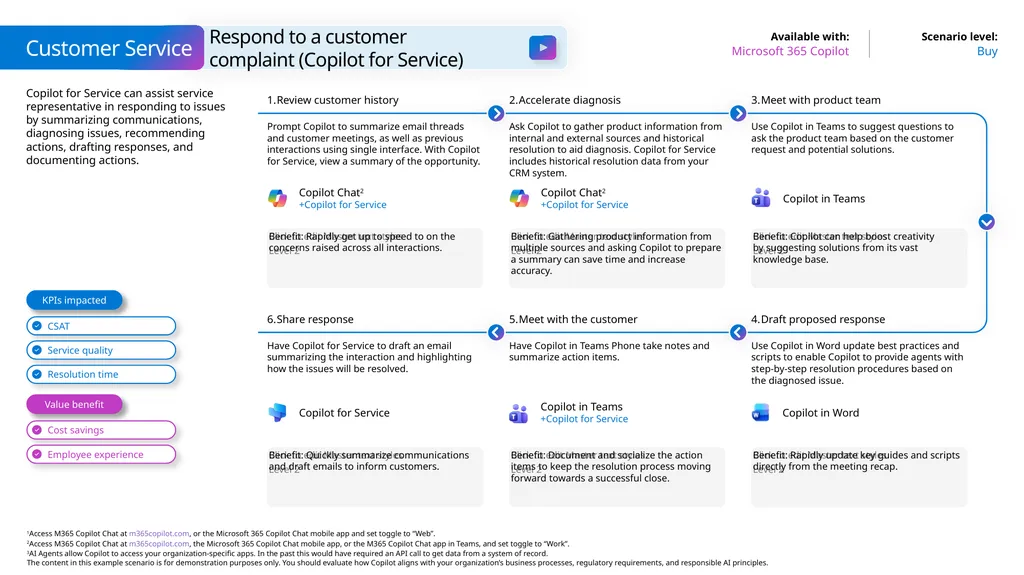
Copilot for Service can assist service representative in responding to issues by summarizing communications, diagnosing issues, recommending actions, drafting responses, and documenting actions. Customer Service Buy Microsoft 365 Copilot Respond to a customer complaint (Copilot for Service) Benefit: Rapidly get up to speed to on the concerns raised across all interactions. Review customer history Prompt Copilot to summarize email threads and customer meetings, as well as previous interactions using single interface. With Copilot
for Service, view a summary of the opportunity. Accelerate diagnosis Ask Copilot to gather product information from internal and external sources and historical resolution to aid diagnosis. Copilot for Service includes historical resolution data from your
CRM system. Benefit: Copilot can help boost creativity
by suggesting solutions from its vast knowledge base. Meet with product team Use Copilot in Teams to suggest questions to ask the product team based on the customer request and potential solutions. Benefit: Gathering product information from multiple sources and asking Copilot to prepare a summary can save time and increase accuracy. Benefit: Quickly summarize communications and draft emails to inform customers. Share response Have Copilot for Service to draft an email summarizing the interaction and highlighting how the issues will be resolved. Meet with the customer Have Copilot in Teams Phone take notes and summarize action items. Benefit: Rapidly update key guides and scripts directly from the meeting recap. Draft proposed response Use Copilot in Word update best practices and scripts to enable Copilot to provide agents with step-by-step resolution procedures based on the diagnosed issue. Benefit: Document and socialize the action items to keep the resolution process moving forward towards a successful close. Value benefit KPIs impacted Copilot Chat2
+Copilot for Service Copilot Chat2
+Copilot for Service Copilot in Teams Copilot in Teams
+Copilot for Service Copilot for Service Copilot in Word<br>
+Copilot for Service Copilot Chat2
+Copilot for Service Copilot in Teams Copilot in Teams
+Copilot for Service Copilot for Service Copilot in Word<br>
14
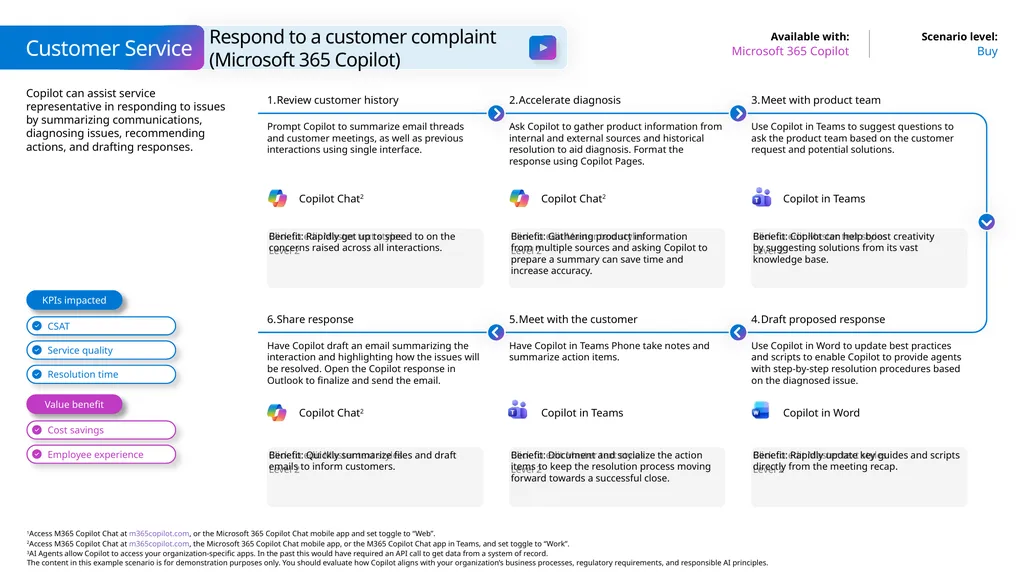
Copilot can assist service representative in responding to issues by summarizing communications, diagnosing issues, recommending actions, and drafting responses. Customer Service Buy Microsoft 365 Copilot Respond to a customer complaint
(Microsoft 365 Copilot) Benefit: Rapidly get up to speed to on the concerns raised across all interactions. Review customer history Prompt Copilot to summarize email threads and customer meetings, as well as previous interactions using single interface. Accelerate diagnosis Ask Copilot to gather product information from internal and external sources and historical resolution to aid diagnosis. Format the response using Copilot Pages. Benefit: Copilot can help boost creativity
by suggesting solutions from its vast knowledge base. Meet with product team Use Copilot in Teams to suggest questions to ask the product team based on the customer request and potential solutions. Benefit: Gathering product information
from multiple sources and asking Copilot to prepare a summary can save time and
increase accuracy. Benefit: Quickly summarize files and draft emails to inform customers. Share response Have Copilot draft an email summarizing the interaction and highlighting how the issues will be resolved. Open the Copilot response in Outlook to finalize and send the email. Meet with the customer Have Copilot in Teams Phone take notes and summarize action items. Benefit: Rapidly update key guides and scripts directly from the meeting recap. Draft proposed response Use Copilot in Word to update best practices and scripts to enable Copilot to provide agents with step-by-step resolution procedures based on the diagnosed issue. Benefit: Document and socialize the action items to keep the resolution process moving forward towards a successful close. Value benefit KPIs impacted Copilot Chat2 Copilot Chat2 Copilot in Teams Copilot in Teams Copilot Chat2 Copilot in Word<br>
15
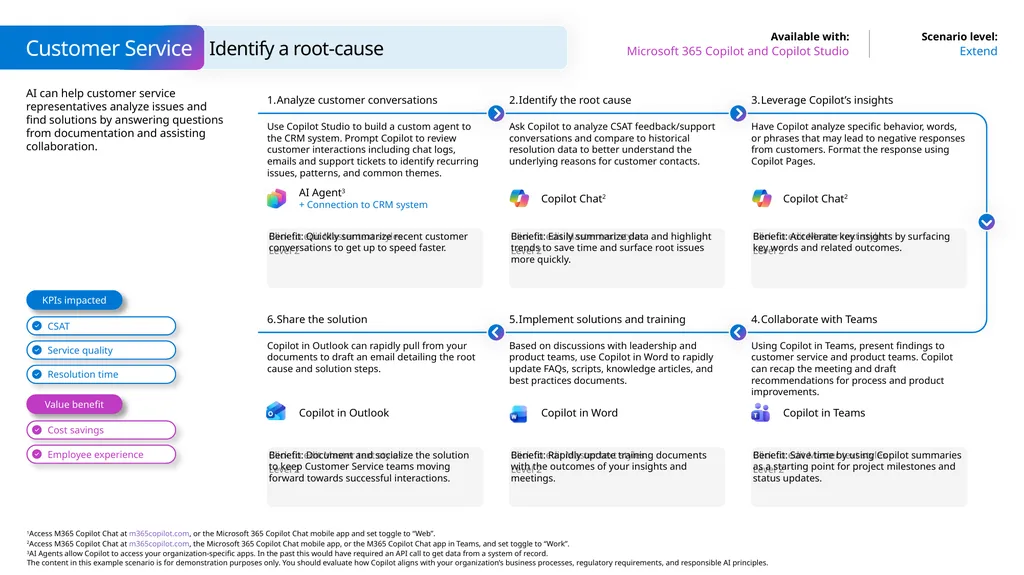
AI can help customer service representatives analyze issues and find solutions by answering questions from documentation and assisting collaboration. Customer Service Extend Microsoft 365 Copilot and Copilot Studio Identify a root-cause Benefit: Quickly summarize recent customer conversations to get up to speed faster. Analyze customer conversations Use Copilot Studio to build a custom agent to the CRM system. Prompt Copilot to review customer interactions including chat logs, emails and support tickets to identify recurring issues, patterns, and common themes. Identify the root cause Ask Copilot to analyze CSAT feedback/support conversations and compare to historical resolution data to better understand the underlying reasons for customer contacts. Benefit: Accelerate key insights by surfacing key words and related outcomes. Leverage Copilot’s insights Have Copilot analyze specific behavior, words, or phrases that may lead to negative responses from customers. Format the response using Copilot Pages. Benefit: Easily summarize data and highlight trends to save time and surface root issues more quickly. Benefit: Document and socialize the solution
to keep Customer Service teams moving forward towards successful interactions. Share the solution Copilot in Outlook can rapidly pull from your documents to draft an email detailing the root cause and solution steps. Implement solutions and training Based on discussions with leadership and product teams, use Copilot in Word to rapidly update FAQs, scripts, knowledge articles, and best practices documents. Benefit: Save time by using Copilot summaries as a starting point for project milestones and status updates. Collaborate with Teams Using Copilot in Teams, present findings to customer service and product teams. Copilot can recap the meeting and draft recommendations for process and product improvements. Benefit: Rapidly update training documents with the outcomes of your insights and meetings. Value benefit KPIs impacted AI Agent3
+ Connection to CRM system Copilot Chat2 Copilot Chat2 Copilot in Word Copilot in Outlook Copilot in Teams<br>
+ Connection to CRM system Copilot Chat2 Copilot Chat2 Copilot in Word Copilot in Outlook Copilot in Teams<br>
16
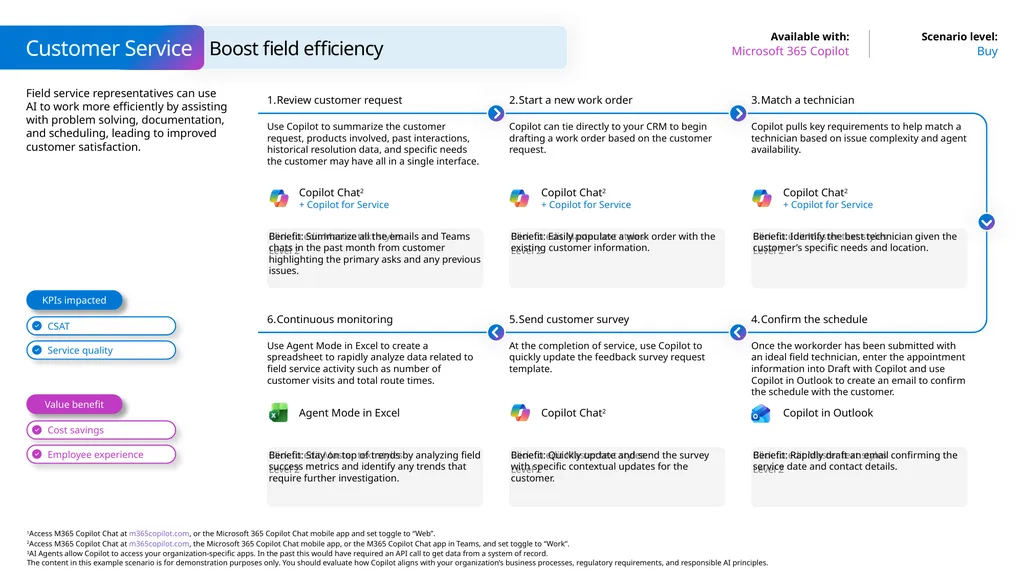
Field service representatives can use AI to work more efficiently by assisting with problem solving, documentation, and scheduling, leading to improved customer satisfaction. Customer Service Buy Microsoft 365 Copilot Boost field efficiency Benefit: Summarize all the emails and Teams chats in the past month from customer highlighting the primary asks and any previous issues. Review customer request Use Copilot to summarize the customer request, products involved, past interactions, historical resolution data, and specific needs the customer may have all in a single interface. Start a new work order Copilot can tie directly to your CRM to begin drafting a work order based on the customer request. Benefit: Identify the best technician given the customer’s specific needs and location. Match a technician Copilot pulls key requirements to help match a technician based on issue complexity and agent availability. Benefit: Easily populate a work order with the existing customer information. Benefit: Stay on top of trends by analyzing field success metrics and identify any trends that require further investigation. Continuous monitoring Use Agent Mode in Excel to create a spreadsheet to rapidly analyze data related to field service activity such as number of customer visits and total route times. Send customer survey At the completion of service, use Copilot to quickly update the feedback survey request template. Benefit: Rapidly draft an email confirming the service date and contact details. Confirm the schedule Once the workorder has been submitted with an ideal field technician, enter the appointment information into Draft with Copilot and use Copilot in Outlook to create an email to confirm the schedule with the customer. Benefit: Quickly update and send the survey with specific contextual updates for the customer. Value benefit KPIs impacted Copilot Chat2
+ Copilot for Service Copilot Chat2
+ Copilot for Service Copilot Chat2
+ Copilot for Service Copilot Chat2 Agent Mode in Excel Copilot in Outlook<br>
+ Copilot for Service Copilot Chat2
+ Copilot for Service Copilot Chat2
+ Copilot for Service Copilot Chat2 Agent Mode in Excel Copilot in Outlook<br>
17
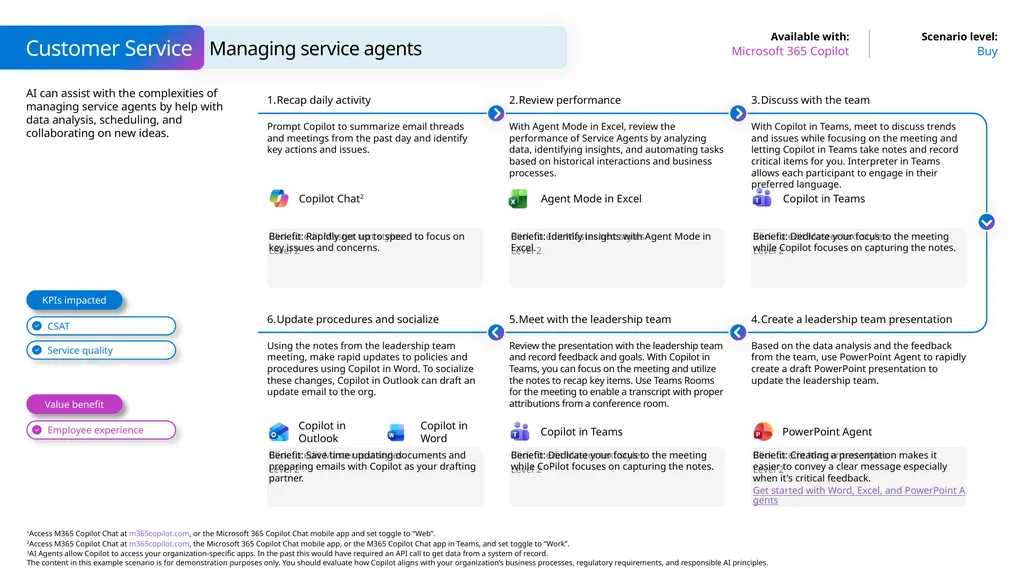
AI can assist with the complexities of managing service agents by help with data analysis, scheduling, and collaborating on new ideas. Customer Service Buy Microsoft 365 Copilot Managing service agents Benefit: Rapidly get up to speed to focus on key issues and concerns. Recap daily activity Prompt Copilot to summarize email threads and meetings from the past day and identify key actions and issues. Review performance With Agent Mode in Excel, review the performance of Service Agents by analyzing data, identifying insights, and automating tasks based on historical interactions and business processes. Benefit: Dedicate your focus to the meeting while Copilot focuses on capturing the notes. Discuss with the team With Copilot in Teams, meet to discuss trends and issues while focusing on the meeting and letting Copilot in Teams take notes and record critical items for you. Interpreter in Teams allows each participant to engage in their preferred language. Benefit: Identify insights with Agent Mode in Excel. Benefit: Save time updating documents and preparing emails with Copilot as your drafting partner. Update procedures and socialize Using the notes from the leadership team meeting, make rapid updates to policies and procedures using Copilot in Word. To socialize these changes, Copilot in Outlook can draft an update email to the org. Meet with the leadership team Review the presentation with the leadership team and record feedback and goals. With Copilot in Teams, you can focus on the meeting and utilize the notes to recap key items. Use Teams Rooms for the meeting to enable a transcript with proper attributions from a conference room. Benefit: Creating a presentation makes it easier to convey a clear message especially when it's critical feedback.
Get started with Word, Excel, and PowerPoint Agents Create a leadership team presentation Based on the data analysis and the feedback from the team, use PowerPoint Agent to rapidly create a draft PowerPoint presentation to update the leadership team. Benefit: Dedicate your focus to the meeting while CoPilot focuses on capturing the notes. Value benefit KPIs impacted Copilot Chat2 Agent Mode in Excel Copilot in Teams Copilot in Teams Copilot in Outlook PowerPoint Agent Copilot in Word<br>
Get started with Word, Excel, and PowerPoint Agents Create a leadership team presentation Based on the data analysis and the feedback from the team, use PowerPoint Agent to rapidly create a draft PowerPoint presentation to update the leadership team. Benefit: Dedicate your focus to the meeting while CoPilot focuses on capturing the notes. Value benefit KPIs impacted Copilot Chat2 Agent Mode in Excel Copilot in Teams Copilot in Teams Copilot in Outlook PowerPoint Agent Copilot in Word<br>
18
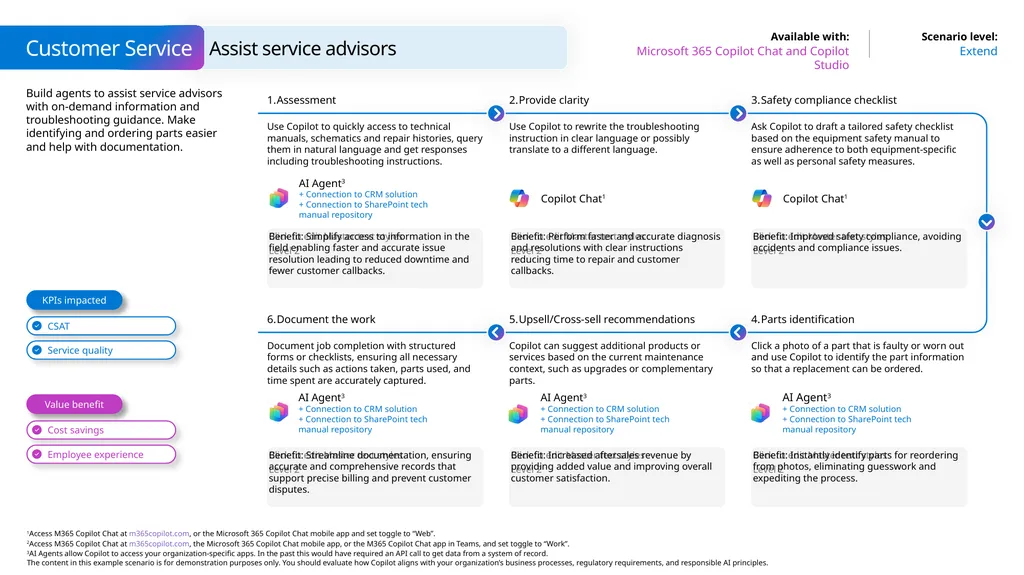
Build agents to assist service advisors with on-demand information and troubleshooting guidance. Make identifying and ordering parts easier and help with documentation. Customer Service Extend Microsoft 365 Copilot Chat and Copilot Studio Assist service advisors Benefit: Simplify access to information in the field enabling faster and accurate issue resolution leading to reduced downtime and fewer customer callbacks. Assessment Use Copilot to quickly access to technical manuals, schematics and repair histories, query them in natural language and get responses including troubleshooting instructions. Provide clarity Use Copilot to rewrite the troubleshooting instruction in clear language or possibly translate to a different language. Benefit: Improved safety compliance, avoiding accidents and compliance issues. Safety compliance checklist Ask Copilot to draft a tailored safety checklist based on the equipment safety manual to ensure adherence to both equipment-specific as well as personal safety measures. Benefit: Perform faster and accurate diagnosis and resolutions with clear instructions reducing time to repair and customer callbacks. Benefit: Streamline documentation, ensuring accurate and comprehensive records that support precise billing and prevent customer disputes. Document the work Document job completion with structured forms or checklists, ensuring all necessary details such as actions taken, parts used, and time spent are accurately captured. Upsell/Cross-sell recommendations Copilot can suggest additional products or services based on the current maintenance context, such as upgrades or complementary parts. Benefit: Instantly identify parts for reordering from photos, eliminating guesswork and expediting the process. Parts identification Click a photo of a part that is faulty or worn out and use Copilot to identify the part information so that a replacement can be ordered. Benefit: Increased aftersales revenue by providing added value and improving overall customer satisfaction. Value benefit KPIs impacted AI Agent3
+ Connection to CRM solution
+ Connection to SharePoint tech manual repository Copilot Chat1 Copilot Chat1 AI Agent3
+ Connection to CRM solution
+ Connection to SharePoint tech manual repository AI Agent3
+ Connection to CRM solution
+ Connection to SharePoint tech manual repository AI Agent3
+ Connection to CRM solution
+ Connection to SharePoint tech manual repository<br>
+ Connection to CRM solution
+ Connection to SharePoint tech manual repository Copilot Chat1 Copilot Chat1 AI Agent3
+ Connection to CRM solution
+ Connection to SharePoint tech manual repository AI Agent3
+ Connection to CRM solution
+ Connection to SharePoint tech manual repository AI Agent3
+ Connection to CRM solution
+ Connection to SharePoint tech manual repository<br>
19
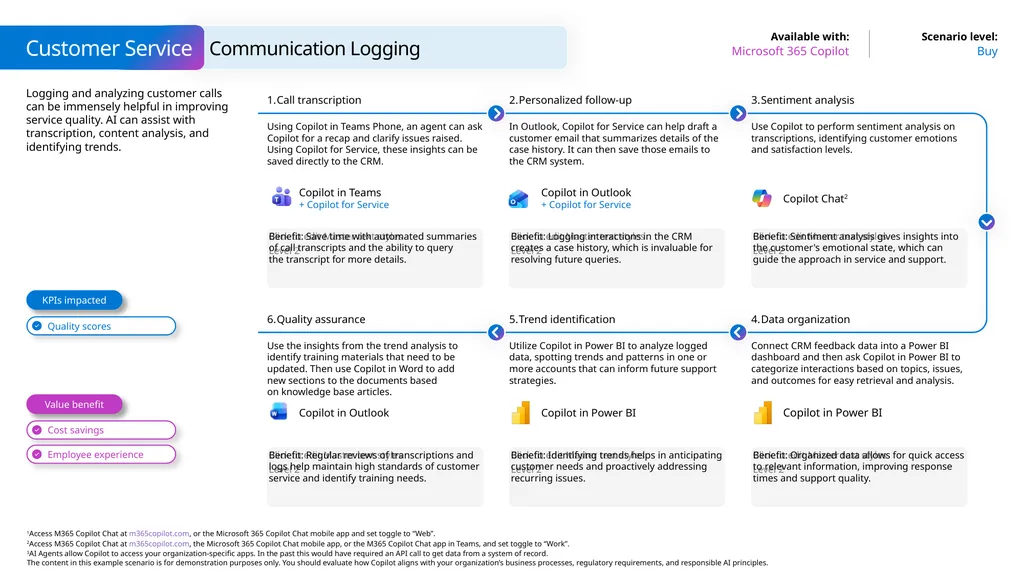
Logging and analyzing customer calls can be immensely helpful in improving service quality. AI can assist with transcription, content analysis, and identifying trends. Customer Service Buy Microsoft 365 Copilot Communication Logging Benefit: Save time with automated summaries of call transcripts and the ability to query the transcript for more details. Call transcription Using Copilot in Teams Phone, an agent can ask Copilot for a recap and clarify issues raised. Using Copilot for Service, these insights can be saved directly to the CRM. Personalized follow-up In Outlook, Copilot for Service can help draft a customer email that summarizes details of the case history. It can then save those emails to the CRM system. Benefit: Sentiment analysis gives insights into the customer's emotional state, which can guide the approach in service and support. Sentiment analysis Use Copilot to perform sentiment analysis on transcriptions, identifying customer emotions and satisfaction levels. Benefit: Logging interactions in the CRM creates a case history, which is invaluable for resolving future queries. Benefit: Regular reviews of transcriptions and logs help maintain high standards of customer service and identify training needs. Quality assurance Use the insights from the trend analysis to identify training materials that need to be updated. Then use Copilot in Word to add new sections to the documents based on knowledge base articles. Trend identification Utilize Copilot in Power BI to analyze logged data, spotting trends and patterns in one or more accounts that can inform future support strategies. Benefit: Organized data allows for quick access to relevant information, improving response times and support quality. Data organization Connect CRM feedback data into a Power BI dashboard and then ask Copilot in Power BI to categorize interactions based on topics, issues, and outcomes for easy retrieval and analysis. Benefit: Identifying trends helps in anticipating customer needs and proactively addressing recurring issues. Value benefit KPIs impacted Copilot in Teams
+ Copilot for Service Copilot in Outlook
+ Copilot for Service Copilot Chat2 Copilot in Power BI Copilot in Outlook Copilot in Power BI<br>
+ Copilot for Service Copilot in Outlook
+ Copilot for Service Copilot Chat2 Copilot in Power BI Copilot in Outlook Copilot in Power BI<br>
20
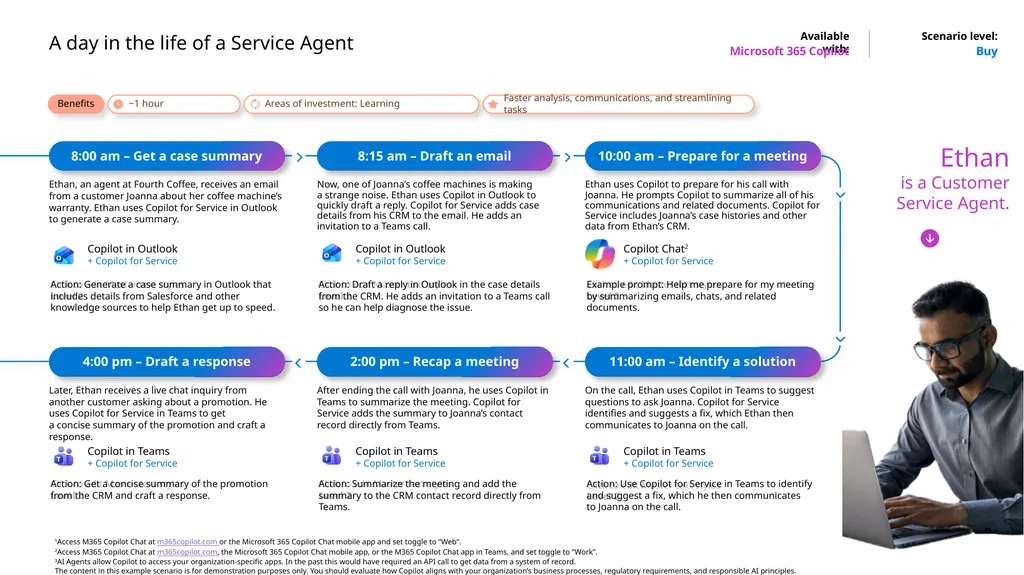
A day in the life of a Service Agent Buy Microsoft 365 Copilot 8:00 am – Get a case summary Ethan, an agent at Fourth Coffee, receives an email from a customer Joanna about her coffee machine’s warranty. Ethan uses Copilot for Service in Outlook to generate a case summary. Action: Generate a case summary in Outlook that includes details from Salesforce and other knowledge sources to help Ethan get up to speed. 8:15 am – Draft an email Now, one of Joanna’s coffee machines is making a strange noise. Ethan uses Copilot in Outlook to quickly draft a reply. Copilot for Service adds case details from his CRM to the email. He adds an invitation to a Teams call. Action: Draft a reply in Outlook in the case details from the CRM. He adds an invitation to a Teams call so he can help diagnose the issue. 10:00 am – Prepare for a meeting Ethan uses Copilot to prepare for his call with Joanna. He prompts Copilot to summarize all of his communications and related documents. Copilot for Service includes Joanna’s case histories and other data from Ethan’s CRM. Example prompt: Help me prepare for my meeting by summarizing emails, chats, and related documents. 11:00 am – Identify a solution On the call, Ethan uses Copilot in Teams to suggest questions to ask Joanna. Copilot for Service identifies and suggests a fix, which Ethan then communicates to Joanna on the call. Action: Use Copilot for Service in Teams to identify and suggest a fix, which he then communicates
to Joanna on the call. 2:00 pm – Recap a meeting After ending the call with Joanna, he uses Copilot in Teams to summarize the meeting. Copilot for Service adds the summary to Joanna’s contact record directly from Teams. Action: Summarize the meeting and add the summary to the CRM contact record directly from Teams. 4:00 pm – Draft a response Later, Ethan receives a live chat inquiry from another customer asking about a promotion. He uses Copilot for Service in Teams to get a concise summary of the promotion and craft a response. Action: Get a concise summary of the promotion
from the CRM and craft a response. Ethan
is a Customer Service Agent. Benefits Copilot in Outlook
+ Copilot for Service Copilot in Teams
+ Copilot for Service Copilot in Outlook
+ Copilot for Service Copilot in Teams
+ Copilot for Service Copilot in Teams
+ Copilot for Service<br>
+ Copilot for Service Copilot in Teams
+ Copilot for Service Copilot in Outlook
+ Copilot for Service Copilot in Teams
+ Copilot for Service Copilot in Teams
+ Copilot for Service<br>
21
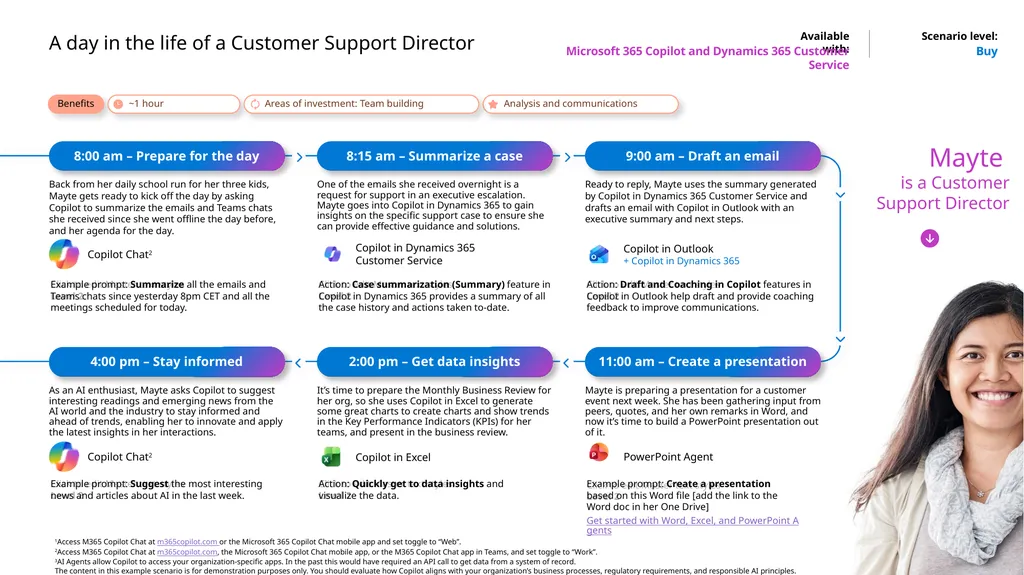
It’s time to prepare the Monthly Business Review for her org, so she uses Copilot in Excel to generate some great charts to create charts and show trends in the Key Performance Indicators (KPIs) for her teams, and present in the business review. Action: Quickly get to data insights and visualize the data. Copilot in Excel A day in the life of a Customer Support Director Buy Microsoft 365 Copilot and Dynamics 365 Customer Service 8:00 am – Prepare for the day Back from her daily school run for her three kids, Mayte gets ready to kick off the day by asking Copilot to summarize the emails and Teams chats she received since she went offline the day before, and her agenda for the day. Example prompt: Summarize all the emails and Teams chats since yesterday 8pm CET and all the meetings scheduled for today. 8:15 am – Summarize a case One of the emails she received overnight is a request for support in an executive escalation. Mayte goes into Copilot in Dynamics 365 to gain insights on the specific support case to ensure she can provide effective guidance and solutions. Action: Case summarization (Summary) feature in Copilot in Dynamics 365 provides a summary of all the case history and actions taken to-date. 9:00 am – Draft an email Ready to reply, Mayte uses the summary generated by Copilot in Dynamics 365 Customer Service and drafts an email with Copilot in Outlook with an executive summary and next steps. Action: Draft and Coaching in Copilot features in Copilot in Outlook help draft and provide coaching feedback to improve communications. 11:00 am – Create a presentation Mayte is preparing a presentation for a customer event next week. She has been gathering input from peers, quotes, and her own remarks in Word, and now it’s time to build a PowerPoint presentation out of it. Example prompt: Create a presentation based on this Word file [add the link to the Word doc in her One Drive]
Get started with Word, Excel, and PowerPoint Agents 2:00 pm – Get data insights 4:00 pm – Stay informed As an AI enthusiast, Mayte asks Copilot to suggest interesting readings and emerging news from the AI world and the industry to stay informed and ahead of trends, enabling her to innovate and apply the latest insights in her interactions. Example prompt: Suggest the most interesting news and articles about AI in the last week. Mayte is a Customer Support Director Benefits Copilot in Outlook
+ Copilot in Dynamics 365<br>
Get started with Word, Excel, and PowerPoint Agents 2:00 pm – Get data insights 4:00 pm – Stay informed As an AI enthusiast, Mayte asks Copilot to suggest interesting readings and emerging news from the AI world and the industry to stay informed and ahead of trends, enabling her to innovate and apply the latest insights in her interactions. Example prompt: Suggest the most interesting news and articles about AI in the last week. Mayte is a Customer Support Director Benefits Copilot in Outlook
+ Copilot in Dynamics 365<br>