01
More accurate Turns BY SANJAY AND ARVIND SESHAN This lesson uses SPIKE 3 software<br>
02
Lesson Objectives Learn how to improve the accuracy of turns
Learn alternative ways to do pivot and spin turns
Note: Although images in this lessons may show a SPIKE Prime, the code blocks are the same for Robot Inventor Copyright © 2023 SPIKE Prime Lessons (primelessons.org) CC-BY-NC-SA. (Last edit: 5/12/2023) 2<br>
03
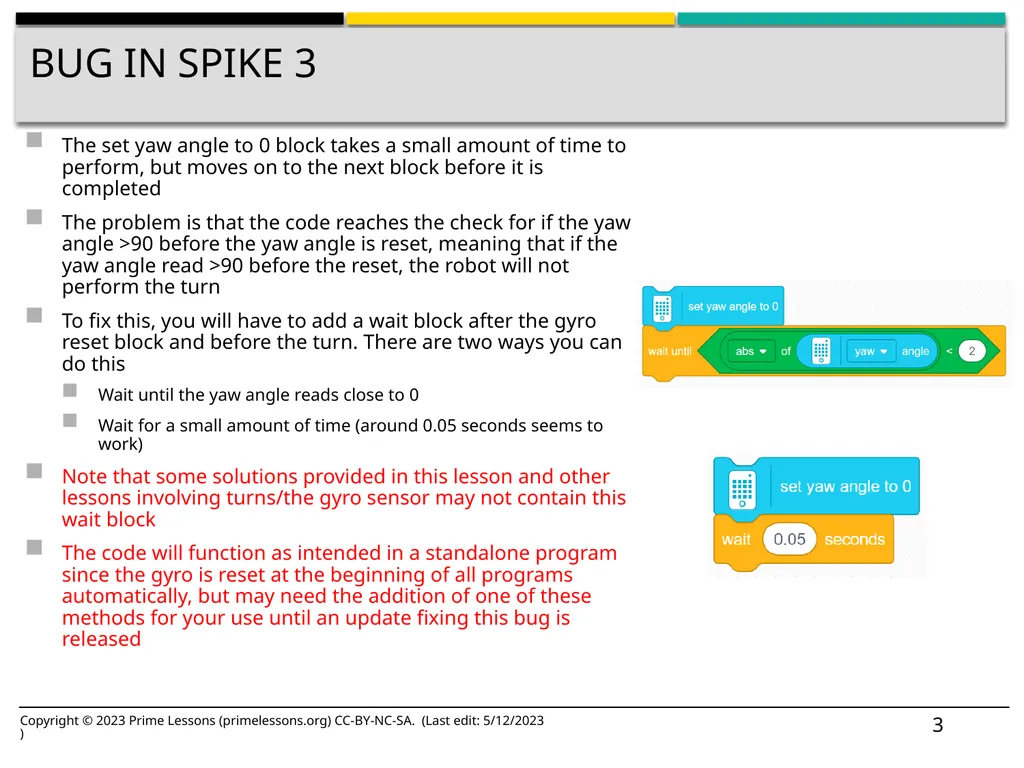
Bug In SPIKE 3 The set yaw angle to 0 block takes a small amount of time to perform, but moves on to the next block before it is completed
The problem is that the code reaches the check for if the yaw angle >90 before the yaw angle is reset, meaning that if the yaw angle read >90 before the reset, the robot will not perform the turn
To fix this, you will have to add a wait block after the gyro reset block and before the turn. There are two ways you can do this
Wait until the yaw angle reads close to 0
Wait for a small amount of time (around 0.05 seconds seems to work)
Note that some solutions provided in this lesson and other lessons involving turns/the gyro sensor may not contain this wait block
The code will function as intended in a standalone program since the gyro is reset at the beginning of all programs automatically, but may need the addition of one of these methods for your use until an update fixing this bug is released Copyright © 2023 Prime Lessons (primelessons.org) CC-BY-NC-SA. (Last edit: 5/12/2023) 3<br>
04
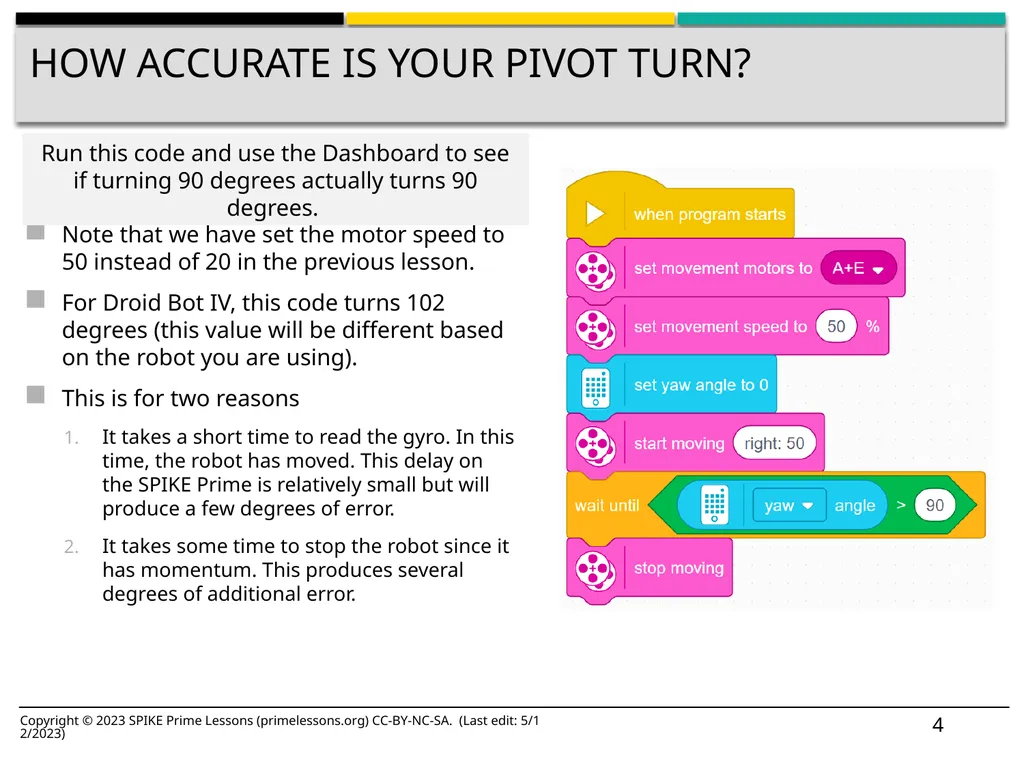
How Accurate Is Your pivot Turn? Note that we have set the motor speed to 50 instead of 20 in the previous lesson.
For Droid Bot IV, this code turns 102 degrees (this value will be different based on the robot you are using).
This is for two reasons
It takes a short time to read the gyro. In this time, the robot has moved. This delay on the SPIKE Prime is relatively small but will produce a few degrees of error.
It takes some time to stop the robot since it has momentum. This produces several degrees of additional error. Run this code and use the Dashboard to see if turning 90 degrees actually turns 90 degrees. Copyright © 2023 SPIKE Prime Lessons (primelessons.org) CC-BY-NC-SA. (Last edit: 5/12/2023) 4<br>
05
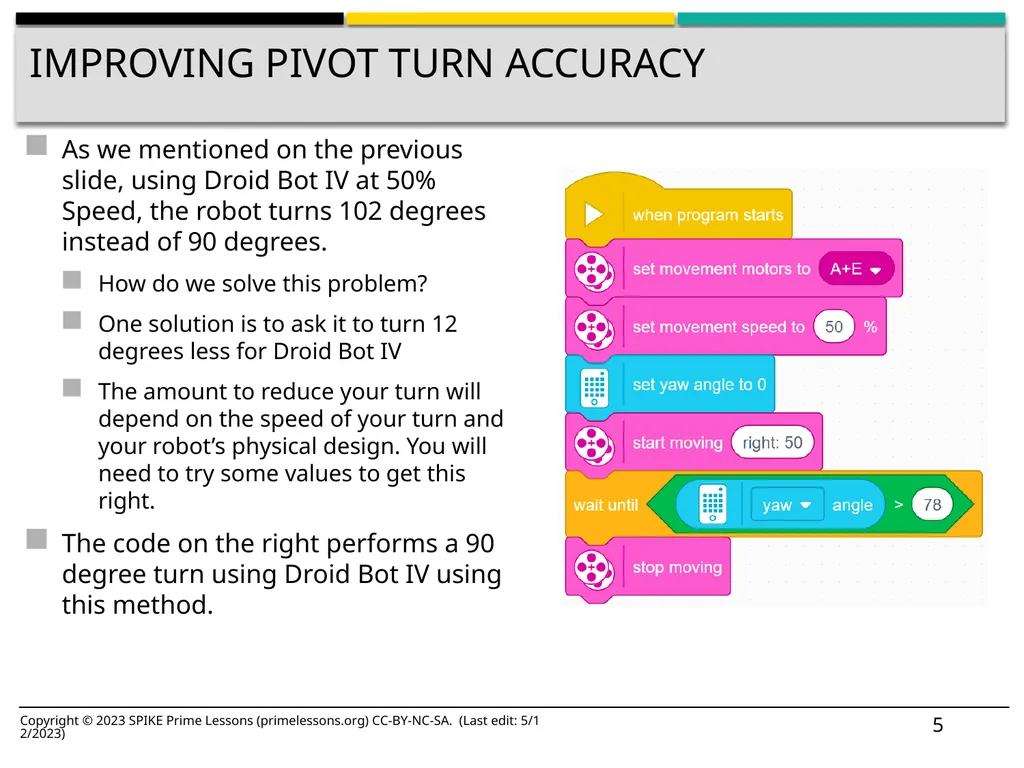
Improving pivot Turn Accuracy As we mentioned on the previous slide, using Droid Bot IV at 50% Speed, the robot turns 102 degrees instead of 90 degrees.
How do we solve this problem?
One solution is to ask it to turn 12 degrees less for Droid Bot IV
The amount to reduce your turn will depend on the speed of your turn and your robot’s physical design. You will need to try some values to get this right.
The code on the right performs a 90 degree turn using Droid Bot IV using this method. Copyright © 2023 SPIKE Prime Lessons (primelessons.org) CC-BY-NC-SA. (Last edit: 5/12/2023) 5<br>
06
Another way to turn is to use movement blocks with duration.
One advantage of these movement blocks is that they decelerate at the end of a move to improve accuracy.
How much do the wheels turn for the above block?
The distance specified is the maximum distance traveled by the two wheels.
At the end of any tank move, the value of the greater of the distance traveled by both wheels will be equal to the entered duration.
Answer: The left wheel will turn 360 degrees and the right wheel will turn 0 degrees.
Note that the above move will cause a Droid Bot IV to turn the “robot” 90 degrees to the right. Another solution for pivot turns Copyright © 2023 SPIKE Prime Lessons (primelessons.org) CC-BY-NC-SA. (Last edit: 5/12/2023) 6<br>
07
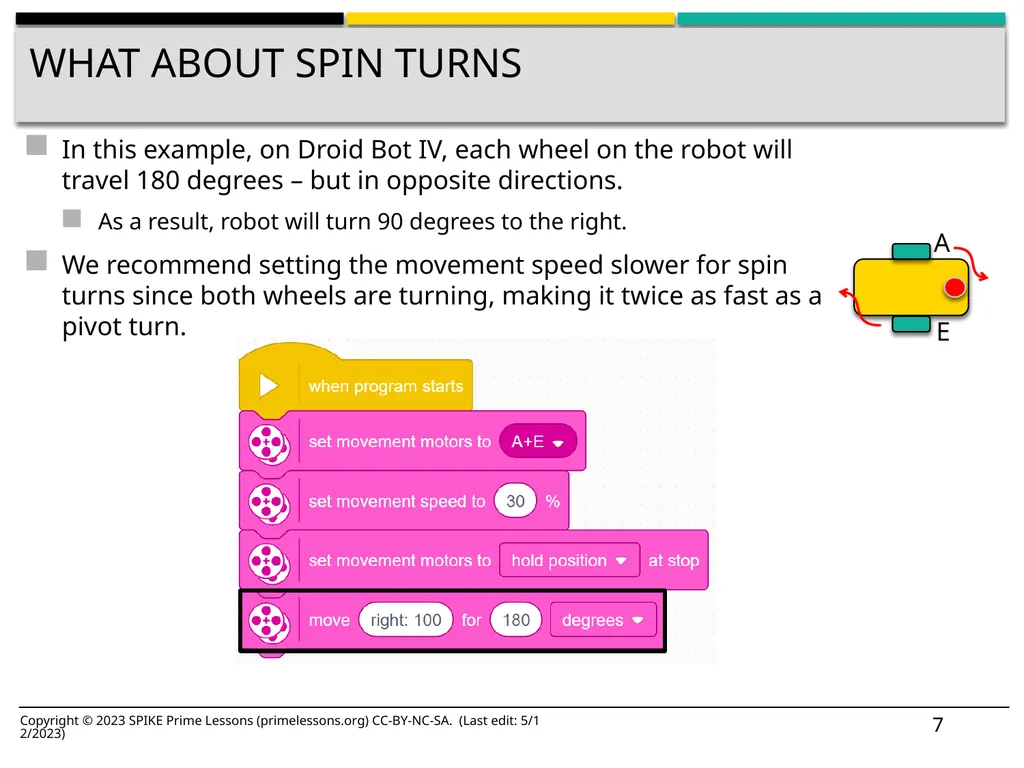
WHAT ABOUT SPIN TURNS In this example, on Droid Bot IV, each wheel on the robot will travel 180 degrees – but in opposite directions.
As a result, robot will turn 90 degrees to the right.
We recommend setting the movement speed slower for spin turns since both wheels are turning, making it twice as fast as a pivot turn. Copyright © 2023 SPIKE Prime Lessons (primelessons.org) CC-BY-NC-SA. (Last edit: 5/12/2023) 7<br>
08
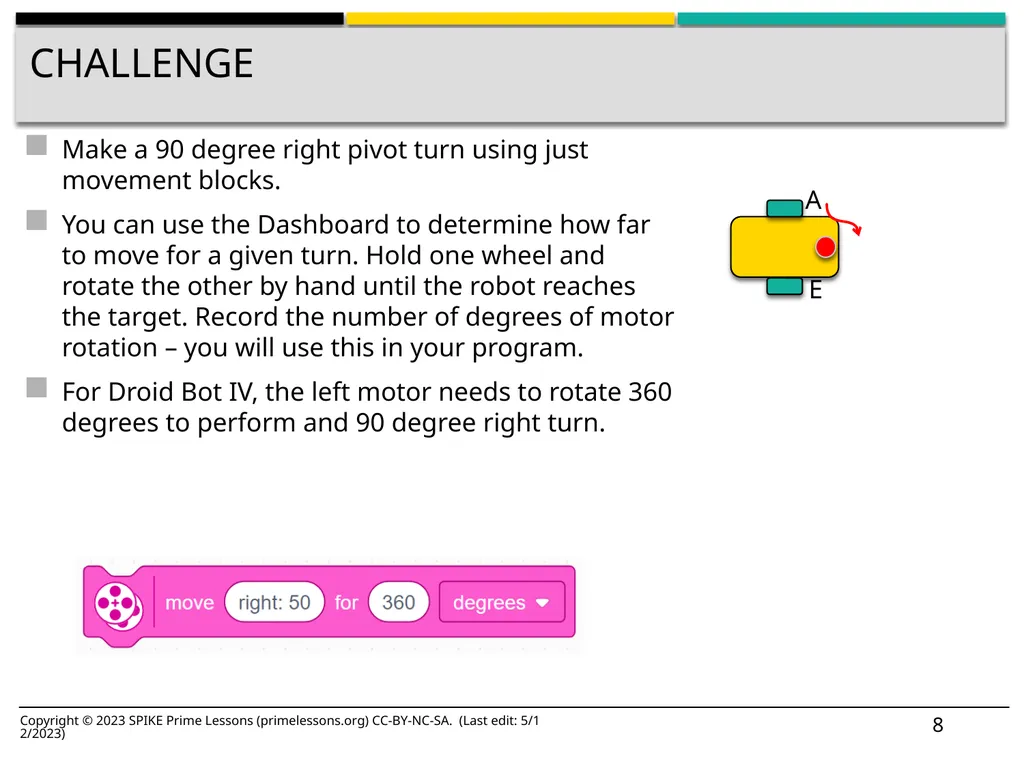
Challenge Make a 90 degree right pivot turn using just movement blocks.
You can use the Dashboard to determine how far to move for a given turn. Hold one wheel and rotate the other by hand until the robot reaches the target. Record the number of degrees of motor rotation – you will use this in your program.
For Droid Bot IV, the left motor needs to rotate 360 degrees to perform and 90 degree right turn. Copyright © 2023 SPIKE Prime Lessons (primelessons.org) CC-BY-NC-SA. (Last edit: 5/12/2023) 8<br>
09
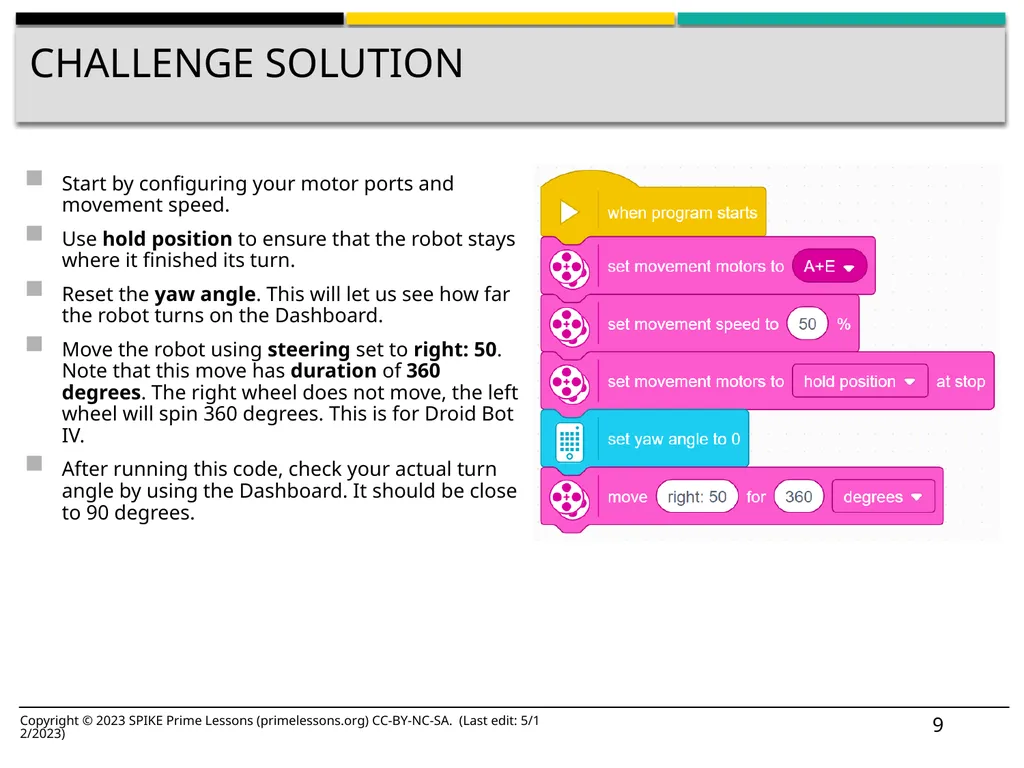
Challenge Solution Start by configuring your motor ports and movement speed.
Use hold position to ensure that the robot stays where it finished its turn.
Reset the yaw angle. This will let us see how far the robot turns on the Dashboard.
Move the robot using steering set to right: 50. Note that this move has duration of 360 degrees. The right wheel does not move, the left wheel will spin 360 degrees. This is for Droid Bot IV.
After running this code, check your actual turn angle by using the Dashboard. It should be close to 90 degrees. Copyright © 2023 SPIKE Prime Lessons (primelessons.org) CC-BY-NC-SA. (Last edit: 5/12/2023) 9<br>
10
CREDITS This lesson was created by Sanjay Seshan and Arvind Seshan for SPIKE Prime Lessons
More lessons are available at www.primelessons.org Copyright © 2023 SPIKE Prime Lessons (primelessons.org) CC-BY-NC-SA. (Last edit: 5/12/2023) 10 This work is licensed under a Creative Commons Attribution-NonCommercial-ShareAlike 4.0 International License.<br>
Show all 10 slides