
The Reimbursable Process in Research 1 December
A
Published · 36 slides · 0 views

1 / 1
Description
The Reimbursable Process in Research 1 December 12, 2024 Diane Murphy, Budget Analyst, Finance Kari Points, Advisor, Field Operations Objectives for todays training 2 12182024 Section 1: What is the billing process? 3 How do we bill
Related Topics
Share
Embed code
Download this presentation From Below
"The Reimbursable Process in Research 1 December" is the property of its rightful owner. Permission is granted to download and print the materials on this website for personal, non-commercial use only, and to display it on your personal computer provided you do not modify the materials and that you retain all copyright notices contained in the materials. By downloading content from our website, you accept the terms of this agreement.
Presentation Transcript
01
The Reimbursable Process in Research 1 December 12, 2024
Diane Murphy, Budget Analyst, Finance
Kari Points, Advisor, Field Operations<br>
Diane Murphy, Budget Analyst, Finance
Kari Points, Advisor, Field Operations<br>
02
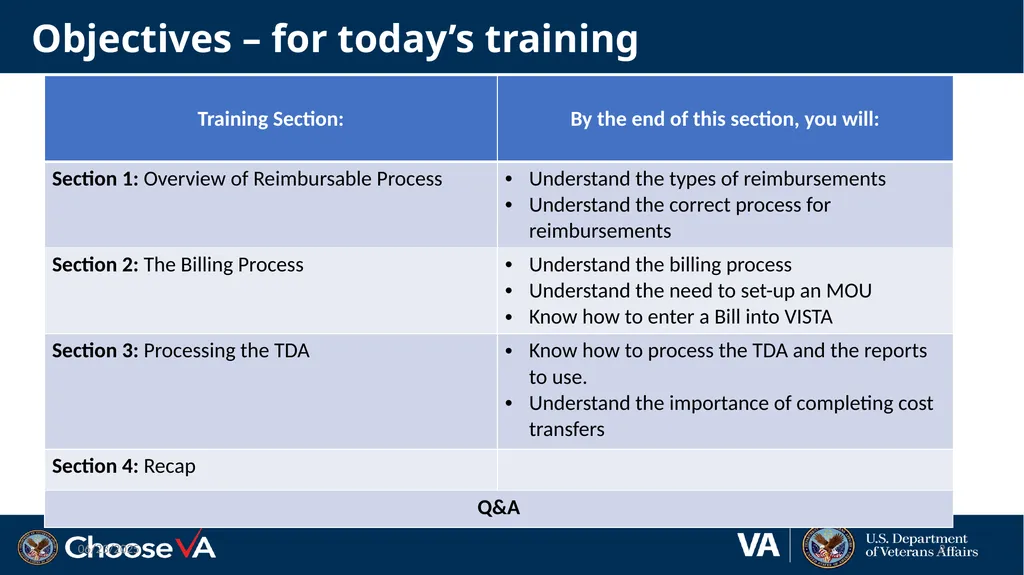
Objectives – for today’s training 2 12/18/2024<br>
03
Section 1: What is the billing process? 3 How do we bill our NPC?<br>
04
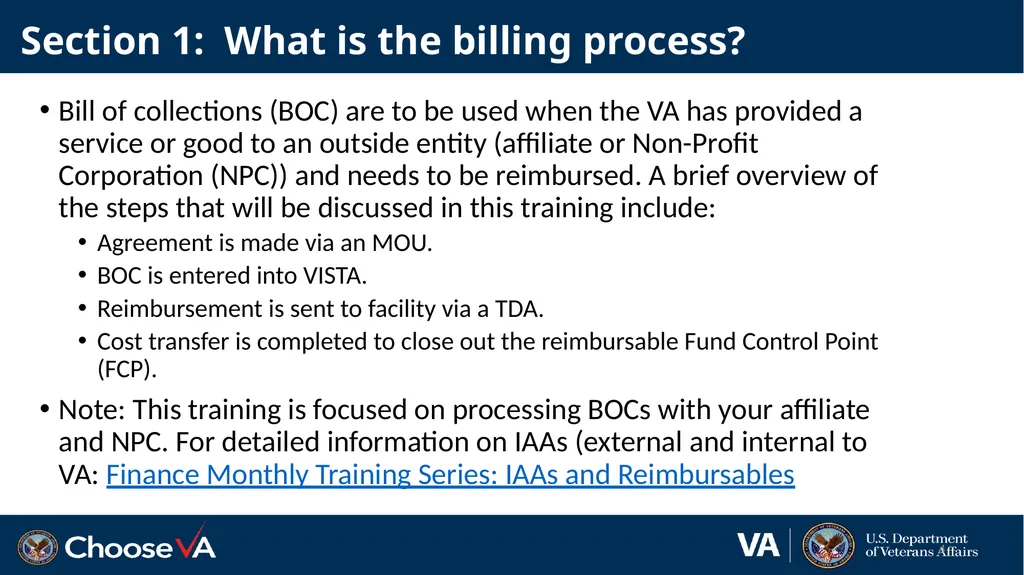
Section 1: What is the billing process? 4 Bill of collections (BOC) are to be used when the VA has provided a service or good to an outside entity (affiliate or Non-Profit Corporation (NPC)) and needs to be reimbursed. A brief overview of the steps that will be discussed in this training include:
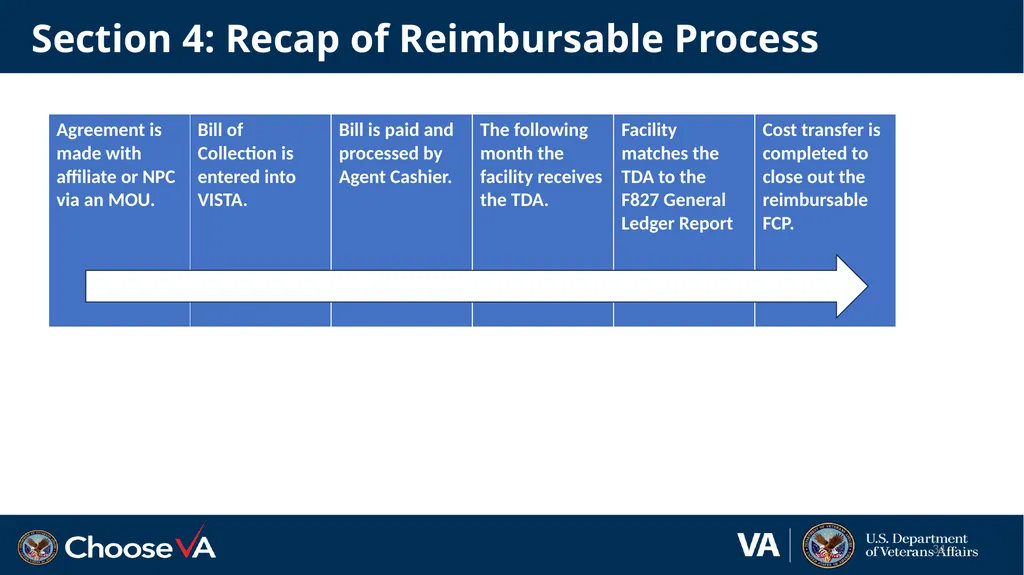
Agreement is made via an MOU.
BOC is entered into VISTA.
Reimbursement is sent to facility via a TDA.
Cost transfer is completed to close out the reimbursable Fund Control Point (FCP).
Note: This training is focused on processing BOCs with your affiliate and NPC. For detailed information on IAAs (external and internal to VA: Finance Monthly Training Series: IAAs and Reimbursables<br>
Agreement is made via an MOU.
BOC is entered into VISTA.
Reimbursement is sent to facility via a TDA.
Cost transfer is completed to close out the reimbursable Fund Control Point (FCP).
Note: This training is focused on processing BOCs with your affiliate and NPC. For detailed information on IAAs (external and internal to VA: Finance Monthly Training Series: IAAs and Reimbursables<br>
05
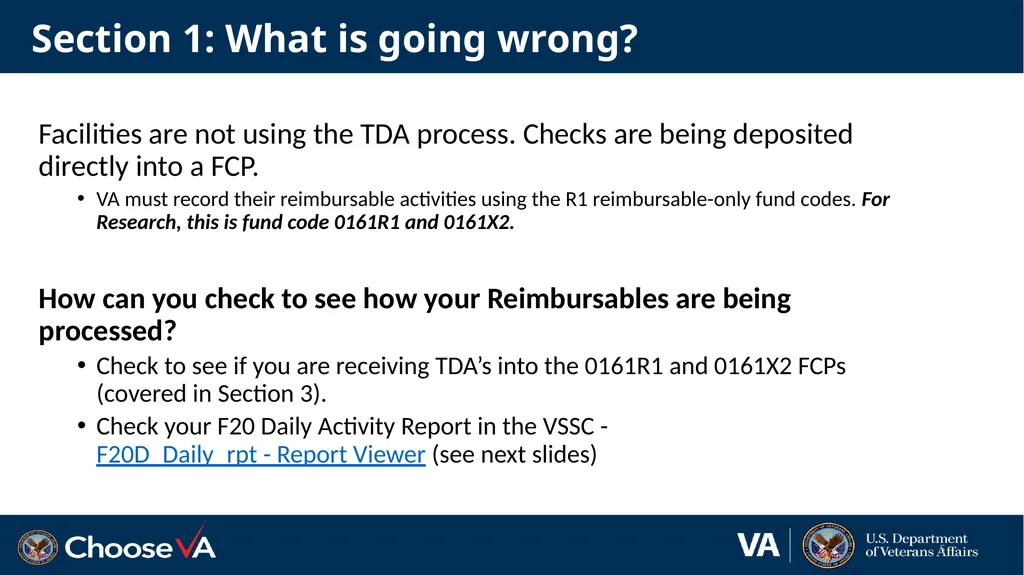
Section 1: What is going wrong? Facilities are not using the TDA process. Checks are being deposited directly into a FCP.
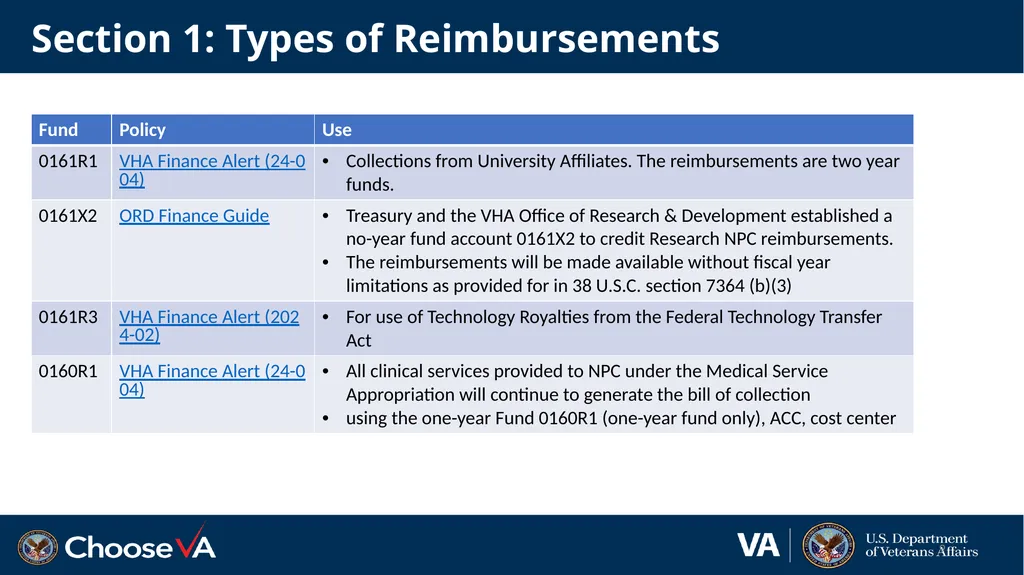
VA must record their reimbursable activities using the R1 reimbursable-only fund codes. For Research, this is fund code 0161R1 and 0161X2.
How can you check to see how your Reimbursables are being processed?
Check to see if you are receiving TDA’s into the 0161R1 and 0161X2 FCPs (covered in Section 3).
Check your F20 Daily Activity Report in the VSSC - F20D_Daily_rpt - Report Viewer (see next slides) 5<br>
VA must record their reimbursable activities using the R1 reimbursable-only fund codes. For Research, this is fund code 0161R1 and 0161X2.
How can you check to see how your Reimbursables are being processed?
Check to see if you are receiving TDA’s into the 0161R1 and 0161X2 FCPs (covered in Section 3).
Check your F20 Daily Activity Report in the VSSC - F20D_Daily_rpt - Report Viewer (see next slides) 5<br>
06
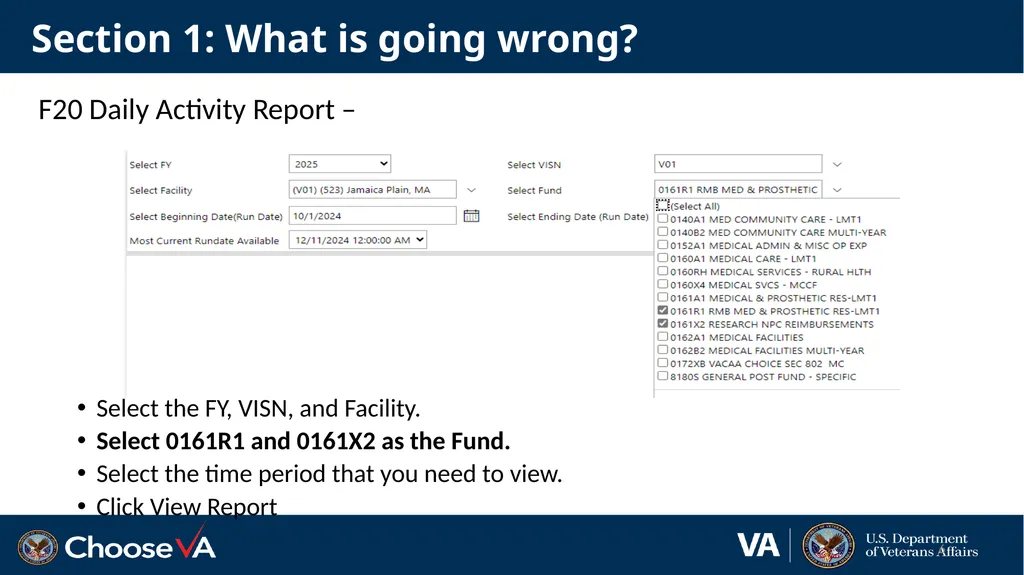
Section 1: What is going wrong? F20 Daily Activity Report –
Select the FY, VISN, and Facility.
Select 0161R1 and 0161X2 as the Fund.
Select the time period that you need to view.
Click View Report 6<br>
Select the FY, VISN, and Facility.
Select 0161R1 and 0161X2 as the Fund.
Select the time period that you need to view.
Click View Report 6<br>
07
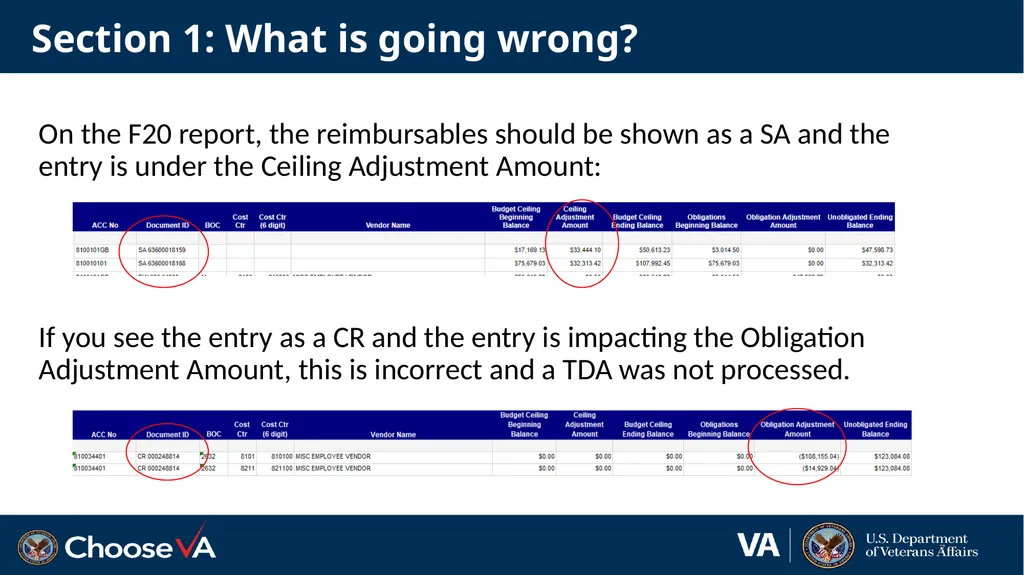
Section 1: What is going wrong? On the F20 report, the reimbursables should be shown as a SA and the entry is under the Ceiling Adjustment Amount:
If you see the entry as a CR and the entry is impacting the Obligation Adjustment Amount, this is incorrect and a TDA was not processed. 7<br>
If you see the entry as a CR and the entry is impacting the Obligation Adjustment Amount, this is incorrect and a TDA was not processed. 7<br>
08
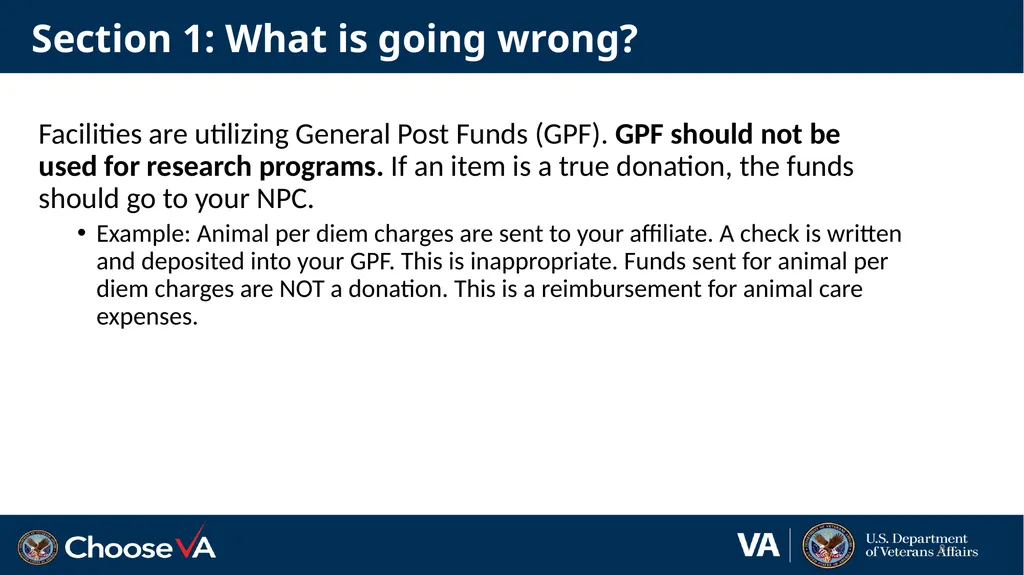
Section 1: What is going wrong? Facilities are utilizing General Post Funds (GPF). GPF should not be used for research programs. If an item is a true donation, the funds should go to your NPC.
Example: Animal per diem charges are sent to your affiliate. A check is written and deposited into your GPF. This is inappropriate. Funds sent for animal per diem charges are NOT a donation. This is a reimbursement for animal care expenses. 8<br>
Example: Animal per diem charges are sent to your affiliate. A check is written and deposited into your GPF. This is inappropriate. Funds sent for animal per diem charges are NOT a donation. This is a reimbursement for animal care expenses. 8<br>
09
Section 1: Types of Reimbursements 9<br>
10
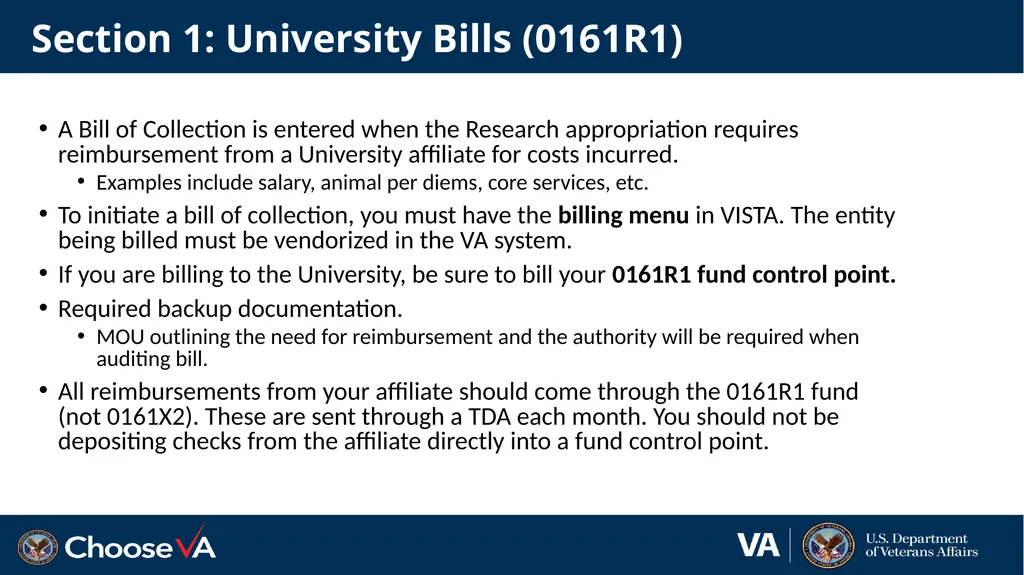
Section 1: University Bills (0161R1) A Bill of Collection is entered when the Research appropriation requires reimbursement from a University affiliate for costs incurred.
Examples include salary, animal per diems, core services, etc.
To initiate a bill of collection, you must have the billing menu in VISTA. The entity being billed must be vendorized in the VA system.
If you are billing to the University, be sure to bill your 0161R1 fund control point.
Required backup documentation.
MOU outlining the need for reimbursement and the authority will be required when auditing bill.
All reimbursements from your affiliate should come through the 0161R1 fund (not 0161X2). These are sent through a TDA each month. You should not be depositing checks from the affiliate directly into a fund control point.<br>
Examples include salary, animal per diems, core services, etc.
To initiate a bill of collection, you must have the billing menu in VISTA. The entity being billed must be vendorized in the VA system.
If you are billing to the University, be sure to bill your 0161R1 fund control point.
Required backup documentation.
MOU outlining the need for reimbursement and the authority will be required when auditing bill.
All reimbursements from your affiliate should come through the 0161R1 fund (not 0161X2). These are sent through a TDA each month. You should not be depositing checks from the affiliate directly into a fund control point.<br>
11
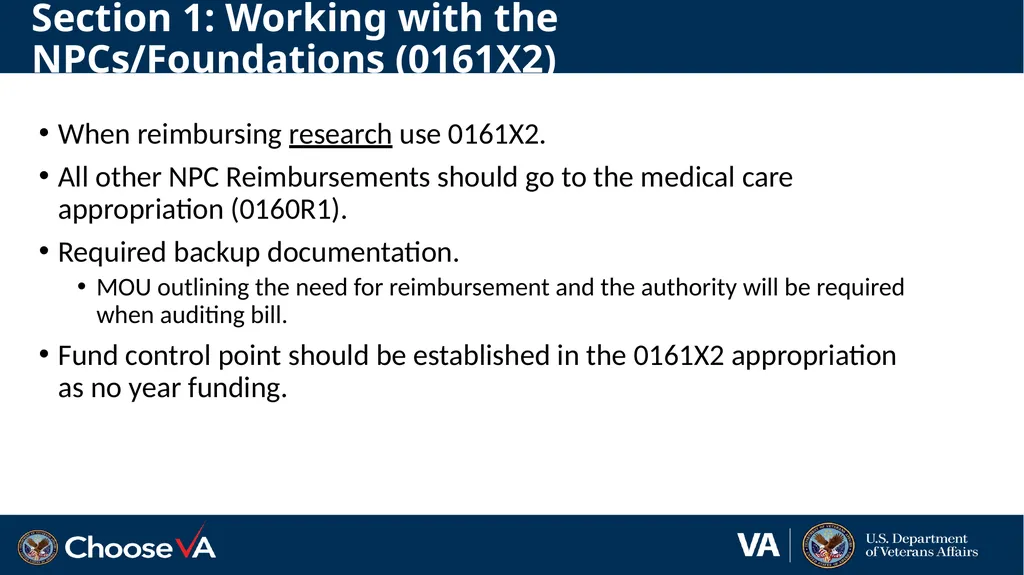
Section 1: Working with the NPCs/Foundations (0161X2) When reimbursing research use 0161X2.
All other NPC Reimbursements should go to the medical care appropriation (0160R1).
Required backup documentation.
MOU outlining the need for reimbursement and the authority will be required when auditing bill.
Fund control point should be established in the 0161X2 appropriation as no year funding.<br>
All other NPC Reimbursements should go to the medical care appropriation (0160R1).
Required backup documentation.
MOU outlining the need for reimbursement and the authority will be required when auditing bill.
Fund control point should be established in the 0161X2 appropriation as no year funding.<br>
12
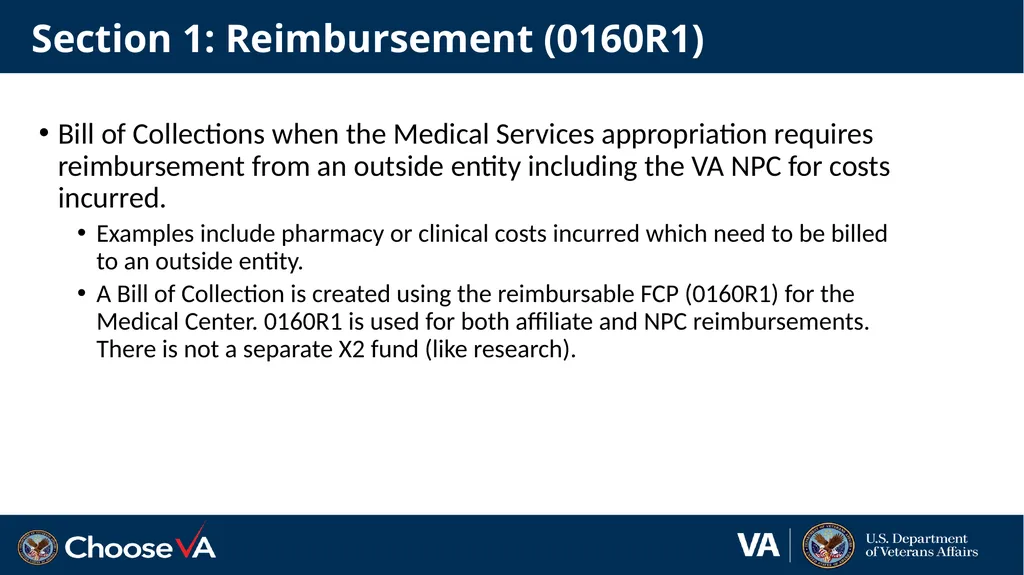
Section 1: Reimbursement (0160R1) Bill of Collections when the Medical Services appropriation requires reimbursement from an outside entity including the VA NPC for costs incurred.
Examples include pharmacy or clinical costs incurred which need to be billed to an outside entity.
A Bill of Collection is created using the reimbursable FCP (0160R1) for the Medical Center. 0160R1 is used for both affiliate and NPC reimbursements. There is not a separate X2 fund (like research).<br>
Examples include pharmacy or clinical costs incurred which need to be billed to an outside entity.
A Bill of Collection is created using the reimbursable FCP (0160R1) for the Medical Center. 0160R1 is used for both affiliate and NPC reimbursements. There is not a separate X2 fund (like research).<br>
13
Section 2: The Billing Process 13<br>
14
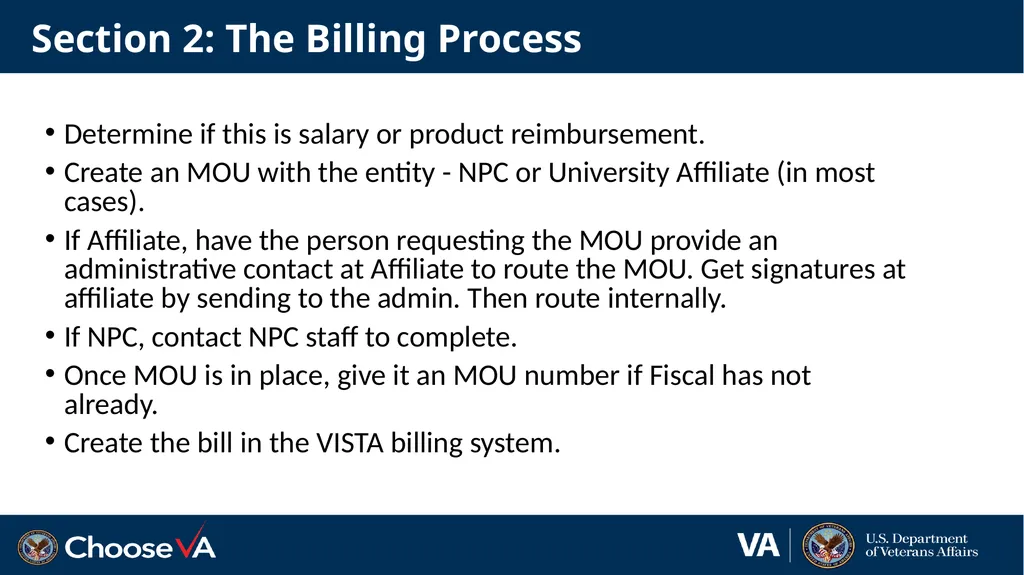
Section 2: The Billing Process Determine if this is salary or product reimbursement.
Create an MOU with the entity - NPC or University Affiliate (in most cases).
If Affiliate, have the person requesting the MOU provide an administrative contact at Affiliate to route the MOU. Get signatures at affiliate by sending to the admin. Then route internally.
If NPC, contact NPC staff to complete.
Once MOU is in place, give it an MOU number if Fiscal has not already.
Create the bill in the VISTA billing system.<br>
Create an MOU with the entity - NPC or University Affiliate (in most cases).
If Affiliate, have the person requesting the MOU provide an administrative contact at Affiliate to route the MOU. Get signatures at affiliate by sending to the admin. Then route internally.
If NPC, contact NPC staff to complete.
Once MOU is in place, give it an MOU number if Fiscal has not already.
Create the bill in the VISTA billing system.<br>
15
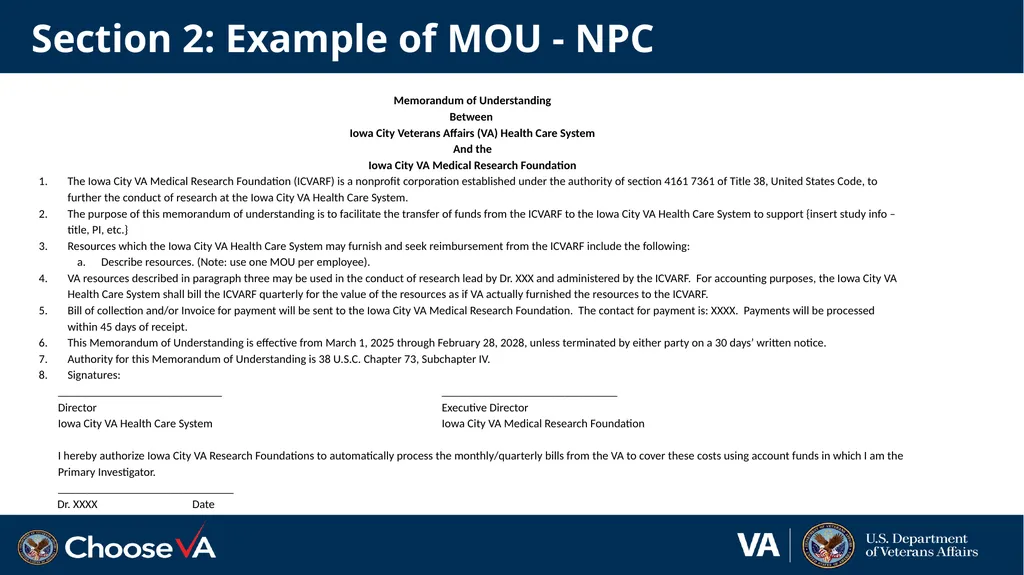
Section 2: Example of MOU - NPC Memorandum of Understanding
Between
Iowa City Veterans Affairs (VA) Health Care System
And the
Iowa City VA Medical Research Foundation
The Iowa City VA Medical Research Foundation (ICVARF) is a nonprofit corporation established under the authority of section 4161 7361 of Title 38, United States Code, to further the conduct of research at the Iowa City VA Health Care System.
The purpose of this memorandum of understanding is to facilitate the transfer of funds from the ICVARF to the Iowa City VA Health Care System to support {insert study info – title, PI, etc.}
Resources which the Iowa City VA Health Care System may furnish and seek reimbursement from the ICVARF include the following:
Describe resources. (Note: use one MOU per employee).
VA resources described in paragraph three may be used in the conduct of research lead by Dr. XXX and administered by the ICVARF. For accounting purposes, the Iowa City VA Health Care System shall bill the ICVARF quarterly for the value of the resources as if VA actually furnished the resources to the ICVARF.
Bill of collection and/or Invoice for payment will be sent to the Iowa City VA Medical Research Foundation. The contact for payment is: XXXX. Payments will be processed within 45 days of receipt.
This Memorandum of Understanding is effective from March 1, 2025 through February 28, 2028, unless terminated by either party on a 30 days’ written notice.
Authority for this Memorandum of Understanding is 38 U.S.C. Chapter 73, Subchapter IV.
Signatures:
____________________________ ______________________________
Director Executive Director
Iowa City VA Health Care System Iowa City VA Medical Research Foundation
I hereby authorize Iowa City VA Research Foundations to automatically process the monthly/quarterly bills from the VA to cover these costs using account funds in which I am the Primary Investigator.
______________________________
Dr. XXXX Date<br>
Between
Iowa City Veterans Affairs (VA) Health Care System
And the
Iowa City VA Medical Research Foundation
The Iowa City VA Medical Research Foundation (ICVARF) is a nonprofit corporation established under the authority of section 4161 7361 of Title 38, United States Code, to further the conduct of research at the Iowa City VA Health Care System.
The purpose of this memorandum of understanding is to facilitate the transfer of funds from the ICVARF to the Iowa City VA Health Care System to support {insert study info – title, PI, etc.}
Resources which the Iowa City VA Health Care System may furnish and seek reimbursement from the ICVARF include the following:
Describe resources. (Note: use one MOU per employee).
VA resources described in paragraph three may be used in the conduct of research lead by Dr. XXX and administered by the ICVARF. For accounting purposes, the Iowa City VA Health Care System shall bill the ICVARF quarterly for the value of the resources as if VA actually furnished the resources to the ICVARF.
Bill of collection and/or Invoice for payment will be sent to the Iowa City VA Medical Research Foundation. The contact for payment is: XXXX. Payments will be processed within 45 days of receipt.
This Memorandum of Understanding is effective from March 1, 2025 through February 28, 2028, unless terminated by either party on a 30 days’ written notice.
Authority for this Memorandum of Understanding is 38 U.S.C. Chapter 73, Subchapter IV.
Signatures:
____________________________ ______________________________
Director Executive Director
Iowa City VA Health Care System Iowa City VA Medical Research Foundation
I hereby authorize Iowa City VA Research Foundations to automatically process the monthly/quarterly bills from the VA to cover these costs using account funds in which I am the Primary Investigator.
______________________________
Dr. XXXX Date<br>
16
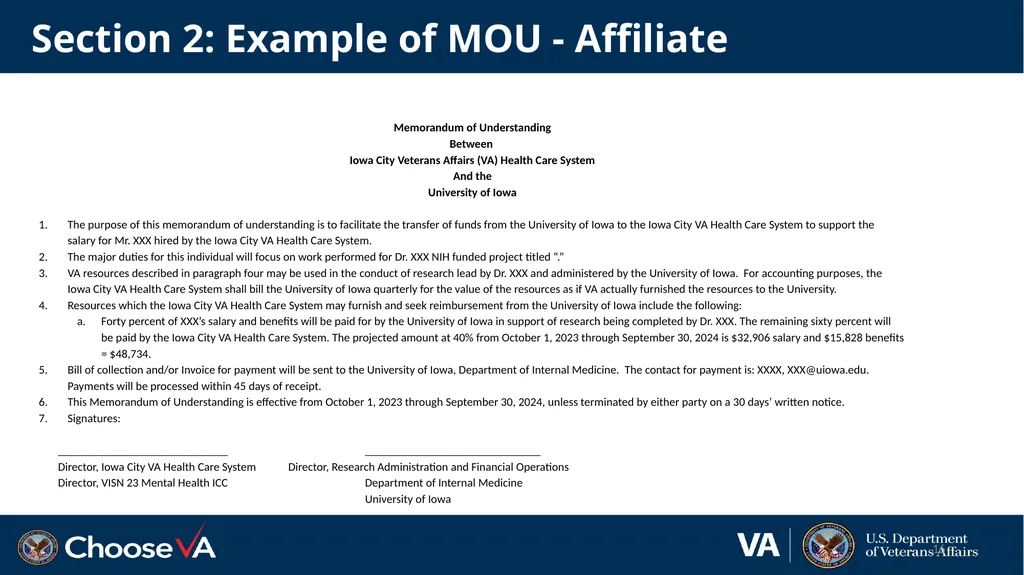
Section 2: Example of MOU - Affiliate Memorandum of Understanding
Between
Iowa City Veterans Affairs (VA) Health Care System
And the
University of Iowa
The purpose of this memorandum of understanding is to facilitate the transfer of funds from the University of Iowa to the Iowa City VA Health Care System to support the salary for Mr. XXX hired by the Iowa City VA Health Care System.
The major duties for this individual will focus on work performed for Dr. XXX NIH funded project titled “.”
VA resources described in paragraph four may be used in the conduct of research lead by Dr. XXX and administered by the University of Iowa. For accounting purposes, the Iowa City VA Health Care System shall bill the University of Iowa quarterly for the value of the resources as if VA actually furnished the resources to the University.
Resources which the Iowa City VA Health Care System may furnish and seek reimbursement from the University of Iowa include the following:
Forty percent of XXX’s salary and benefits will be paid for by the University of Iowa in support of research being completed by Dr. XXX. The remaining sixty percent will be paid by the Iowa City VA Health Care System. The projected amount at 40% from October 1, 2023 through September 30, 2024 is $32,906 salary and $15,828 benefits = $48,734.
Bill of collection and/or Invoice for payment will be sent to the University of Iowa, Department of Internal Medicine. The contact for payment is: XXXX, XXX@uiowa.edu. Payments will be processed within 45 days of receipt.
This Memorandum of Understanding is effective from October 1, 2023 through September 30, 2024, unless terminated by either party on a 30 days’ written notice.
Signatures:
_____________________________ ______________________________
Director, Iowa City VA Health Care System Director, Research Administration and Financial Operations
Director, VISN 23 Mental Health ICC Department of Internal Medicine
University of Iowa 16<br>
Between
Iowa City Veterans Affairs (VA) Health Care System
And the
University of Iowa
The purpose of this memorandum of understanding is to facilitate the transfer of funds from the University of Iowa to the Iowa City VA Health Care System to support the salary for Mr. XXX hired by the Iowa City VA Health Care System.
The major duties for this individual will focus on work performed for Dr. XXX NIH funded project titled “.”
VA resources described in paragraph four may be used in the conduct of research lead by Dr. XXX and administered by the University of Iowa. For accounting purposes, the Iowa City VA Health Care System shall bill the University of Iowa quarterly for the value of the resources as if VA actually furnished the resources to the University.
Resources which the Iowa City VA Health Care System may furnish and seek reimbursement from the University of Iowa include the following:
Forty percent of XXX’s salary and benefits will be paid for by the University of Iowa in support of research being completed by Dr. XXX. The remaining sixty percent will be paid by the Iowa City VA Health Care System. The projected amount at 40% from October 1, 2023 through September 30, 2024 is $32,906 salary and $15,828 benefits = $48,734.
Bill of collection and/or Invoice for payment will be sent to the University of Iowa, Department of Internal Medicine. The contact for payment is: XXXX, XXX@uiowa.edu. Payments will be processed within 45 days of receipt.
This Memorandum of Understanding is effective from October 1, 2023 through September 30, 2024, unless terminated by either party on a 30 days’ written notice.
Signatures:
_____________________________ ______________________________
Director, Iowa City VA Health Care System Director, Research Administration and Financial Operations
Director, VISN 23 Mental Health ICC Department of Internal Medicine
University of Iowa 16<br>
17
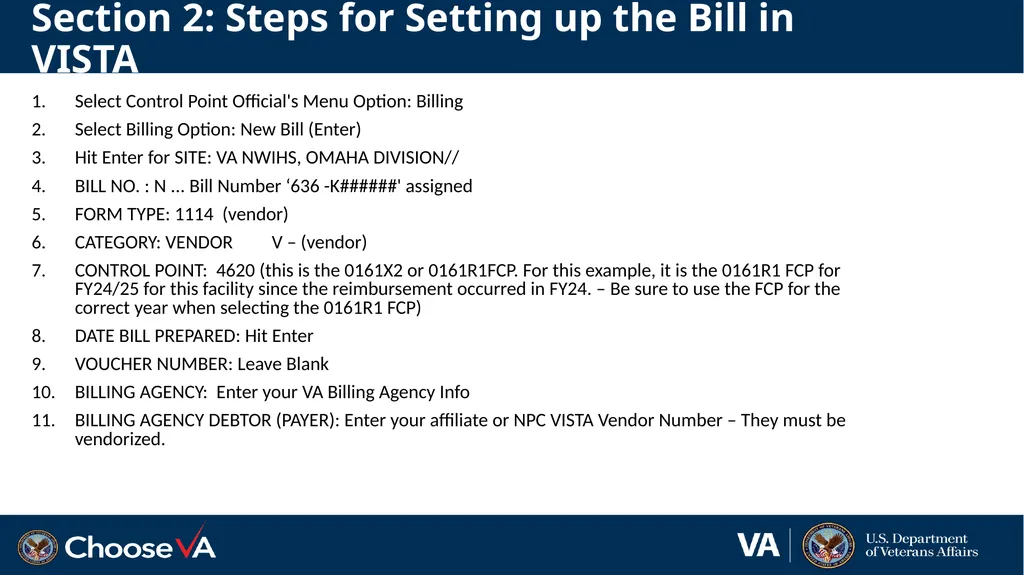
Section 2: Steps for Setting up the Bill in VISTA Select Control Point Official's Menu Option: Billing
Select Billing Option: New Bill (Enter)
Hit Enter for SITE: VA NWIHS, OMAHA DIVISION//
BILL NO. : N ... Bill Number ‘636 -K######' assigned
FORM TYPE: 1114 (vendor)
CATEGORY: VENDOR V – (vendor)
CONTROL POINT: 4620 (this is the 0161X2 or 0161R1FCP. For this example, it is the 0161R1 FCP for FY24/25 for this facility since the reimbursement occurred in FY24. – Be sure to use the FCP for the correct year when selecting the 0161R1 FCP)
DATE BILL PREPARED: Hit Enter
VOUCHER NUMBER: Leave Blank
BILLING AGENCY: Enter your VA Billing Agency Info
BILLING AGENCY DEBTOR (PAYER): Enter your affiliate or NPC VISTA Vendor Number – They must be vendorized.<br>
Select Billing Option: New Bill (Enter)
Hit Enter for SITE: VA NWIHS, OMAHA DIVISION//
BILL NO. : N ... Bill Number ‘636 -K######' assigned
FORM TYPE: 1114 (vendor)
CATEGORY: VENDOR V – (vendor)
CONTROL POINT: 4620 (this is the 0161X2 or 0161R1FCP. For this example, it is the 0161R1 FCP for FY24/25 for this facility since the reimbursement occurred in FY24. – Be sure to use the FCP for the correct year when selecting the 0161R1 FCP)
DATE BILL PREPARED: Hit Enter
VOUCHER NUMBER: Leave Blank
BILLING AGENCY: Enter your VA Billing Agency Info
BILLING AGENCY DEBTOR (PAYER): Enter your affiliate or NPC VISTA Vendor Number – They must be vendorized.<br>
18
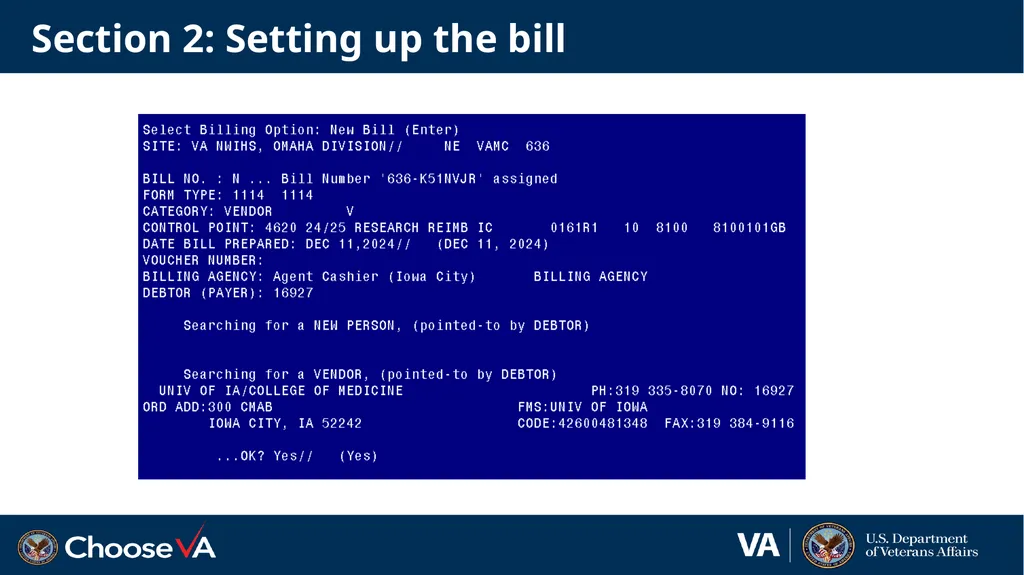
Section 2: Setting up the bill<br>
19
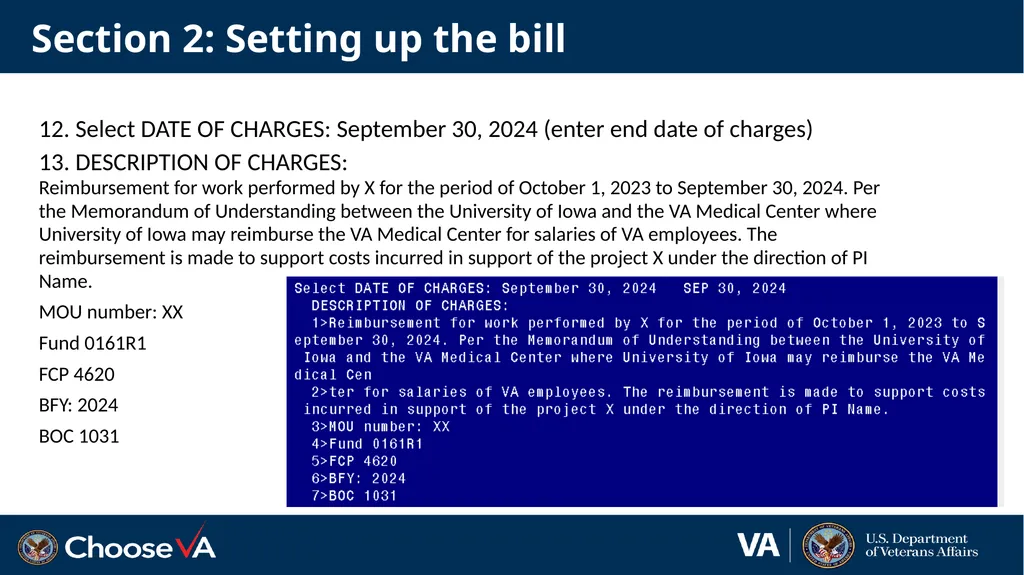
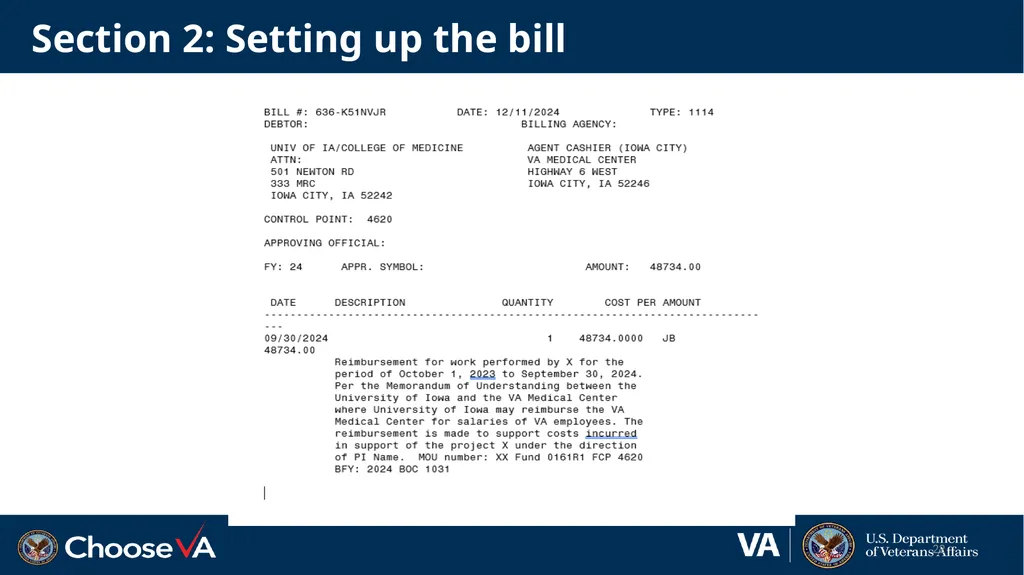
Section 2: Setting up the bill 12. Select DATE OF CHARGES: September 30, 2024 (enter end date of charges)
13. DESCRIPTION OF CHARGES:
Reimbursement for work performed by X for the period of October 1, 2023 to September 30, 2024. Per the Memorandum of Understanding between the University of Iowa and the VA Medical Center where University of Iowa may reimburse the VA Medical Center for salaries of VA employees. The reimbursement is made to support costs incurred in support of the project X under the direction of PI Name.
MOU number: XX
Fund 0161R1
FCP 4620
BFY: 2024
BOC 1031<br>
13. DESCRIPTION OF CHARGES:
Reimbursement for work performed by X for the period of October 1, 2023 to September 30, 2024. Per the Memorandum of Understanding between the University of Iowa and the VA Medical Center where University of Iowa may reimburse the VA Medical Center for salaries of VA employees. The reimbursement is made to support costs incurred in support of the project X under the direction of PI Name.
MOU number: XX
Fund 0161R1
FCP 4620
BFY: 2024
BOC 1031<br>
20
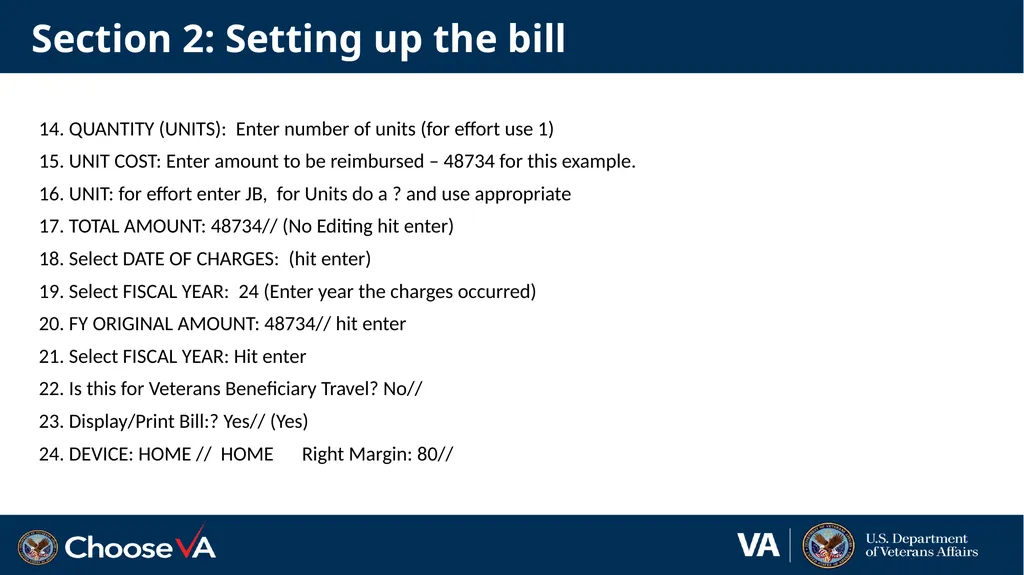
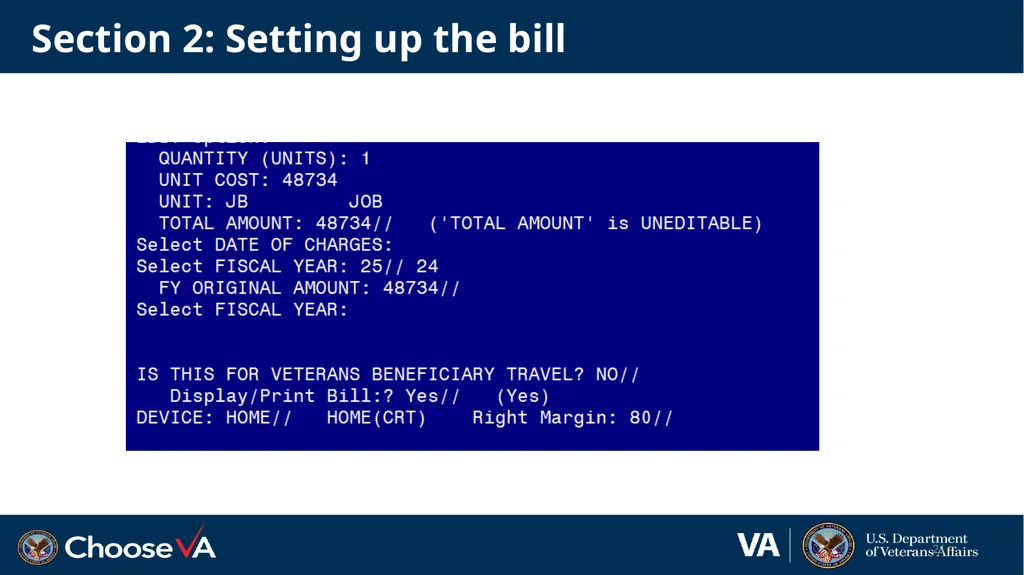
Section 2: Setting up the bill 14. QUANTITY (UNITS): Enter number of units (for effort use 1)
15. UNIT COST: Enter amount to be reimbursed – 48734 for this example.
16. UNIT: for effort enter JB, for Units do a ? and use appropriate
17. TOTAL AMOUNT: 48734// (No Editing hit enter)
18. Select DATE OF CHARGES: (hit enter)
19. Select FISCAL YEAR: 24 (Enter year the charges occurred)
20. FY ORIGINAL AMOUNT: 48734// hit enter
21. Select FISCAL YEAR: Hit enter
22. Is this for Veterans Beneficiary Travel? No//
23. Display/Print Bill:? Yes// (Yes)
24. DEVICE: HOME // HOME Right Margin: 80//<br>
15. UNIT COST: Enter amount to be reimbursed – 48734 for this example.
16. UNIT: for effort enter JB, for Units do a ? and use appropriate
17. TOTAL AMOUNT: 48734// (No Editing hit enter)
18. Select DATE OF CHARGES: (hit enter)
19. Select FISCAL YEAR: 24 (Enter year the charges occurred)
20. FY ORIGINAL AMOUNT: 48734// hit enter
21. Select FISCAL YEAR: Hit enter
22. Is this for Veterans Beneficiary Travel? No//
23. Display/Print Bill:? Yes// (Yes)
24. DEVICE: HOME // HOME Right Margin: 80//<br>
21
Section 2: Setting up the bill 21<br>
22
Section 2: Setting up the bill 22<br>
23
Section 2: What happens next Bill is approved by FCP Approving Official.
Accounting Reviews the bill and may ask questions, send back or approve.
Question may include:
What BFY is the bill to be collected in? Use the year that the expense was made
What is the revenue code? Usually, it will be one of the following 3
8000 – Non-medical reimbursements
8004 - ANCILLARY MED SVC, MED RES
8020 - FED INTERAGENCY AGR - MED RES
Accounting approves the bill, and the clock starts ticking.
The NPC or Affiliate will deposit check through Agent Cashier.
TDA is then processed once the collection is completed (see next section)<br>
Accounting Reviews the bill and may ask questions, send back or approve.
Question may include:
What BFY is the bill to be collected in? Use the year that the expense was made
What is the revenue code? Usually, it will be one of the following 3
8000 – Non-medical reimbursements
8004 - ANCILLARY MED SVC, MED RES
8020 - FED INTERAGENCY AGR - MED RES
Accounting approves the bill, and the clock starts ticking.
The NPC or Affiliate will deposit check through Agent Cashier.
TDA is then processed once the collection is completed (see next section)<br>
24
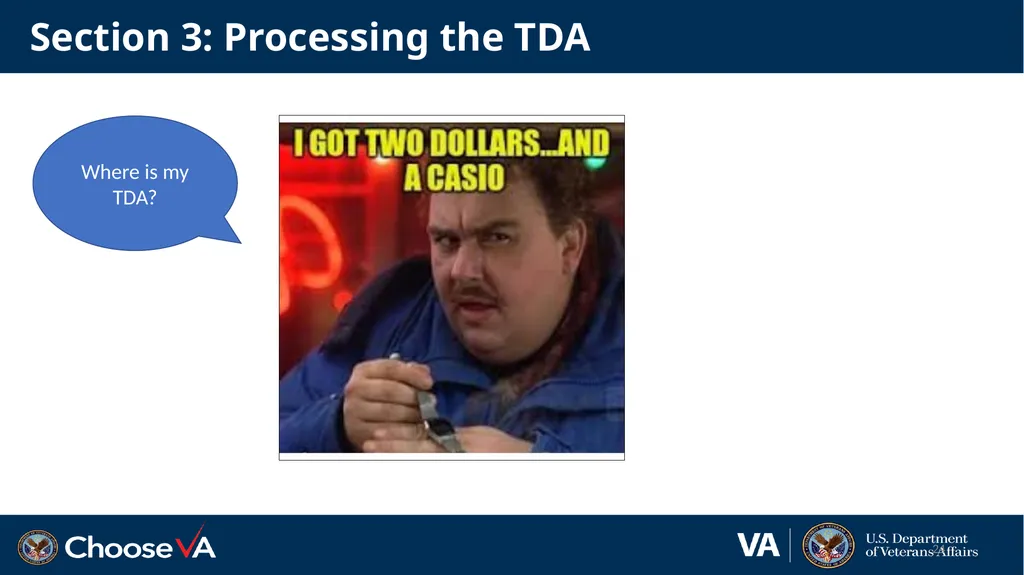
Section 3: Processing the TDA 24 Where is my TDA?<br>
25
Section 3: Receiving the TDA Now that you have entered the bill, when will you receive the reimbursement?
Once your Agent Cashier has received payment and processed it, the station can expect to receive the reimbursement the following month.
Reimbursements received in one month are sent via TDA typically by the third week of the subsequent month. 25<br>
Once your Agent Cashier has received payment and processed it, the station can expect to receive the reimbursement the following month.
Reimbursements received in one month are sent via TDA typically by the third week of the subsequent month. 25<br>
26
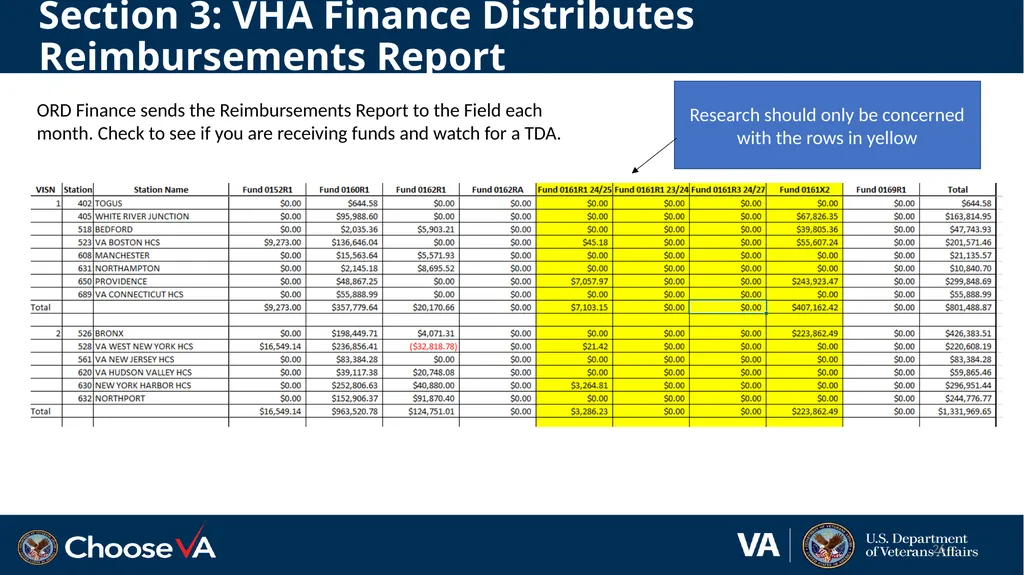
Section 3: VHA Finance Distributes Reimbursements Report 26 Research should only be concerned with the rows in yellow ORD Finance sends the Reimbursements Report to the Field each month. Check to see if you are receiving funds and watch for a TDA.<br>
27
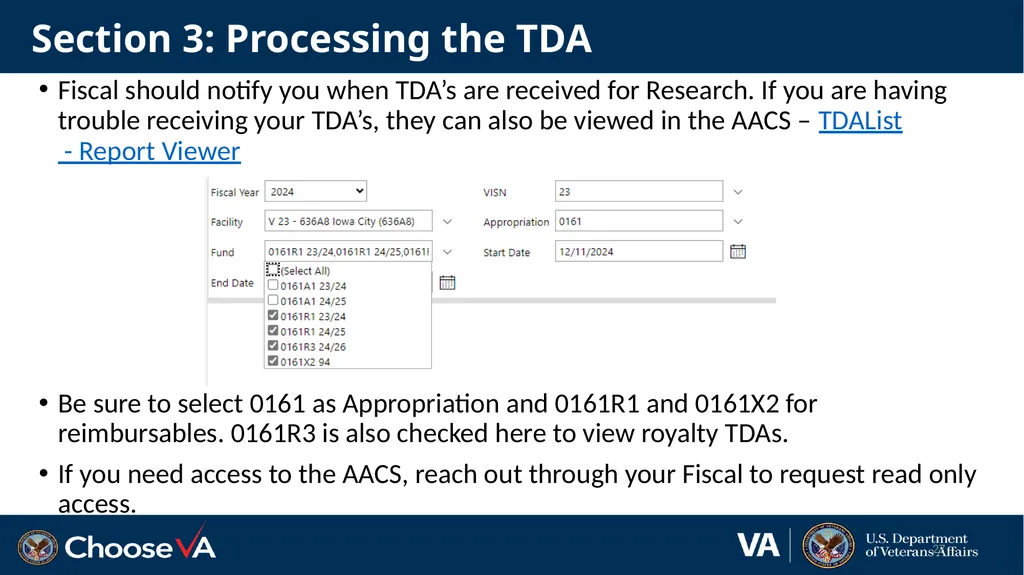
Section 3: Processing the TDA Fiscal should notify you when TDA’s are received for Research. If you are having trouble receiving your TDA’s, they can also be viewed in the AACS – TDAList - Report Viewer
Be sure to select 0161 as Appropriation and 0161R1 and 0161X2 for reimbursables. 0161R3 is also checked here to view royalty TDAs.
If you need access to the AACS, reach out through your Fiscal to request read only access. 27<br>
Be sure to select 0161 as Appropriation and 0161R1 and 0161X2 for reimbursables. 0161R3 is also checked here to view royalty TDAs.
If you need access to the AACS, reach out through your Fiscal to request read only access. 27<br>
28
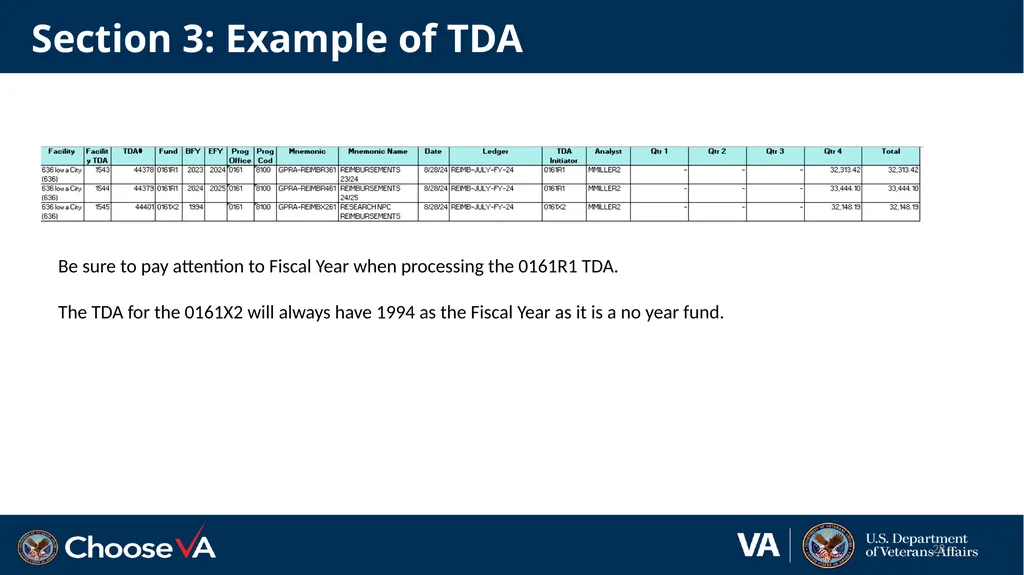
Section 3: Example of TDA 28 Be sure to pay attention to Fiscal Year when processing the 0161R1 TDA.
The TDA for the 0161X2 will always have 1994 as the Fiscal Year as it is a no year fund.<br>
The TDA for the 0161X2 will always have 1994 as the Fiscal Year as it is a no year fund.<br>
29
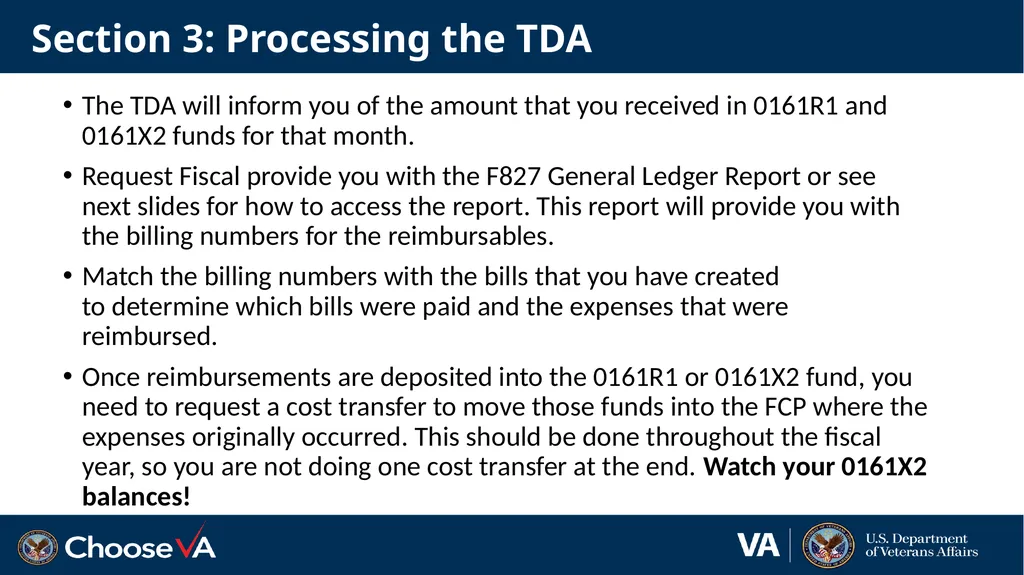
Section 3: Processing the TDA The TDA will inform you of the amount that you received in 0161R1 and 0161X2 funds for that month.
Request Fiscal provide you with the F827 General Ledger Report or see next slides for how to access the report. This report will provide you with the billing numbers for the reimbursables.
Match the billing numbers with the bills that you have created to determine which bills were paid and the expenses that were reimbursed.
Once reimbursements are deposited into the 0161R1 or 0161X2 fund, you need to request a cost transfer to move those funds into the FCP where the expenses originally occurred. This should be done throughout the fiscal year, so you are not doing one cost transfer at the end. Watch your 0161X2 balances!<br>
Request Fiscal provide you with the F827 General Ledger Report or see next slides for how to access the report. This report will provide you with the billing numbers for the reimbursables.
Match the billing numbers with the bills that you have created to determine which bills were paid and the expenses that were reimbursed.
Once reimbursements are deposited into the 0161R1 or 0161X2 fund, you need to request a cost transfer to move those funds into the FCP where the expenses originally occurred. This should be done throughout the fiscal year, so you are not doing one cost transfer at the end. Watch your 0161X2 balances!<br>
30
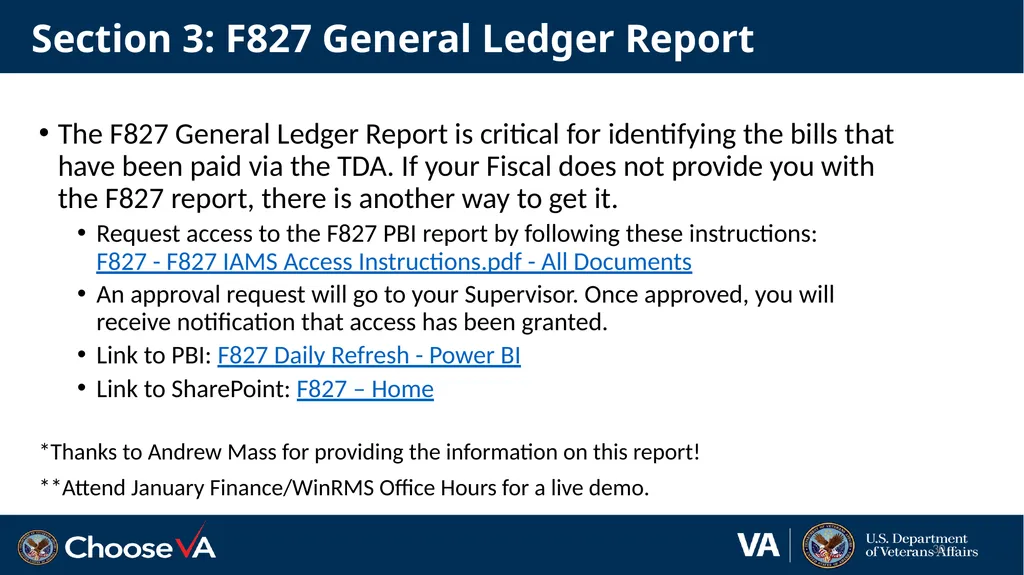
Section 3: F827 General Ledger Report The F827 General Ledger Report is critical for identifying the bills that have been paid via the TDA. If your Fiscal does not provide you with the F827 report, there is another way to get it.
Request access to the F827 PBI report by following these instructions: F827 - F827 IAMS Access Instructions.pdf - All Documents
An approval request will go to your Supervisor. Once approved, you will receive notification that access has been granted.
Link to PBI: F827 Daily Refresh - Power BI
Link to SharePoint: F827 – Home
*Thanks to Andrew Mass for providing the information on this report!
**Attend January Finance/WinRMS Office Hours for a live demo. 30<br>
Request access to the F827 PBI report by following these instructions: F827 - F827 IAMS Access Instructions.pdf - All Documents
An approval request will go to your Supervisor. Once approved, you will receive notification that access has been granted.
Link to PBI: F827 Daily Refresh - Power BI
Link to SharePoint: F827 – Home
*Thanks to Andrew Mass for providing the information on this report!
**Attend January Finance/WinRMS Office Hours for a live demo. 30<br>
31
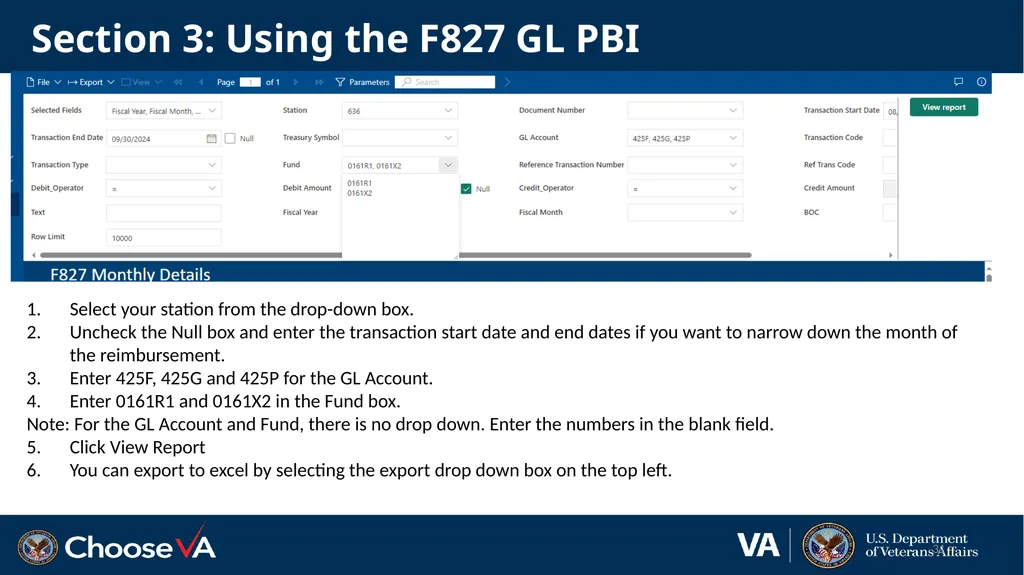
Section 3: Using the F827 GL PBI 31 Select your station from the drop-down box.
Uncheck the Null box and enter the transaction start date and end dates if you want to narrow down the month of the reimbursement.
Enter 425F, 425G and 425P for the GL Account.
Enter 0161R1 and 0161X2 in the Fund box.
Note: For the GL Account and Fund, there is no drop down. Enter the numbers in the blank field.
Click View Report
You can export to excel by selecting the export drop down box on the top left.<br>
Uncheck the Null box and enter the transaction start date and end dates if you want to narrow down the month of the reimbursement.
Enter 425F, 425G and 425P for the GL Account.
Enter 0161R1 and 0161X2 in the Fund box.
Note: For the GL Account and Fund, there is no drop down. Enter the numbers in the blank field.
Click View Report
You can export to excel by selecting the export drop down box on the top left.<br>
32
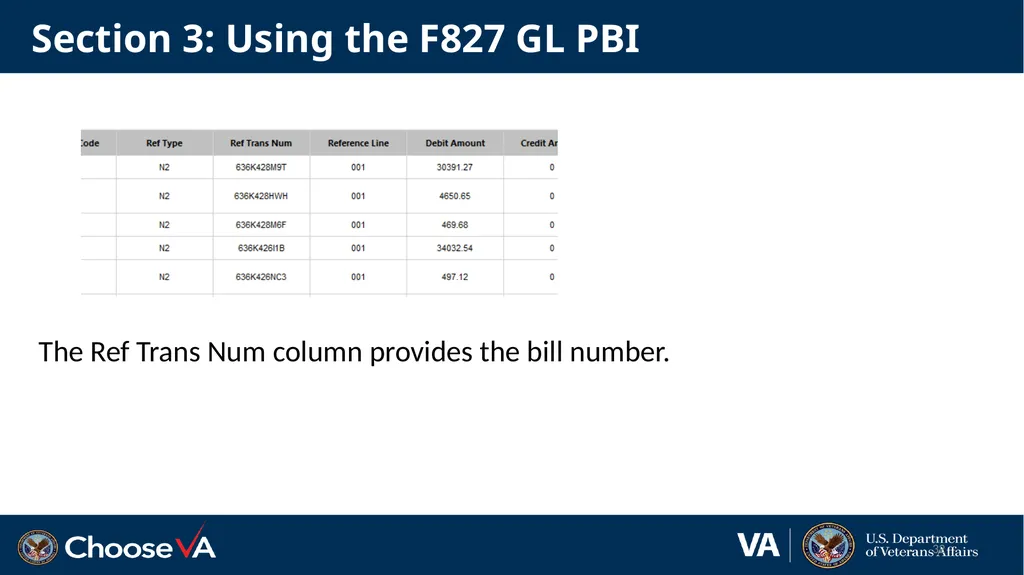
Section 3: Using the F827 GL PBI The Ref Trans Num column provides the bill number. 32<br>
33
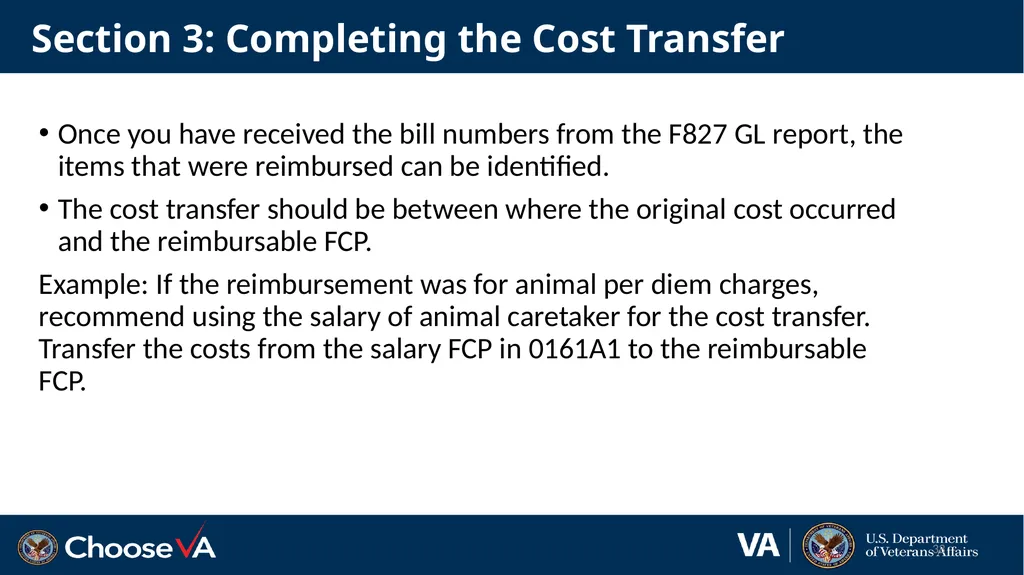
Section 3: Completing the Cost Transfer Once you have received the bill numbers from the F827 GL report, the items that were reimbursed can be identified.
The cost transfer should be between where the original cost occurred and the reimbursable FCP.
Example: If the reimbursement was for animal per diem charges, recommend using the salary of animal caretaker for the cost transfer. Transfer the costs from the salary FCP in 0161A1 to the reimbursable FCP. 33<br>
The cost transfer should be between where the original cost occurred and the reimbursable FCP.
Example: If the reimbursement was for animal per diem charges, recommend using the salary of animal caretaker for the cost transfer. Transfer the costs from the salary FCP in 0161A1 to the reimbursable FCP. 33<br>
34
Section 4: Recap of Reimbursable Process 34<br>
35
Questions 35<br>
36
Links F827 Daily Refresh - Power BI
Reimbursable Policies - Financial Management System Services (va.gov)
Departmental Guidance R Fund (FY 2018)
VHA Finance Alert (R-fund) Volume 2020, Issue 001
https://vaww.va.gov/fmshome/reimbursementPolicies.asp
https://www.va.gov/finance/docs/VA-FinancialPolicyVolumeIChapter11.pdf
Intragovernmental Reimbursement Guide
REIMB_EARNINGS - Report Viewer (va.gov)
FY 23 ORD IAA Training 120422.pptx 36<br>
Reimbursable Policies - Financial Management System Services (va.gov)
Departmental Guidance R Fund (FY 2018)
VHA Finance Alert (R-fund) Volume 2020, Issue 001
https://vaww.va.gov/fmshome/reimbursementPolicies.asp
https://www.va.gov/finance/docs/VA-FinancialPolicyVolumeIChapter11.pdf
Intragovernmental Reimbursement Guide
REIMB_EARNINGS - Report Viewer (va.gov)
FY 23 ORD IAA Training 120422.pptx 36<br>