
Tools overview Copilot Studio Architecture
AM
Published · 33 slides · 0 views

1 / 1






Description
Tools overview Copilot Studio Architecture Bootcamp Agenda 1 Understand how tools fit into the Copilot Studio agent architecture 2 Learn the different tool types available for agents 3 Compare connectors, REST APIs, MCP, prompts, and agent
Related Topics
Share
Embed code
Download this presentation From Below
"Tools overview Copilot Studio Architecture" is the property of its rightful owner. Permission is granted to download and print the materials on this website for personal, non-commercial use only, and to display it on your personal computer provided you do not modify the materials and that you retain all copyright notices contained in the materials. By downloading content from our website, you accept the terms of this agreement.
Presentation Transcript
01
Tools overview Copilot Studio Architecture Bootcamp<br>
02
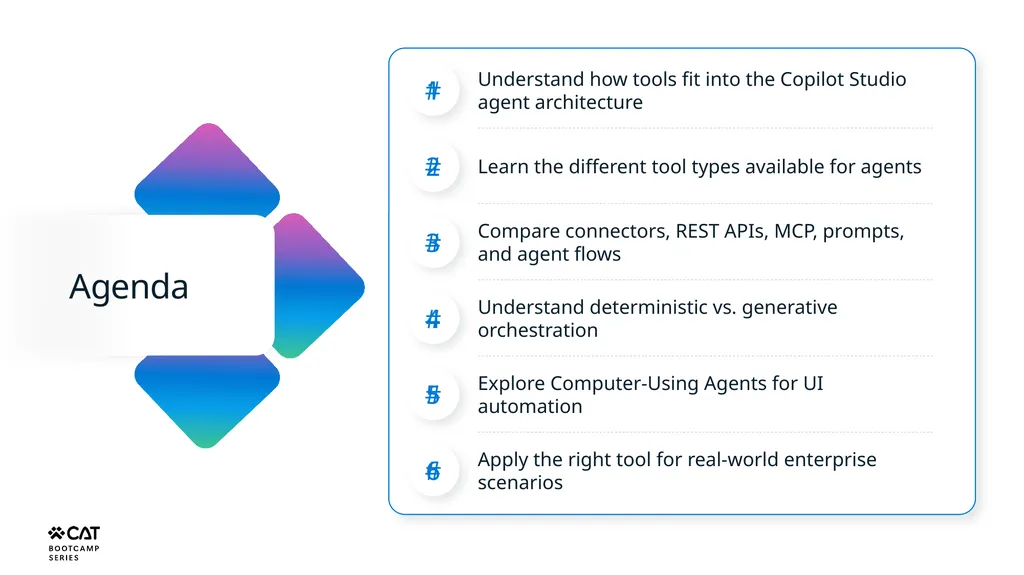
Agenda 1 Understand how tools fit into the Copilot Studio agent architecture 2 Learn the different tool types available for agents 3 Compare connectors, REST APIs, MCP, prompts, and agent flows 4 Understand deterministic vs. generative orchestration 5 Explore Computer-Using Agents for UI automation 6 Apply the right tool for real-world enterprise scenarios<br>
03
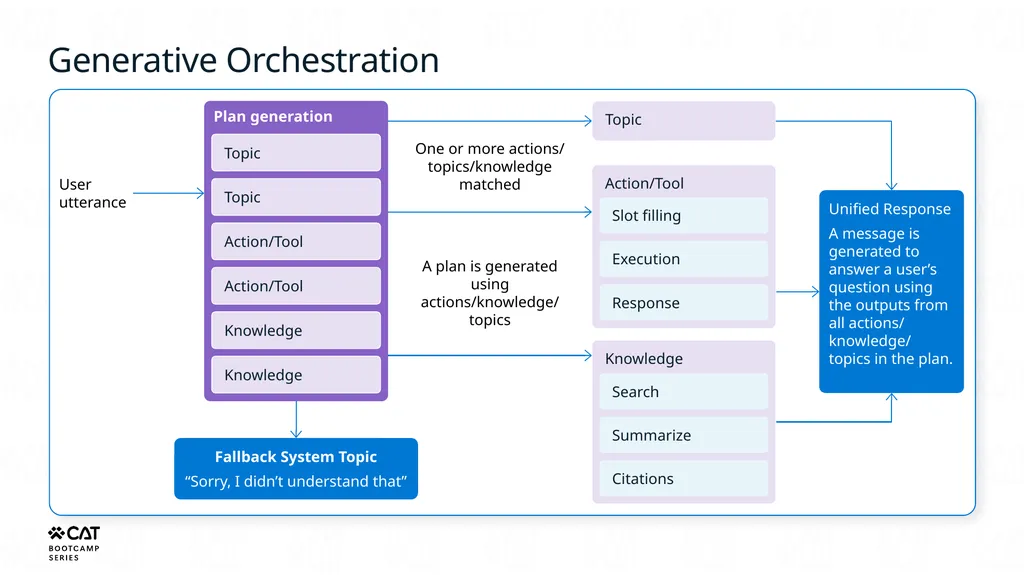
Generative Orchestration User
utterance Plan generation Topic Topic Action/Tool Action/Tool Knowledge Knowledge Fallback System Topic
“Sorry, I didn’t understand that” One or more actions/ topics/knowledge matched A plan is generated using actions/knowledge/ topics Topic Action/Tool Slot filling Execution Response Knowledge Search Summarize Citations Unified Response
A message is generated to answer a user’s question using the outputs from all actions/ knowledge/ topics in the plan.<br>
“Sorry, I didn’t understand that” One or more actions/ topics/knowledge matched A plan is generated using actions/knowledge/ topics Topic Action/Tool Slot filling Execution Response Knowledge Search Summarize Citations Unified Response
A message is generated to answer a user’s question using the outputs from all actions/ knowledge/ topics in the plan.<br>
04
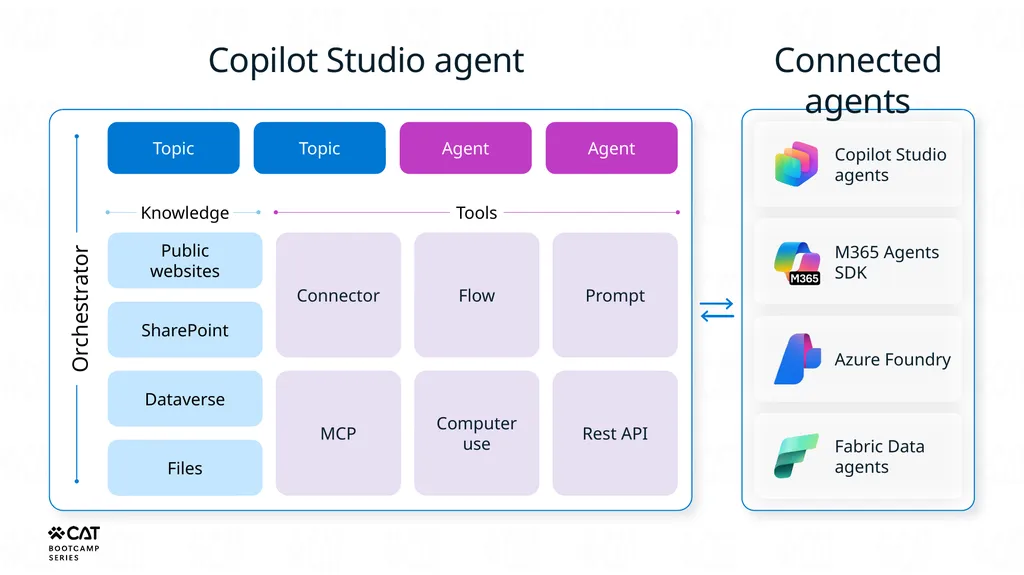
Copilot Studio agent Orchestrator Topic Topic Agent Agent Knowledge Public websites SharePoint Dataverse Files Tools Connector MCP Flow Computer use Prompt Rest API Connected agents Copilot Studio agents M365 Agents SDK Azure Foundry Fabric Data agents<br>
05
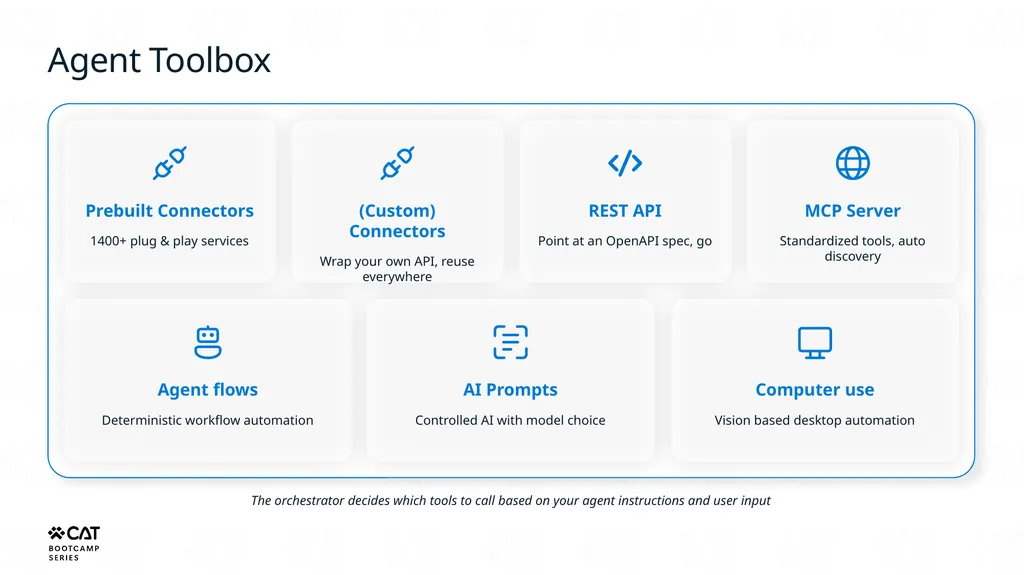
Agent Toolbox Prebuilt Connectors
1400+ plug & play services (Custom) Connectors
Wrap your own API, reuse everywhere REST API
Point at an OpenAPI spec, go MCP Server
Standardized tools, auto discovery Agent flows
Deterministic workflow automation AI Prompts
Controlled AI with model choice Computer use
Vision based desktop automation The orchestrator decides which tools to call based on your agent instructions and user input<br>
1400+ plug & play services (Custom) Connectors
Wrap your own API, reuse everywhere REST API
Point at an OpenAPI spec, go MCP Server
Standardized tools, auto discovery Agent flows
Deterministic workflow automation AI Prompts
Controlled AI with model choice Computer use
Vision based desktop automation The orchestrator decides which tools to call based on your agent instructions and user input<br>
06
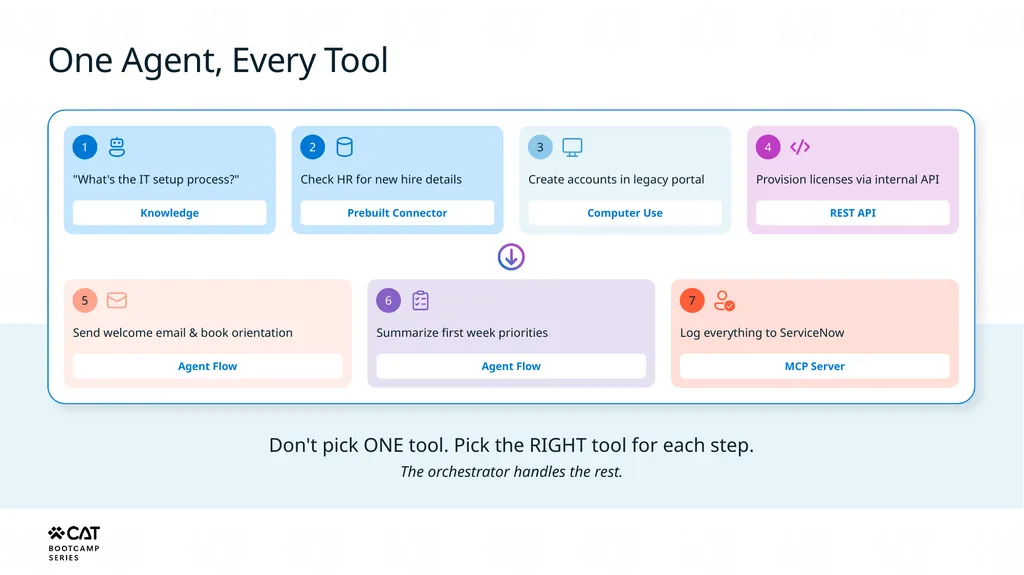
One Agent, Every Tool 1 "What's the IT setup process?" Knowledge 2 Check HR for new hire details Prebuilt Connector 3 Create accounts in legacy portal Computer Use 4 Provision licenses via internal API REST API 5 Send welcome email & book orientation Agent Flow 6 Summarize first week priorities Agent Flow 7 Log everything to ServiceNow MCP Server Don't pick ONE tool. Pick the RIGHT tool for each step.
The orchestrator handles the rest.<br>
The orchestrator handles the rest.<br>
07
Tools Tools are versatile and reusable components.
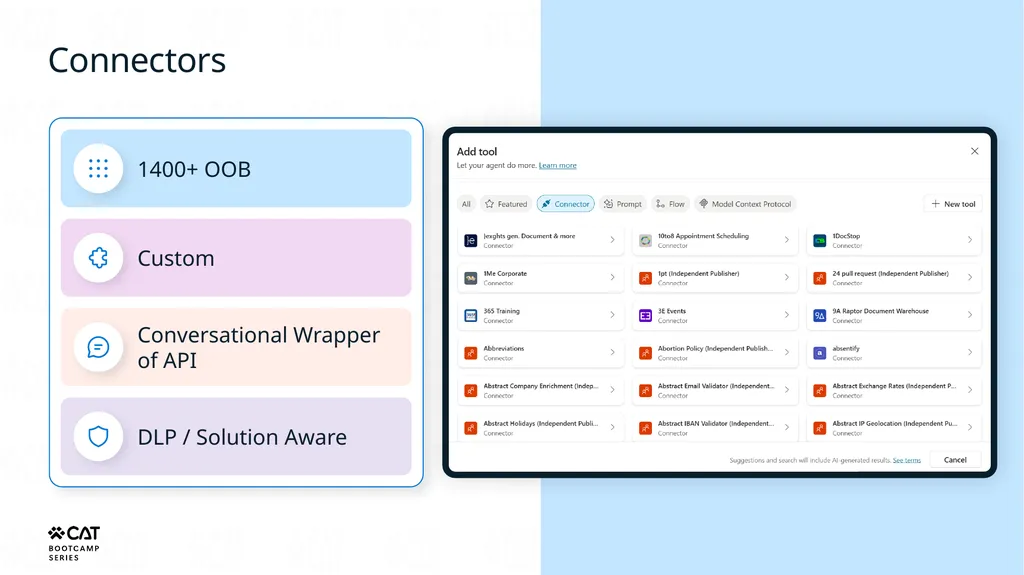
Create, manage and use tools across various agents within an environment. Connectors Choose from 1400+ prebuilt Power Platform connectors, 100+ Copilot connectors or create a custom connector for any public API to retrieve information, write/edit/update records to external services and data sources REST APIs Use APIs directly for your agent to connect with and use data in the most flexible and scalable manner Prompts Leverage library of prompts or draft custom instructions with Copilot to transform text, documents, images and data with LLMs Agent Flows Define predictable automations to run the same way each time, giving you more control over specific actions the agent could take, including allowing the agent to directly use web and desktop apps through UI automation Model Context Protocol Use open standard protocol to connect your LOB services to the agent with adequate context and tools enabled by the servers<br>
Create, manage and use tools across various agents within an environment. Connectors Choose from 1400+ prebuilt Power Platform connectors, 100+ Copilot connectors or create a custom connector for any public API to retrieve information, write/edit/update records to external services and data sources REST APIs Use APIs directly for your agent to connect with and use data in the most flexible and scalable manner Prompts Leverage library of prompts or draft custom instructions with Copilot to transform text, documents, images and data with LLMs Agent Flows Define predictable automations to run the same way each time, giving you more control over specific actions the agent could take, including allowing the agent to directly use web and desktop apps through UI automation Model Context Protocol Use open standard protocol to connect your LOB services to the agent with adequate context and tools enabled by the servers<br>
08
Connectors<br>
09
Connectors 1400+ OOB Custom Conversational Wrapper
of API DLP / Solution Aware<br>
10
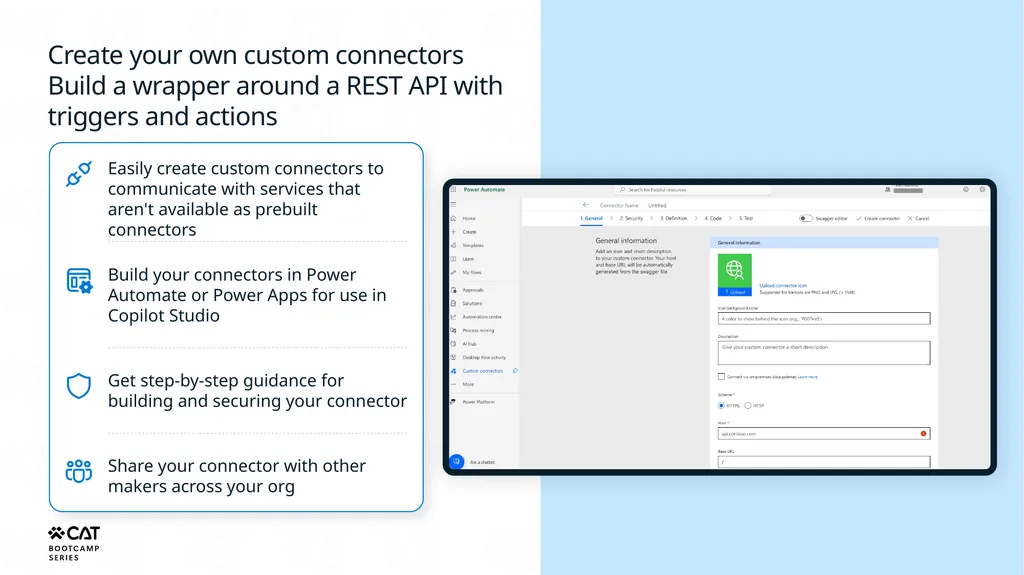
Create your own custom connectors
Build a wrapper around a REST API with triggers and actions Easily create custom connectors to communicate with services that aren't available as prebuilt connectors Build your connectors in Power Automate or Power Apps for use in Copilot Studio Get step-by-step guidance for building and securing your connector Share your connector with other makers across your org<br>
11
Enhanced Connector SDK Zero data copy Read and write capabilities Knowledge-enabled Fully governed Go to GitHub and start building<br>
12
Agent Flows<br>
13
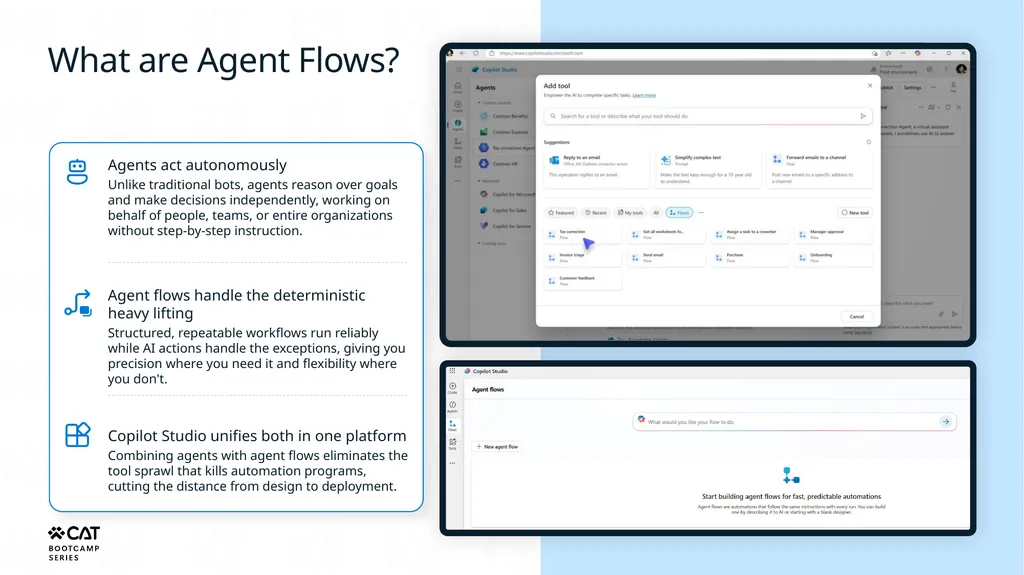
What are Agent Flows? Agents act autonomously
Unlike traditional bots, agents reason over goals and make decisions independently, working on behalf of people, teams, or entire organizations without step-by-step instruction. Agent flows handle the deterministic heavy lifting
Structured, repeatable workflows run reliably while AI actions handle the exceptions, giving you precision where you need it and flexibility where you don't. Copilot Studio unifies both in one platform
Combining agents with agent flows eliminates the tool sprawl that kills automation programs, cutting the distance from design to deployment.<br>
Unlike traditional bots, agents reason over goals and make decisions independently, working on behalf of people, teams, or entire organizations without step-by-step instruction. Agent flows handle the deterministic heavy lifting
Structured, repeatable workflows run reliably while AI actions handle the exceptions, giving you precision where you need it and flexibility where you don't. Copilot Studio unifies both in one platform
Combining agents with agent flows eliminates the tool sprawl that kills automation programs, cutting the distance from design to deployment.<br>
14
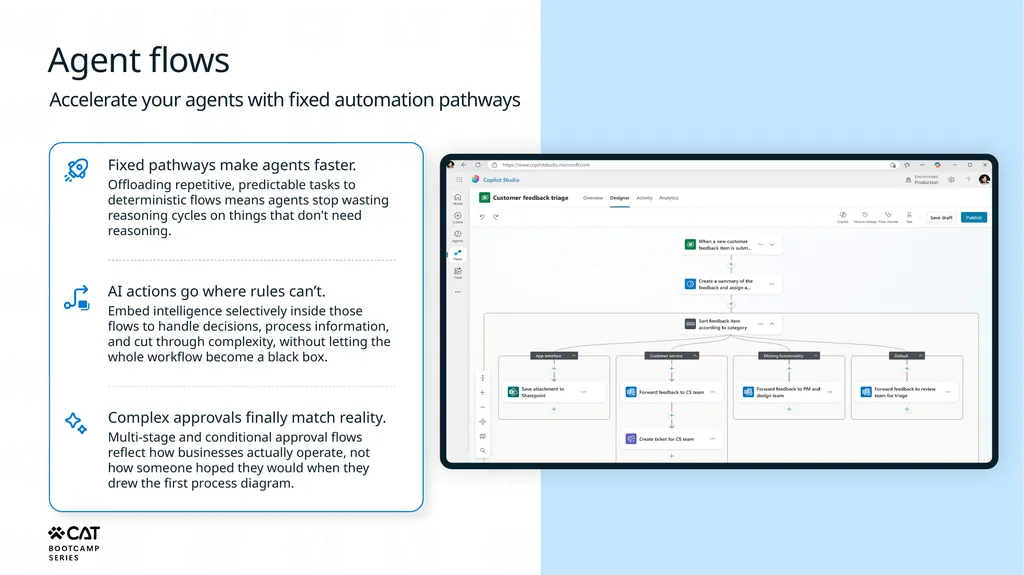
Agent flows Accelerate your agents with fixed automation pathways Fixed pathways make agents faster.
Offloading repetitive, predictable tasks to deterministic flows means agents stop wasting reasoning cycles on things that don't need reasoning. AI actions go where rules can’t.
Embed intelligence selectively inside those flows to handle decisions, process information, and cut through complexity, without letting the whole workflow become a black box. Complex approvals finally match reality.
Multi-stage and conditional approval flows reflect how businesses actually operate, not how someone hoped they would when they drew the first process diagram.<br>
Offloading repetitive, predictable tasks to deterministic flows means agents stop wasting reasoning cycles on things that don't need reasoning. AI actions go where rules can’t.
Embed intelligence selectively inside those flows to handle decisions, process information, and cut through complexity, without letting the whole workflow become a black box. Complex approvals finally match reality.
Multi-stage and conditional approval flows reflect how businesses actually operate, not how someone hoped they would when they drew the first process diagram.<br>
15
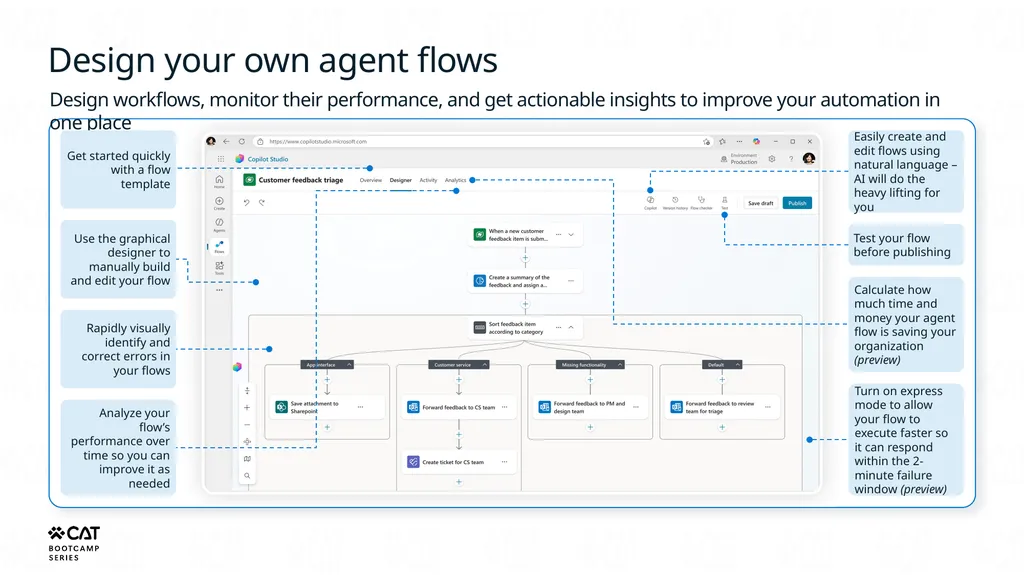
Design your own agent flows Design workflows, monitor their performance, and get actionable insights to improve your automation in one place Get started quickly with a flow template Use the graphical designer to manually build and edit your flow Rapidly visually identify and correct errors in your flows Analyze your flow’s performance over time so you can improve it as needed Easily create and edit flows using natural language – AI will do the heavy lifting for you Test your flow before publishing Calculate how much time and money your agent flow is saving your organization (preview) Turn on express mode to allow your flow to execute faster so it can respond within the 2-minute failure window (preview)<br>
16
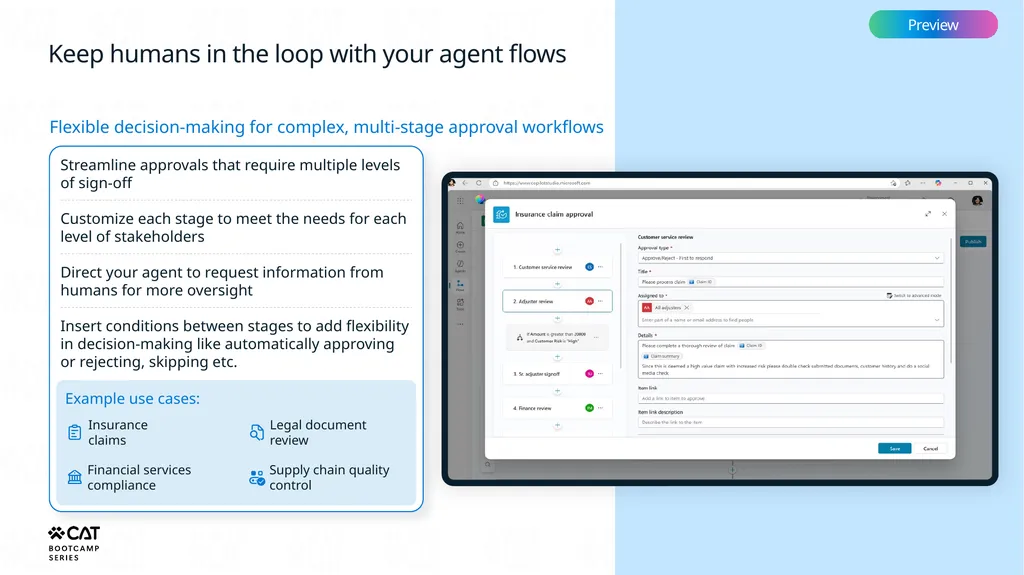
Keep humans in the loop with your agent flows Preview Flexible decision-making for complex, multi-stage approval workflows Streamline approvals that require multiple levels of sign-off Customize each stage to meet the needs for each level of stakeholders Direct your agent to request information from humans for more oversight Insert conditions between stages to add flexibility in decision-making like automatically approving or rejecting, skipping etc. Example use cases: Insurance
claims Financial services
compliance Legal document
review Supply chain quality
control<br>
17
Prompts<br>
18
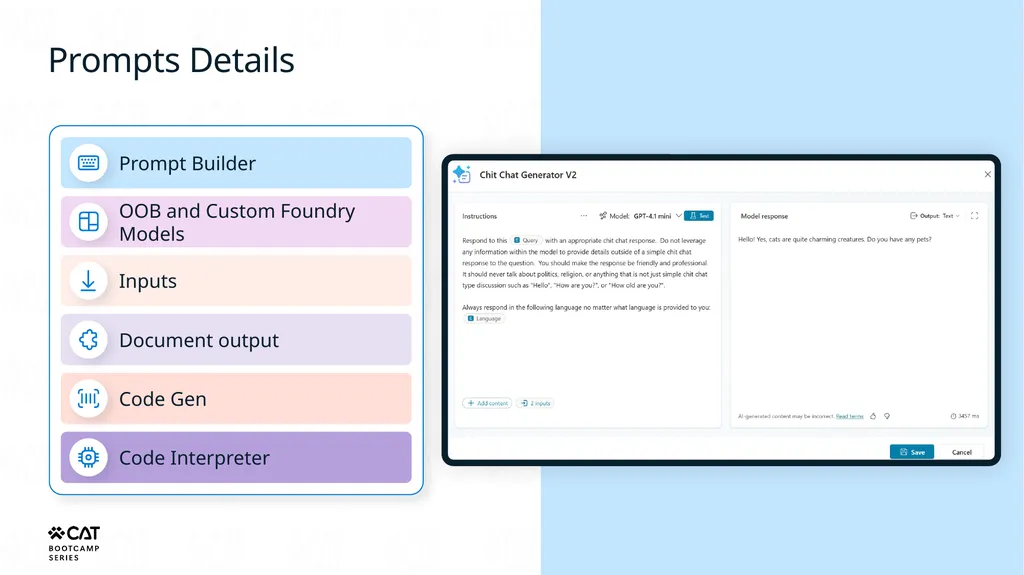
Prompts Details Prompt Builder OOB and Custom Foundry Models Inputs Document output Code Gen Code Interpreter<br>
19
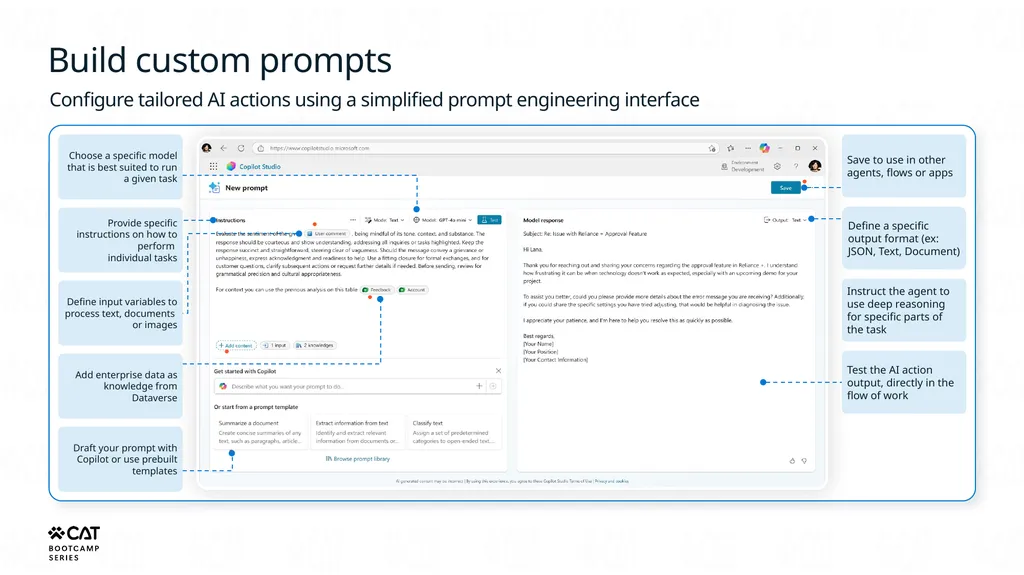
Build custom prompts Configure tailored AI actions using a simplified prompt engineering interface Choose a specific model that is best suited to run a given task Provide specific instructions on how to perform
individual tasks Define input variables to process text, documents
or images Add enterprise data as knowledge from Dataverse Draft your prompt with Copilot or use prebuilt templates Save to use in other agents, flows or apps Define a specific output format (ex: JSON, Text, Document) Instruct the agent to use deep reasoning for specific parts of the task Test the AI action output, directly in the flow of work<br>
20
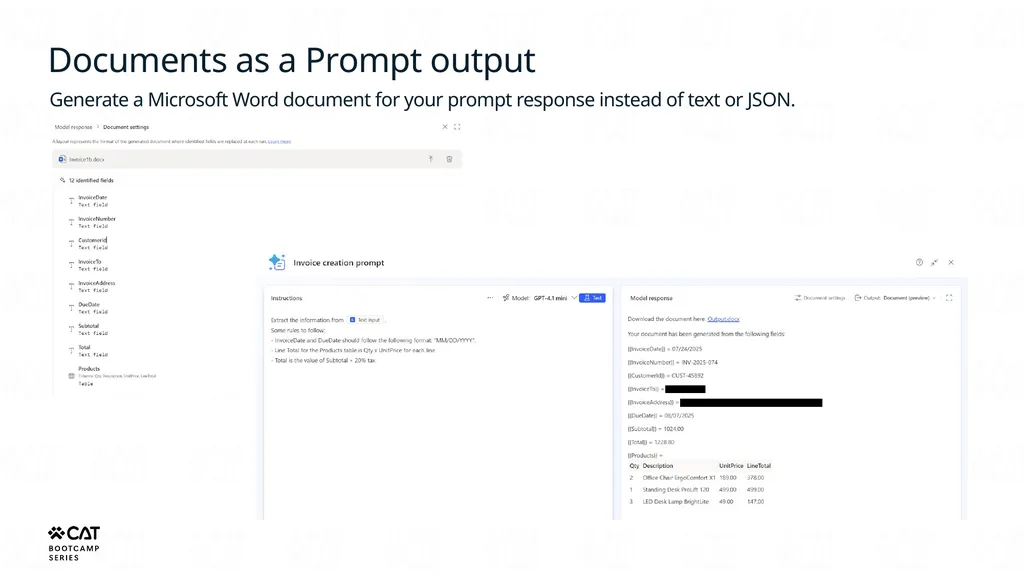
Documents as a Prompt output Generate a Microsoft Word document for your prompt response instead of text or JSON.<br>
21
MCP<br>
22
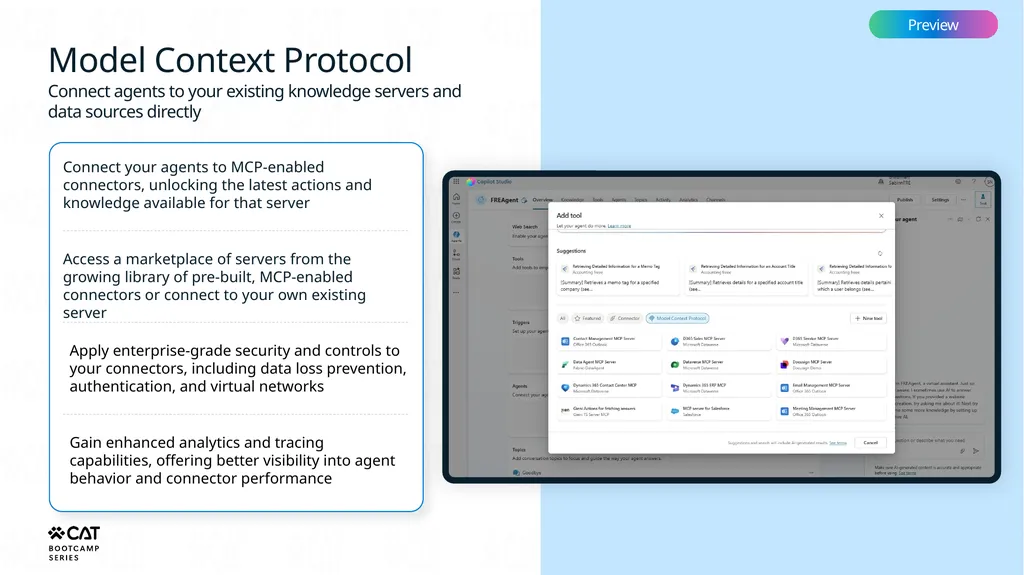
Model Context Protocol Preview Connect agents to your existing knowledge servers and data sources directly Connect your agents to MCP-enabled connectors, unlocking the latest actions and knowledge available for that server Access a marketplace of servers from the growing library of pre-built, MCP-enabled connectors or connect to your own existing server Apply enterprise-grade security and controls to your connectors, including data loss prevention, authentication, and virtual networks Gain enhanced analytics and tracing capabilities, offering better visibility into agent behavior and connector performance<br>
23
Access a growing catalog of MCP connectors<br>
24
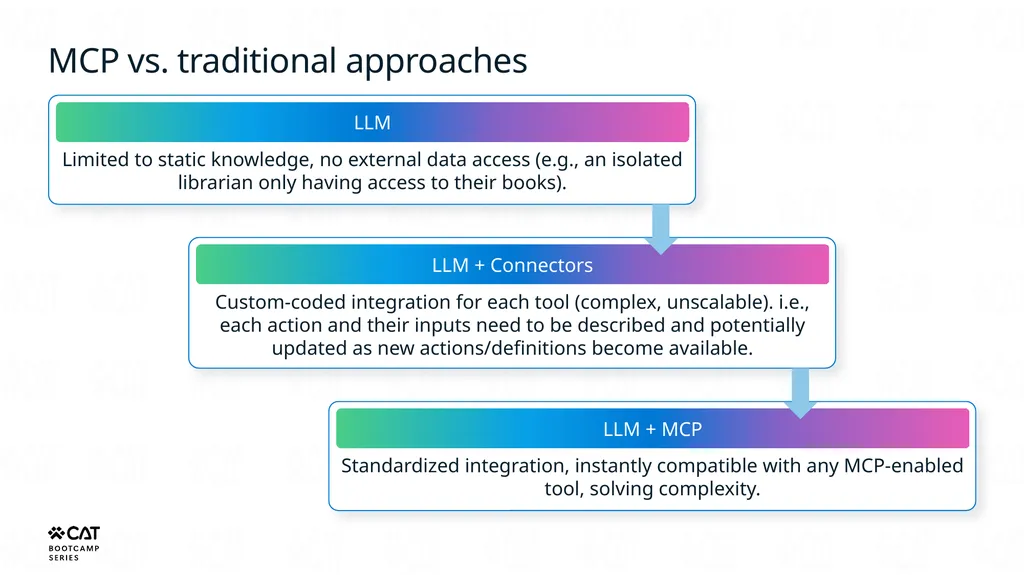
MCP vs. traditional approaches LLM Limited to static knowledge, no external data access (e.g., an isolated librarian only having access to their books). LLM + Connectors Custom-coded integration for each tool (complex, unscalable). i.e., each action and their inputs need to be described and potentially updated as new actions/definitions become available. LLM + MCP Standardized integration, instantly compatible with any MCP-enabled tool, solving complexity.<br>
25
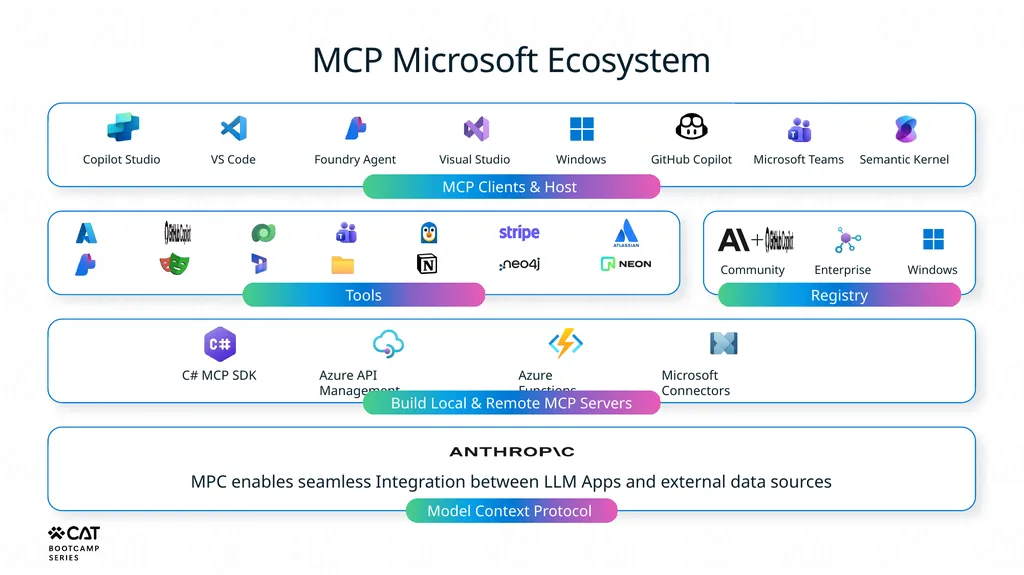
MCP Clients & Host MCP Microsoft Ecosystem Copilot Studio VS Code Foundry Agent Visual Studio Windows GitHub Copilot Microsoft Teams Semantic Kernel Tools Community Enterprise Windows Registry C# MCP SDK Azure API Management Azure Functions Microsoft Connectors Build Local & Remote MCP Servers MPC enables seamless Integration between LLM Apps and external data sources Model Context Protocol<br>
26
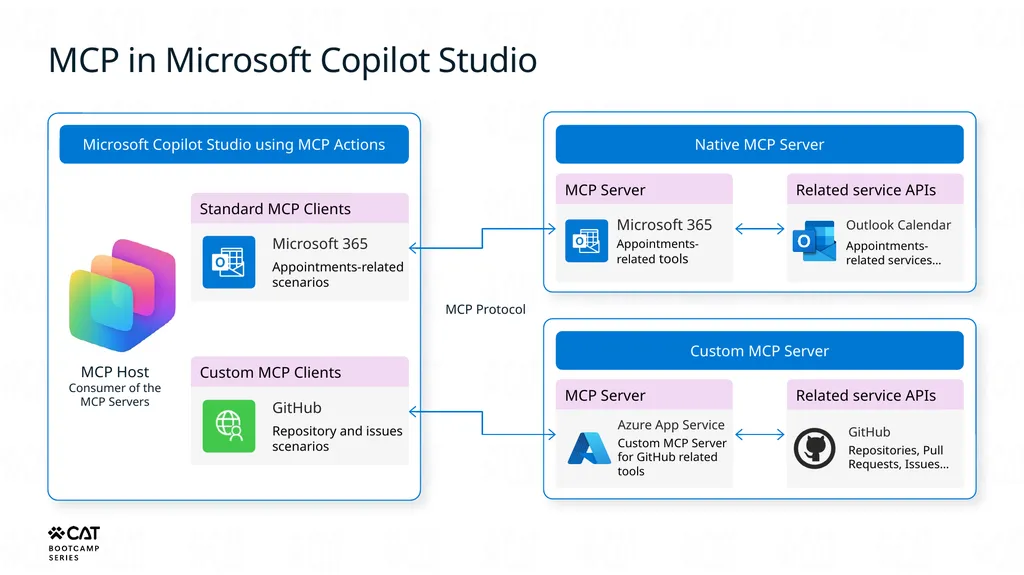
MCP in Microsoft Copilot Studio Microsoft Copilot Studio using MCP Actions Standard MCP Clients MCP Host
Consumer of the MCP Servers Microsoft 365
Appointments-related scenarios MCP Protocol Custom MCP Clients GitHub
Repository and issues scenarios Native MCP Server MCP Server Microsoft 365
Appointments-related tools Related service APIs Outlook Calendar
Appointments-related services… Custom MCP Server MCP Server Azure App Service
Custom MCP Server for GitHub related tools Related service APIs GitHub
Repositories, Pull Requests, Issues…<br>
Appointments-related scenarios MCP Protocol Custom MCP Clients GitHub
Repository and issues scenarios Native MCP Server MCP Server Microsoft 365
Appointments-related tools Related service APIs Outlook Calendar
Appointments-related services… Custom MCP Server MCP Server Azure App Service
Custom MCP Server for GitHub related tools Related service APIs GitHub
Repositories, Pull Requests, Issues…<br>
27
MCP Video<br>
28
… … MCP Servers for Your Enterprise Systems Dataverse MCP server Search Query Store + D365 Sales MCP server D365 Supply Chain MCP server D365 Service MCP server D365 Finance MCP server D365 Business Central MCP server + <custom>
MCP server Custom AI tools Custom API tools Custom CUA & data tools<br>
29
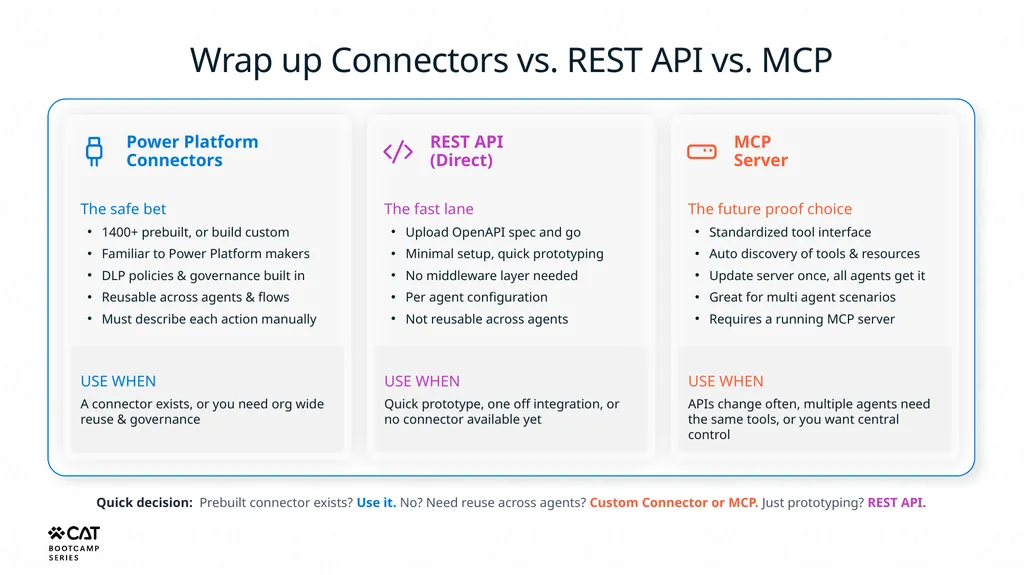
Wrap up Connectors vs. REST API vs. MCP Power Platform Connectors The safe bet
1400+ prebuilt, or build custom
Familiar to Power Platform makers
DLP policies & governance built in
Reusable across agents & flows
Must describe each action manually USE WHEN
A connector exists, or you need org wide reuse & governance REST API
(Direct) The fast lane
Upload OpenAPI spec and go
Minimal setup, quick prototyping
No middleware layer needed
Per agent configuration
Not reusable across agents USE WHEN
Quick prototype, one off integration, or no connector available yet MCP
Server The future proof choice
Standardized tool interface
Auto discovery of tools & resources
Update server once, all agents get it
Great for multi agent scenarios
Requires a running MCP server USE WHEN
APIs change often, multiple agents need the same tools, or you want central control Quick decision: Prebuilt connector exists? Use it. No? Need reuse across agents? Custom Connector or MCP. Just prototyping? REST API.<br>
1400+ prebuilt, or build custom
Familiar to Power Platform makers
DLP policies & governance built in
Reusable across agents & flows
Must describe each action manually USE WHEN
A connector exists, or you need org wide reuse & governance REST API
(Direct) The fast lane
Upload OpenAPI spec and go
Minimal setup, quick prototyping
No middleware layer needed
Per agent configuration
Not reusable across agents USE WHEN
Quick prototype, one off integration, or no connector available yet MCP
Server The future proof choice
Standardized tool interface
Auto discovery of tools & resources
Update server once, all agents get it
Great for multi agent scenarios
Requires a running MCP server USE WHEN
APIs change often, multiple agents need the same tools, or you want central control Quick decision: Prebuilt connector exists? Use it. No? Need reuse across agents? Custom Connector or MCP. Just prototyping? REST API.<br>
30
CUA<br>
31
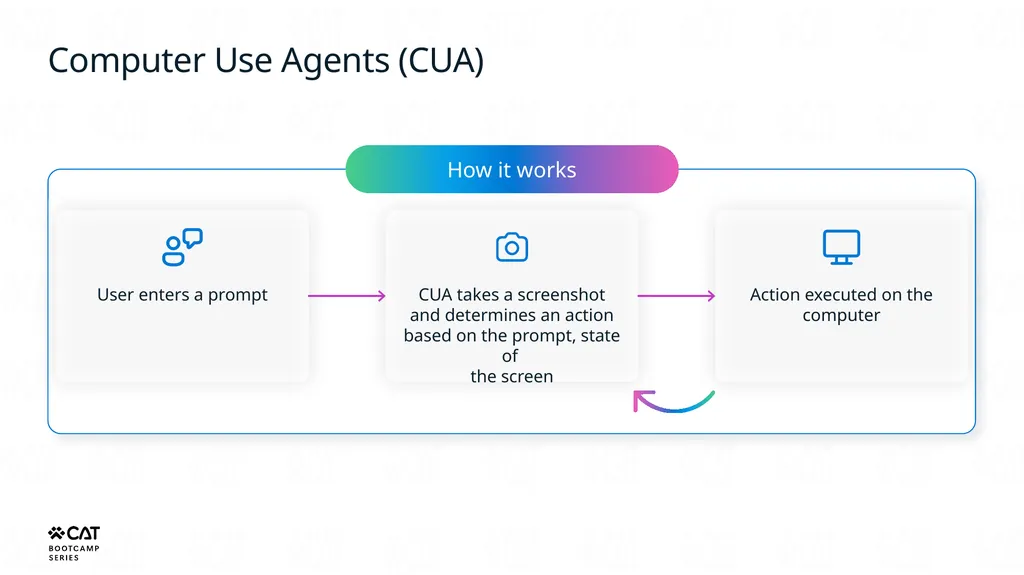
Computer Use Agents (CUA) How it works User enters a prompt CUA takes a screenshot and determines an action based on the prompt, state of
the screen Action executed on the computer<br>
32
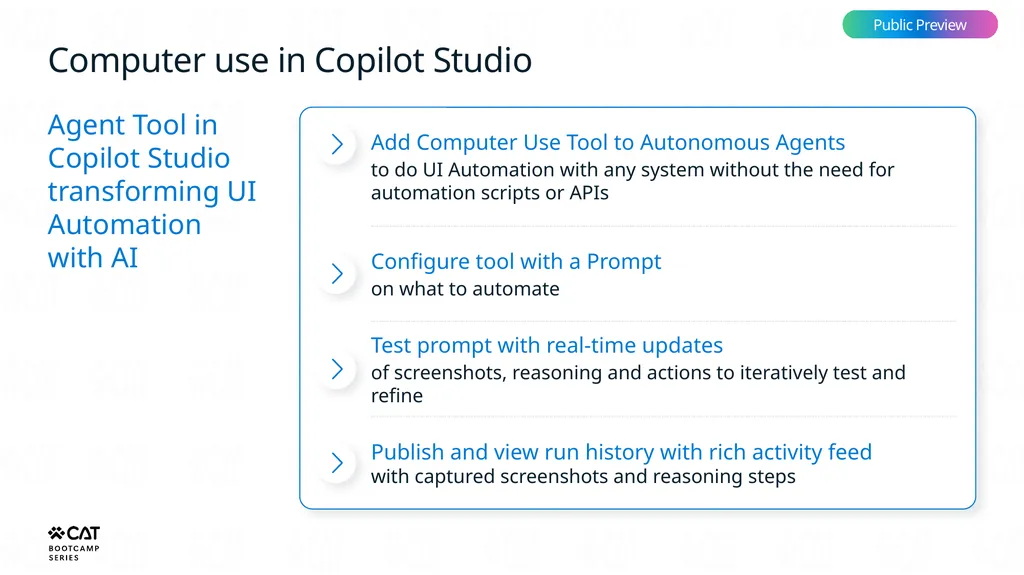
Computer use in Copilot Studio Public Preview Agent Tool in Copilot Studio transforming UI Automation
with AI Add Computer Use Tool to Autonomous Agents
to do UI Automation with any system without the need for automation scripts or APIs Configure tool with a Prompt
on what to automate Test prompt with real-time updates
of screenshots, reasoning and actions to iteratively test and refine Publish and view run history with rich activity feed with captured screenshots and reasoning steps<br>
to do UI Automation with any system without the need for automation scripts or APIs Configure tool with a Prompt
on what to automate Test prompt with real-time updates
of screenshots, reasoning and actions to iteratively test and refine Publish and view run history with rich activity feed with captured screenshots and reasoning steps<br>
33
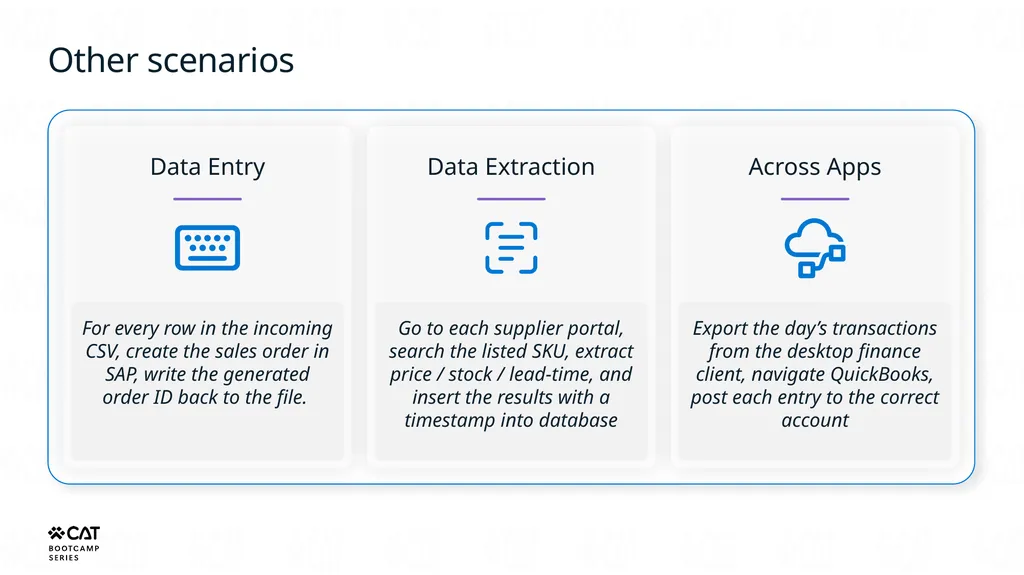
Other scenarios Data Entry For every row in the incoming CSV, create the sales order in SAP, write the generated order ID back to the file. Data Extraction Go to each supplier portal, search the listed SKU, extract price / stock / lead-time, and insert the results with a timestamp into database Across Apps Export the day’s transactions from the desktop finance client, navigate QuickBooks, post each entry to the correct account<br>
34
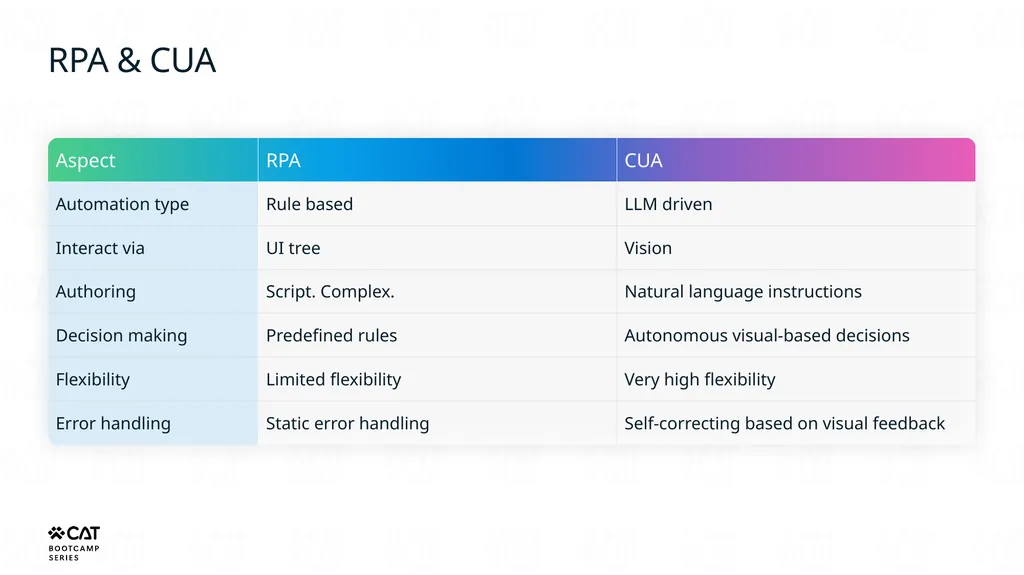
RPA & CUA<br>
35
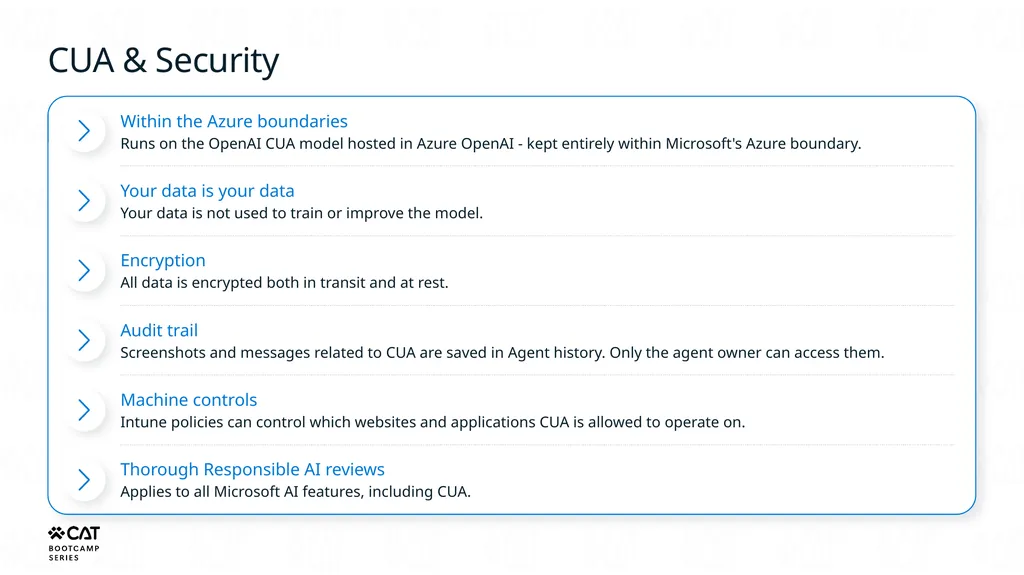
CUA & Security Within the Azure boundaries
Runs on the OpenAI CUA model hosted in Azure OpenAI - kept entirely within Microsoft's Azure boundary. Your data is your data
Your data is not used to train or improve the model. Encryption
All data is encrypted both in transit and at rest. Audit trail
Screenshots and messages related to CUA are saved in Agent history. Only the agent owner can access them. Machine controls
Intune policies can control which websites and applications CUA is allowed to operate on. Thorough Responsible AI reviews
Applies to all Microsoft AI features, including CUA.<br>
Runs on the OpenAI CUA model hosted in Azure OpenAI - kept entirely within Microsoft's Azure boundary. Your data is your data
Your data is not used to train or improve the model. Encryption
All data is encrypted both in transit and at rest. Audit trail
Screenshots and messages related to CUA are saved in Agent history. Only the agent owner can access them. Machine controls
Intune policies can control which websites and applications CUA is allowed to operate on. Thorough Responsible AI reviews
Applies to all Microsoft AI features, including CUA.<br>
36
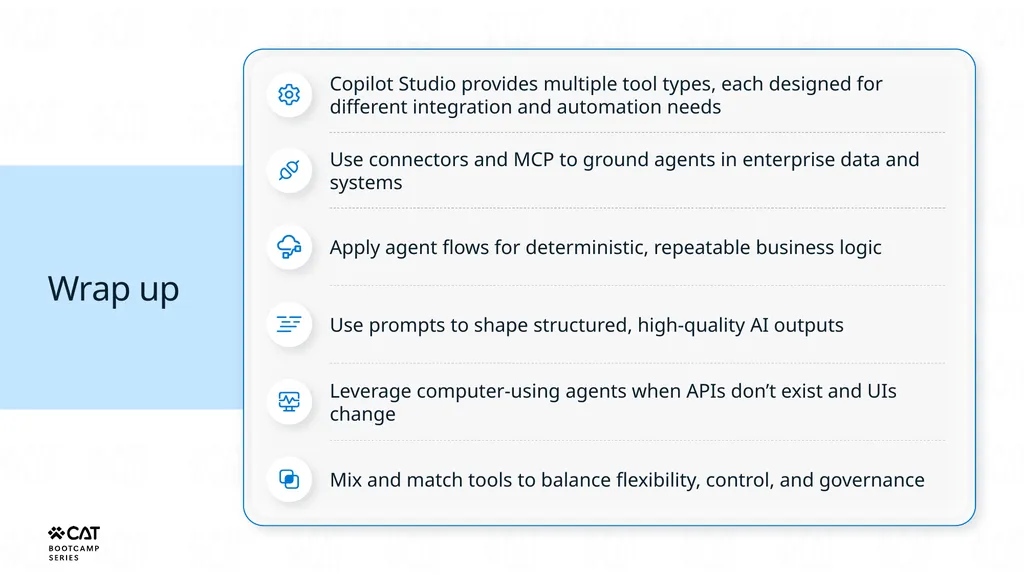
Wrap up Copilot Studio provides multiple tool types, each designed for different integration and automation needs Use connectors and MCP to ground agents in enterprise data and systems Apply agent flows for deterministic, repeatable business logic Use prompts to shape structured, high‑quality AI outputs Leverage computer‑using agents when APIs don’t exist and UIs change Mix and match tools to balance flexibility, control, and governance<br>
37
Lab: Copilot Studio Tools • Extend agents with connectors to external services
• Build deterministic logic with agent flows
• Connect MCP servers and author custom prompts Timer 60 min<br>
• Build deterministic logic with agent flows
• Connect MCP servers and author custom prompts Timer 60 min<br>
38
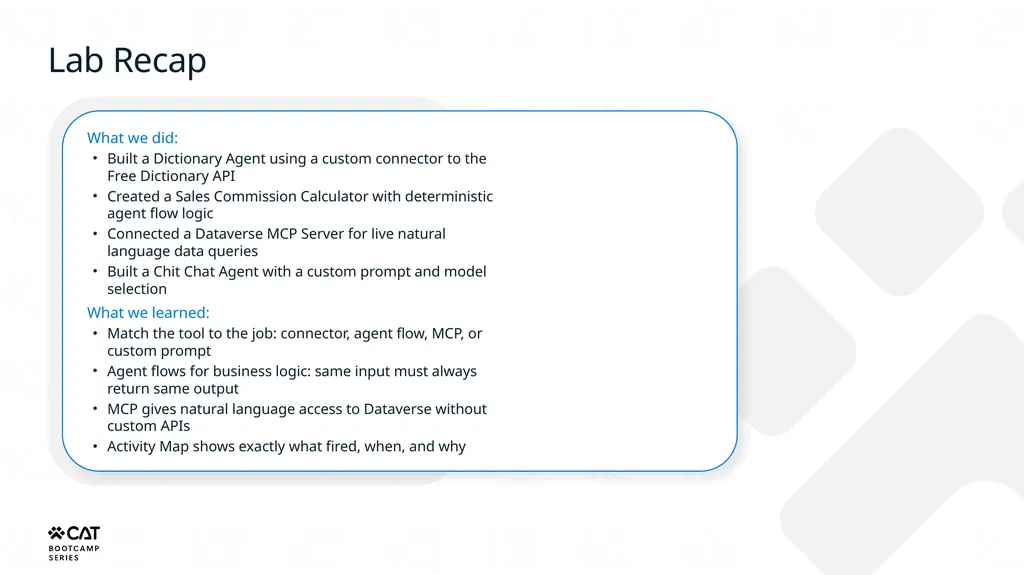
Lab Recap What we did:
Built a Dictionary Agent using a custom connector to the Free Dictionary API
Created a Sales Commission Calculator with deterministic agent flow logic
Connected a Dataverse MCP Server for live natural language data queries
Built a Chit Chat Agent with a custom prompt and model selection
What we learned:
Match the tool to the job: connector, agent flow, MCP, or custom prompt
Agent flows for business logic: same input must always return same output
MCP gives natural language access to Dataverse without custom APIs
Activity Map shows exactly what fired, when, and why<br>
Built a Dictionary Agent using a custom connector to the Free Dictionary API
Created a Sales Commission Calculator with deterministic agent flow logic
Connected a Dataverse MCP Server for live natural language data queries
Built a Chit Chat Agent with a custom prompt and model selection
What we learned:
Match the tool to the job: connector, agent flow, MCP, or custom prompt
Agent flows for business logic: same input must always return same output
MCP gives natural language access to Dataverse without custom APIs
Activity Map shows exactly what fired, when, and why<br>