
Microsoft Scenario Library Discover industry and
MJ
Published · 44 slides · 0 views

1 / 1




Description
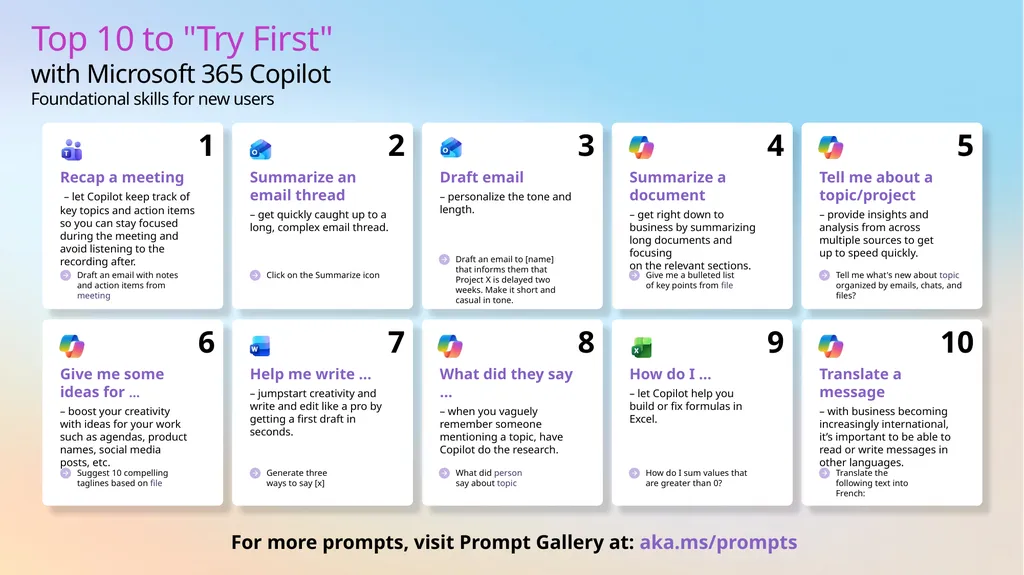
Microsoft Scenario Library Discover industry and role-based use cases Top 10 to Try First with Microsoft 365 Copilot Foundational skills for new users For more prompts, visit Prompt Gallery at: aka.msprompts AI value journey Org Value
Related Topics
Share
Embed code
Download this presentation From Below
"Microsoft Scenario Library Discover industry and" is the property of its rightful owner. Permission is granted to download and print the materials on this website for personal, non-commercial use only, and to display it on your personal computer provided you do not modify the materials and that you retain all copyright notices contained in the materials. By downloading content from our website, you accept the terms of this agreement.
Presentation Transcript
01
Microsoft Scenario Library Discover industry and role-based use cases<br>
02
Top 10 to "Try First" with Microsoft 365 Copilot
Foundational skills for new users For more prompts, visit Prompt Gallery at: aka.ms/prompts<br>
03
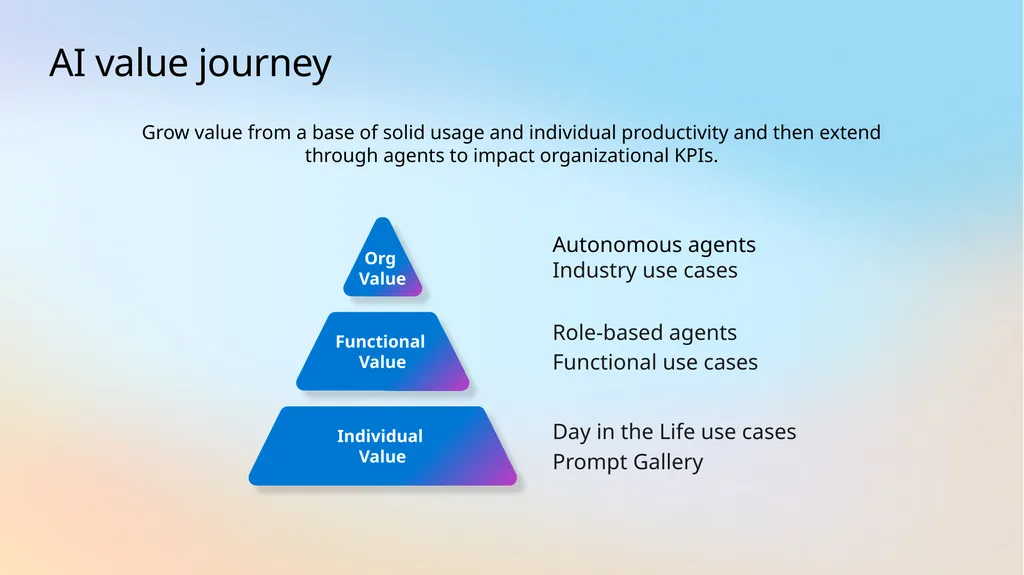
AI value journey Org
Value Functional
Value Autonomous agents
Industry use cases Role-based agents
Functional use cases Individual Value Day in the Life use cases
Prompt Gallery Grow value from a base of solid usage and individual productivity and then extend through agents to impact organizational KPIs.<br>
Industry use cases Role-based agents
Functional use cases Individual Value Day in the Life use cases
Prompt Gallery Grow value from a base of solid usage and individual productivity and then extend through agents to impact organizational KPIs.<br>
04
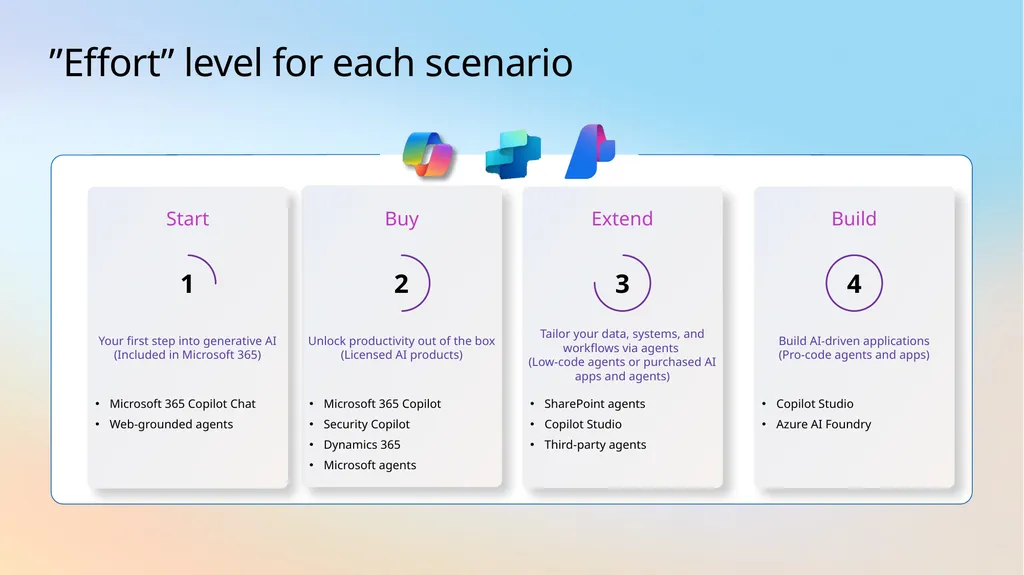
”Effort” level for each scenario Buy Microsoft 365 Copilot
Security Copilot
Dynamics 365
Microsoft agents Unlock productivity out of the box (Licensed AI products) 2 Extend SharePoint agents
Copilot Studio
Third-party agents Tailor your data, systems, and workflows via agents
(Low-code agents or purchased AI apps and agents) 3 Start Microsoft 365 Copilot Chat
Web-grounded agents Your first step into generative AI (Included in Microsoft 365) 1 Build Copilot Studio
Azure AI Foundry Build AI-driven applications
(Pro-code agents and apps) 4<br>
Security Copilot
Dynamics 365
Microsoft agents Unlock productivity out of the box (Licensed AI products) 2 Extend SharePoint agents
Copilot Studio
Third-party agents Tailor your data, systems, and workflows via agents
(Low-code agents or purchased AI apps and agents) 3 Start Microsoft 365 Copilot Chat
Web-grounded agents Your first step into generative AI (Included in Microsoft 365) 1 Build Copilot Studio
Azure AI Foundry Build AI-driven applications
(Pro-code agents and apps) 4<br>
05
AI use cases for
Education<br>
06
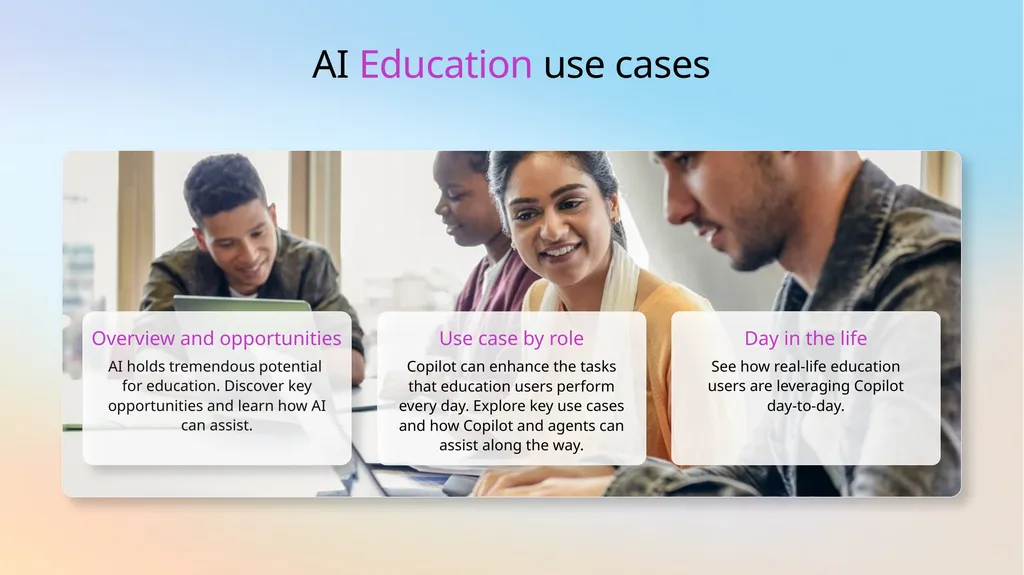
AI Education use cases Overview and opportunities AI holds tremendous potential
for education. Discover key opportunities and learn how AI can assist. Use case by role Copilot can enhance the tasks that education users perform every day. Explore key use cases and how Copilot and agents can assist along the way. Day in the life See how real-life education users are leveraging Copilot day-to-day.<br>
07
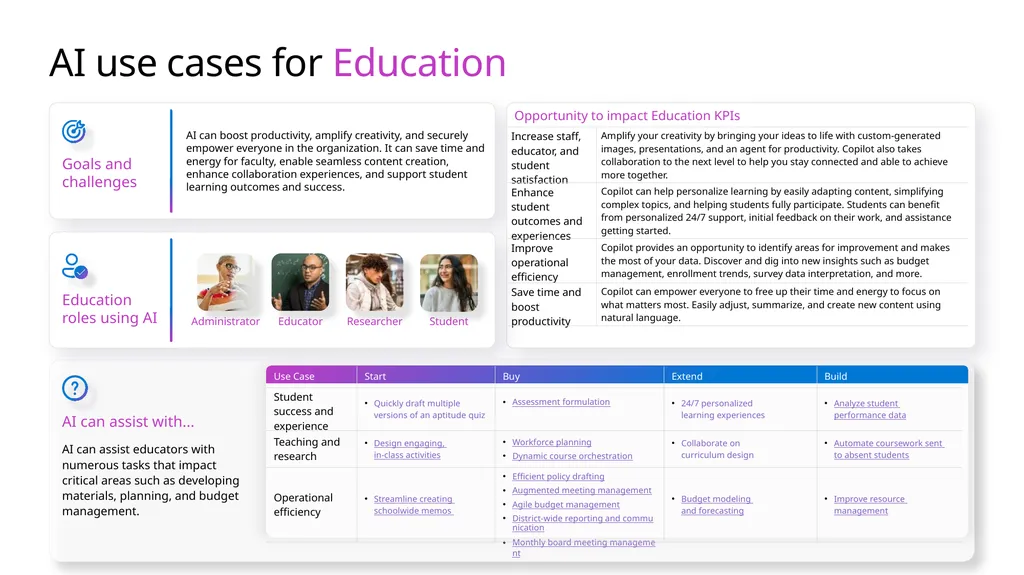
AI use cases for Education Goals and challenges AI can boost productivity, amplify creativity, and securely empower everyone in the organization. It can save time and energy for faculty, enable seamless content creation, enhance collaboration experiences, and support student learning outcomes and success. AI can assist with... AI can assist educators with numerous tasks that impact critical areas such as developing materials, planning, and budget management. Education roles using AI Educator Researcher Student Administrator<br>
08
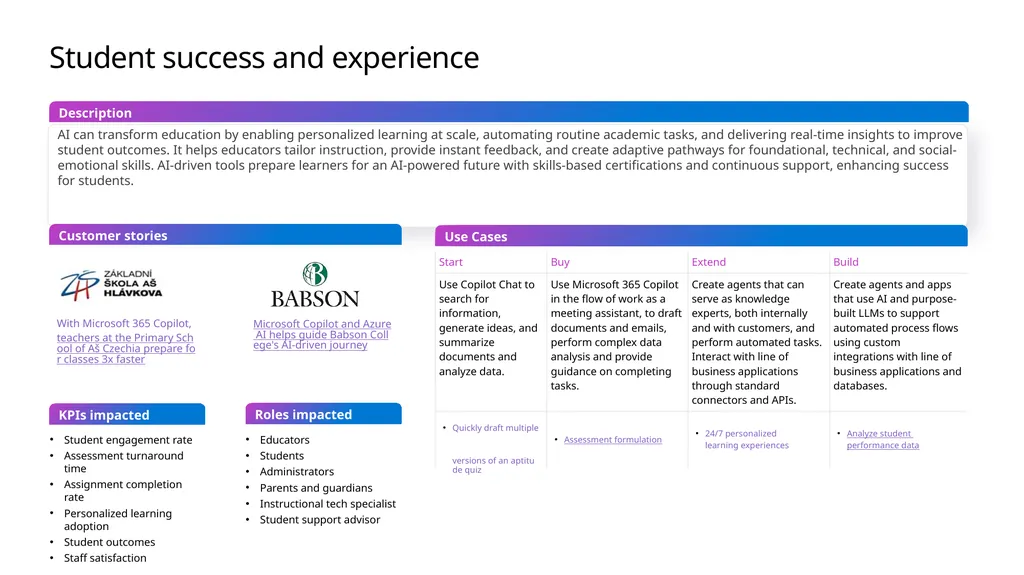
Student success and experience AI can transform education by enabling personalized learning at scale, automating routine academic tasks, and delivering real-time insights to improve student outcomes. It helps educators tailor instruction, provide instant feedback, and create adaptive pathways for foundational, technical, and social-emotional skills. AI-driven tools prepare learners for an AI-powered future with skills-based certifications and continuous support, enhancing success for students. Use Cases Customer stories Description KPIs impacted Student engagement rate
Assessment turnaround time
Assignment completion rate
Personalized learning adoption
Student outcomes
Staff satisfaction Educators
Students
Administrators
Parents and guardians
Instructional tech specialist
Student support advisor Roles impacted With Microsoft 365 Copilot, teachers at the Primary School of Aš Czechia prepare for classes 3x faster Microsoft Copilot and Azure AI helps guide Babson College's AI-driven journey<br>
Assessment turnaround time
Assignment completion rate
Personalized learning adoption
Student outcomes
Staff satisfaction Educators
Students
Administrators
Parents and guardians
Instructional tech specialist
Student support advisor Roles impacted With Microsoft 365 Copilot, teachers at the Primary School of Aš Czechia prepare for classes 3x faster Microsoft Copilot and Azure AI helps guide Babson College's AI-driven journey<br>
09
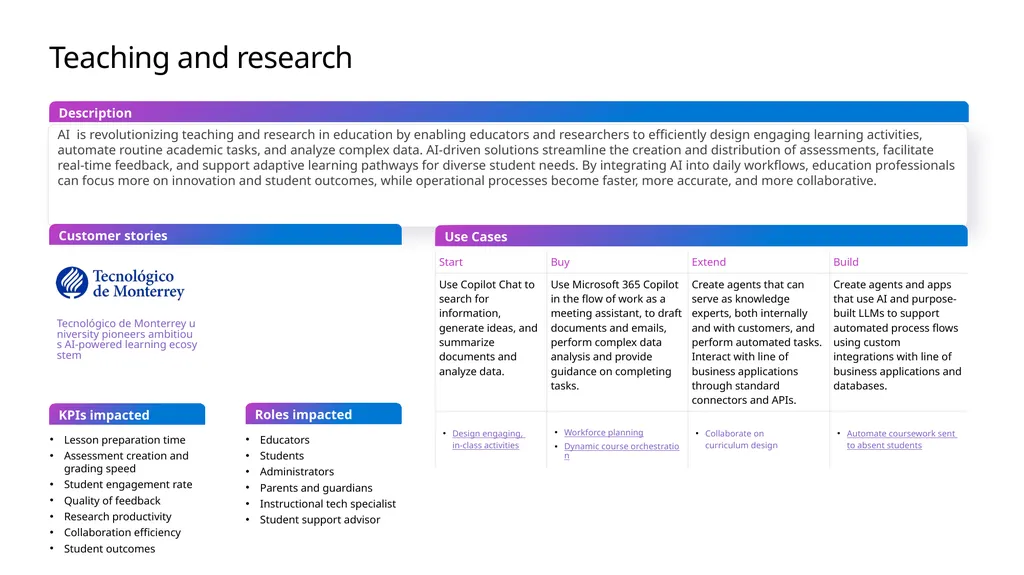
Teaching and research AI is revolutionizing teaching and research in education by enabling educators and researchers to efficiently design engaging learning activities, automate routine academic tasks, and analyze complex data. AI-driven solutions streamline the creation and distribution of assessments, facilitate real-time feedback, and support adaptive learning pathways for diverse student needs. By integrating AI into daily workflows, education professionals can focus more on innovation and student outcomes, while operational processes become faster, more accurate, and more collaborative. Use Cases Description Lesson preparation time
Assessment creation and grading speed
Student engagement rate
Quality of feedback
Research productivity
Collaboration efficiency
Student outcomes Tecnológico de Monterrey university pioneers ambitious AI-powered learning ecosystem KPIs impacted Roles impacted Customer stories Educators
Students
Administrators
Parents and guardians
Instructional tech specialist
Student support advisor<br>
Assessment creation and grading speed
Student engagement rate
Quality of feedback
Research productivity
Collaboration efficiency
Student outcomes Tecnológico de Monterrey university pioneers ambitious AI-powered learning ecosystem KPIs impacted Roles impacted Customer stories Educators
Students
Administrators
Parents and guardians
Instructional tech specialist
Student support advisor<br>
10
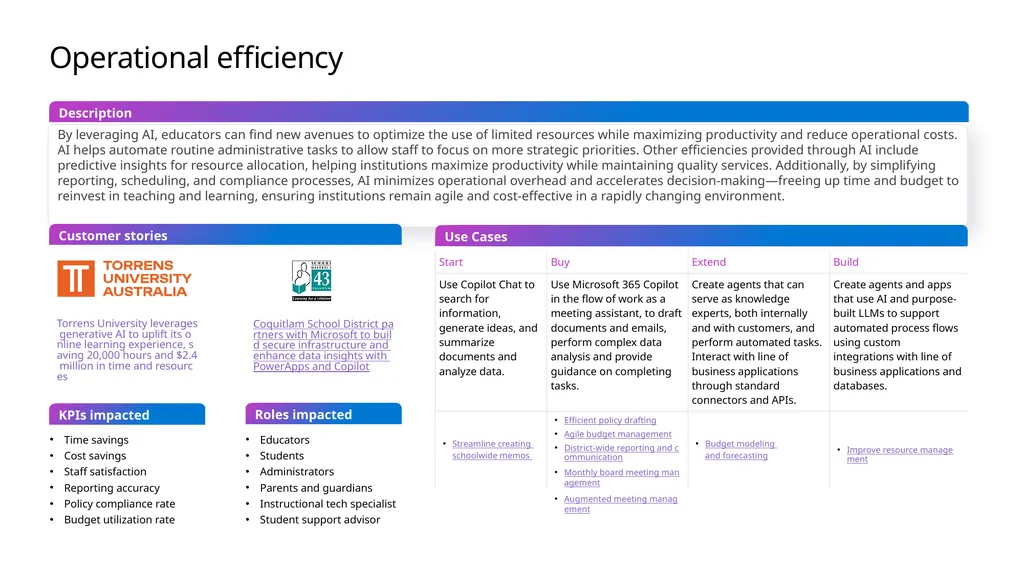
Operational efficiency By leveraging AI, educators can find new avenues to optimize the use of limited resources while maximizing productivity and reduce operational costs. AI helps automate routine administrative tasks to allow staff to focus on more strategic priorities. Other efficiencies provided through AI include predictive insights for resource allocation, helping institutions maximize productivity while maintaining quality services. Additionally, by simplifying reporting, scheduling, and compliance processes, AI minimizes operational overhead and accelerates decision-making—freeing up time and budget to reinvest in teaching and learning, ensuring institutions remain agile and cost-effective in a rapidly changing environment. Use Cases Customer stories Description Torrens University leverages generative AI to uplift its online learning experience, saving 20,000 hours and $2.4 million in time and resources Time savings
Cost savings
Staff satisfaction
Reporting accuracy
Policy compliance rate
Budget utilization rate Educators
Students
Administrators
Parents and guardians
Instructional tech specialist
Student support advisor KPIs impacted Roles impacted Coquitlam School District partners with Microsoft to build secure infrastructure and enhance data insights with PowerApps and Copilot<br>
Cost savings
Staff satisfaction
Reporting accuracy
Policy compliance rate
Budget utilization rate Educators
Students
Administrators
Parents and guardians
Instructional tech specialist
Student support advisor KPIs impacted Roles impacted Coquitlam School District partners with Microsoft to build secure infrastructure and enhance data insights with PowerApps and Copilot<br>
11
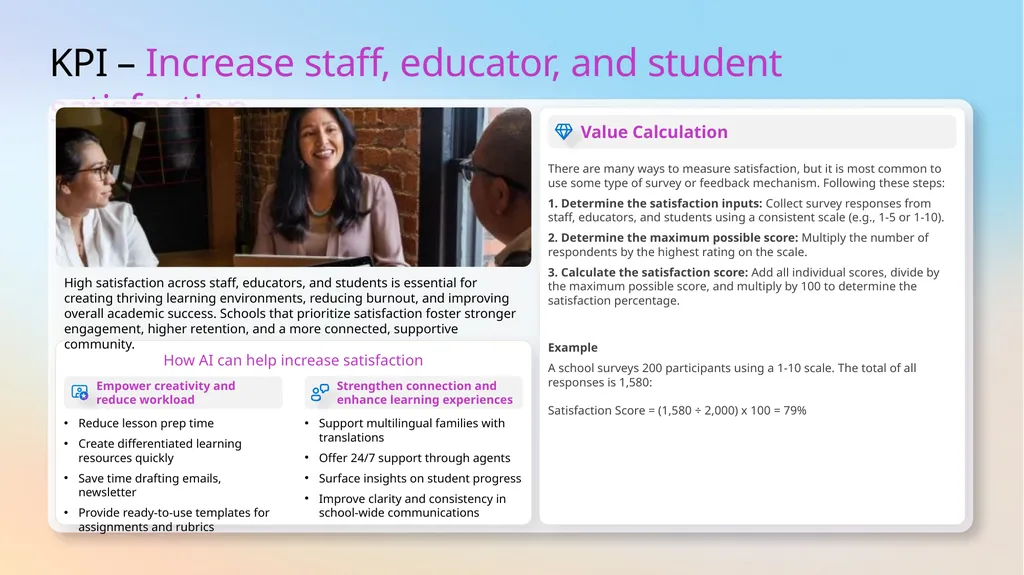
KPI – Increase staff, educator, and student satisfaction How AI can help increase satisfaction Empower creativity and
reduce workload Strengthen connection and enhance learning experiences High satisfaction across staff, educators, and students is essential for creating thriving learning environments, reducing burnout, and improving overall academic success. Schools that prioritize satisfaction foster stronger engagement, higher retention, and a more connected, supportive community. Reduce lesson prep time
Create differentiated learning resources quickly
Save time drafting emails, newsletter
Provide ready-to-use templates for assignments and rubrics Support multilingual families with translations
Offer 24/7 support through agents
Surface insights on student progress
Improve clarity and consistency in school-wide communications Value Calculation There are many ways to measure satisfaction, but it is most common to use some type of survey or feedback mechanism. Following these steps:
1. Determine the satisfaction inputs: Collect survey responses from staff, educators, and students using a consistent scale (e.g., 1-5 or 1-10).
2. Determine the maximum possible score: Multiply the number of respondents by the highest rating on the scale.
3. Calculate the satisfaction score: Add all individual scores, divide by the maximum possible score, and multiply by 100 to determine the satisfaction percentage.
Example
A school surveys 200 participants using a 1-10 scale. The total of all responses is 1,580: Satisfaction Score = (1,580 ÷ 2,000) x 100 = 79%<br>
Create differentiated learning resources quickly
Save time drafting emails, newsletter
Provide ready-to-use templates for assignments and rubrics Support multilingual families with translations
Offer 24/7 support through agents
Surface insights on student progress
Improve clarity and consistency in school-wide communications Value Calculation There are many ways to measure satisfaction, but it is most common to use some type of survey or feedback mechanism. Following these steps:
1. Determine the satisfaction inputs: Collect survey responses from staff, educators, and students using a consistent scale (e.g., 1-5 or 1-10).
2. Determine the maximum possible score: Multiply the number of respondents by the highest rating on the scale.
3. Calculate the satisfaction score: Add all individual scores, divide by the maximum possible score, and multiply by 100 to determine the satisfaction percentage.
Example
A school surveys 200 participants using a 1-10 scale. The total of all responses is 1,580: Satisfaction Score = (1,580 ÷ 2,000) x 100 = 79%<br>
12
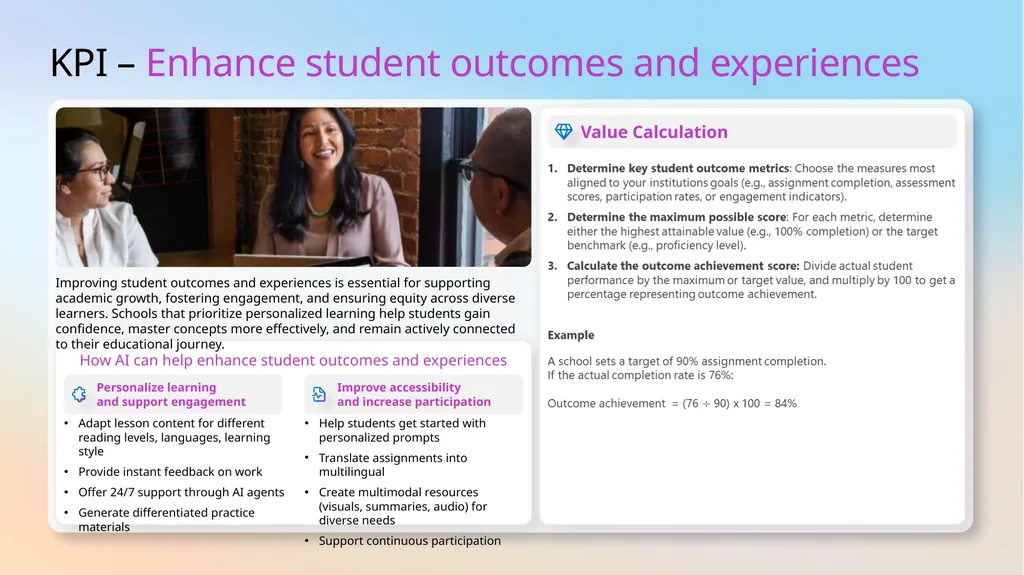
KPI – Enhance student outcomes and experiences How AI can help enhance student outcomes and experiences Personalize learning
and support engagement Improve accessibility
and increase participation Improving student outcomes and experiences is essential for supporting academic growth, fostering engagement, and ensuring equity across diverse learners. Schools that prioritize personalized learning help students gain confidence, master concepts more effectively, and remain actively connected to their educational journey. Adapt lesson content for different reading levels, languages, learning style
Provide instant feedback on work
Offer 24/7 support through AI agents
Generate differentiated practice materials Help students get started with personalized prompts
Translate assignments into multilingual
Create multimodal resources (visuals, summaries, audio) for diverse needs
Support continuous participation Value Calculation<br>
Provide instant feedback on work
Offer 24/7 support through AI agents
Generate differentiated practice materials Help students get started with personalized prompts
Translate assignments into multilingual
Create multimodal resources (visuals, summaries, audio) for diverse needs
Support continuous participation Value Calculation<br>
13
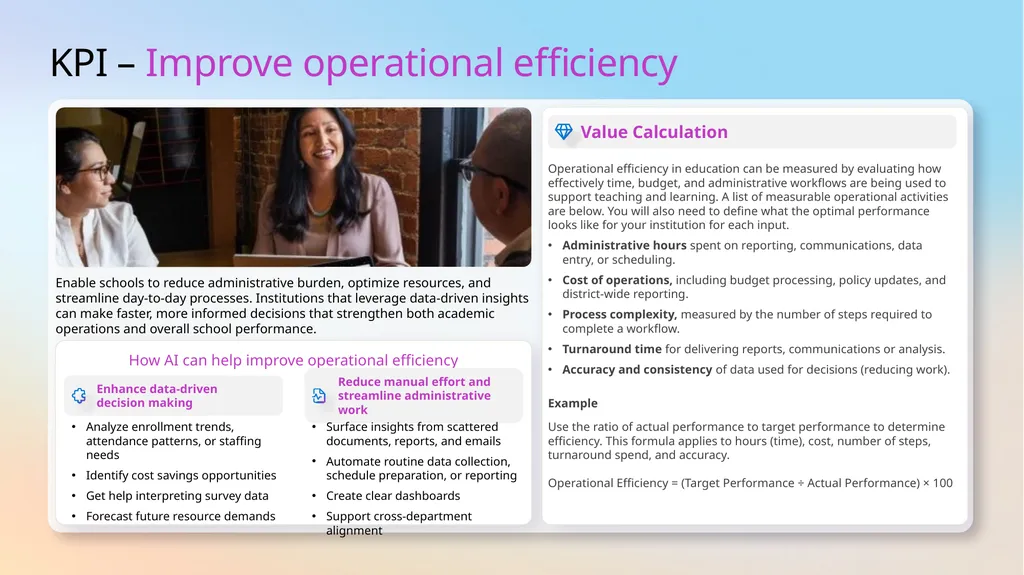
KPI – Improve operational efficiency How AI can help improve operational efficiency Enhance data-driven
decision making Reduce manual effort and streamline administrative work Enable schools to reduce administrative burden, optimize resources, and streamline day-to-day processes. Institutions that leverage data-driven insights can make faster, more informed decisions that strengthen both academic operations and overall school performance. Analyze enrollment trends, attendance patterns, or staffing needs
Identify cost savings opportunities
Get help interpreting survey data
Forecast future resource demands Surface insights from scattered documents, reports, and emails
Automate routine data collection, schedule preparation, or reporting
Create clear dashboards
Support cross-department alignment Value Calculation Operational efficiency in education can be measured by evaluating how effectively time, budget, and administrative workflows are being used to support teaching and learning. A list of measurable operational activities are below. You will also need to define what the optimal performance looks like for your institution for each input.
Administrative hours spent on reporting, communications, data entry, or scheduling.
Cost of operations, including budget processing, policy updates, and district-wide reporting.
Process complexity, measured by the number of steps required to complete a workflow.
Turnaround time for delivering reports, communications or analysis.
Accuracy and consistency of data used for decisions (reducing work).
Example
Use the ratio of actual performance to target performance to determine efficiency. This formula applies to hours (time), cost, number of steps, turnaround spend, and accuracy. Operational Efficiency = (Target Performance ÷ Actual Performance) × 100<br>
Identify cost savings opportunities
Get help interpreting survey data
Forecast future resource demands Surface insights from scattered documents, reports, and emails
Automate routine data collection, schedule preparation, or reporting
Create clear dashboards
Support cross-department alignment Value Calculation Operational efficiency in education can be measured by evaluating how effectively time, budget, and administrative workflows are being used to support teaching and learning. A list of measurable operational activities are below. You will also need to define what the optimal performance looks like for your institution for each input.
Administrative hours spent on reporting, communications, data entry, or scheduling.
Cost of operations, including budget processing, policy updates, and district-wide reporting.
Process complexity, measured by the number of steps required to complete a workflow.
Turnaround time for delivering reports, communications or analysis.
Accuracy and consistency of data used for decisions (reducing work).
Example
Use the ratio of actual performance to target performance to determine efficiency. This formula applies to hours (time), cost, number of steps, turnaround spend, and accuracy. Operational Efficiency = (Target Performance ÷ Actual Performance) × 100<br>
14
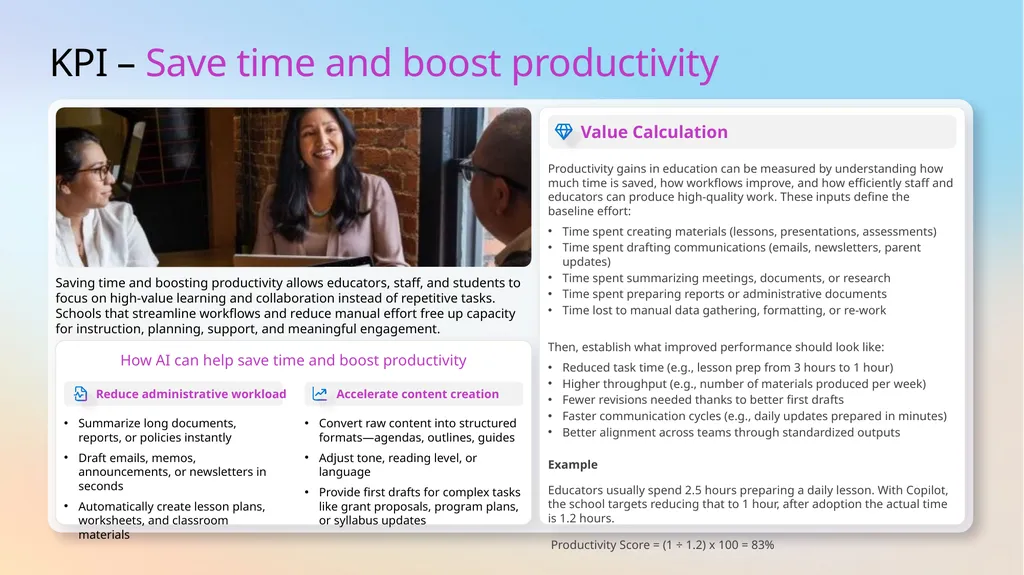
KPI – Save time and boost productivity How AI can help save time and boost productivity Reduce administrative workload Accelerate content creation Saving time and boosting productivity allows educators, staff, and students to focus on high-value learning and collaboration instead of repetitive tasks. Schools that streamline workflows and reduce manual effort free up capacity for instruction, planning, support, and meaningful engagement. Summarize long documents, reports, or policies instantly
Draft emails, memos, announcements, or newsletters in seconds
Automatically create lesson plans, worksheets, and classroom materials Convert raw content into structured formats—agendas, outlines, guides
Adjust tone, reading level, or language
Provide first drafts for complex tasks like grant proposals, program plans, or syllabus updates Value Calculation Productivity gains in education can be measured by understanding how much time is saved, how workflows improve, and how efficiently staff and educators can produce high-quality work. These inputs define the baseline effort:
Time spent creating materials (lessons, presentations, assessments)
Time spent drafting communications (emails, newsletters, parent updates)
Time spent summarizing meetings, documents, or research
Time spent preparing reports or administrative documents
Time lost to manual data gathering, formatting, or re‑work
Then, establish what improved performance should look like:
Reduced task time (e.g., lesson prep from 3 hours to 1 hour)
Higher throughput (e.g., number of materials produced per week)
Fewer revisions needed thanks to better first drafts
Faster communication cycles (e.g., daily updates prepared in minutes)
Better alignment across teams through standardized outputs
Example
Educators usually spend 2.5 hours preparing a daily lesson. With Copilot, the school targets reducing that to 1 hour, after adoption the actual time is 1.2 hours.
Productivity Score = (1 ÷ 1.2) x 100 = 83%<br>
Draft emails, memos, announcements, or newsletters in seconds
Automatically create lesson plans, worksheets, and classroom materials Convert raw content into structured formats—agendas, outlines, guides
Adjust tone, reading level, or language
Provide first drafts for complex tasks like grant proposals, program plans, or syllabus updates Value Calculation Productivity gains in education can be measured by understanding how much time is saved, how workflows improve, and how efficiently staff and educators can produce high-quality work. These inputs define the baseline effort:
Time spent creating materials (lessons, presentations, assessments)
Time spent drafting communications (emails, newsletters, parent updates)
Time spent summarizing meetings, documents, or research
Time spent preparing reports or administrative documents
Time lost to manual data gathering, formatting, or re‑work
Then, establish what improved performance should look like:
Reduced task time (e.g., lesson prep from 3 hours to 1 hour)
Higher throughput (e.g., number of materials produced per week)
Fewer revisions needed thanks to better first drafts
Faster communication cycles (e.g., daily updates prepared in minutes)
Better alignment across teams through standardized outputs
Example
Educators usually spend 2.5 hours preparing a daily lesson. With Copilot, the school targets reducing that to 1 hour, after adoption the actual time is 1.2 hours.
Productivity Score = (1 ÷ 1.2) x 100 = 83%<br>
15
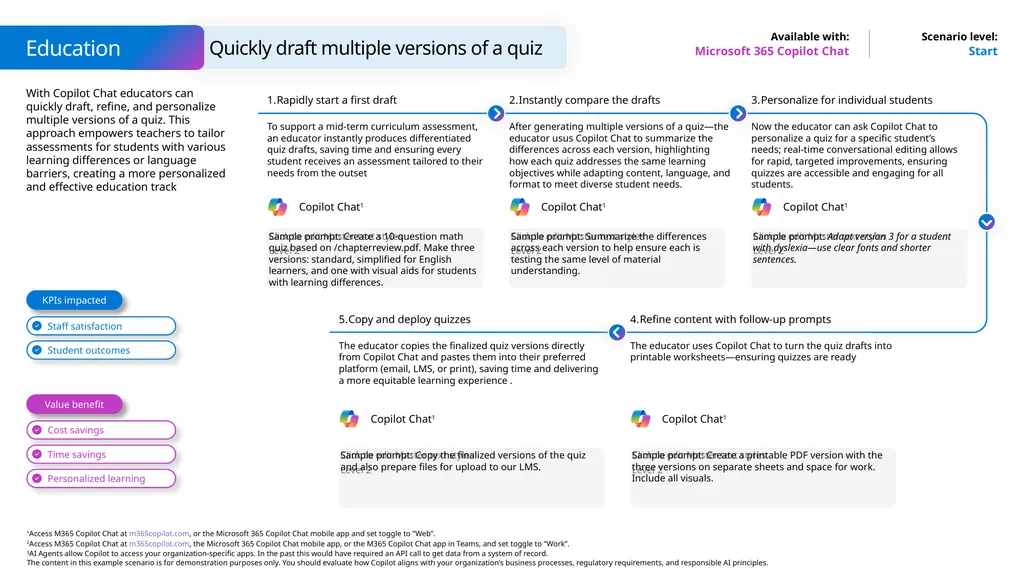
Quickly draft multiple versions of a quiz Education Microsoft 365 Copilot Chat Start With Copilot Chat educators can quickly draft, refine, and personalize multiple versions of a quiz. This approach empowers teachers to tailor assessments for students with various learning differences or language barriers, creating a more personalized and effective education track Rapidly start a first draft To support a mid-term curriculum assessment, an educator instantly produces differentiated quiz drafts, saving time and ensuring every student receives an assessment tailored to their needs from the outset Sample prompt: Create a 10-question math quiz based on /chapterreview.pdf. Make three versions: standard, simplified for English learners, and one with visual aids for students with learning differences. Instantly compare the drafts After generating multiple versions of a quiz—the educator usus Copilot Chat to summarize the differences across each version, highlighting how each quiz addresses the same learning objectives while adapting content, language, and format to meet diverse student needs. Sample prompt: Summarize the differences across each version to help ensure each is testing the same level of material understanding. Personalize for individual students Now the educator can ask Copilot Chat to personalize a quiz for a specific student’s needs; real-time conversational editing allows for rapid, targeted improvements, ensuring quizzes are accessible and engaging for all students. Sample prompt: Adapt version 3 for a student with dyslexia—use clear fonts and shorter sentences. Refine content with follow-up prompts The educator uses Copilot Chat to turn the quiz drafts into printable worksheets—ensuring quizzes are ready Sample prompt: Create a printable PDF version with the three versions on separate sheets and space for work. Include all visuals. Copy and deploy quizzes The educator copies the finalized quiz versions directly from Copilot Chat and pastes them into their preferred platform (email, LMS, or print), saving time and delivering a more equitable learning experience . Sample prompt: Copy the finalized versions of the quiz and also prepare files for upload to our LMS. Copilot Chat1 Copilot Chat1 Copilot Chat1 Copilot Chat1 Copilot Chat1 Value benefit KPIs impacted<br>
16
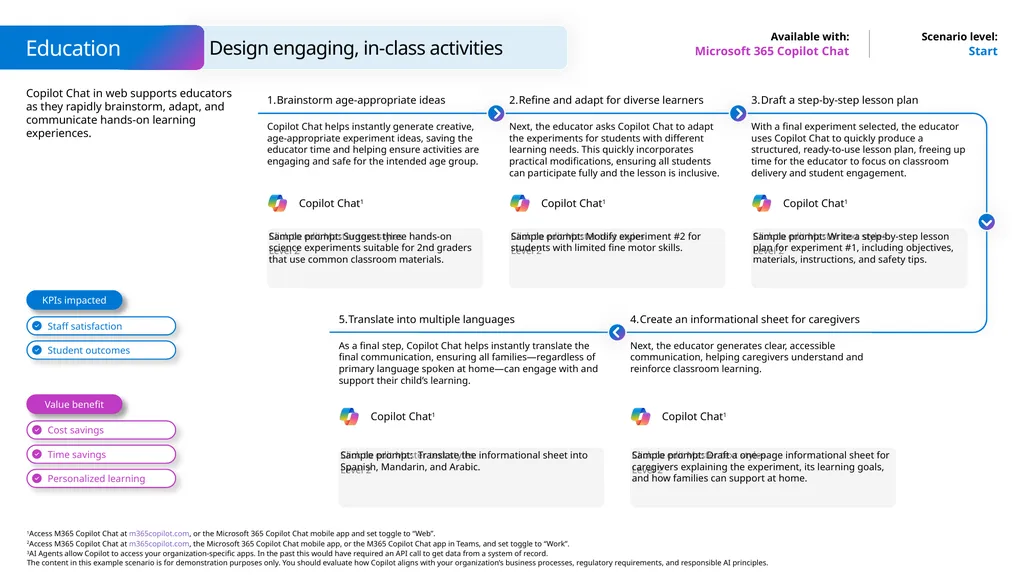
Design engaging, in-class activities Education Microsoft 365 Copilot Chat Start Copilot Chat in web supports educators as they rapidly brainstorm, adapt, and communicate hands-on learning experiences. Brainstorm age-appropriate ideas Copilot Chat helps instantly generate creative, age-appropriate experiment ideas, saving the educator time and helping ensure activities are engaging and safe for the intended age group. Sample prompt: Suggest three hands-on science experiments suitable for 2nd graders that use common classroom materials. Refine and adapt for diverse learners Next, the educator asks Copilot Chat to adapt the experiments for students with different learning needs. This quickly incorporates practical modifications, ensuring all students can participate fully and the lesson is inclusive. Sample prompt: Modify experiment #2 for students with limited fine motor skills. Draft a step-by-step lesson plan With a final experiment selected, the educator uses Copilot Chat to quickly produce a structured, ready-to-use lesson plan, freeing up time for the educator to focus on classroom delivery and student engagement. Sample prompt: Write a step-by-step lesson plan for experiment #1, including objectives, materials, instructions, and safety tips. Create an informational sheet for caregivers Next, the educator generates clear, accessible communication, helping caregivers understand and reinforce classroom learning. Sample prompt: Draft a one-page informational sheet for caregivers explaining the experiment, its learning goals, and how families can support at home. Translate into multiple languages As a final step, Copilot Chat helps instantly translate the final communication, ensuring all families—regardless of primary language spoken at home—can engage with and support their child’s learning. Sample prompt: Translate the informational sheet into Spanish, Mandarin, and Arabic. Copilot Chat1 Copilot Chat1 Copilot Chat1 Copilot Chat1 Copilot Chat1 Value benefit KPIs impacted<br>
17
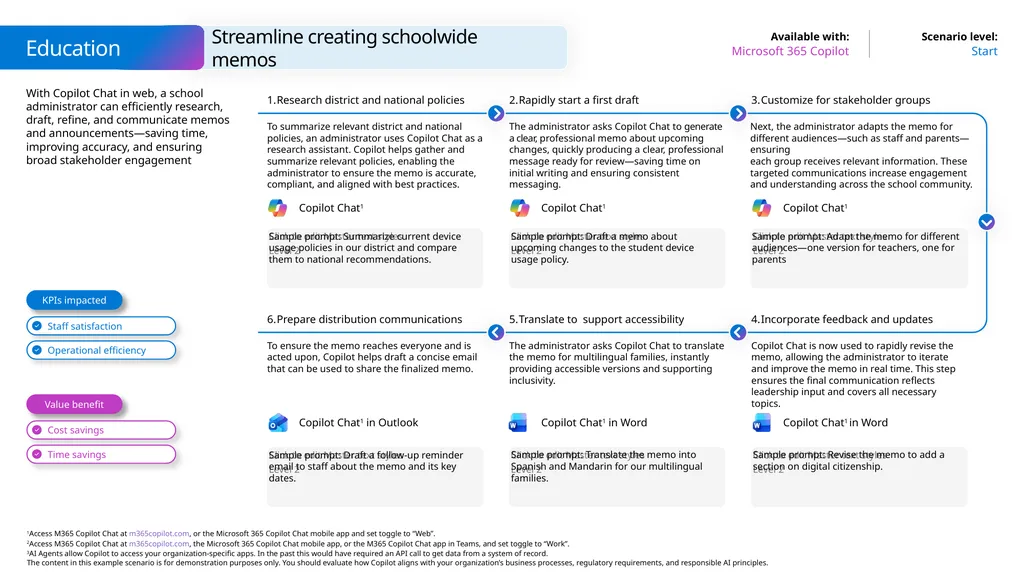
With Copilot Chat in web, a school administrator can efficiently research, draft, refine, and communicate memos and announcements—saving time, improving accuracy, and ensuring broad stakeholder engagement Streamline creating schoolwide memos Start Microsoft 365 Copilot Education Sample prompt: Summarize current device usage policies in our district and compare them to national recommendations. Research district and national policies To summarize relevant district and national policies, an administrator uses Copilot Chat as a research assistant. Copilot helps gather and summarize relevant policies, enabling the administrator to ensure the memo is accurate, compliant, and aligned with best practices. Rapidly start a first draft The administrator asks Copilot Chat to generate a clear, professional memo about upcoming changes, quickly producing a clear, professional message ready for review—saving time on initial writing and ensuring consistent messaging. Sample prompt: Adapt the memo for different audiences—one version for teachers, one for parents Customize for stakeholder groups Next, the administrator adapts the memo for different audiences—such as staff and parents—ensuring
each group receives relevant information. These targeted communications increase engagement and understanding across the school community. Sample prompt: Draft a memo about upcoming changes to the student device usage policy. Sample prompt: Draft a follow-up reminder email to staff about the memo and its key dates. Prepare distribution communications To ensure the memo reaches everyone and is acted upon, Copilot helps draft a concise email that can be used to share the finalized memo. Translate to support accessibility The administrator asks Copilot Chat to translate the memo for multilingual families, instantly providing accessible versions and supporting inclusivity. Sample prompt: Revise the memo to add a section on digital citizenship. Incorporate feedback and updates Copilot Chat is now used to rapidly revise the memo, allowing the administrator to iterate and improve the memo in real time. This step ensures the final communication reflects leadership input and covers all necessary topics. Sample prompt: Translate the memo into Spanish and Mandarin for our multilingual families. Value benefit KPIs impacted Copilot Chat1 Copilot Chat1 Copilot Chat1 Copilot Chat1 in Word Copilot Chat1 in Outlook Copilot Chat1 in Word<br>
18
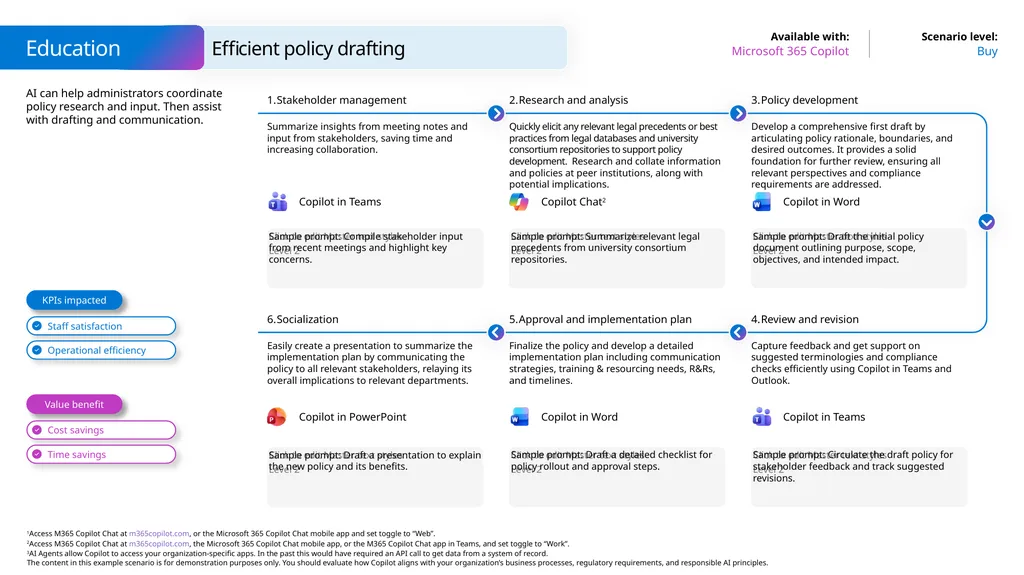
AI can help administrators coordinate policy research and input. Then assist with drafting and communication. Efficient policy drafting Buy Microsoft 365 Copilot Education Sample prompt: Compile stakeholder input from recent meetings and highlight key concerns. Stakeholder management Summarize insights from meeting notes and input from stakeholders, saving time and increasing collaboration. Research and analysis Quickly elicit any relevant legal precedents or best practices from legal databases and university consortium repositories to support policy development. Research and collate information and policies at peer institutions, along with potential implications. Sample prompt: Draft the initial policy document outlining purpose, scope, objectives, and intended impact. Policy development Develop a comprehensive first draft by articulating policy rationale, boundaries, and desired outcomes. It provides a solid foundation for further review, ensuring all relevant perspectives and compliance requirements are addressed. Sample prompt: Summarize relevant legal precedents from university consortium repositories. Sample prompt: Draft a presentation to explain the new policy and its benefits. Socialization Easily create a presentation to summarize the implementation plan by communicating the policy to all relevant stakeholders, relaying its overall implications to relevant departments. Approval and implementation plan Finalize the policy and develop a detailed implementation plan including communication strategies, training & resourcing needs, R&Rs,
and timelines. Sample prompt: Circulate the draft policy for stakeholder feedback and track suggested revisions. Review and revision Capture feedback and get support on suggested terminologies and compliance checks efficiently using Copilot in Teams and Outlook. Sample prompt: Draft a detailed checklist for policy rollout and approval steps. Value benefit KPIs impacted Copilot Chat2 Copilot in Word Copilot in PowerPoint Copilot in Word Copilot in Teams Copilot in Teams<br>
19
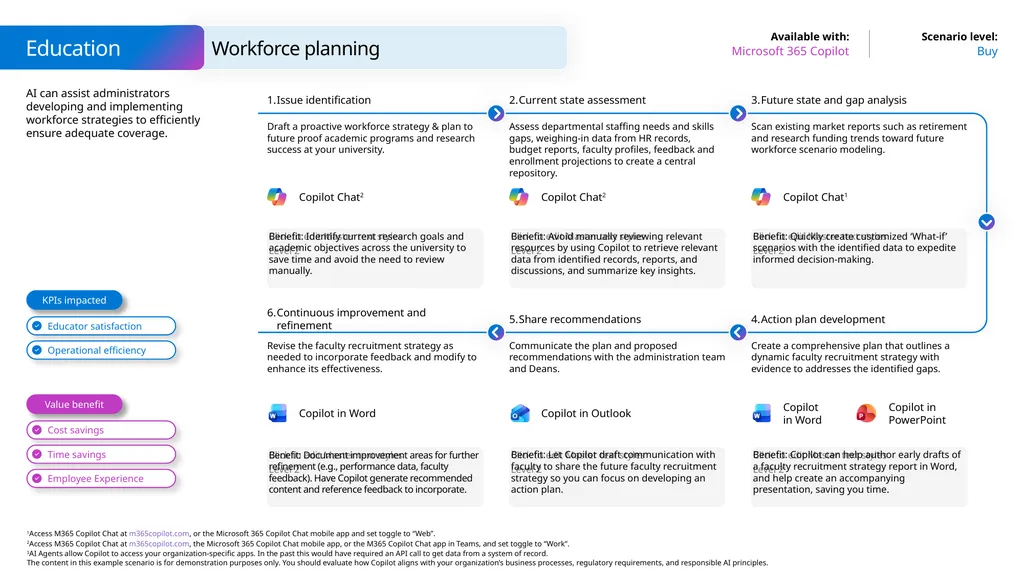
AI can assist administrators developing and implementing workforce strategies to efficiently ensure adequate coverage. Workforce planning Buy Microsoft 365 Copilot Education Benefit: Identify current research goals and academic objectives across the university to save time and avoid the need to review manually. Issue identification Draft a proactive workforce strategy & plan to future proof academic programs and research success at your university. Current state assessment Assess departmental staffing needs and skills gaps, weighing-in data from HR records, budget reports, faculty profiles, feedback and enrollment projections to create a central repository. Benefit: Quickly create customized ‘What-if’ scenarios with the identified data to expedite informed decision-making. Future state and gap analysis Scan existing market reports such as retirement and research funding trends toward future workforce scenario modeling. Benefit: Avoid manually reviewing relevant resources by using Copilot to retrieve relevant data from identified records, reports, and discussions, and summarize key insights. Benefit: Document improvement areas for further refinement (e.g., performance data, faculty feedback). Have Copilot generate recommended content and reference feedback to incorporate. Continuous improvement and refinement Revise the faculty recruitment strategy as needed to incorporate feedback and modify to enhance its effectiveness. Share recommendations Communicate the plan and proposed recommendations with the administration team and Deans. Benefit: Copilot can help author early drafts of a faculty recruitment strategy report in Word,
and help create an accompanying presentation, saving you time. Action plan development Create a comprehensive plan that outlines a dynamic faculty recruitment strategy with evidence to addresses the identified gaps. Benefit: Let Copilot draft communication with faculty to share the future faculty recruitment strategy so you can focus on developing an action plan. Value benefit KPIs impacted Copilot Chat2 Copilot Chat1 Copilot Chat2 Copilot in Outlook Copilot in Word Copilot in Word Copilot in PowerPoint<br>
20
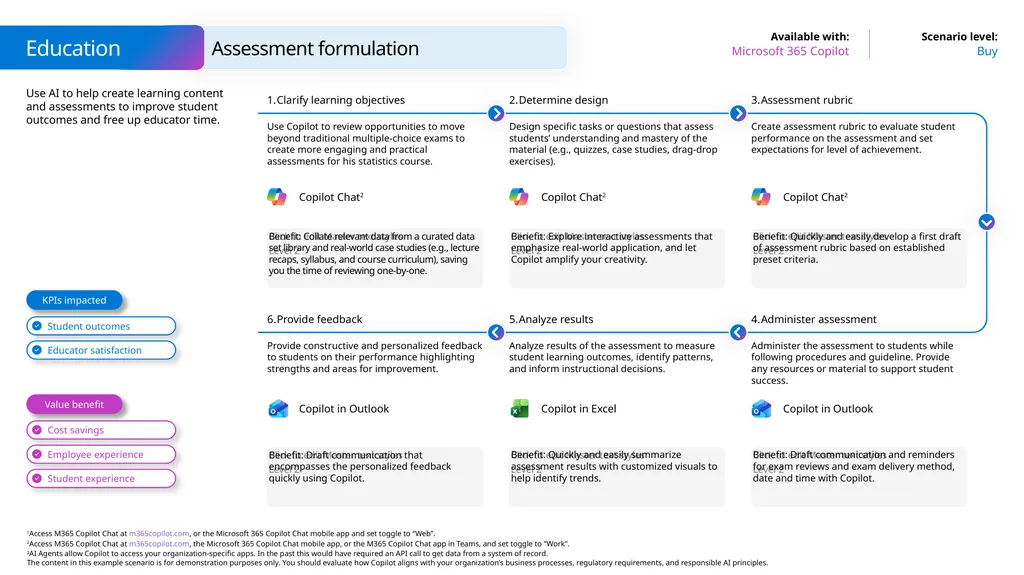
Use AI to help create learning content and assessments to improve student outcomes and free up educator time. Assessment formulation Buy Microsoft 365 Copilot Education Benefit: Collate relevant data from a curated data set library and real-world case studies (e.g., lecture recaps, syllabus, and course curriculum), saving you the time of reviewing one-by-one. Clarify learning objectives Use Copilot to review opportunities to move beyond traditional multiple-choice exams to create more engaging and practical assessments for his statistics course. Determine design Design specific tasks or questions that assess students’ understanding and mastery of the material (e.g., quizzes, case studies, drag-drop exercises). Benefit: Quickly and easily develop a first draft of assessment rubric based on established preset criteria. Assessment rubric Create assessment rubric to evaluate student performance on the assessment and set expectations for level of achievement. Benefit: Explore interactive assessments that emphasize real-world application, and let Copilot amplify your creativity. Benefit: Draft communication that encompasses the personalized feedback quickly using Copilot. Provide feedback Provide constructive and personalized feedback to students on their performance highlighting strengths and areas for improvement. Analyze results Analyze results of the assessment to measure student learning outcomes, identify patterns, and inform instructional decisions. Benefit: Draft communication and reminders for exam reviews and exam delivery method, date and time with Copilot. Administer assessment Administer the assessment to students while following procedures and guideline. Provide any resources or material to support student success. Benefit: Quickly and easily summarize assessment results with customized visuals to help identify trends. Value benefit KPIs impacted Copilot Chat2 Copilot Chat2 Copilot Chat2 Copilot in Outlook Copilot in Outlook Copilot in Excel<br>
21
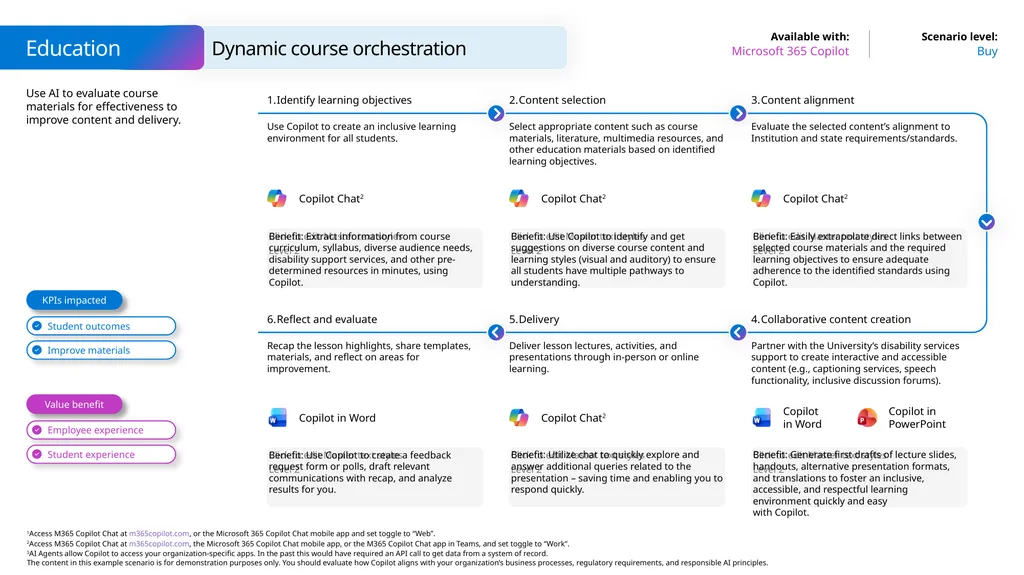
Use AI to evaluate course materials for effectiveness to improve content and delivery. Dynamic course orchestration Buy Microsoft 365 Copilot Education Benefit: Extract information from course curriculum, syllabus, diverse audience needs, disability support services, and other pre-determined resources in minutes, using Copilot. Identify learning objectives Use Copilot to create an inclusive learning environment for all students. Content selection Select appropriate content such as course materials, literature, multimedia resources, and other education materials based on identified learning objectives. Benefit: Easily extrapolate direct links between selected course materials and the required learning objectives to ensure adequate adherence to the identified standards using Copilot. Content alignment Evaluate the selected content’s alignment to Institution and state requirements/standards. Benefit: Use Copilot to identify and get suggestions on diverse course content and learning styles (visual and auditory) to ensure all students have multiple pathways to understanding. Benefit: Use Copilot to create a feedback request form or polls, draft relevant communications with recap, and analyze results for you. Reflect and evaluate Recap the lesson highlights, share templates, materials, and reflect on areas for improvement. Delivery Deliver lesson lectures, activities, and presentations through in-person or online learning. Benefit: Generate first drafts of lecture slides, handouts, alternative presentation formats, and translations to foster an inclusive, accessible, and respectful learning environment quickly and easy
with Copilot. Collaborative content creation Partner with the University’s disability services support to create interactive and accessible content (e.g., captioning services, speech functionality, inclusive discussion forums). Benefit: Utilize chat to quickly explore and answer additional queries related to the presentation – saving time and enabling you to respond quickly. Value benefit KPIs impacted Copilot in Word Copilot in Word Copilot in PowerPoint Copilot Chat2 Copilot Chat2 Copilot Chat2 Copilot Chat2<br>
22
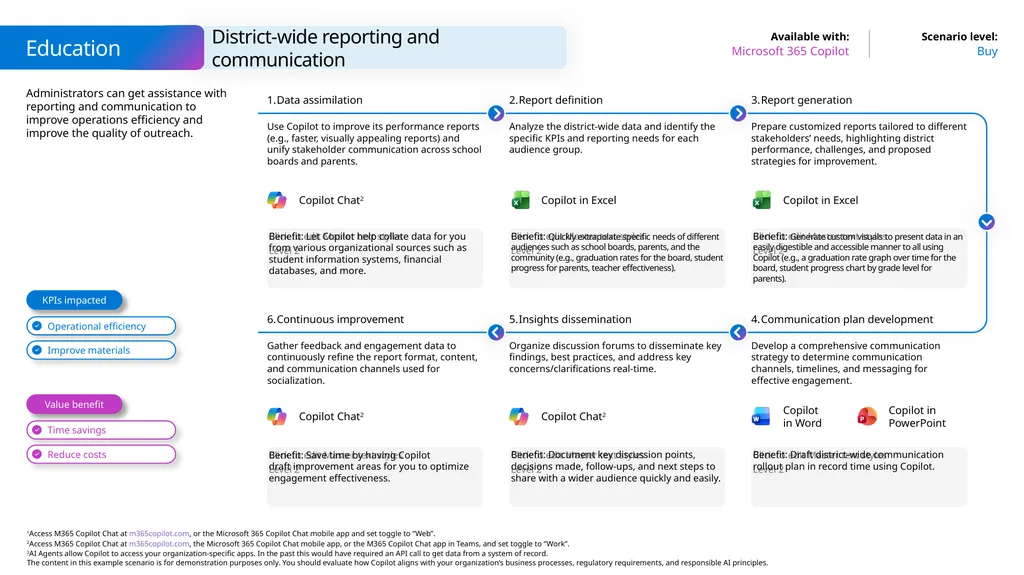
Administrators can get assistance with reporting and communication to improve operations efficiency and improve the quality of outreach. District-wide reporting and communication Buy Microsoft 365 Copilot Education Benefit: Let Copilot help collate data for you from various organizational sources such as student information systems, financial databases, and more. Data assimilation Use Copilot to improve its performance reports (e.g., faster, visually appealing reports) and unify stakeholder communication across school boards and parents. Report definition Analyze the district-wide data and identify the specific KPIs and reporting needs for each audience group. Benefit: Generate custom visuals to present data in an easily digestible and accessible manner to all using Copilot (e.g., a graduation rate graph over time for the board, student progress chart by grade level for parents). Report generation Prepare customized reports tailored to different stakeholders’ needs, highlighting district performance, challenges, and proposed strategies for improvement. Benefit: Quickly extrapolate specific needs of different audiences such as school boards, parents, and the community (e.g., graduation rates for the board, student progress for parents, teacher effectiveness). Benefit: Save time by having Copilot draft improvement areas for you to optimize engagement effectiveness. Continuous improvement Gather feedback and engagement data to continuously refine the report format, content, and communication channels used for socialization. Insights dissemination Organize discussion forums to disseminate key findings, best practices, and address key concerns/clarifications real-time. Benefit: Draft district-wide communication rollout plan in record time using Copilot. Communication plan development Develop a comprehensive communication strategy to determine communication channels, timelines, and messaging for effective engagement. Benefit: Document key discussion points, decisions made, follow-ups, and next steps to share with a wider audience quickly and easily. Value benefit KPIs impacted Copilot Chat2 Copilot Chat2 Copilot Chat2 Copilot in Excel Copilot in Excel Copilot in Word Copilot in PowerPoint<br>
23
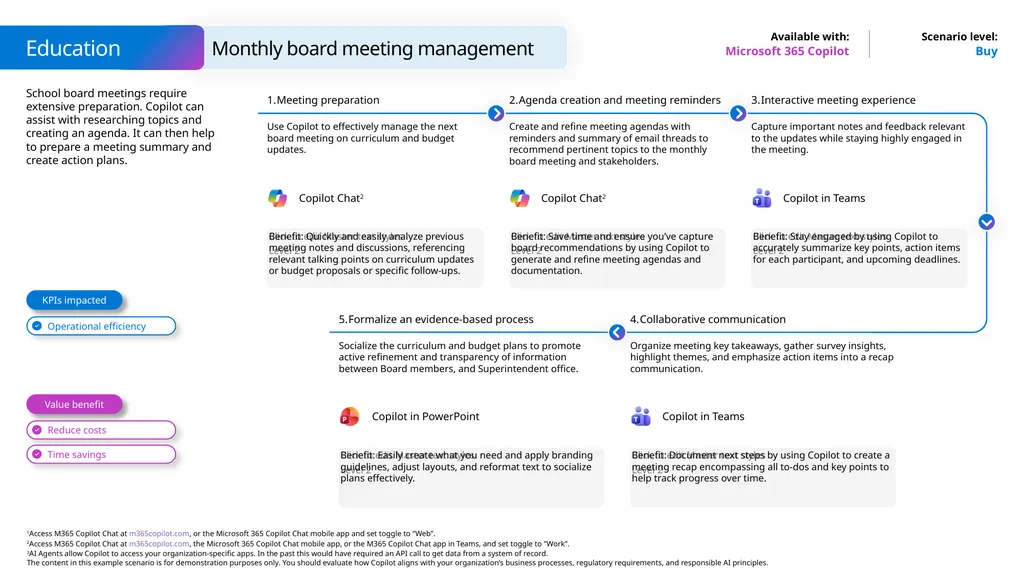
School board meetings require extensive preparation. Copilot can assist with researching topics and creating an agenda. It can then help to prepare a meeting summary and create action plans. Buy Microsoft 365 Copilot Benefit: Quickly and easily analyze previous meeting notes and discussions, referencing relevant talking points on curriculum updates or budget proposals or specific follow-ups. Meeting preparation Use Copilot to effectively manage the next board meeting on curriculum and budget updates. Agenda creation and meeting reminders Create and refine meeting agendas with reminders and summary of email threads to recommend pertinent topics to the monthly board meeting and stakeholders. Benefit: Stay engaged by using Copilot to accurately summarize key points, action items for each participant, and upcoming deadlines. Interactive meeting experience Capture important notes and feedback relevant to the updates while staying highly engaged in the meeting. Benefit: Save time and ensure you’ve capture board recommendations by using Copilot to generate and refine meeting agendas and documentation. Formalize an evidence-based process Socialize the curriculum and budget plans to promote active refinement and transparency of information between Board members, and Superintendent office. Benefit: Document next steps by using Copilot to create a meeting recap encompassing all to-dos and key points to help track progress over time. Collaborative communication Organize meeting key takeaways, gather survey insights, highlight themes, and emphasize action items into a recap communication. Benefit: Easily create what you need and apply branding guidelines, adjust layouts, and reformat text to socialize plans effectively. Value benefit KPIs impacted Monthly board meeting management Education Copilot Chat2 Copilot Chat2 Copilot in Teams Copilot in Teams Copilot in PowerPoint<br>
24
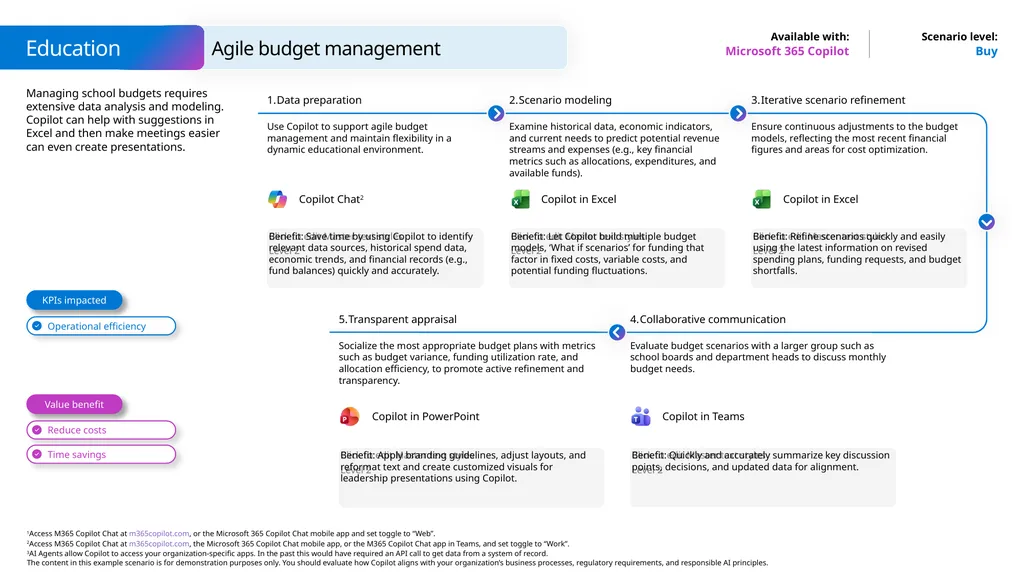
Managing school budgets requires extensive data analysis and modeling. Copilot can help with suggestions in Excel and then make meetings easier can even create presentations. Buy Microsoft 365 Copilot Benefit: Save time by using Copilot to identify relevant data sources, historical spend data, economic trends, and financial records (e.g., fund balances) quickly and accurately. Data preparation Use Copilot to support agile budget management and maintain flexibility in a dynamic educational environment. Scenario modeling Examine historical data, economic indicators, and current needs to predict potential revenue streams and expenses (e.g., key financial metrics such as allocations, expenditures, and available funds). Benefit: Refine scenarios quickly and easily using the latest information on revised spending plans, funding requests, and budget shortfalls. Iterative scenario refinement Ensure continuous adjustments to the budget models, reflecting the most recent financial figures and areas for cost optimization. Benefit: Let Copilot build multiple budget models, ‘What if scenarios’ for funding that factor in fixed costs, variable costs, and potential funding fluctuations. Transparent appraisal Socialize the most appropriate budget plans with metrics such as budget variance, funding utilization rate, and allocation efficiency, to promote active refinement and transparency. Benefit: Quickly and accurately summarize key discussion points, decisions, and updated data for alignment. Collaborative communication Evaluate budget scenarios with a larger group such as school boards and department heads to discuss monthly budget needs. Benefit: Apply branding guidelines, adjust layouts, and reformat text and create customized visuals for leadership presentations using Copilot. Value benefit KPIs impacted Agile budget management Education Copilot Chat2 Copilot in Teams Copilot in PowerPoint Copilot in Excel Copilot in Excel<br>
25
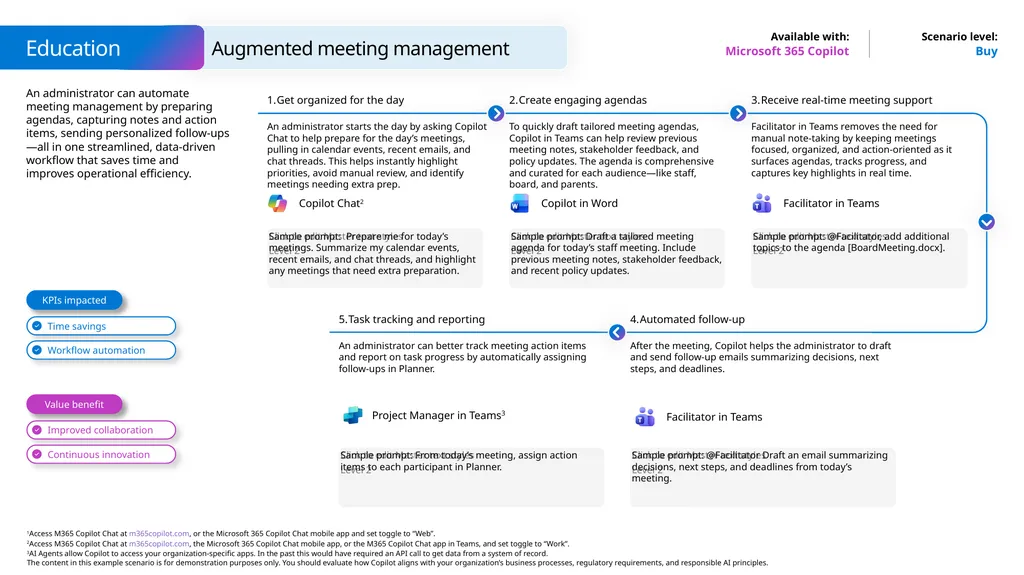
An administrator can automate meeting management by preparing agendas, capturing notes and action items, sending personalized follow-ups—all in one streamlined, data-driven workflow that saves time and improves operational efficiency. Buy Microsoft 365 Copilot Sample prompt: Prepare me for today’s meetings. Summarize my calendar events, recent emails, and chat threads, and highlight any meetings that need extra preparation. Get organized for the day An administrator starts the day by asking Copilot Chat to help prepare for the day’s meetings, pulling in calendar events, recent emails, and chat threads. This helps instantly highlight priorities, avoid manual review, and identify meetings needing extra prep. Create engaging agendas To quickly draft tailored meeting agendas, Copilot in Teams can help review previous meeting notes, stakeholder feedback, and policy updates. The agenda is comprehensive and curated for each audience—like staff, board, and parents. Sample prompt: @Facilitator, add additional topics to the agenda [BoardMeeting.docx]. Receive real-time meeting support Facilitator in Teams removes the need for manual note-taking by keeping meetings focused, organized, and action-oriented as it surfaces agendas, tracks progress, and captures key highlights in real time. Sample prompt: Draft a tailored meeting agenda for today’s staff meeting. Include previous meeting notes, stakeholder feedback, and recent policy updates. Task tracking and reporting An administrator can better track meeting action items and report on task progress by automatically assigning follow-ups in Planner. Sample prompt: @Facilitator Draft an email summarizing decisions, next steps, and deadlines from today’s meeting. Automated follow-up After the meeting, Copilot helps the administrator to draft and send follow-up emails summarizing decisions, next steps, and deadlines. Sample prompt: From today’s meeting, assign action items to each participant in Planner. Value benefit KPIs impacted Augmented meeting management Education Copilot in Word Facilitator in Teams Project Manager in Teams3 Copilot Chat2 Facilitator in Teams<br>
26
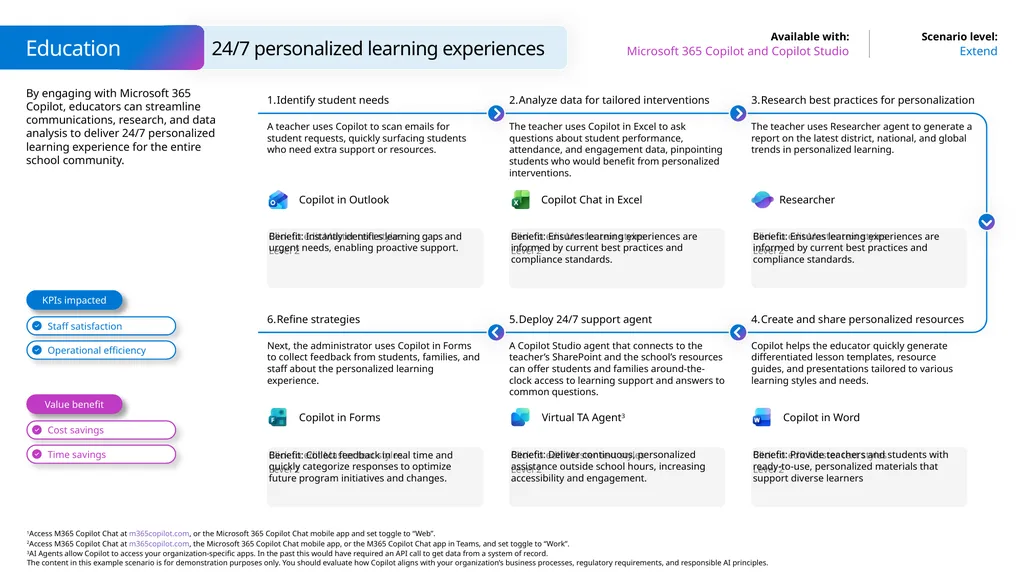
By engaging with Microsoft 365 Copilot, educators can streamline communications, research, and data analysis to deliver 24/7 personalized learning experience for the entire school community. 24/7 personalized learning experiences Extend Microsoft 365 Copilot and Copilot Studio Education Benefit: Instantly identifies learning gaps and urgent needs, enabling proactive support. Identify student needs A teacher uses Copilot to scan emails for student requests, quickly surfacing students who need extra support or resources. Analyze data for tailored interventions The teacher uses Copilot in Excel to ask questions about student performance, attendance, and engagement data, pinpointing students who would benefit from personalized interventions. Benefit: Ensures learning experiences are informed by current best practices and compliance standards. Research best practices for personalization The teacher uses Researcher agent to generate a report on the latest district, national, and global trends in personalized learning. Benefit: Ensures learning experiences are informed by current best practices and compliance standards. Benefit: Collect feedback in real time and quickly categorize responses to optimize future program initiatives and changes. Refine strategies Next, the administrator uses Copilot in Forms to collect feedback from students, families, and staff about the personalized learning experience. Deploy 24/7 support agent A Copilot Studio agent that connects to the teacher’s SharePoint and the school’s resources can offer students and families around-the-clock access to learning support and answers to common questions. Benefit: Provide teachers and students with ready-to-use, personalized materials that support diverse learners Create and share personalized resources Copilot helps the educator quickly generate differentiated lesson templates, resource guides, and presentations tailored to various learning styles and needs. Benefit: Deliver continuous, personalized assistance outside school hours, increasing accessibility and engagement. Value benefit KPIs impacted Copilot in Forms Copilot in Word Copilot in Outlook Researcher Copilot Chat in Excel Virtual TA Agent3<br>
27
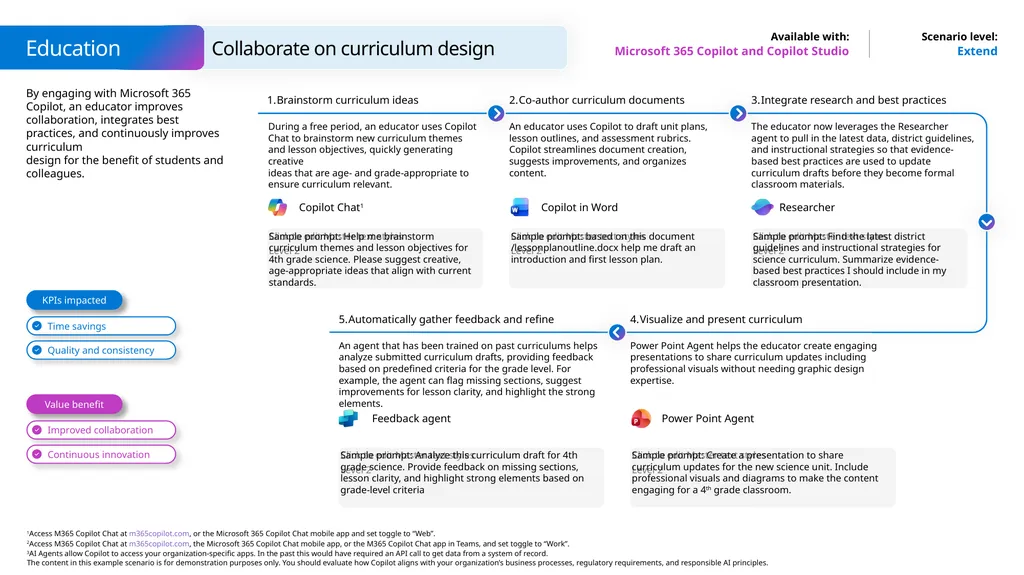
By engaging with Microsoft 365 Copilot, an educator improves collaboration, integrates best practices, and continuously improves curriculum
design for the benefit of students and colleagues. Extend Microsoft 365 Copilot and Copilot Studio Sample prompt: Help me brainstorm curriculum themes and lesson objectives for 4th grade science. Please suggest creative, age-appropriate ideas that align with current standards. Brainstorm curriculum ideas During a free period, an educator uses Copilot Chat to brainstorm new curriculum themes and lesson objectives, quickly generating creative
ideas that are age- and grade-appropriate to ensure curriculum relevant. Co-author curriculum documents An educator uses Copilot to draft unit plans, lesson outlines, and assessment rubrics. Copilot streamlines document creation, suggests improvements, and organizes content. Sample prompt: Find the latest district guidelines and instructional strategies for science curriculum. Summarize evidence-based best practices I should include in my classroom presentation. Integrate research and best practices The educator now leverages the Researcher agent to pull in the latest data, district guidelines, and instructional strategies so that evidence-based best practices are used to update curriculum drafts before they become formal classroom materials. Sample prompt: based on this document /lessonplanoutline.docx help me draft an introduction and first lesson plan. Automatically gather feedback and refine An agent that has been trained on past curriculums helps analyze submitted curriculum drafts, providing feedback based on predefined criteria for the grade level. For example, the agent can flag missing sections, suggest improvements for lesson clarity, and highlight the strong elements. Sample prompt: Create a presentation to share curriculum updates for the new science unit. Include professional visuals and diagrams to make the content engaging for a 4th grade classroom. Visualize and present curriculum Power Point Agent helps the educator create engaging presentations to share curriculum updates including professional visuals without needing graphic design expertise. Sample prompt: Analyze this curriculum draft for 4th grade science. Provide feedback on missing sections, lesson clarity, and highlight strong elements based on grade-level criteria Value benefit KPIs impacted Collaborate on curriculum design Education Copilot Chat1 Power Point Agent Feedback agent Copilot in Word Researcher<br>
28
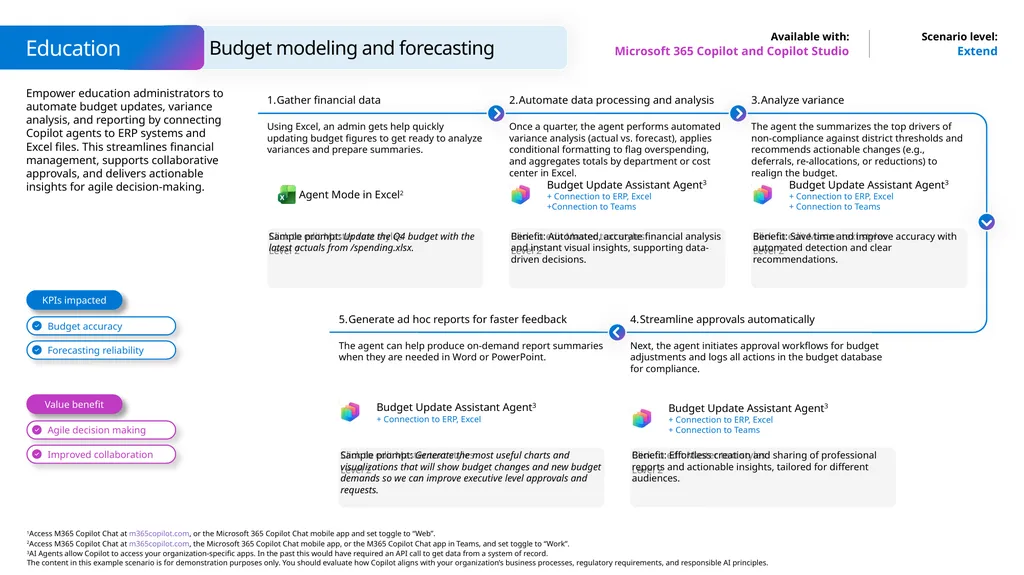
Budget modeling and forecasting Education Microsoft 365 Copilot and Copilot Studio Extend Empower education administrators to automate budget updates, variance analysis, and reporting by connecting Copilot agents to ERP systems and Excel files. This streamlines financial management, supports collaborative approvals, and delivers actionable insights for agile decision-making. Gather financial data Using Excel, an admin gets help quickly updating budget figures to get ready to analyze variances and prepare summaries. Sample prompt: Update the Q4 budget with the latest actuals from /spending.xlsx. Automate data processing and analysis Once a quarter, the agent performs automated variance analysis (actual vs. forecast), applies conditional formatting to flag overspending, and aggregates totals by department or cost center in Excel. Benefit: Automated, accurate financial analysis and instant visual insights, supporting data-driven decisions. Analyze variance The agent the summarizes the top drivers of non-compliance against district thresholds and recommends actionable changes (e.g., deferrals, re-allocations, or reductions) to realign the budget. Benefit: Save time and improve accuracy with automated detection and clear recommendations. Streamline approvals automatically Next, the agent initiates approval workflows for budget adjustments and logs all actions in the budget database for compliance. Benefit: Effortless creation and sharing of professional reports and actionable insights, tailored for different audiences. Generate ad hoc reports for faster feedback The agent can help produce on-demand report summaries when they are needed in Word or PowerPoint. Sample prompt: Generate the most useful charts and visualizations that will show budget changes and new budget demands so we can improve executive level approvals and requests. Agent Mode in Excel2 Value benefit KPIs impacted Budget Update Assistant Agent3
+ Connection to ERP, Excel +Connection to Teams Budget Update Assistant Agent3
+ Connection to ERP, Excel + Connection to Teams Budget Update Assistant Agent3
+ Connection to ERP, Excel Budget Update Assistant Agent3
+ Connection to ERP, Excel + Connection to Teams<br>
+ Connection to ERP, Excel +Connection to Teams Budget Update Assistant Agent3
+ Connection to ERP, Excel + Connection to Teams Budget Update Assistant Agent3
+ Connection to ERP, Excel Budget Update Assistant Agent3
+ Connection to ERP, Excel + Connection to Teams<br>
29
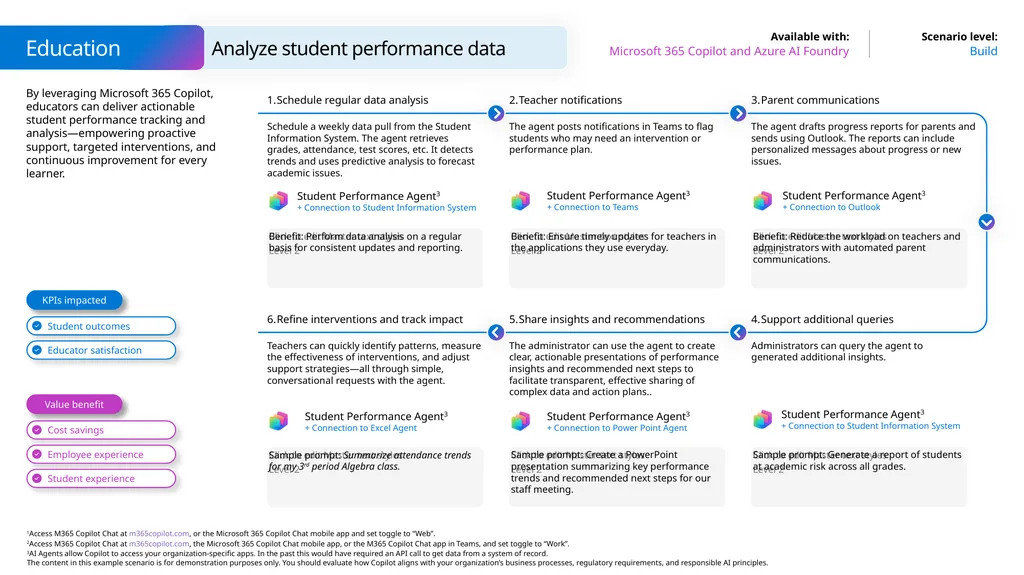
By leveraging Microsoft 365 Copilot, educators can deliver actionable student performance tracking and analysis—empowering proactive support, targeted interventions, and continuous improvement for every learner. Analyze student performance data Build Microsoft 365 Copilot and Azure AI Foundry Education Benefit: Perform data analysis on a regular basis for consistent updates and reporting. Schedule regular data analysis Schedule a weekly data pull from the Student Information System. The agent retrieves grades, attendance, test scores, etc. It detects trends and uses predictive analysis to forecast academic issues. Teacher notifications The agent posts notifications in Teams to flag students who may need an intervention or performance plan. Benefit: Reduce the workload on teachers and administrators with automated parent communications. Parent communications The agent drafts progress reports for parents and sends using Outlook. The reports can include personalized messages about progress or new issues. Benefit: Ensure timely updates for teachers in the applications they use everyday. Refine interventions and track impact Share insights and recommendations The administrator can use the agent to create clear, actionable presentations of performance insights and recommended next steps to facilitate transparent, effective sharing of complex data and action plans.. Sample prompt: Generate a report of students at academic risk across all grades. Support additional queries Administrators can query the agent to generated additional insights. Sample prompt: Create a PowerPoint presentation summarizing key performance trends and recommended next steps for our staff meeting. Student Performance Agent3
+ Connection to Student Information System Student Performance Agent3
+ Connection to Student Information System Value benefit KPIs impacted Student Performance Agent3
+ Connection to Teams Student Performance Agent3
+ Connection to Outlook Student Performance Agent3
+ Connection to Power Point Agent Sample prompt: Summarize attendance trends for my 3rd period Algebra class. Teachers can quickly identify patterns, measure the effectiveness of interventions, and adjust support strategies—all through simple, conversational requests with the agent. Student Performance Agent3
+ Connection to Excel Agent<br>
+ Connection to Student Information System Student Performance Agent3
+ Connection to Student Information System Value benefit KPIs impacted Student Performance Agent3
+ Connection to Teams Student Performance Agent3
+ Connection to Outlook Student Performance Agent3
+ Connection to Power Point Agent Sample prompt: Summarize attendance trends for my 3rd period Algebra class. Teachers can quickly identify patterns, measure the effectiveness of interventions, and adjust support strategies—all through simple, conversational requests with the agent. Student Performance Agent3
+ Connection to Excel Agent<br>
30
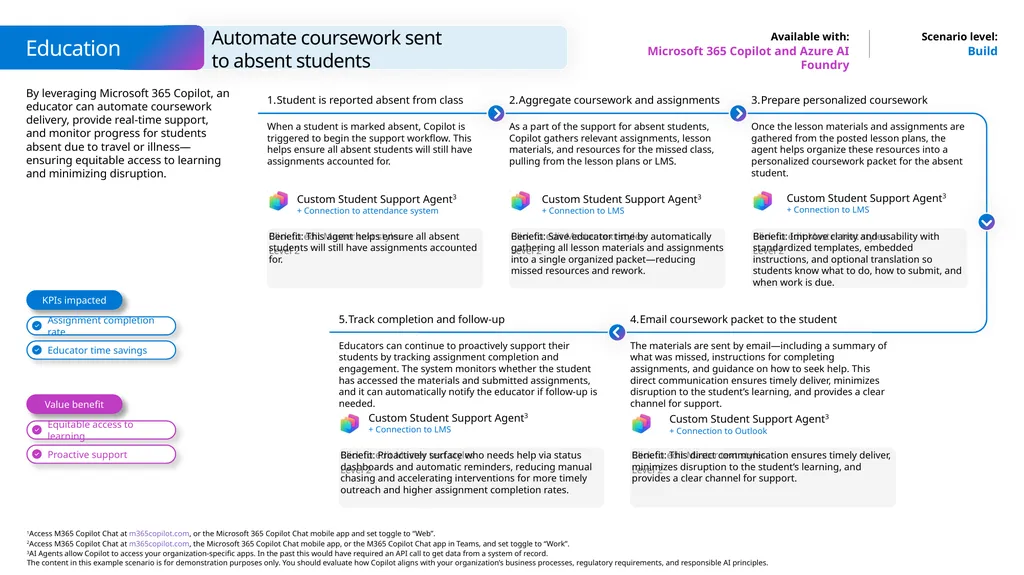
By leveraging Microsoft 365 Copilot, an educator can automate coursework delivery, provide real-time support, and monitor progress for students absent due to travel or illness—ensuring equitable access to learning and minimizing disruption. Build Microsoft 365 Copilot and Azure AI Foundry Benefit: This agent helps ensure all absent students will still have assignments accounted for. Student is reported absent from class When a student is marked absent, Copilot is triggered to begin the support workflow. This helps ensure all absent students will still have assignments accounted for. Aggregate coursework and assignments As a part of the support for absent students, Copilot gathers relevant assignments, lesson materials, and resources for the missed class, pulling from the lesson plans or LMS. Benefit: Improve clarity and usability with standardized templates, embedded instructions, and optional translation so students know what to do, how to submit, and when work is due. Prepare personalized coursework Once the lesson materials and assignments are gathered from the posted lesson plans, the agent helps organize these resources into a personalized coursework packet for the absent student. Benefit: Save educator time by automatically gathering all lesson materials and assignments into a single organized packet—reducing missed resources and rework. Track completion and follow-up Educators can continue to proactively support their students by tracking assignment completion and engagement. The system monitors whether the student has accessed the materials and submitted assignments, and it can automatically notify the educator if follow-up is needed. Benefit: This direct communication ensures timely deliver, minimizes disruption to the student’s learning, and provides a clear channel for support. Email coursework packet to the student The materials are sent by email—including a summary of what was missed, instructions for completing assignments, and guidance on how to seek help. This direct communication ensures timely deliver, minimizes disruption to the student’s learning, and provides a clear channel for support. Benefit: Proactively surface who needs help via status dashboards and automatic reminders, reducing manual chasing and accelerating interventions for more timely outreach and higher assignment completion rates. Value benefit KPIs impacted Automate coursework sent
to absent students Education Custom Student Support Agent3
+ Connection to attendance system Custom Student Support Agent3
+ Connection to LMS Custom Student Support Agent3
+ Connection to LMS Custom Student Support Agent3
+ Connection to LMS Custom Student Support Agent3
+ Connection to Outlook<br>
+ Connection to attendance system Custom Student Support Agent3
+ Connection to LMS Custom Student Support Agent3
+ Connection to LMS Custom Student Support Agent3
+ Connection to LMS Custom Student Support Agent3
+ Connection to Outlook<br>
31
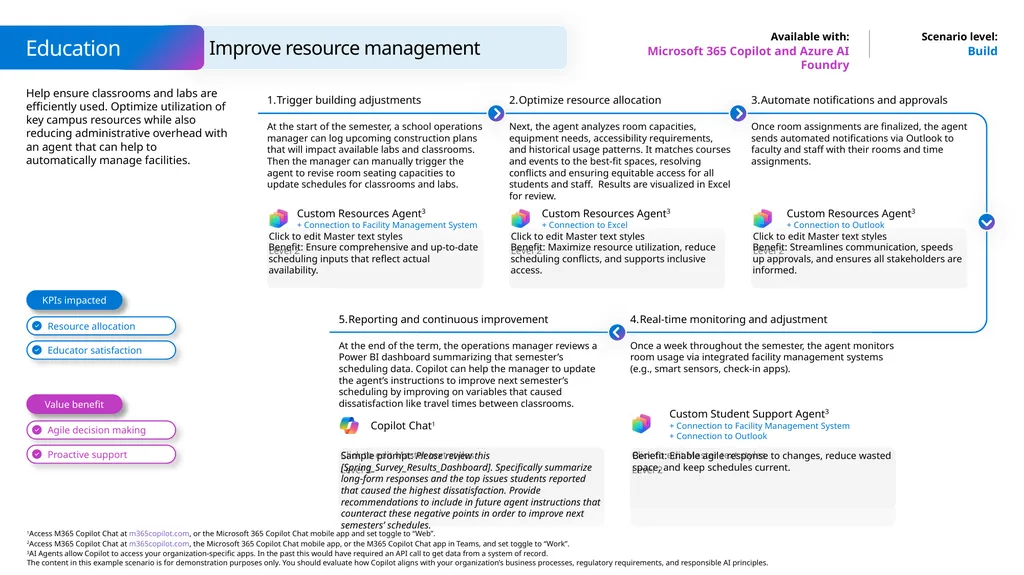
Improve resource management Education Microsoft 365 Copilot and Azure AI Foundry Build Help ensure classrooms and labs are efficiently used. Optimize utilization of key campus resources while also reducing administrative overhead with an agent that can help to automatically manage facilities. Trigger building adjustments At the start of the semester, a school operations manager can log upcoming construction plans that will impact available labs and classrooms. Then the manager can manually trigger the agent to revise room seating capacities to update schedules for classrooms and labs. Benefit: Ensure comprehensive and up-to-date scheduling inputs that reflect actual availability. Optimize resource allocation Next, the agent analyzes room capacities, equipment needs, accessibility requirements, and historical usage patterns. It matches courses and events to the best-fit spaces, resolving conflicts and ensuring equitable access for all students and staff. Results are visualized in Excel for review. Benefit: Maximize resource utilization, reduce scheduling conflicts, and supports inclusive access. Automate notifications and approvals Once room assignments are finalized, the agent sends automated notifications via Outlook to faculty and staff with their rooms and time assignments. Benefit: Streamlines communication, speeds up approvals, and ensures all stakeholders are informed. Real-time monitoring and adjustment Once a week throughout the semester, the agent monitors room usage via integrated facility management systems (e.g., smart sensors, check-in apps). Benefit: Enable agile response to changes, reduce wasted space, and keep schedules current. Reporting and continuous improvement At the end of the term, the operations manager reviews a Power BI dashboard summarizing that semester’s scheduling data. Copilot can help the manager to update the agent’s instructions to improve next semester’s scheduling by improving on variables that caused dissatisfaction like travel times between classrooms. Sample prompt: Please review this [Spring_Survey_Results_Dashboard]. Specifically summarize long-form responses and the top issues students reported that caused the highest dissatisfaction. Provide recommendations to include in future agent instructions that counteract these negative points in order to improve next semesters’ schedules. Value benefit KPIs impacted Custom Resources Agent3
+ Connection to Facility Management System Custom Resources Agent3
+ Connection to Excel Custom Resources Agent3
+ Connection to Outlook Custom Student Support Agent3
+ Connection to Facility Management System + Connection to Outlook Copilot Chat1<br>
+ Connection to Facility Management System Custom Resources Agent3
+ Connection to Excel Custom Resources Agent3
+ Connection to Outlook Custom Student Support Agent3
+ Connection to Facility Management System + Connection to Outlook Copilot Chat1<br>
32
A day in the life of a K-12 Educator Buy Microsoft 365 Copilot 7:00 am – Catch up on emails Cassandra needs to catch up parent emails and critical messages from school administration, so she has Copilot summarize her emails and chats from the past week with key actions. Benefit: Easily catch up on mail and focus on the most important messages to address. Use additional time to prepare for the day. 8:15 am – Reply to emails Cassandra asks Copilot to create a general message that outlines the plan tonight’s parent and guardian meeting. Benefit: Get started with a draft and spend more time working on the details based on recent
community feedback. 9:00 am – Get planning feedback Cassandra uses Copilot in Word to review her lesson plan, add differentiated learning activities, and adjust the reading level for the formative assessment questions. Benefit: Personalize learning for students to ensure the class materials are provided in the way that works best for them. 11:00 am – Analyze data Cassandra uses Agent Mode in Excel to get insights from the data that help her understand where and which students might be struggling ahead of their next exam. Benefit: Effortlessly identify insights and use them to build a plan for a review session that focuses where they might need more support. 2:00 pm – Recap a meeting Cassandra missed the curriculum meeting while taking students to the library. She uses Copilot to review the meeting summary and next steps. Benefit: Avoid feeling behind and stay connected while prioritizing time with students. 4:00 pm – Create a presentation Cassandra is making the final touches for tonight's meeting. She uses PowerPoint Agent to quickly build a PowerPoint presentation based on the class syllabus. Benefit: Bring your files to life and focus on your ideas and final touches for the meeting.
Get started with Word, Excel, and PowerPoint Agents Copilot in Word Copilot in Teams PowerPoint Agent Copilot in Outlook Benefits Cassandra
is a K-12 Educator.<br>
Get started with Word, Excel, and PowerPoint Agents Copilot in Word Copilot in Teams PowerPoint Agent Copilot in Outlook Benefits Cassandra
is a K-12 Educator.<br>
33
A day in the life of an Education Leader Buy Microsoft 365 Copilot 8:00 am – Summarize the day Megan starts the day by using Copilot to summarize her calendar for that day with details to help her prepare for each meeting. Benefit: Start the day with confidence and identify where more preparation is needed. 8:15 am – Summarize email thread Megan summarizes her email threads about grants and curriculum reviews and uses Copilot in Outlook to draft responses. Benefit: Transform long conversations into short summaries and save time with a drafting partner. 9:00 am – Recap a meeting Megan joins late for a meeting with her leadership team to discuss progress. She uses Copilot in Teams to catch up and suggest next steps. Benefit: Get up to speed and have more effective conversations in real-time and for follow-ups. 11:00 am – Update a budget Megan needs to work on the budget for her school. She asks Copilot to add a column for budget variance. Benefit: Go deeper with data and easily visualize insights to share them with the rest of the team. 2:00 pm – Create a presentation Megan is scheduled to present new department programs and initiatives at tonight’s Alumni Donor event. She uses PowerPoint Agent to quickly build a PowerPoint presentation. Benefit: Spend less time building presentations and more time on making sure messages are clear.
Get started with Word, Excel, and PowerPoint Agents 4:00 pm – Get writing assistance Megan is asked to prepare a speech for graduation. To get started, she prompts Copilot in Word to draft ideas and potential outlines. Benefit: Quickly inspire more ideas and build on your expertise, receive immediate feedback and support as you iterate. Copilot in Teams PowerPoint Agent Copilot in Word Copilot in Outlook Copilot in Excel Benefits Megan
is an Education Leader.<br>
Get started with Word, Excel, and PowerPoint Agents 4:00 pm – Get writing assistance Megan is asked to prepare a speech for graduation. To get started, she prompts Copilot in Word to draft ideas and potential outlines. Benefit: Quickly inspire more ideas and build on your expertise, receive immediate feedback and support as you iterate. Copilot in Teams PowerPoint Agent Copilot in Word Copilot in Outlook Copilot in Excel Benefits Megan
is an Education Leader.<br>
34
A day in the life of a Researcher Buy Microsoft 365 Copilot 8:00 am – Recap a meeting Lilly uses Copilot in Teams to easily recap a meeting she missed about research plans and review the questions and action items assigned to her. Benefit: Avoid listening to meeting recordings and spend that time working on action items to improve and finalize the plan. 8:15 am – Respond to an email Lilly summarizes feedback from colleagues about her grant proposal and asks Copilot to generate a response that outlines the next steps. Benefit: Easily document and share next steps that reflect multiple perspectives from a long thread. 9:00 am – Get writing assistance Lilly uses Researcher to pull together a first draft of the grant proposal based on feedback and other relevant files. She limits Researcher to internal sources and has the output go directly into a Word document. Benefit: Expand on your ideas and transform your document with helpful assistance at every stage.
Get started with Researcher 11:00 am – Analyze data Lilly reviews the latest data from her sustainability study with Copilot in Excel, which helps her generate insights and visualize the data. Benefit: Discover and explore insights with ease and effortlessly highlight, filter, and sort the data. 2:00 pm – Draft a presentation With her insights and paper ready in Word, she asks PowerPoint Agent to create a PowerPoint presentation for her conference next week. Benefit: Focus on your content instead of the design with help drafting the slides and help restructuring or making edits.
Get started with Word, Excel, and PowerPoint Agents 4:00 pm – Create an agenda Lilly gets back into grant work with her colleagues by using Copilot in Loop to draft a meeting agenda and sort their actions into a table where everyone can provide updates. Benefit: Co-create and stay in sync no matter where the group works and build on suggestions to quickly make progress. Copilot in Teams PowerPoint Agent Copilot in Outlook Copilot in Excel Benefits Lilly
is a Researcher. Researcher<br>
Get started with Researcher 11:00 am – Analyze data Lilly reviews the latest data from her sustainability study with Copilot in Excel, which helps her generate insights and visualize the data. Benefit: Discover and explore insights with ease and effortlessly highlight, filter, and sort the data. 2:00 pm – Draft a presentation With her insights and paper ready in Word, she asks PowerPoint Agent to create a PowerPoint presentation for her conference next week. Benefit: Focus on your content instead of the design with help drafting the slides and help restructuring or making edits.
Get started with Word, Excel, and PowerPoint Agents 4:00 pm – Create an agenda Lilly gets back into grant work with her colleagues by using Copilot in Loop to draft a meeting agenda and sort their actions into a table where everyone can provide updates. Benefit: Co-create and stay in sync no matter where the group works and build on suggestions to quickly make progress. Copilot in Teams PowerPoint Agent Copilot in Outlook Copilot in Excel Benefits Lilly
is a Researcher. Researcher<br>
35
A day in the life of a Higher Education Student Buy Microsoft 365 Copilot 8:00 am – Summarize communications Alex has a busy day ahead and gets started by having Copilot summarize the latest information from professors and the schedule for the week. Benefit: Stay connected and prepared across classes, extracurriculars, work, and more. 8:15 am – Create a presentation The summary reminds her of her upcoming presentation, and she uses PowerPoint Agent to quickly create a PowerPoint presentation based on her notes and bring her written thoughts to life. Benefit: Boost creativity and spend the time saved rehearsing the presentation with Speaker Coach.
Get started with Word, Excel, and PowerPoint Agents 9:00 am – Analyze data In economics class, Alex uses Copilot in Excel to analyze financial data and create visually appealing charts for a report. Benefit: Get data analysis support, converse to increase understanding of the insights, and easily convey them to others. 11:00 am – Recap a meeting Alex was out sick for an exam prep session and uses Copilot in Teams to easily catch up, ask clarification questions, and replay the sections she needed the most help with. Benefit: Keep up and deepen learning experiences with the opportunity to ask endless questions and adapt content. 2:00 pm – Get creative ideas Alex is on student council where they're using Copilot in Whiteboard to collaboratively brainstorm ideas and Copilot in Loop to iterate on their proposal and outline next steps. Get initial feedback. Benefit: Spark and organize new ideas while staying in sync to kick start group projects. 8:00 pm – Summarize notes Alex needs to do one last exam review to boost her confidence, so she turns to Copilot in OneNote to summarize class notes and create a quiz. Benefit: Easily summarize notes and use them in a way that increases understanding by openly chatting with notes or transforming them. Copilot in Excel PowerPoint Agent Copilot in Teams Benefits Alex
is a Higher Education Student.<br>
Get started with Word, Excel, and PowerPoint Agents 9:00 am – Analyze data In economics class, Alex uses Copilot in Excel to analyze financial data and create visually appealing charts for a report. Benefit: Get data analysis support, converse to increase understanding of the insights, and easily convey them to others. 11:00 am – Recap a meeting Alex was out sick for an exam prep session and uses Copilot in Teams to easily catch up, ask clarification questions, and replay the sections she needed the most help with. Benefit: Keep up and deepen learning experiences with the opportunity to ask endless questions and adapt content. 2:00 pm – Get creative ideas Alex is on student council where they're using Copilot in Whiteboard to collaboratively brainstorm ideas and Copilot in Loop to iterate on their proposal and outline next steps. Get initial feedback. Benefit: Spark and organize new ideas while staying in sync to kick start group projects. 8:00 pm – Summarize notes Alex needs to do one last exam review to boost her confidence, so she turns to Copilot in OneNote to summarize class notes and create a quiz. Benefit: Easily summarize notes and use them in a way that increases understanding by openly chatting with notes or transforming them. Copilot in Excel PowerPoint Agent Copilot in Teams Benefits Alex
is a Higher Education Student.<br>
36
A day in the life of a HED Educator Buy Microsoft 365 Copilot 7:00 am – Summarize communications It is Monday morning and Roger wants to prepare for the week ahead, so he has Copilot summarize his emails and teams chats from the past week with a focus on student and faculty emails. Benefit: Easily catch up on mail and focus on the most important messages to address. Use additional time to prepare for the day. 8:15 am – Draft an email Roger asks Copilot in Outlook to create an update on the departmental curriculum plan status for the semester. Benefit: Get started with a draft and spend more time working on the details based on recent
community feedback. 9:00 am – Draft an outline Roger uses Copilot in Word to draft a student led outline for a research paper, citing academic journals, on countries and their government structures which is outlined in the semester plan. Benefit: Expand on your ideas and transform your document with helpful assistance at every stage. 11:00 am – Create a survey Roger uses Copilot in Forms for students to check understanding at the end of the session. The data provides insights that helps both the students and him understand where there are knowledge gaps. Benefit: Effortlessly identify insights and use them to signpost students to where they could get more support if needed. 2:00 pm – Recap a meeting Roger missed the department meeting due to a personal appointment. He uses Copilot to review the meeting summary and next steps. Benefit: Avoid feeling behind and stay connected while prioritizing time with students. 4:00 pm – Create a presentation Roger is making the final touches for next week’s lecture. He uses PowerPoint Agent to quickly build a PowerPoint presentation as a key resource based on the lecture content. Benefit: Bring your files to life and focus on your ideas and final touches for the meeting.
Get started with Word, Excel, and PowerPoint Agents Copilot in Word Copilot in Teams PowerPoint Agent Copilot in Outlook Copilot in Forms Benefits Roger
is a HED Educator.<br>
Get started with Word, Excel, and PowerPoint Agents Copilot in Word Copilot in Teams PowerPoint Agent Copilot in Outlook Copilot in Forms Benefits Roger
is a HED Educator.<br>
37
A day in the life of a Head of Student Services Buy Microsoft 365 Copilot 8:00 am – Recap a meeting Megan uses Copilot in Teams to easily recap a meeting she missed about new student portal plans outlining the questions to review and action items assigned to her. Benefit: Avoid listening to meeting recordings and spend that time working on action items to create new ideas and answer questions. 8:15 am – Draft an email Megan summarizes feedback from colleagues about her recent proposal and asks Copilot to generate a response that outlines the next actionable steps. Benefit: Easily document and share next steps that reflect multiple perspectives from a long thread. 9:00 am – Get help writing content Megan uses Copilot in Word to revise and expand the key sections of the events and activities that keep students and faculty engaged based on feedback and other relevant files. Benefit: Expand on your ideas and transform your document with helpful assistance at every stage. 11:00 am – Analyze data Megan reviews the latest data to monitor the services budget ensuring their spend is in line with the objectives. She uses Agent Mode in Excel to generate data for new grants and scholarships that are available to students and visualizes the data. Benefit: Discover and explore insights with ease and effortlessly highlight, filter, and sort the data. 2:00 pm – Create a presentation With her insights from Excel and the proposal in Word, she asks PowerPoint Agent to create a PowerPoint presentation for her committee session next week. Benefit: Quickly create a draft of your presentation based on other documents, giving you more time to refine the presentation and work on other tasks.
Get started with Word, Excel, and PowerPoint Agents 4:00 pm – Collaborate on a plan Megan gets back into student satisfaction work with her colleagues by using Copilot in Loop to work on a project plan that conducts regular reviews of student satisfaction and success and implement changes when necessary. Benefit: Co-create and stay in sync no matter where the group works and build on suggestions to quickly make progress. Copilot in Teams Copilot in Word PowerPoint Agent Copilot in Outlook Agent Mode in Excel Benefits Megan
is a Head of Student Services.<br>
Get started with Word, Excel, and PowerPoint Agents 4:00 pm – Collaborate on a plan Megan gets back into student satisfaction work with her colleagues by using Copilot in Loop to work on a project plan that conducts regular reviews of student satisfaction and success and implement changes when necessary. Benefit: Co-create and stay in sync no matter where the group works and build on suggestions to quickly make progress. Copilot in Teams Copilot in Word PowerPoint Agent Copilot in Outlook Agent Mode in Excel Benefits Megan
is a Head of Student Services.<br>
38
A day in the life of a K-12 Special Education Assistant Buy Microsoft 365 Copilot 7:00 am – Plan your day Alex asks Copilot to summarize her day ahead, listing any actions that need to be taken and student information to be aware of, providing a concise summary of student support needs. Benefit: Easily outline the day ahead gather information from mail and chats. Use additional time to prepare for the day. 8:15 am – Draft an email Alex asks Copilot to draft her monthly parent update email that highlights the progress of students she looks after. Benefit: Get started with a draft and spend more time working on the details based on recent student outcomes. 9:00 am – Get lesson feedback Alex uses Copilot in Word to review the teacher lesson plans, then uses Copilot to suggest differentiated learning activities, and adjust the reading level for the formative assessment questions. Benefit: Personalize learning for students to ensure the class materials are provided in the way that works best for them. 11:00 am – Analyze data Alex uses Copilot in Excel to get insights from the data that help her understand where and which students might need more support ahead of their next exam. Benefit: Effortlessly identify insights and use them to build a plan for a review session for the upcoming exam. 2:00 pm – Recap a meeting Alex missed a staff meeting while taking students on a school trip. She uses Copilot to review the meeting summary and any actions relating to her and the students she supports. Benefit: Easily catch up and stay in the know while prioritizing time with students. 4:00 pm – Create a presentation Alex is making the final touches for tomorrow’s team meeting. She uses PowerPoint Agent to quickly build a PowerPoint presentation based on relevant student data outlining the next steps. Benefit: Bring your data to life and focus on your ideas for the next meeting.
Get started with Word, Excel, and PowerPoint Agents Copilot in Word Copilot in Teams PowerPoint Agent Copilot in Outlook Copilot in Excel Benefits Alex
is a K-12 Special Education Assistant.<br>
Get started with Word, Excel, and PowerPoint Agents Copilot in Word Copilot in Teams PowerPoint Agent Copilot in Outlook Copilot in Excel Benefits Alex
is a K-12 Special Education Assistant.<br>
39
A day in the life of a K-12 Educator using Copilot Chat Start Microsoft 365 Copilot Chat 7:00 am – Draft an email Dierdra needs to catch up parent emails and critical messages from school administration, so she has Copilot Chat in Outlook draft a reply email to the head of school addressing her professional development plans. Benefit: Easily catch up on mail and focus on the most important messages to address. Use additional time to prepare for the day. 8:15 am – Create a lesson plan Dierdra asks Copilot Chat in Word to create a lesson plan for each chapter of The Iliad that includes a reading, discussion, and writing assignment for the next unit. Benefit: Get started with a draft and spend more time working on the details based on the pacing of your class. 9:00 am – Get creative questions Dierdra uses Copilot Chat in Word to create various comprehension questions to use with her lesson plan and add differentiated learning activities for her students. Benefit: Personalize learning for students to ensure the class materials are provided in the way that works best for them. 11:00 am – Manage grades Dierdra uses Copilot Chat in Excel to create a gradebook spreadsheet to track her class participation and homework scores for her next literature unit. Benefit: Effortlessly create spreadsheets and use them to track student progress to gain insights over time to see where they might need more support. 2:00 pm – Catch up on a meeting Dierdra missed the curriculum meeting while taking students to the library. She uses Copilot Chat to review the meeting summary and research implementation next steps. Benefit: Avoid feeling behind and stay connected while prioritizing time with students. 4:00 pm – Get presentation feedback Dierdra is making the final touches for tonight's meeting. She uses Copilot Chat in PowerPoint to quickly check for clarity and completeness in her presentation. Benefit: Bring your files to life and focus on your ideas and final touches for the meeting. Copilot Chat in Outlook Copilot Chat in Word Copilot Chat in PowerPoint Copilot Chat in Word Copilot Chat in Excel Benefits Dierdra
is a K-12 Educator.<br>
is a K-12 Educator.<br>
40
A day in the life of a Law student using Copilot Chat Start Microsoft 365 Copilot Chat 8:15 am – Draft an email Alex needs to connect with her professor before lecture for the day, so she has Copilot Chat in Outlook draft an email addressing her questions regarding the amicus brief requirements. Benefit: Easily catch up on mail and focus on the most important messages to address. Use additional time to prepare for the day. 8:45 am – Create an outline Alex asks Copilot Chat in Word to create an outline for today’s chapter of the criminal law textbook so she can organize her notes accordingly before the lecture begins. Benefit: Get started with a draft or outline and spend more time working on the details based on the pacing of your assignments. 11:00 am – Create a study guide Alex creates a study guide with Copilot Chat as her personal study assistant to test her comprehension as she preps for her midterm exams. Benefit: Personalize learning for knowledge checks and study assistance to ensure you master the concepts presented in your class materials. 11:30 am – Conduct research Copilot Chat assists Alex in researching various cases for her criminal law project, enabling her to ask questions to go beyond surface level information. Benefit: Dive deeper into content with case summaries, and the ability to explore research and ask questions to improve understanding. 3:00 pm – Get writing feedback Alex enlists Copilot Chat in Word to provide feedback on her resume with relevant keywords and phrases that highlight her legal skills, qualifications, and professional development. Benefit: Stand out against the competition with a detailed resume and personalized cover letter to secure the desired internship or clerkship. 4:30 pm – Research people Alex preps for tonight’s networking event using Copilot Chat to research attendees and prepare introductions based on relationships she hopes to build. Benefit: Effortlessly research and prepare to give details about yourself efficiently and professionally. Copilot Chat in Outlook Copilot Chat in Word Copilot Chat in Word Benefits Alex
is a Law student.<br>
is a Law student.<br>
41
A day in the life of an MBA student using Copilot Chat Start Microsoft 365 Copilot Chat 7:00 am – Draft notes Megan needs to plan her day, and with the help of Copilot Chat, she can draft notes to her professor and group partners about the upcoming project. Benefit: Easily manage your time with content creation to help manage your schedule to complete coursework on time. 8:30 am – Conduct research Megan asks Copilot Chat in Word to collect market research and cite data from four different sources so she can create an outline for her competitive analysis assignment. Benefit: Get started with a draft or outline and spend more time digging into the details. 10:00 am – Create a practice quiz Megan creates a practice quiz with Copilot Chat to test her comprehension of her lecture notes and homework documents as she preps for her midterm exams. Benefit: Personalize learning for study assistance to ensure you master the concepts presented in your class materials. 11:45am – Analyze reports Copilot Chat assists Megan in analyzing financial analysis reports online, providing sources to ensure proper citations. Benefit: Bring your essays and reports to life with effortless varied research support, feedback on your work, and detailed citations. 1:30 pm – Update a resume Megan enlists Copilot Chat in Word to support her in tailoring her work experiences for a resume with relevant keywords and phrases that highlight her business acumen and studies. Benefit: Stand out against the competition with a detailed resume and personalized cover letter to secure the desired internship. 4:15 pm – Research people Megan preps for tonight’s networking event using Copilot Chat to research attendees and prepare introductions based on relationships she hopes to build. Benefit: Effortlessly research and prepare to give details about yourself efficiently and professionally. Copilot Chat in Word Copilot Chat in Word Benefits Megan
is an MBA student.<br>
is an MBA student.<br>
42
A day in the life of a Law student Buy Microsoft 365 Copilot 7:00 am – Catch up on email Megan needs to connect with her professor before class, so she asks Copilot to summarize the latest from the professor and draft an email addressing her remaining questions. Benefit: Easily catch up on mail and focus on the most important messages to address. Use additional time to prepare for the day. 8:15 am – Recap a meeting Megan asks Copilot in Teams to review the deposition from yesterday to review the meeting summary and highlight key pieces of evidence. Benefit: Stay connected and prioritize with a summary of your meeting or study session and spend more time working on the details based on the pacing of your assignments. 9:00 am – Create a study guide Megan creates a study guide with Copilot Chat as her personal study assistant to test her comprehension of her lecture notes and homework documents as she preps for her midterm exams. Benefit: Personalize learning for knowledge checks and study assistance to ensure you master the concepts presented in your class materials. 11:30 am – Draft a brief Copilot in Word assists Megan in drafting an amicus brief for her criminal law project, ensuring the interest, summary, argument, and conclusion are thoroughly represented. Benefit: Bring your case briefs to life efficiently and professionally with templates and research condensed with ease, expediting your workflow. 2:00 pm – Update presentations Megan uses Copilot to tailor her arguments for her mock trial assignment. Copilot helps create her presentation as she outlines her line of questioning with appropriate vocabulary and evidence. Benefit: Personalize presentations for engaging your audience or professor and formally showcase your comprehension in an organized way. 4:30 pm – Draft an email Megan preps for her group’s mock trial project using Copilot to draft email introductions based on the individuals they need to attend to act as plaintiff, witnesses, and defense. Benefit: Effortlessly create verbiage with appropriate language and structure to give details about your content efficiently and professionally. Copilot in Outlook Copilot in PowerPoint Copilot in Outlook Copilot in Teams Copilot in Word Benefits Megan
is a Law student.<br>
is a Law student.<br>
43
A day in the life of an MBA student Buy Microsoft 365 Copilot 7:00 am – Catch up on email Alex needs to organize her day, so she asks Copilot to search through her messages and prioritize her academic responsibilities and work commitments in an organized list. Benefit: Easily catch up on mail and focus on the most important tasks to address. Use additional time to prepare for the day. 8:15 am – Recap a meeting Alex asks Copilot to review the group collaboration session in Teams from the night before to review the meeting summary and next steps. Benefit: Stay connected and prioritize with a summarized agenda or outline and spend more time working on the details based on the pacing of your assignments. 9:00 am – Create a presentation Alex creates her career plan and development slides with Copilot in PowerPoint as her personal assistant to showcase her career development and learnings. Benefit: Personalize presentations for engaging in career services and preparing for internships or job interviews focused on post-MBA employment. 11:45am – Conduct research Copilot Chat assists Alex in completing case study summaries from her past class coursework and assignments on marketing, operations, and strategy. Benefit: Bring your assignments to life efficiently and professionally with templates and research condensed with ease, expediting your workflow. 1:30 pm – Draft a cover letter Alex uses Word Agent to draft a cover letter in Word based on the job description, requirements, company information, and her own resume. Benefit: Stand out against the competition with a detailed resume and personalized cover letter to secure the desired internship or employment.
Get started with Word, Excel, and PowerPoint Agents 8:00 pm – Draft an email Alex easily drafts thank you and follow-up notes after a networking event and receives coaching from Copilot to ensure a professional tone. Benefit: Effortlessly draft detailed and polished emails to expand your professional network. Copilot in Outlook Copilot in PowerPoint Word Agent Copilot in Outlook Copilot in Teams Benefits Alex
is an MBA student.<br>
Get started with Word, Excel, and PowerPoint Agents 8:00 pm – Draft an email Alex easily drafts thank you and follow-up notes after a networking event and receives coaching from Copilot to ensure a professional tone. Benefit: Effortlessly draft detailed and polished emails to expand your professional network. Copilot in Outlook Copilot in PowerPoint Word Agent Copilot in Outlook Copilot in Teams Benefits Alex
is an MBA student.<br>
44
A day in the life of a Law Professor Buy Microsoft 365 Copilot 8:30 am – Catch up on email Cassandra asks Copilot Chat to search through previous messages to find more information regarding the mock trial and draft an outline of the plan. Benefit: Easily catch up on mail and focus on the most important messages to address. Use additional time to prepare for the day. 9:15 am – Create class materials Cassandra uses Copilot in Word to review her lesson plan for the trial, add differentiated learning activities, and adjust the comprehension level for first year and second year students. Benefit: Personalize learning for students to ensure the class materials are provided in the way that works best for them with a formative assessment structure. 10:30 am – Draft an email Cassandra asks Copilot to create a general message that outlines the mock trial plan, with requirements for students, to send to the college’s law program. Benefit: Get started with a draft and spend more time working on the details based on recent staff feedback. 11:00 am – Collaborate on a grant Cassandra uses Copilot in Loop to start a grant proposal for various research projects, new educational programs, and community initiatives to delegate the research and academic data collection among faculty. Benefit: Effortlessly co-author in real-time and track progress the grant proposal to ensure all university information is captured across departments. 2:00 pm – Catch up on a meeting Cassandra missed the leadership meeting while facilitating the mock trial. She uses Copilot to review the meeting summary and next steps. Benefit: Avoid feeling behind and stay connected while prioritizing time with students. 4:00 pm – Create a presentation Cassandra is making the final touches for tomorrow’s lecture. She uses PowerPoint Agent to quickly build a PowerPoint presentation based on the case brief the class is studying. Benefit: Bring your ideas to life and focus on your ideas and final touches for your classes.
Get started with Word, Excel, and PowerPoint Agents Copilot in Outlook Copilot in Teams PowerPoint Agent Copilot in Word Benefits Cassandra
is a Law Professor.<br>
Get started with Word, Excel, and PowerPoint Agents Copilot in Outlook Copilot in Teams PowerPoint Agent Copilot in Word Benefits Cassandra
is a Law Professor.<br>