
Microsoft Scenario Library Discover industry and
PM
Published · 27 slides · 0 views

1 / 1


Description
Microsoft Scenario Library Discover industry and role-based use cases Top 10 to Try First with Microsoft 365 Copilot Foundational skills for new users For more prompts, visit Prompt Gallery at: aka.msprompts AI value journey Org Value
Related Topics
Share
Embed code
Download this presentation From Below
"Microsoft Scenario Library Discover industry and" is the property of its rightful owner. Permission is granted to download and print the materials on this website for personal, non-commercial use only, and to display it on your personal computer provided you do not modify the materials and that you retain all copyright notices contained in the materials. By downloading content from our website, you accept the terms of this agreement.
Presentation Transcript
01
Microsoft Scenario Library Discover industry and role-based use cases<br>
02
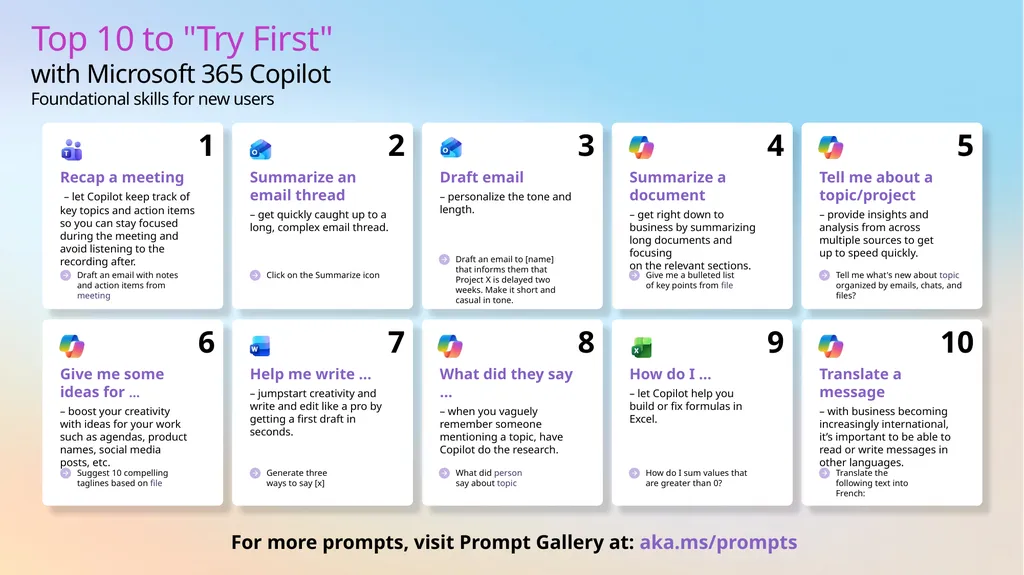
Top 10 to "Try First" with Microsoft 365 Copilot
Foundational skills for new users For more prompts, visit Prompt Gallery at: aka.ms/prompts<br>
03
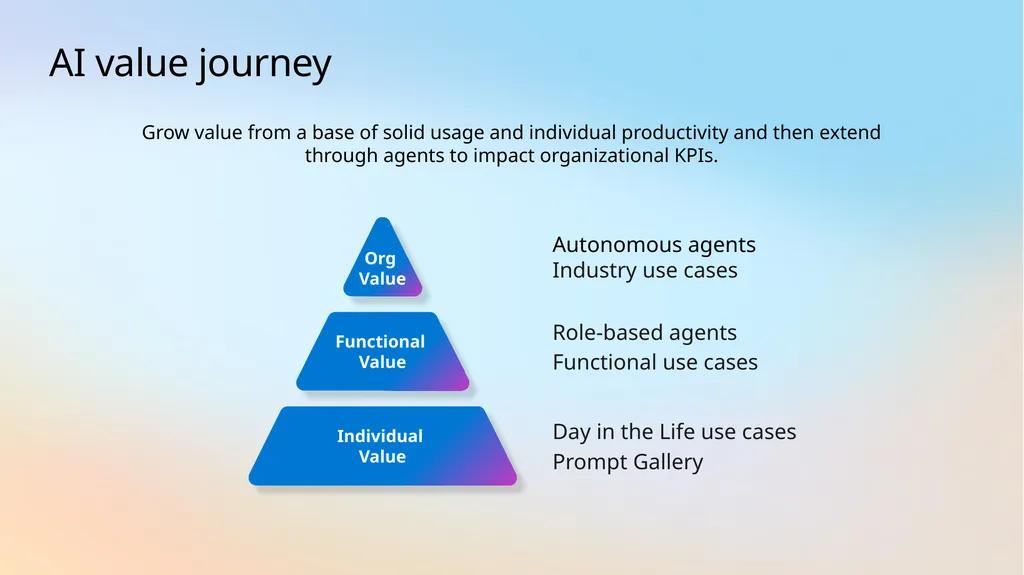
AI value journey Org
Value Functional
Value Autonomous agents
Industry use cases Role-based agents
Functional use cases Individual Value Day in the Life use cases
Prompt Gallery Grow value from a base of solid usage and individual productivity and then extend through agents to impact organizational KPIs.<br>
Industry use cases Role-based agents
Functional use cases Individual Value Day in the Life use cases
Prompt Gallery Grow value from a base of solid usage and individual productivity and then extend through agents to impact organizational KPIs.<br>
04
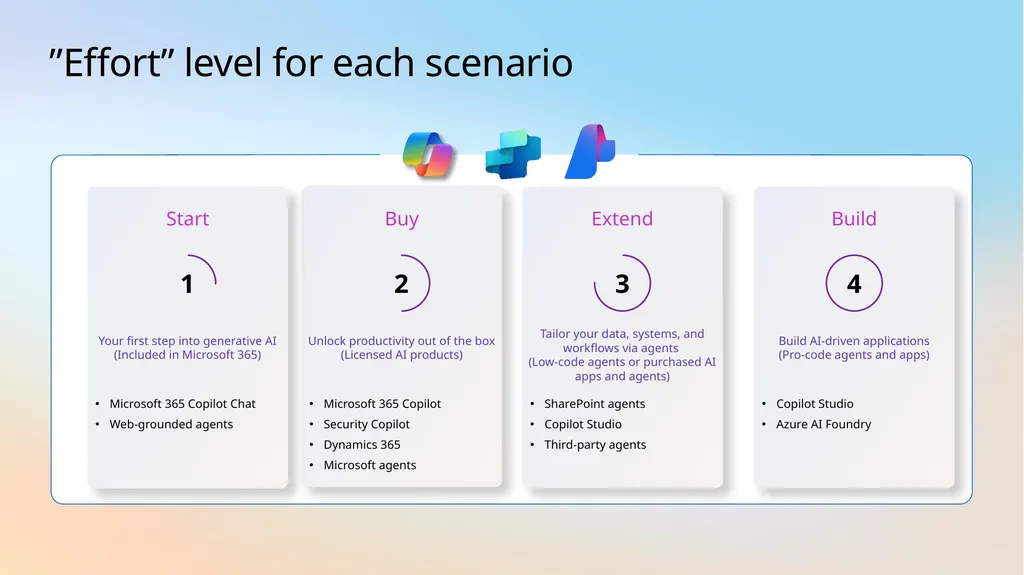
”Effort” level for each scenario Buy Microsoft 365 Copilot
Security Copilot
Dynamics 365
Microsoft agents Unlock productivity out of the box (Licensed AI products) 2 Extend SharePoint agents
Copilot Studio
Third-party agents Tailor your data, systems, and workflows via agents
(Low-code agents or purchased AI apps and agents) 3 Start Microsoft 365 Copilot Chat
Web-grounded agents Your first step into generative AI (Included in Microsoft 365) 1 Build Copilot Studio
Azure AI Foundry Build AI-driven applications
(Pro-code agents and apps) 4<br>
Security Copilot
Dynamics 365
Microsoft agents Unlock productivity out of the box (Licensed AI products) 2 Extend SharePoint agents
Copilot Studio
Third-party agents Tailor your data, systems, and workflows via agents
(Low-code agents or purchased AI apps and agents) 3 Start Microsoft 365 Copilot Chat
Web-grounded agents Your first step into generative AI (Included in Microsoft 365) 1 Build Copilot Studio
Azure AI Foundry Build AI-driven applications
(Pro-code agents and apps) 4<br>
05
AI use cases for
Media & Entertainment<br>
06
AI Media & Entertainment use cases Overview and KPIs KPIs play a crucial role in the sector, providing a compass to navigate toward success. Let's dive into KPIs for Media and Entertainment and how AI can assist. Use case by role AI can simplify the tasks that
Media and Entertainment organizations perform every day. Look at key use cases and how Copilot and agents can assist along the way. Day in the life See how real-life Media and Entertainment pros are using AI in their day-to-day.<br>
07
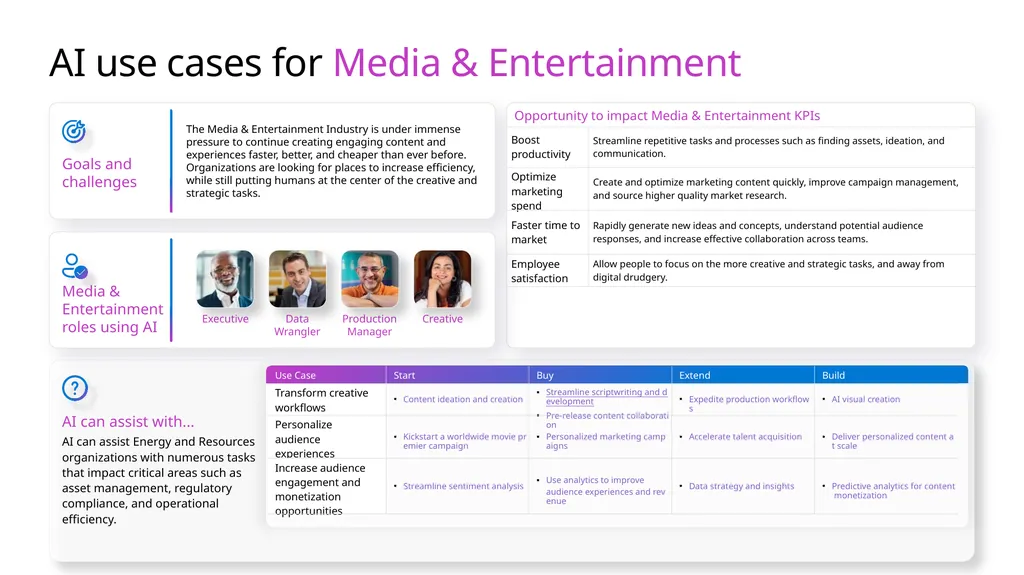
AI use cases for Media & Entertainment Goals and challenges The Media & Entertainment Industry is under immense pressure to continue creating engaging content and experiences faster, better, and cheaper than ever before. Organizations are looking for places to increase efficiency, while still putting humans at the center of the creative and
strategic tasks. AI can assist with... AI can assist Energy and Resources organizations with numerous tasks that impact critical areas such as asset management, regulatory compliance, and operational efficiency. Media & Entertainment roles using AI Data Wrangler Executive Production Manager Creative<br>
08
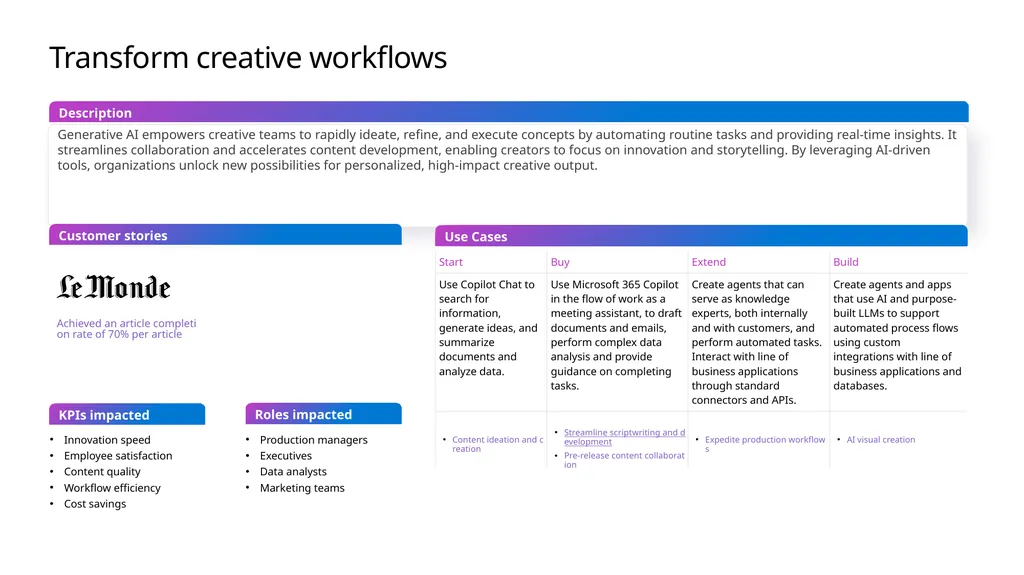
Transform creative workflows Generative AI empowers creative teams to rapidly ideate, refine, and execute concepts by automating routine tasks and providing real-time insights. It streamlines collaboration and accelerates content development, enabling creators to focus on innovation and storytelling. By leveraging AI-driven tools, organizations unlock new possibilities for personalized, high-impact creative output. Use Cases Customer stories Description KPIs impacted Innovation speed
Employee satisfaction
Content quality
Workflow efficiency
Cost savings Production managers
Executives
Data analysts
Marketing teams Roles impacted Achieved an article completion rate of 70% per article<br>
Employee satisfaction
Content quality
Workflow efficiency
Cost savings Production managers
Executives
Data analysts
Marketing teams Roles impacted Achieved an article completion rate of 70% per article<br>
09
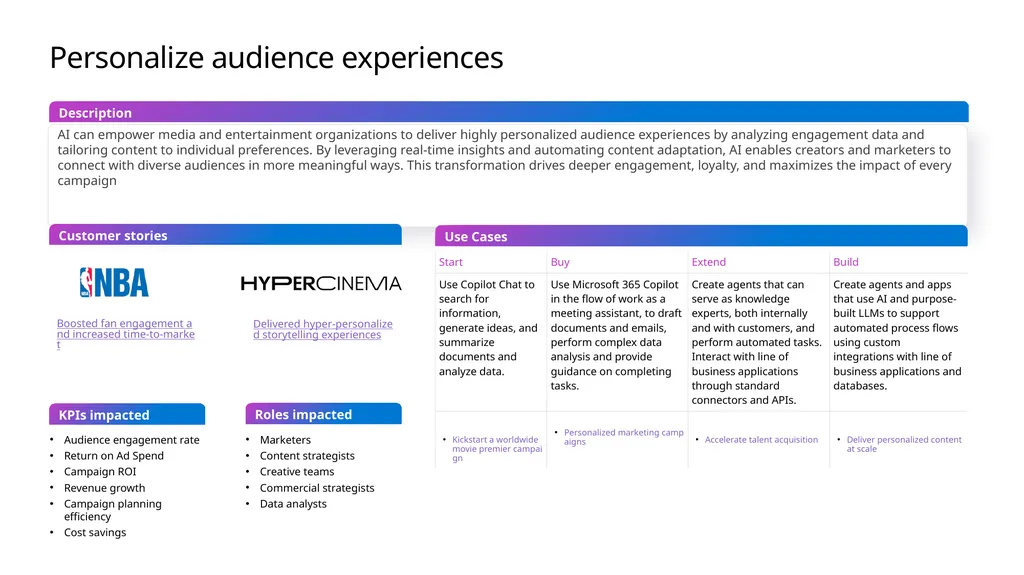
Personalize audience experiences AI can empower media and entertainment organizations to deliver highly personalized audience experiences by analyzing engagement data and tailoring content to individual preferences. By leveraging real-time insights and automating content adaptation, AI enables creators and marketers to connect with diverse audiences in more meaningful ways. This transformation drives deeper engagement, loyalty, and maximizes the impact of every campaign Use Cases Customer stories Description KPIs impacted Audience engagement rate
Return on Ad Spend
Campaign ROI
Revenue growth
Campaign planning efficiency
Cost savings Marketers
Content strategists
Creative teams
Commercial strategists
Data analysts Roles impacted Boosted fan engagement and increased time-to-market Delivered hyper-personalized storytelling experiences<br>
Return on Ad Spend
Campaign ROI
Revenue growth
Campaign planning efficiency
Cost savings Marketers
Content strategists
Creative teams
Commercial strategists
Data analysts Roles impacted Boosted fan engagement and increased time-to-market Delivered hyper-personalized storytelling experiences<br>
10
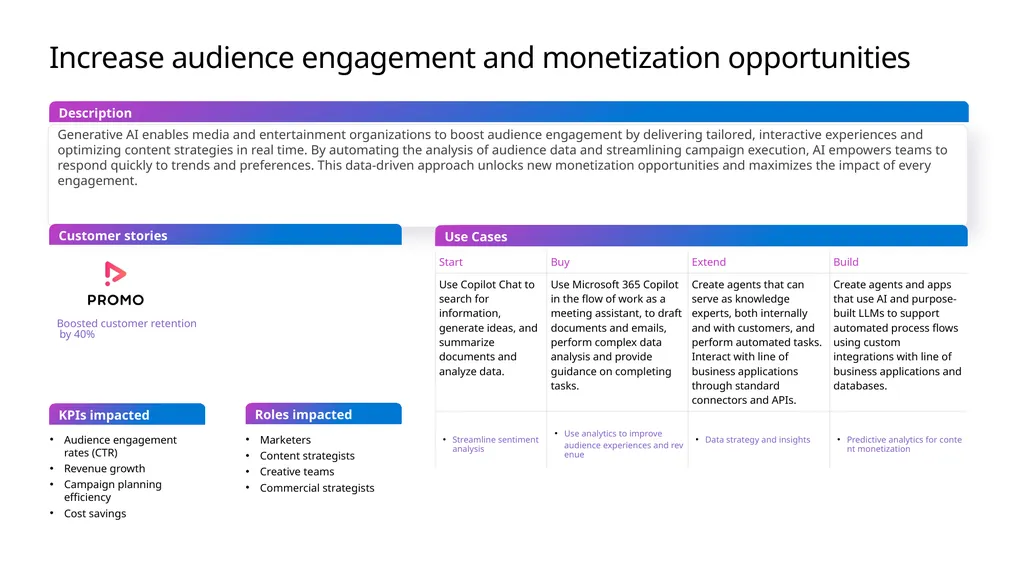
Increase audience engagement and monetization opportunities Generative AI enables media and entertainment organizations to boost audience engagement by delivering tailored, interactive experiences and optimizing content strategies in real time. By automating the analysis of audience data and streamlining campaign execution, AI empowers teams to respond quickly to trends and preferences. This data-driven approach unlocks new monetization opportunities and maximizes the impact of every engagement. Use Cases Customer stories Description KPIs impacted Audience engagement rates (CTR)
Revenue growth
Campaign planning efficiency
Cost savings Marketers
Content strategists
Creative teams
Commercial strategists Roles impacted Boosted customer retention by 40%<br>
Revenue growth
Campaign planning efficiency
Cost savings Marketers
Content strategists
Creative teams
Commercial strategists Roles impacted Boosted customer retention by 40%<br>
11
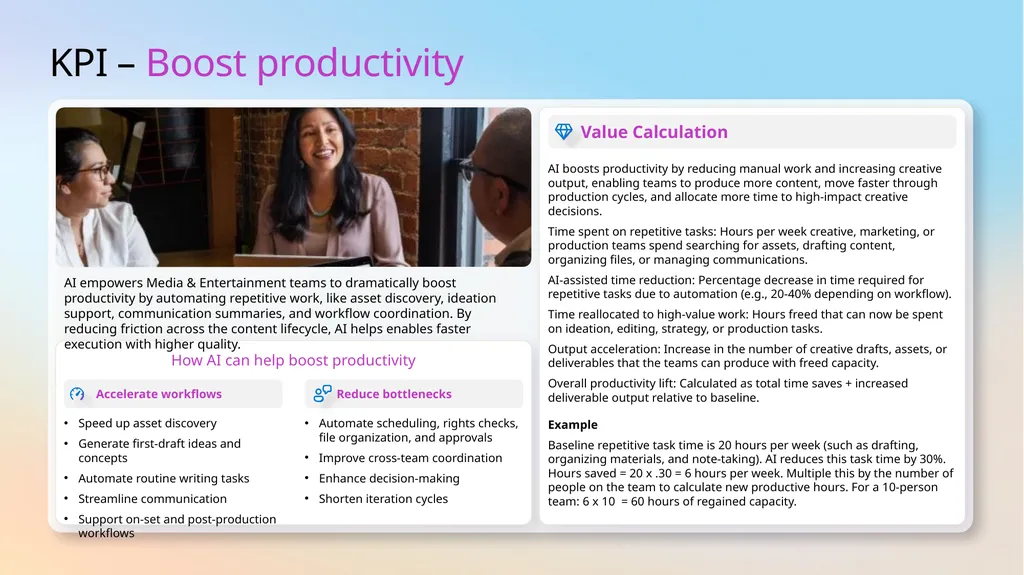
KPI – Boost productivity How AI can help boost productivity Accelerate workflows Reduce bottlenecks AI empowers Media & Entertainment teams to dramatically boost productivity by automating repetitive work, like asset discovery, ideation support, communication summaries, and workflow coordination. By reducing friction across the content lifecycle, AI helps enables faster execution with higher quality. Speed up asset discovery
Generate first-draft ideas and concepts
Automate routine writing tasks
Streamline communication
Support on-set and post-production workflows Automate scheduling, rights checks, file organization, and approvals
Improve cross-team coordination
Enhance decision-making
Shorten iteration cycles Value Calculation AI boosts productivity by reducing manual work and increasing creative output, enabling teams to produce more content, move faster through production cycles, and allocate more time to high-impact creative decisions.
Time spent on repetitive tasks: Hours per week creative, marketing, or production teams spend searching for assets, drafting content, organizing files, or managing communications.
AI-assisted time reduction: Percentage decrease in time required for repetitive tasks due to automation (e.g., 20-40% depending on workflow).
Time reallocated to high-value work: Hours freed that can now be spent on ideation, editing, strategy, or production tasks.
Output acceleration: Increase in the number of creative drafts, assets, or deliverables that the teams can produce with freed capacity.
Overall productivity lift: Calculated as total time saves + increased deliverable output relative to baseline.
Example
Baseline repetitive task time is 20 hours per week (such as drafting, organizing materials, and note-taking). AI reduces this task time by 30%. Hours saved = 20 x .30 = 6 hours per week. Multiple this by the number of people on the team to calculate new productive hours. For a 10-person team: 6 x 10 = 60 hours of regained capacity.<br>
Generate first-draft ideas and concepts
Automate routine writing tasks
Streamline communication
Support on-set and post-production workflows Automate scheduling, rights checks, file organization, and approvals
Improve cross-team coordination
Enhance decision-making
Shorten iteration cycles Value Calculation AI boosts productivity by reducing manual work and increasing creative output, enabling teams to produce more content, move faster through production cycles, and allocate more time to high-impact creative decisions.
Time spent on repetitive tasks: Hours per week creative, marketing, or production teams spend searching for assets, drafting content, organizing files, or managing communications.
AI-assisted time reduction: Percentage decrease in time required for repetitive tasks due to automation (e.g., 20-40% depending on workflow).
Time reallocated to high-value work: Hours freed that can now be spent on ideation, editing, strategy, or production tasks.
Output acceleration: Increase in the number of creative drafts, assets, or deliverables that the teams can produce with freed capacity.
Overall productivity lift: Calculated as total time saves + increased deliverable output relative to baseline.
Example
Baseline repetitive task time is 20 hours per week (such as drafting, organizing materials, and note-taking). AI reduces this task time by 30%. Hours saved = 20 x .30 = 6 hours per week. Multiple this by the number of people on the team to calculate new productive hours. For a 10-person team: 6 x 10 = 60 hours of regained capacity.<br>
12
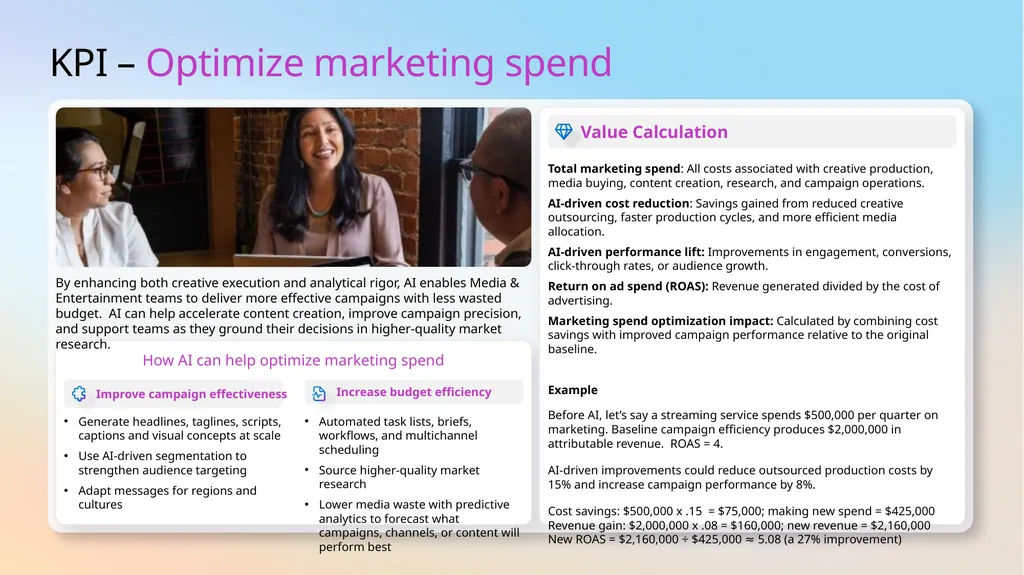
KPI – Optimize marketing spend How AI can help optimize marketing spend Improve campaign effectiveness Increase budget efficiency By enhancing both creative execution and analytical rigor, AI enables Media & Entertainment teams to deliver more effective campaigns with less wasted budget. AI can help accelerate content creation, improve campaign precision, and support teams as they ground their decisions in higher-quality market research. Generate headlines, taglines, scripts, captions and visual concepts at scale
Use AI-driven segmentation to strengthen audience targeting
Adapt messages for regions and cultures Automated task lists, briefs, workflows, and multichannel scheduling
Source higher-quality market research
Lower media waste with predictive analytics to forecast what campaigns, channels, or content will perform best Value Calculation Total marketing spend: All costs associated with creative production, media buying, content creation, research, and campaign operations.
AI-driven cost reduction: Savings gained from reduced creative outsourcing, faster production cycles, and more efficient media allocation.
AI-driven performance lift: Improvements in engagement, conversions, click-through rates, or audience growth.
Return on ad spend (ROAS): Revenue generated divided by the cost of advertising.
Marketing spend optimization impact: Calculated by combining cost savings with improved campaign performance relative to the original baseline.
Example
Before AI, let’s say a streaming service spends $500,000 per quarter on marketing. Baseline campaign efficiency produces $2,000,000 in attributable revenue. ROAS = 4.
AI-driven improvements could reduce outsourced production costs by 15% and increase campaign performance by 8%.
Cost savings: $500,000 x .15 = $75,000; making new spend = $425,000 Revenue gain: $2,000,000 x .08 = $160,000; new revenue = $2,160,000 New ROAS = $2,160,000 ÷ $425,000 ≈ 5.08 (a 27% improvement)<br>
Use AI-driven segmentation to strengthen audience targeting
Adapt messages for regions and cultures Automated task lists, briefs, workflows, and multichannel scheduling
Source higher-quality market research
Lower media waste with predictive analytics to forecast what campaigns, channels, or content will perform best Value Calculation Total marketing spend: All costs associated with creative production, media buying, content creation, research, and campaign operations.
AI-driven cost reduction: Savings gained from reduced creative outsourcing, faster production cycles, and more efficient media allocation.
AI-driven performance lift: Improvements in engagement, conversions, click-through rates, or audience growth.
Return on ad spend (ROAS): Revenue generated divided by the cost of advertising.
Marketing spend optimization impact: Calculated by combining cost savings with improved campaign performance relative to the original baseline.
Example
Before AI, let’s say a streaming service spends $500,000 per quarter on marketing. Baseline campaign efficiency produces $2,000,000 in attributable revenue. ROAS = 4.
AI-driven improvements could reduce outsourced production costs by 15% and increase campaign performance by 8%.
Cost savings: $500,000 x .15 = $75,000; making new spend = $425,000 Revenue gain: $2,000,000 x .08 = $160,000; new revenue = $2,160,000 New ROAS = $2,160,000 ÷ $425,000 ≈ 5.08 (a 27% improvement)<br>
13
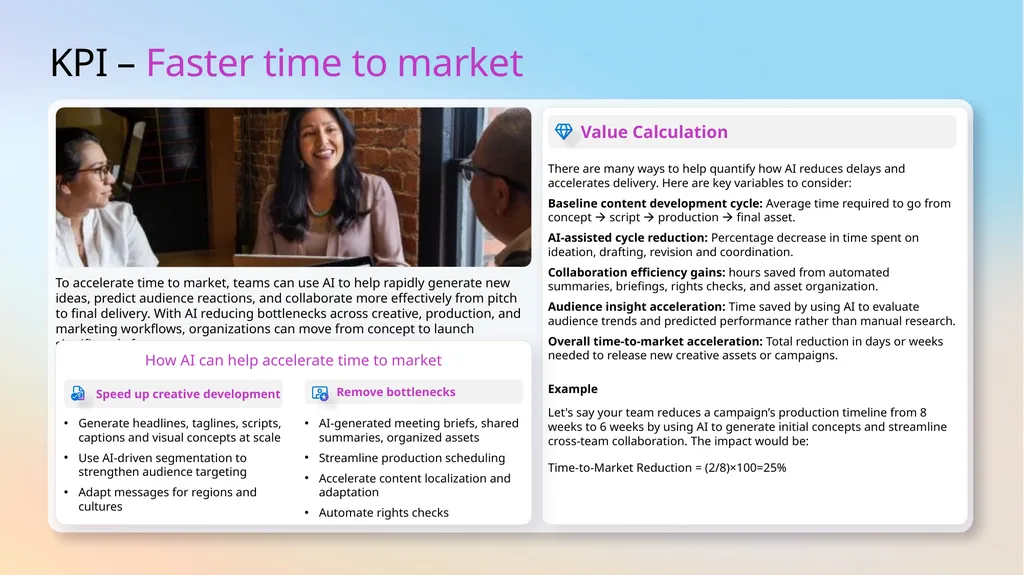
KPI – Faster time to market To accelerate time to market, teams can use AI to help rapidly generate new ideas, predict audience reactions, and collaborate more effectively from pitch to final delivery. With AI reducing bottlenecks across creative, production, and marketing workflows, organizations can move from concept to launch significantly faster. Value Calculation There are many ways to help quantify how AI reduces delays and accelerates delivery. Here are key variables to consider:
Baseline content development cycle: Average time required to go from concept script production final asset.
AI-assisted cycle reduction: Percentage decrease in time spent on ideation, drafting, revision and coordination.
Collaboration efficiency gains: hours saved from automated summaries, briefings, rights checks, and asset organization.
Audience insight acceleration: Time saved by using AI to evaluate audience trends and predicted performance rather than manual research.
Overall time-to-market acceleration: Total reduction in days or weeks needed to release new creative assets or campaigns.
Example
Let's say your team reduces a campaign’s production timeline from 8 weeks to 6 weeks by using AI to generate initial concepts and streamline cross-team collaboration. The impact would be:
Time-to-Market Reduction = (2/8)×100=25% How AI can help accelerate time to market Speed up creative development Remove bottlenecks Generate headlines, taglines, scripts, captions and visual concepts at scale
Use AI-driven segmentation to strengthen audience targeting
Adapt messages for regions and cultures AI-generated meeting briefs, shared summaries, organized assets
Streamline production scheduling
Accelerate content localization and adaptation
Automate rights checks<br>
Baseline content development cycle: Average time required to go from concept script production final asset.
AI-assisted cycle reduction: Percentage decrease in time spent on ideation, drafting, revision and coordination.
Collaboration efficiency gains: hours saved from automated summaries, briefings, rights checks, and asset organization.
Audience insight acceleration: Time saved by using AI to evaluate audience trends and predicted performance rather than manual research.
Overall time-to-market acceleration: Total reduction in days or weeks needed to release new creative assets or campaigns.
Example
Let's say your team reduces a campaign’s production timeline from 8 weeks to 6 weeks by using AI to generate initial concepts and streamline cross-team collaboration. The impact would be:
Time-to-Market Reduction = (2/8)×100=25% How AI can help accelerate time to market Speed up creative development Remove bottlenecks Generate headlines, taglines, scripts, captions and visual concepts at scale
Use AI-driven segmentation to strengthen audience targeting
Adapt messages for regions and cultures AI-generated meeting briefs, shared summaries, organized assets
Streamline production scheduling
Accelerate content localization and adaptation
Automate rights checks<br>
14
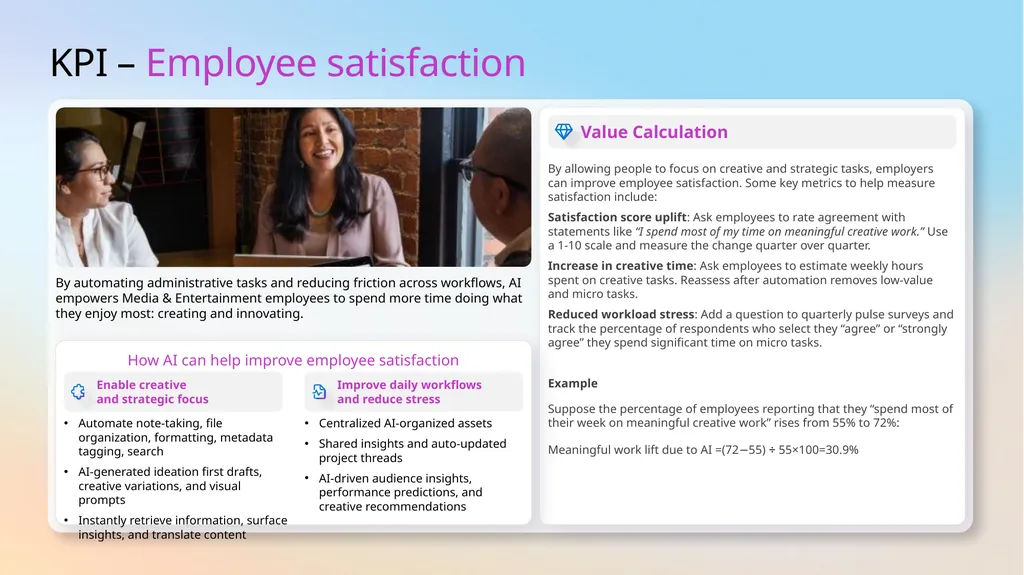
KPI – Employee satisfaction By automating administrative tasks and reducing friction across workflows, AI empowers Media & Entertainment employees to spend more time doing what they enjoy most: creating and innovating. Value Calculation By allowing people to focus on creative and strategic tasks, employers can improve employee satisfaction. Some key metrics to help measure satisfaction include:
Satisfaction score uplift: Ask employees to rate agreement with statements like “I spend most of my time on meaningful creative work.” Use a 1-10 scale and measure the change quarter over quarter.
Increase in creative time: Ask employees to estimate weekly hours spent on creative tasks. Reassess after automation removes low-value and micro tasks.
Reduced workload stress: Add a question to quarterly pulse surveys and track the percentage of respondents who select they “agree” or “strongly agree” they spend significant time on micro tasks.
Example
Suppose the percentage of employees reporting that they “spend most of their week on meaningful creative work” rises from 55% to 72%:
Meaningful work lift due to AI =(72−55) ÷ 55×100=30.9% How AI can help improve employee satisfaction Enable creative and strategic focus Improve daily workflows and reduce stress Automate note-taking, file organization, formatting, metadata tagging, search
AI-generated ideation first drafts, creative variations, and visual prompts
Instantly retrieve information, surface insights, and translate content Centralized AI-organized assets
Shared insights and auto-updated project threads
AI-driven audience insights, performance predictions, and creative recommendations<br>
Satisfaction score uplift: Ask employees to rate agreement with statements like “I spend most of my time on meaningful creative work.” Use a 1-10 scale and measure the change quarter over quarter.
Increase in creative time: Ask employees to estimate weekly hours spent on creative tasks. Reassess after automation removes low-value and micro tasks.
Reduced workload stress: Add a question to quarterly pulse surveys and track the percentage of respondents who select they “agree” or “strongly agree” they spend significant time on micro tasks.
Example
Suppose the percentage of employees reporting that they “spend most of their week on meaningful creative work” rises from 55% to 72%:
Meaningful work lift due to AI =(72−55) ÷ 55×100=30.9% How AI can help improve employee satisfaction Enable creative and strategic focus Improve daily workflows and reduce stress Automate note-taking, file organization, formatting, metadata tagging, search
AI-generated ideation first drafts, creative variations, and visual prompts
Instantly retrieve information, surface insights, and translate content Centralized AI-organized assets
Shared insights and auto-updated project threads
AI-driven audience insights, performance predictions, and creative recommendations<br>
15
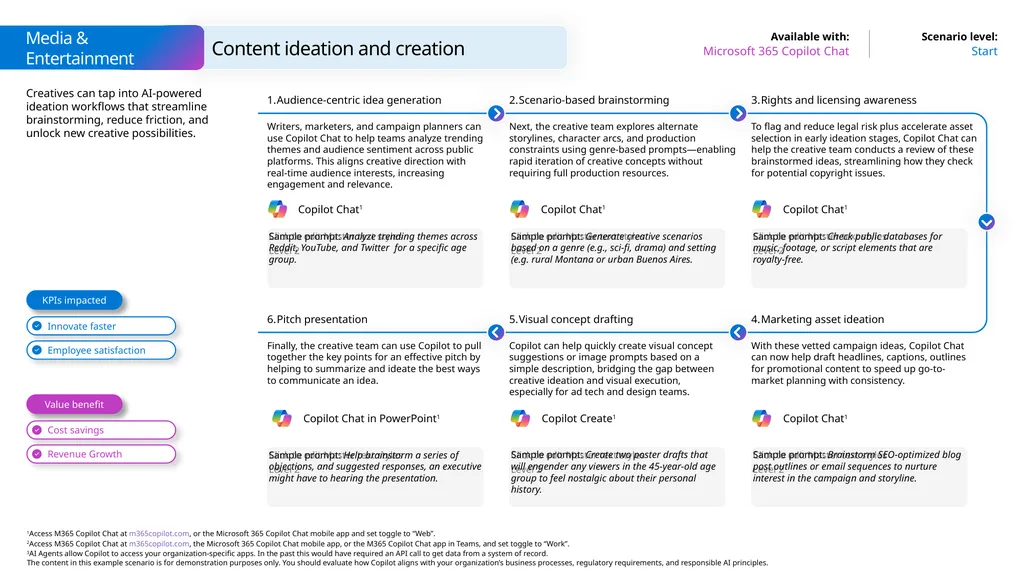
Creatives can tap into AI-powered ideation workflows that streamline brainstorming, reduce friction, and unlock new creative possibilities. Content ideation and creation Start Microsoft 365 Copilot Chat Media & Entertainment Sample prompt: Analyze trending themes across Reddit, YouTube, and Twitter for a specific age group. Audience-centric idea generation Writers, marketers, and campaign planners can use Copilot Chat to help teams analyze trending themes and audience sentiment across public platforms. This aligns creative direction with real-time audience interests, increasing engagement and relevance. Scenario-based brainstorming Next, the creative team explores alternate storylines, character arcs, and production constraints using genre-based prompts—enabling rapid iteration of creative concepts without requiring full production resources. Sample prompt: Check public databases for music, footage, or script elements that are royalty-free. Rights and licensing awareness To flag and reduce legal risk plus accelerate asset selection in early ideation stages, Copilot Chat can help the creative team conducts a review of these brainstormed ideas, streamlining how they check for potential copyright issues. Sample prompt: Generate creative scenarios based on a genre (e.g., sci-fi, drama) and setting (e.g. rural Montana or urban Buenos Aires. Sample prompt: Help brainstorm a series of objections, and suggested responses, an executive might have to hearing the presentation. Pitch presentation Finally, the creative team can use Copilot to pull together the key points for an effective pitch by helping to summarize and ideate the best ways to communicate an idea. Visual concept drafting Copilot can help quickly create visual concept suggestions or image prompts based on a simple description, bridging the gap between creative ideation and visual execution, especially for ad tech and design teams. Sample prompt: Brainstorm SEO-optimized blog post outlines or email sequences to nurture interest in the campaign and storyline. Marketing asset ideation With these vetted campaign ideas, Copilot Chat can now help draft headlines, captions, outlines for promotional content to speed up go-to-market planning with consistency. Sample prompt: Create two poster drafts that will engender any viewers in the 45-year-old age group to feel nostalgic about their personal history. Value benefit KPIs impacted Innovate faster Employee satisfaction Cost savings Revenue Growth Copilot Chat1 Copilot Chat1 Copilot Chat1 Copilot Create1 Copilot Chat in PowerPoint1 Copilot Chat1<br>
16
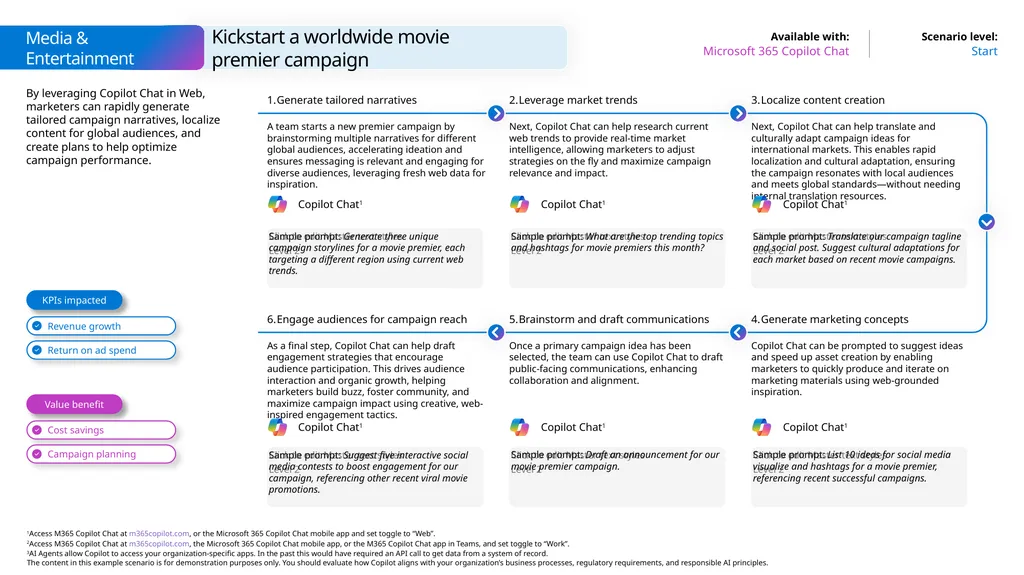
By leveraging Copilot Chat in Web, marketers can rapidly generate tailored campaign narratives, localize content for global audiences, and create plans to help optimize campaign performance. Kickstart a worldwide movie
premier campaign Start Microsoft 365 Copilot Chat Media & Entertainment Sample prompt: Generate three unique campaign storylines for a movie premier, each targeting a different region using current web trends. Generate tailored narratives A team starts a new premier campaign by brainstorming multiple narratives for different global audiences, accelerating ideation and ensures messaging is relevant and engaging for diverse audiences, leveraging fresh web data for inspiration. Leverage market trends Next, Copilot Chat can help research current web trends to provide real-time market intelligence, allowing marketers to adjust strategies on the fly and maximize campaign relevance and impact. Sample prompt: Translate our campaign tagline and social post. Suggest cultural adaptations for each market based on recent movie campaigns. Localize content creation Next, Copilot Chat can help translate and culturally adapt campaign ideas for international markets. This enables rapid localization and cultural adaptation, ensuring the campaign resonates with local audiences and meets global standards—without needing internal translation resources. Sample prompt: What are the top trending topics and hashtags for movie premiers this month? Sample prompt: Suggest five interactive social media contests to boost engagement for our campaign, referencing other recent viral movie promotions. Engage audiences for campaign reach As a final step, Copilot Chat can help draft engagement strategies that encourage audience participation. This drives audience interaction and organic growth, helping marketers build buzz, foster community, and maximize campaign impact using creative, web-inspired engagement tactics. Brainstorm and draft communications Once a primary campaign idea has been selected, the team can use Copilot Chat to draft public-facing communications, enhancing collaboration and alignment. Sample prompt: List 10 ideas for social media visualize and hashtags for a movie premier, referencing recent successful campaigns. Generate marketing concepts Copilot Chat can be prompted to suggest ideas and speed up asset creation by enabling marketers to quickly produce and iterate on marketing materials using web-grounded inspiration. Sample prompt: Draft an announcement for our movie premier campaign. Value benefit KPIs impacted Revenue growth Return on ad spend Cost savings Campaign planning Copilot Chat1 Copilot Chat1 Copilot Chat1 Copilot Chat1 Copilot Chat1 Copilot Chat1<br>
17
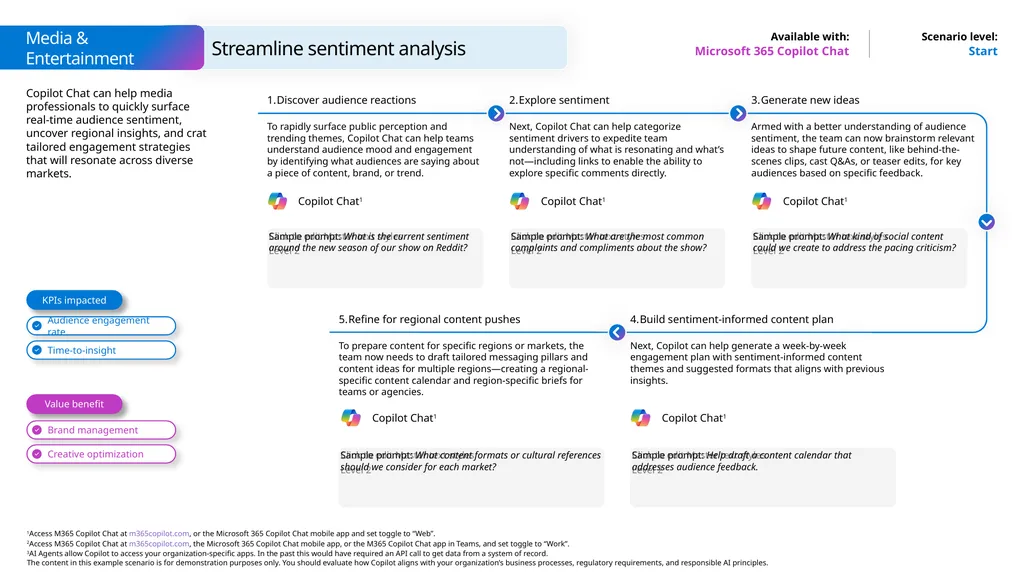
Copilot Chat can help media professionals to quickly surface real-time audience sentiment, uncover regional insights, and crat tailored engagement strategies that will resonate across diverse markets. Start Microsoft 365 Copilot Chat Sample prompt: What is the current sentiment around the new season of our show on Reddit? Discover audience reactions To rapidly surface public perception and trending themes, Copilot Chat can help teams understand audience mood and engagement by identifying what audiences are saying about a piece of content, brand, or trend. Explore sentiment Next, Copilot Chat can help categorize sentiment drivers to expedite team understanding of what is resonating and what’s not—including links to enable the ability to explore specific comments directly. Sample prompt: What kind of social content could we create to address the pacing criticism? Generate new ideas Armed with a better understanding of audience sentiment, the team can now brainstorm relevant ideas to shape future content, like behind-the-scenes clips, cast Q&As, or teaser edits, for key audiences based on specific feedback. Sample prompt: What are the most common complaints and compliments about the show? Refine for regional content pushes To prepare content for specific regions or markets, the team now needs to draft tailored messaging pillars and content ideas for multiple regions—creating a regional-specific content calendar and region-specific briefs for teams or agencies. Sample prompt: Help draft a content calendar that addresses audience feedback. Build sentiment-informed content plan Next, Copilot can help generate a week-by-week engagement plan with sentiment-informed content themes and suggested formats that aligns with previous insights. Sample prompt: What content formats or cultural references should we consider for each market? Streamline sentiment analysis Value benefit KPIs impacted Audience engagement rate Time-to-insight Brand management Creative optimization Copilot Chat1 Copilot Chat1 Copilot Chat1 Copilot Chat1 Copilot Chat1 Media & Entertainment<br>
18
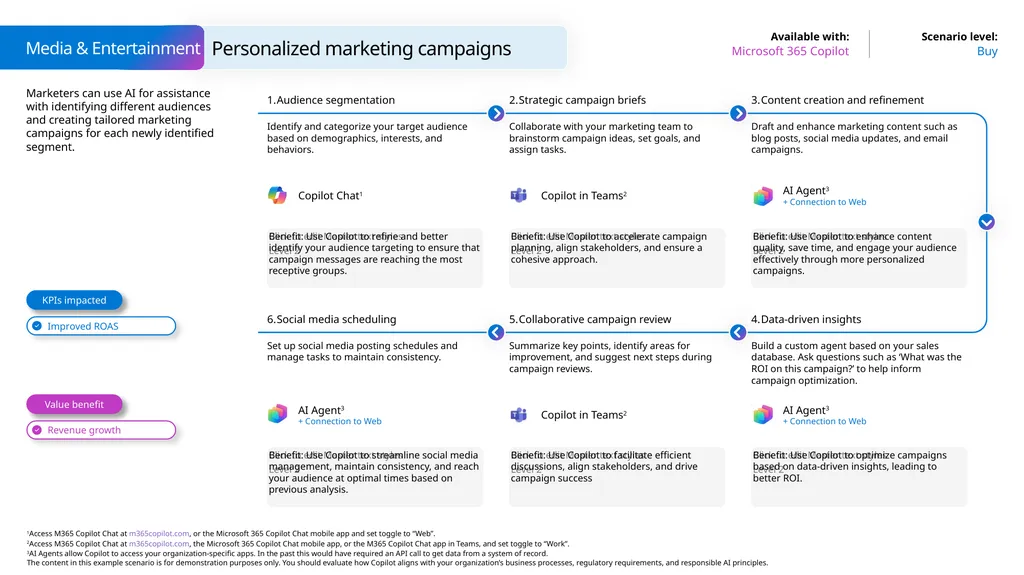
Marketers can use AI for assistance with identifying different audiences and creating tailored marketing campaigns for each newly identified segment. Personalized marketing campaigns Buy Microsoft 365 Copilot Media & Entertainment Benefit: Use Copilot to refine and better identify your audience targeting to ensure that campaign messages are reaching the most receptive groups. Audience segmentation Identify and categorize your target audience based on demographics, interests, and behaviors. Strategic campaign briefs Collaborate with your marketing team to brainstorm campaign ideas, set goals, and assign tasks. Benefit: Use Copilot to enhance content quality, save time, and engage your audience effectively through more personalized campaigns. Content creation and refinement Draft and enhance marketing content such as blog posts, social media updates, and email campaigns. Benefit: Use Copilot to accelerate campaign planning, align stakeholders, and ensure a cohesive approach. Benefit: Use Copilot to streamline social media management, maintain consistency, and reach your audience at optimal times based on previous analysis. Social media scheduling Set up social media posting schedules and manage tasks to maintain consistency. Collaborative campaign review Summarize key points, identify areas for improvement, and suggest next steps during campaign reviews. Benefit: Use Copilot to optimize campaigns based on data-driven insights, leading to
better ROI. Data-driven insights Build a custom agent based on your sales database. Ask questions such as ‘What was the ROI on this campaign?’ to help inform campaign optimization. Benefit: Use Copilot to facilitate efficient discussions, align stakeholders, and drive campaign success Value benefit KPIs impacted AI Agent3
+ Connection to Web AI Agent3
+ Connection to Web Copilot in Teams2 Copilot Chat1 AI Agent3
+ Connection to Web Copilot in Teams2<br>
+ Connection to Web AI Agent3
+ Connection to Web Copilot in Teams2 Copilot Chat1 AI Agent3
+ Connection to Web Copilot in Teams2<br>
19
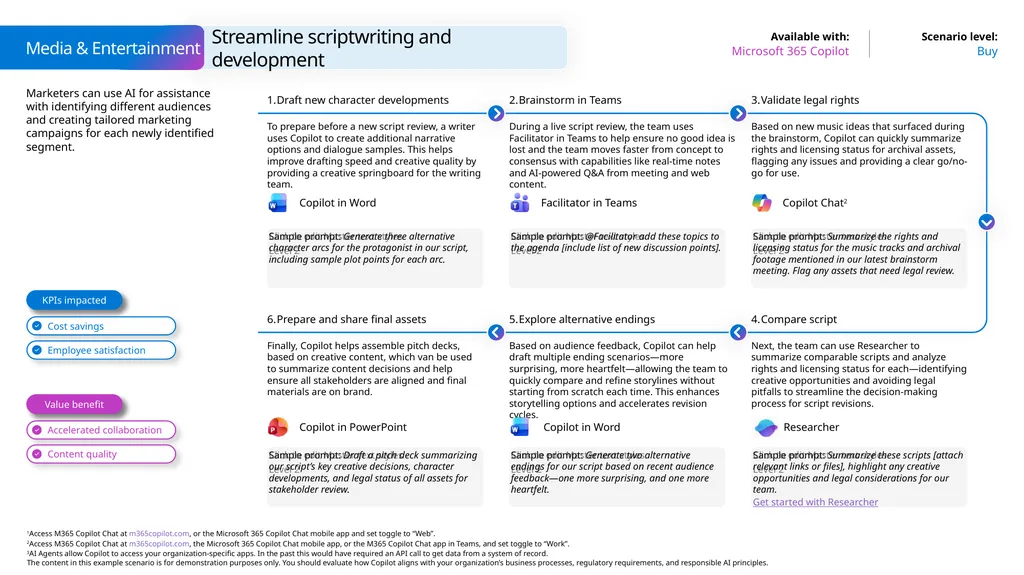
Marketers can use AI for assistance with identifying different audiences and creating tailored marketing campaigns for each newly identified segment. Streamline scriptwriting and development Buy Microsoft 365 Copilot Media & Entertainment Sample prompt: Generate three alternative character arcs for the protagonist in our script, including sample plot points for each arc. Draft new character developments To prepare before a new script review, a writer uses Copilot to create additional narrative options and dialogue samples. This helps improve drafting speed and creative quality by providing a creative springboard for the writing team. Brainstorm in Teams During a live script review, the team uses Facilitator in Teams to help ensure no good idea is lost and the team moves faster from concept to consensus with capabilities like real-time notes and AI-powered Q&A from meeting and web content. Sample prompt: Summarize the rights and licensing status for the music tracks and archival footage mentioned in our latest brainstorm meeting. Flag any assets that need legal review. Validate legal rights Based on new music ideas that surfaced during the brainstorm, Copilot can quickly summarize rights and licensing status for archival assets, flagging any issues and providing a clear go/no-go for use. Sample prompt: @Facilitator add these topics to the agenda [include list of new discussion points]. Sample prompt: Draft a pitch deck summarizing our script’s key creative decisions, character developments, and legal status of all assets for stakeholder review. Prepare and share final assets Finally, Copilot helps assemble pitch decks, based on creative content, which van be used to summarize content decisions and help ensure all stakeholders are aligned and final materials are on brand. Explore alternative endings Based on audience feedback, Copilot can help draft multiple ending scenarios—more surprising, more heartfelt—allowing the team to quickly compare and refine storylines without starting from scratch each time. This enhances storytelling options and accelerates revision cycles. Sample prompt: Summarize these scripts [attach relevant links or files], highlight any creative opportunities and legal considerations for our team.
Get started with Researcher Compare script Next, the team can use Researcher to summarize comparable scripts and analyze rights and licensing status for each—identifying creative opportunities and avoiding legal pitfalls to streamline the decision-making process for script revisions. Sample prompt: Generate two alternative endings for our script based on recent audience feedback—one more surprising, and one more heartfelt. Facilitator in Teams Copilot Chat2 Copilot in Word Researcher Copilot in PowerPoint Value benefit KPIs impacted Cost savings Employee satisfaction Accelerated collaboration Content quality KPIs impacted Value benefit Copilot in Word<br>
Get started with Researcher Compare script Next, the team can use Researcher to summarize comparable scripts and analyze rights and licensing status for each—identifying creative opportunities and avoiding legal pitfalls to streamline the decision-making process for script revisions. Sample prompt: Generate two alternative endings for our script based on recent audience feedback—one more surprising, and one more heartfelt. Facilitator in Teams Copilot Chat2 Copilot in Word Researcher Copilot in PowerPoint Value benefit KPIs impacted Cost savings Employee satisfaction Accelerated collaboration Content quality KPIs impacted Value benefit Copilot in Word<br>
20
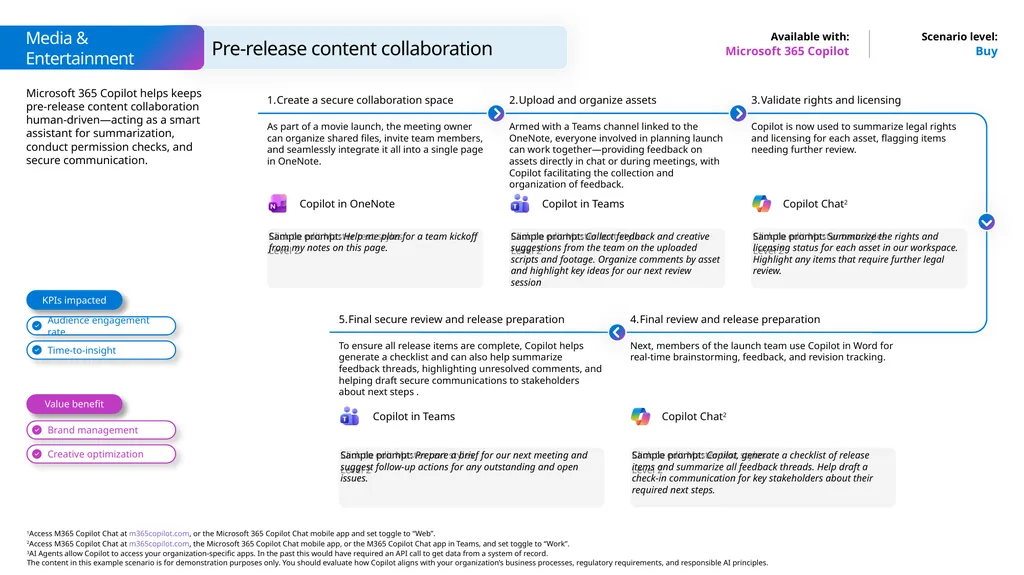
Microsoft 365 Copilot helps keeps pre-release content collaboration human-driven—acting as a smart assistant for summarization, conduct permission checks, and secure communication. Buy Microsoft 365 Copilot Sample prompt: Help me plan for a team kickoff from my notes on this page. Create a secure collaboration space As part of a movie launch, the meeting owner can organize shared files, invite team members, and seamlessly integrate it all into a single page in OneNote. Upload and organize assets Armed with a Teams channel linked to the OneNote, everyone involved in planning launch can work together—providing feedback on assets directly in chat or during meetings, with Copilot facilitating the collection and organization of feedback. Sample prompt: Summarize the rights and licensing status for each asset in our workspace. Highlight any items that require further legal review. Validate rights and licensing Copilot is now used to summarize legal rights and licensing for each asset, flagging items needing further review. Sample prompt: Collect feedback and creative suggestions from the team on the uploaded scripts and footage. Organize comments by asset and highlight key ideas for our next review session Final secure review and release preparation To ensure all release items are complete, Copilot helps generate a checklist and can also help summarize feedback threads, highlighting unresolved comments, and helping draft secure communications to stakeholders about next steps . Sample prompt: Copilot, generate a checklist of release items and summarize all feedback threads. Help draft a check-in communication for key stakeholders about their required next steps. Final review and release preparation Next, members of the launch team use Copilot in Word for real-time brainstorming, feedback, and revision tracking. Sample prompt: Prepare a brief for our next meeting and suggest follow-up actions for any outstanding and open issues. Pre-release content collaboration Value benefit KPIs impacted Audience engagement rate Time-to-insight Brand management Creative optimization Copilot in OneNote Copilot in Teams Copilot Chat2 Copilot in Teams Media & Entertainment Copilot Chat2<br>
21
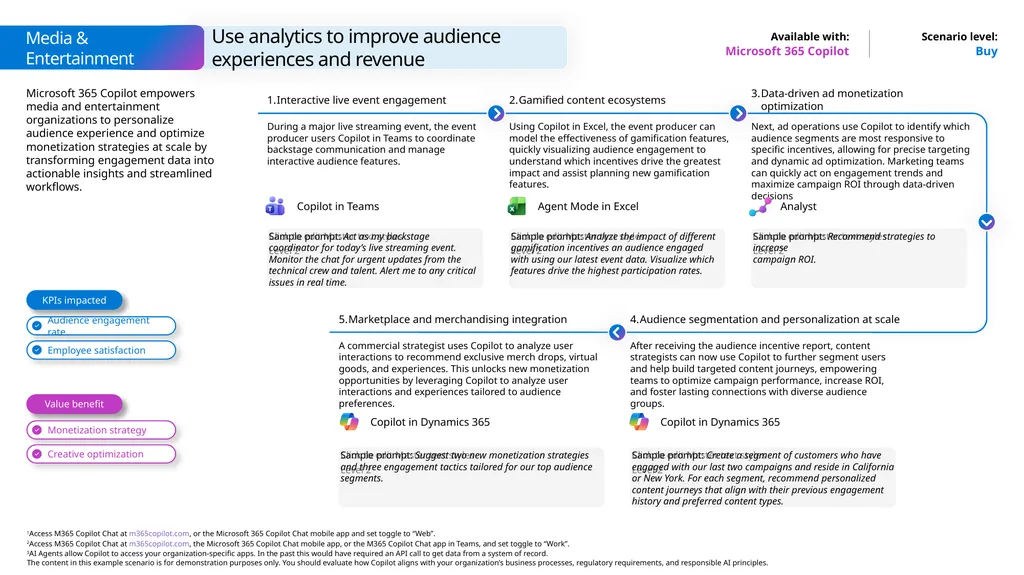
Microsoft 365 Copilot empowers media and entertainment organizations to personalize audience experience and optimize monetization strategies at scale by transforming engagement data into actionable insights and streamlined workflows. Buy Microsoft 365 Copilot Sample prompt: Act as my backstage coordinator for today’s live streaming event. Monitor the chat for urgent updates from the technical crew and talent. Alert me to any critical issues in real time. Interactive live event engagement During a major live streaming event, the event producer users Copilot in Teams to coordinate backstage communication and manage interactive audience features. Gamified content ecosystems Using Copilot in Excel, the event producer can model the effectiveness of gamification features, quickly visualizing audience engagement to understand which incentives drive the greatest impact and assist planning new gamification features. Sample prompt: Recommend strategies to increase
campaign ROI. Data-driven ad monetization optimization Next, ad operations use Copilot to identify which audience segments are most responsive to specific incentives, allowing for precise targeting and dynamic ad optimization. Marketing teams can quickly act on engagement trends and maximize campaign ROI through data-driven decisions Sample prompt: Analyze the impact of different gamification incentives an audience engaged with using our latest event data. Visualize which features drive the highest participation rates. Marketplace and merchandising integration A commercial strategist uses Copilot to analyze user interactions to recommend exclusive merch drops, virtual goods, and experiences. This unlocks new monetization opportunities by leveraging Copilot to analyze user interactions and experiences tailored to audience preferences. Sample prompt: Create a segment of customers who have engaged with our last two campaigns and reside in California or New York. For each segment, recommend personalized content journeys that align with their previous engagement history and preferred content types. Audience segmentation and personalization at scale After receiving the audience incentive report, content strategists can now use Copilot to further segment users and help build targeted content journeys, empowering teams to optimize campaign performance, increase ROI, and foster lasting connections with diverse audience groups. Sample prompt: Suggest two new monetization strategies and three engagement tactics tailored for our top audience segments. Use analytics to improve audience experiences and revenue Value benefit KPIs impacted Audience engagement rate Employee satisfaction Monetization strategy Creative optimization Copilot in Teams Agent Mode in Excel Media & Entertainment Analyst Copilot in Dynamics 365 Copilot in Dynamics 365<br>
22
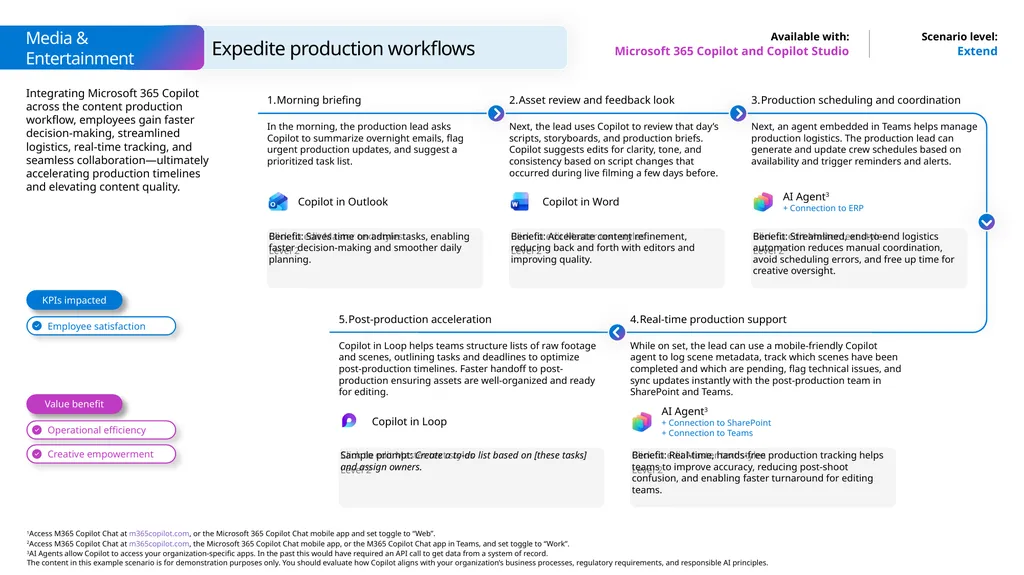
Integrating Microsoft 365 Copilot across the content production workflow, employees gain faster decision-making, streamlined logistics, real-time tracking, and seamless collaboration—ultimately accelerating production timelines and elevating content quality. Extend Microsoft 365 Copilot and Copilot Studio Benefit: Saves time on admin tasks, enabling faster decision-making and smoother daily planning. Morning briefing In the morning, the production lead asks Copilot to summarize overnight emails, flag urgent production updates, and suggest a prioritized task list. Asset review and feedback look Next, the lead uses Copilot to review that day’s scripts, storyboards, and production briefs. Copilot suggests edits for clarity, tone, and consistency based on script changes that occurred during live filming a few days before. Benefit: Streamlined, end-to-end logistics automation reduces manual coordination, avoid scheduling errors, and free up time for creative oversight. Production scheduling and coordination Next, an agent embedded in Teams helps manage production logistics. The production lead can generate and update crew schedules based on availability and trigger reminders and alerts. Benefit: Accelerate content refinement, reducing back and forth with editors and improving quality. Post-production acceleration Copilot in Loop helps teams structure lists of raw footage and scenes, outlining tasks and deadlines to optimize post-production timelines. Faster handoff to post-production ensuring assets are well-organized and ready for editing. Benefit: Real-time, hands-free production tracking helps teams to improve accuracy, reducing post-shoot confusion, and enabling faster turnaround for editing teams. Real-time production support While on set, the lead can use a mobile-friendly Copilot agent to log scene metadata, track which scenes have been completed and which are pending, flag technical issues, and sync updates instantly with the post-production team in SharePoint and Teams. Sample prompt: Create a to-do list based on [these tasks] and assign owners. Expedite production workflows Value benefit KPIs impacted Employee satisfaction Operational efficiency Creative empowerment Media & Entertainment Copilot in Outlook Copilot in Word AI Agent3
+ Connection to ERP AI Agent3
+ Connection to SharePoint + Connection to Teams<br>
+ Connection to ERP AI Agent3
+ Connection to SharePoint + Connection to Teams<br>
23
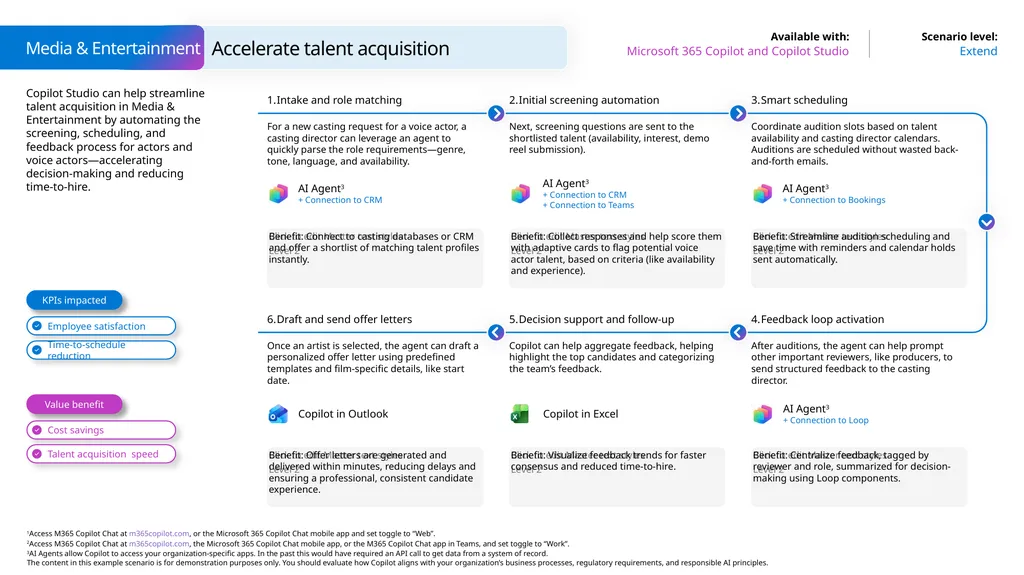
Copilot Studio can help streamline talent acquisition in Media & Entertainment by automating the screening, scheduling, and feedback process for actors and voice actors—accelerating decision-making and reducing time-to-hire. Accelerate talent acquisition Extend Microsoft 365 Copilot and Copilot Studio Media & Entertainment Benefit: Connect to casting databases or CRM and offer a shortlist of matching talent profiles instantly. Intake and role matching For a new casting request for a voice actor, a casting director can leverage an agent to quickly parse the role requirements—genre, tone, language, and availability. Initial screening automation Next, screening questions are sent to the shortlisted talent (availability, interest, demo reel submission). Benefit: Streamline audition scheduling and save time with reminders and calendar holds sent automatically. Smart scheduling Coordinate audition slots based on talent availability and casting director calendars. Auditions are scheduled without wasted back-and-forth emails. Benefit: Collect responses and help score them with adaptive cards to flag potential voice actor talent, based on criteria (like availability and experience). Benefit: Offer letters are generated and delivered within minutes, reducing delays and ensuring a professional, consistent candidate experience. Draft and send offer letters Once an artist is selected, the agent can draft a personalized offer letter using predefined templates and film-specific details, like start date. Decision support and follow-up Copilot can help aggregate feedback, helping highlight the top candidates and categorizing the team’s feedback. Benefit: Centralize feedback, tagged by reviewer and role, summarized for decision-making using Loop components. Feedback loop activation After auditions, the agent can help prompt other important reviewers, like producers, to send structured feedback to the casting director. Benefit: Visualize feedback trends for faster consensus and reduced time-to-hire. Value benefit KPIs impacted Copilot in Outlook AI Agent3
+ Connection to CRM AI Agent3
+ Connection to CRM
+ Connection to Teams AI Agent3
+ Connection to Bookings AI Agent3
+ Connection to Loop Copilot in Excel<br>
+ Connection to CRM AI Agent3
+ Connection to CRM
+ Connection to Teams AI Agent3
+ Connection to Bookings AI Agent3
+ Connection to Loop Copilot in Excel<br>
24
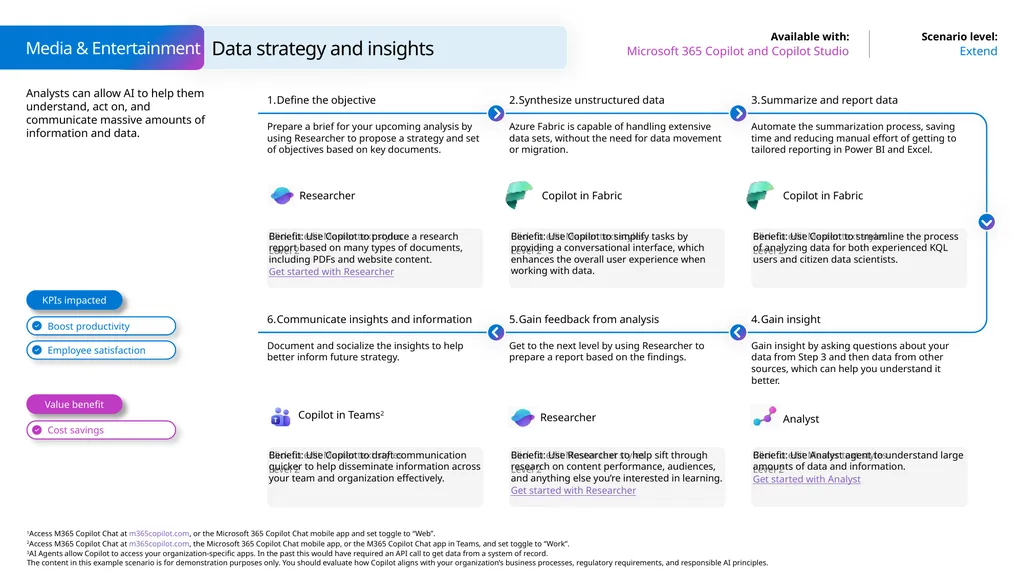
Analysts can allow AI to help them understand, act on, and communicate massive amounts of information and data. Data strategy and insights Extend Microsoft 365 Copilot and Copilot Studio Media & Entertainment Benefit: Use Copilot to produce a research report based on many types of documents, including PDFs and website content.
Get started with Researcher Define the objective Prepare a brief for your upcoming analysis by using Researcher to propose a strategy and set of objectives based on key documents. Synthesize unstructured data Azure Fabric is capable of handling extensive data sets, without the need for data movement or migration. Benefit: Use Copilot to streamline the process of analyzing data for both experienced KQL users and citizen data scientists. Summarize and report data Automate the summarization process, saving time and reducing manual effort of getting to tailored reporting in Power BI and Excel. Benefit: Use Copilot to simplify tasks by providing a conversational interface, which enhances the overall user experience when working with data. Benefit: Use Copilot to draft communication quicker to help disseminate information across your team and organization effectively. Communicate insights and information Document and socialize the insights to help better inform future strategy. Gain feedback from analysis Get to the next level by using Researcher to prepare a report based on the findings. Benefit: Use Analyst agent to understand large amounts of data and information.
Get started with Analyst Gain insight Gain insight by asking questions about your data from Step 3 and then data from other sources, which can help you understand it better. Benefit: Use Researcher to help sift through research on content performance, audiences, and anything else you’re interested in learning.
Get started with Researcher Value benefit KPIs impacted Copilot in Fabric Copilot in Fabric Copilot in Teams2 Analyst Researcher Researcher<br>
Get started with Researcher Define the objective Prepare a brief for your upcoming analysis by using Researcher to propose a strategy and set of objectives based on key documents. Synthesize unstructured data Azure Fabric is capable of handling extensive data sets, without the need for data movement or migration. Benefit: Use Copilot to streamline the process of analyzing data for both experienced KQL users and citizen data scientists. Summarize and report data Automate the summarization process, saving time and reducing manual effort of getting to tailored reporting in Power BI and Excel. Benefit: Use Copilot to simplify tasks by providing a conversational interface, which enhances the overall user experience when working with data. Benefit: Use Copilot to draft communication quicker to help disseminate information across your team and organization effectively. Communicate insights and information Document and socialize the insights to help better inform future strategy. Gain feedback from analysis Get to the next level by using Researcher to prepare a report based on the findings. Benefit: Use Analyst agent to understand large amounts of data and information.
Get started with Analyst Gain insight Gain insight by asking questions about your data from Step 3 and then data from other sources, which can help you understand it better. Benefit: Use Researcher to help sift through research on content performance, audiences, and anything else you’re interested in learning.
Get started with Researcher Value benefit KPIs impacted Copilot in Fabric Copilot in Fabric Copilot in Teams2 Analyst Researcher Researcher<br>
25
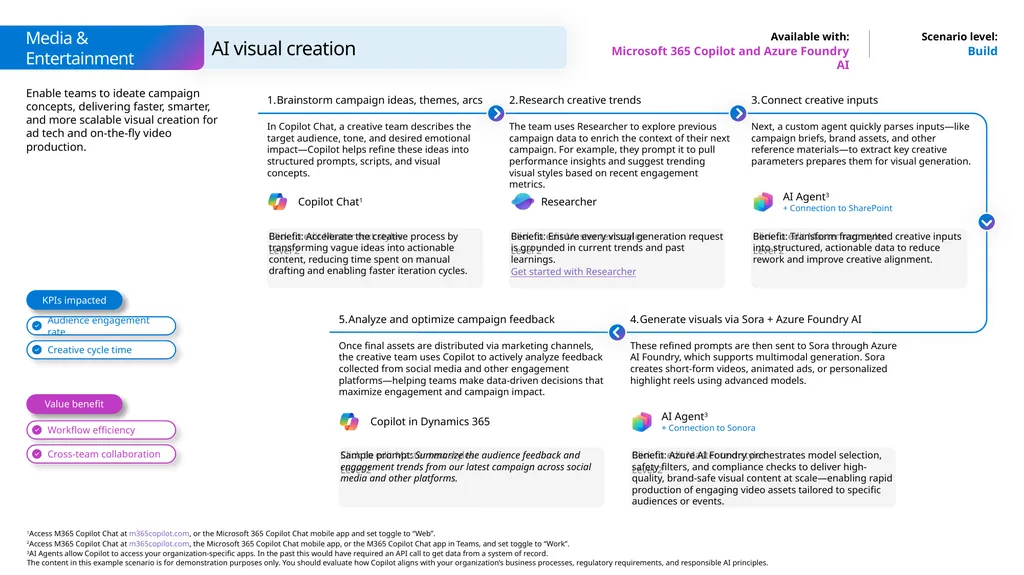
Build Microsoft 365 Copilot and Azure Foundry AI Benefit: Accelerate the creative process by transforming vague ideas into actionable content, reducing time spent on manual drafting and enabling faster iteration cycles. Brainstorm campaign ideas, themes, arcs Enable teams to ideate campaign concepts, delivering faster, smarter, and more scalable visual creation for ad tech and on-the-fly video production. In Copilot Chat, a creative team describes the target audience, tone, and desired emotional impact—Copilot helps refine these ideas into structured prompts, scripts, and visual concepts. Benefit: Transform fragmented creative inputs into structured, actionable data to reduce rework and improve creative alignment. Connect creative inputs Next, a custom agent quickly parses inputs—like campaign briefs, brand assets, and other reference materials—to extract key creative parameters prepares them for visual generation. Benefit: Ensure every visual generation request is grounded in current trends and past learnings.
Get started with Researcher Analyze and optimize campaign feedback Once final assets are distributed via marketing channels, the creative team uses Copilot to actively analyze feedback collected from social media and other engagement platforms—helping teams make data-driven decisions that maximize engagement and campaign impact. Research creative trends The team uses Researcher to explore previous campaign data to enrich the context of their next campaign. For example, they prompt it to pull performance insights and suggest trending visual styles based on recent engagement metrics. Benefit: Azure AI Foundry orchestrates model selection, safety filters, and compliance checks to deliver high-quality, brand-safe visual content at scale—enabling rapid production of engaging video assets tailored to specific audiences or events. Generate visuals via Sora + Azure Foundry AI These refined prompts are then sent to Sora through Azure AI Foundry, which supports multimodal generation. Sora creates short-form videos, animated ads, or personalized highlight reels using advanced models. Sample prompt: Summarize the audience feedback and engagement trends from our latest campaign across social media and other platforms. AI visual creation Value benefit KPIs impacted Audience engagement rate Workflow efficiency Cross-team collaboration Media & Entertainment AI Agent3
+ Connection to SharePoint AI Agent3
+ Connection to Sonora Copilot Chat1 Researcher Creative cycle time Copilot in Dynamics 365<br>
Get started with Researcher Analyze and optimize campaign feedback Once final assets are distributed via marketing channels, the creative team uses Copilot to actively analyze feedback collected from social media and other engagement platforms—helping teams make data-driven decisions that maximize engagement and campaign impact. Research creative trends The team uses Researcher to explore previous campaign data to enrich the context of their next campaign. For example, they prompt it to pull performance insights and suggest trending visual styles based on recent engagement metrics. Benefit: Azure AI Foundry orchestrates model selection, safety filters, and compliance checks to deliver high-quality, brand-safe visual content at scale—enabling rapid production of engaging video assets tailored to specific audiences or events. Generate visuals via Sora + Azure Foundry AI These refined prompts are then sent to Sora through Azure AI Foundry, which supports multimodal generation. Sora creates short-form videos, animated ads, or personalized highlight reels using advanced models. Sample prompt: Summarize the audience feedback and engagement trends from our latest campaign across social media and other platforms. AI visual creation Value benefit KPIs impacted Audience engagement rate Workflow efficiency Cross-team collaboration Media & Entertainment AI Agent3
+ Connection to SharePoint AI Agent3
+ Connection to Sonora Copilot Chat1 Researcher Creative cycle time Copilot in Dynamics 365<br>
26
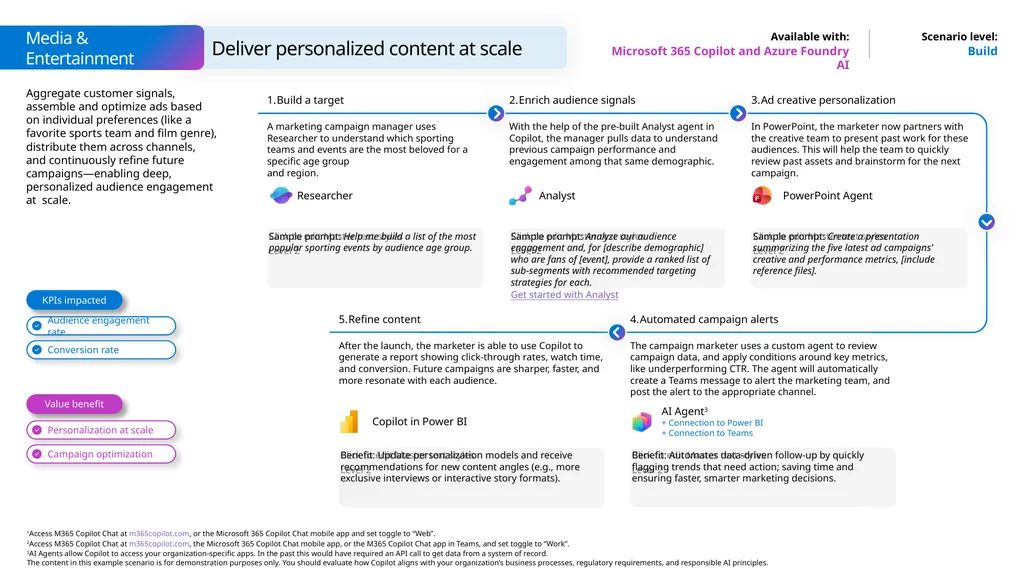
Build Microsoft 365 Copilot and Azure Foundry AI Sample prompt: Help me build a list of the most popular sporting events by audience age group. Build a target Aggregate customer signals, assemble and optimize ads based on individual preferences (like a favorite sports team and film genre), distribute them across channels, and continuously refine future campaigns—enabling deep, personalized audience engagement at scale. A marketing campaign manager uses Researcher to understand which sporting teams and events are the most beloved for a specific age group
and region. Sample prompt: Create a presentation summarizing the five latest ad campaigns’ creative and performance metrics, [include reference files]. Ad creative personalization In PowerPoint, the marketer now partners with the creative team to present past work for these audiences. This will help the team to quickly review past assets and brainstorm for the next campaign. Sample prompt: Analyze our audience engagement and, for [describe demographic] who are fans of [event], provide a ranked list of sub-segments with recommended targeting strategies for each.
Get started with Analyst Refine content After the launch, the marketer is able to use Copilot to generate a report showing click-through rates, watch time, and conversion. Future campaigns are sharper, faster, and more resonate with each audience. Enrich audience signals With the help of the pre-built Analyst agent in Copilot, the manager pulls data to understand previous campaign performance and engagement among that same demographic. Benefit: Automates data-driven follow-up by quickly flagging trends that need action; saving time and ensuring faster, smarter marketing decisions. Automated campaign alerts The campaign marketer uses a custom agent to review campaign data, and apply conditions around key metrics, like underperforming CTR. The agent will automatically create a Teams message to alert the marketing team, and post the alert to the appropriate channel. Benefit: Update personalization models and receive recommendations for new content angles (e.g., more exclusive interviews or interactive story formats). Deliver personalized content at scale Value benefit KPIs impacted Audience engagement rate Personalization at scale Campaign optimization Media & Entertainment AI Agent3
+ Connection to Power BI
+ Connection to Teams Conversion rate Researcher PowerPoint Agent Analyst<br>
Get started with Analyst Refine content After the launch, the marketer is able to use Copilot to generate a report showing click-through rates, watch time, and conversion. Future campaigns are sharper, faster, and more resonate with each audience. Enrich audience signals With the help of the pre-built Analyst agent in Copilot, the manager pulls data to understand previous campaign performance and engagement among that same demographic. Benefit: Automates data-driven follow-up by quickly flagging trends that need action; saving time and ensuring faster, smarter marketing decisions. Automated campaign alerts The campaign marketer uses a custom agent to review campaign data, and apply conditions around key metrics, like underperforming CTR. The agent will automatically create a Teams message to alert the marketing team, and post the alert to the appropriate channel. Benefit: Update personalization models and receive recommendations for new content angles (e.g., more exclusive interviews or interactive story formats). Deliver personalized content at scale Value benefit KPIs impacted Audience engagement rate Personalization at scale Campaign optimization Media & Entertainment AI Agent3
+ Connection to Power BI
+ Connection to Teams Conversion rate Researcher PowerPoint Agent Analyst<br>
27
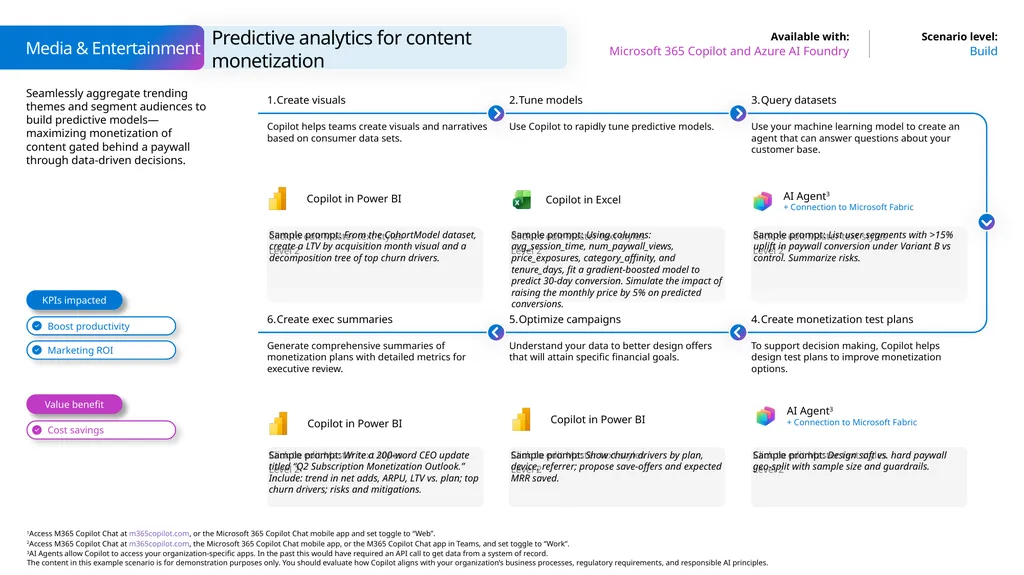
Seamlessly aggregate trending themes and segment audiences to build predictive models—maximizing monetization of content gated behind a paywall through data-driven decisions. Predictive analytics for content monetization Build Microsoft 365 Copilot and Azure AI Foundry Media & Entertainment Sample prompt: From the CohortModel dataset, create a LTV by acquisition month visual and a decomposition tree of top churn drivers. Create visuals Copilot helps teams create visuals and narratives based on consumer data sets. Tune models Use Copilot to rapidly tune predictive models. Sample prompt: List user segments with >15% uplift in paywall conversion under Variant B vs control. Summarize risks. Query datasets Use your machine learning model to create an agent that can answer questions about your customer base. Sample prompt: Using columns: avg_session_time, num_paywall_views, price_exposures, category_affinity, and tenure_days, fit a gradient‑boosted model to predict 30-day conversion. Simulate the impact of raising the monthly price by 5% on predicted conversions. Sample prompt: Write a 200‑word CEO update titled “Q2 Subscription Monetization Outlook.” Include: trend in net adds, ARPU, LTV vs. plan; top churn drivers; risks and mitigations. Create exec summaries Generate comprehensive summaries of monetization plans with detailed metrics for executive review. Optimize campaigns Understand your data to better design offers that will attain specific financial goals. Sample prompt: Design soft vs. hard paywall geo‑split with sample size and guardrails. Create monetization test plans To support decision making, Copilot helps design test plans to improve monetization options. Sample prompt: Show churn drivers by plan, device, referrer; propose save‑offers and expected MRR saved. Value benefit KPIs impacted AI Agent3
+ Connection to Microsoft Fabric Copilot in Excel AI Agent3
+ Connection to Microsoft Fabric<br>
+ Connection to Microsoft Fabric Copilot in Excel AI Agent3
+ Connection to Microsoft Fabric<br>