
Lecture 12 Memory Hierarchy CS213 – Intro to
LO
Published · 55 slides · 0 views
1 / 1
Description
Lecture 12 Memory Hierarchy CS213 Intro to Computer Systems Branden Ghena Winter 2022 Slides adapted from: St-Amour, Hardavellas, Bustamente (Northwestern), Bryant, OHallaron (CMU), Garcia, Weaver (UC Berkeley) Administrivia Business
Related Topics
Share
Embed code
Download this presentation From Below
"Lecture 12 Memory Hierarchy CS213 – Intro to" is the property of its rightful owner. Permission is granted to download and print the materials on this website for personal, non-commercial use only, and to display it on your personal computer provided you do not modify the materials and that you retain all copyright notices contained in the materials. By downloading content from our website, you accept the terms of this agreement.
Presentation Transcript
01
Lecture 12
Memory Hierarchy CS213 – Intro to Computer Systems
Branden Ghena – Winter 2022 Slides adapted from: St-Amour, Hardavellas, Bustamente (Northwestern), Bryant, O’Hallaron (CMU), Garcia, Weaver (UC Berkeley)<br>
Branden Ghena – Winter 2022 Slides adapted from: St-Amour, Hardavellas, Bustamente (Northwestern), Bryant, O’Hallaron (CMU), Garcia, Weaver (UC Berkeley)<br>
02
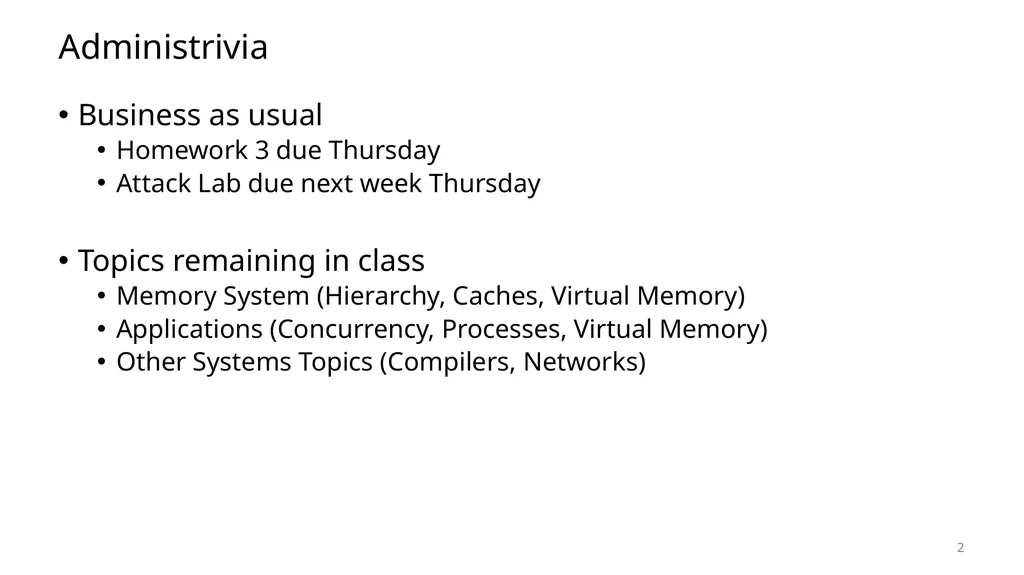
Administrivia Business as usual
Homework 3 due Thursday
Attack Lab due next week Thursday
Topics remaining in class
Memory System (Hierarchy, Caches, Virtual Memory)
Applications (Concurrency, Processes, Virtual Memory)
Other Systems Topics (Compilers, Networks) 2<br>
Homework 3 due Thursday
Attack Lab due next week Thursday
Topics remaining in class
Memory System (Hierarchy, Caches, Virtual Memory)
Applications (Concurrency, Processes, Virtual Memory)
Other Systems Topics (Compilers, Networks) 2<br>
03
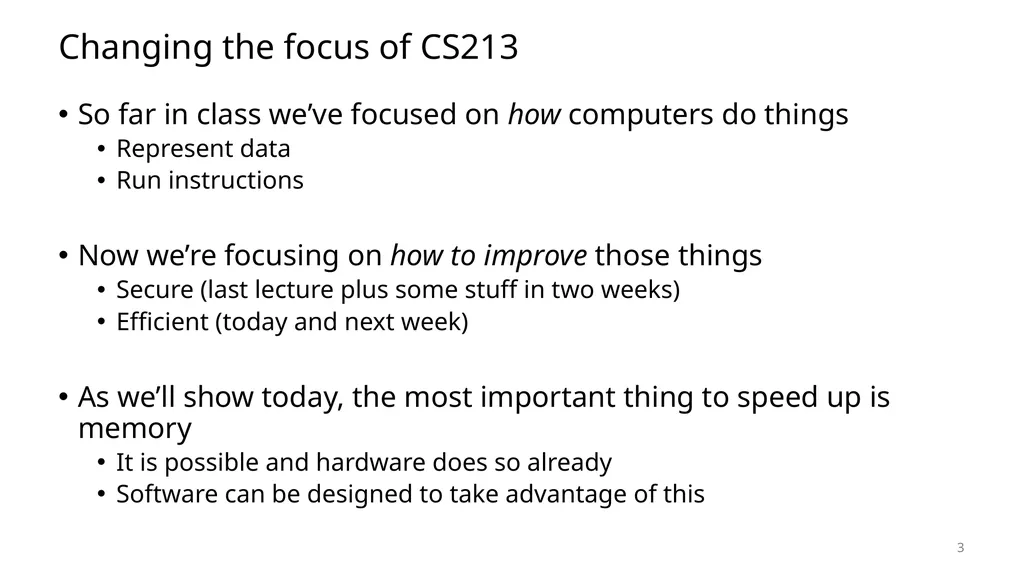
Changing the focus of CS213 So far in class we’ve focused on how computers do things
Represent data
Run instructions
Now we’re focusing on how to improve those things
Secure (last lecture plus some stuff in two weeks)
Efficient (today and next week)
As we’ll show today, the most important thing to speed up is memory
It is possible and hardware does so already
Software can be designed to take advantage of this 3<br>
Represent data
Run instructions
Now we’re focusing on how to improve those things
Secure (last lecture plus some stuff in two weeks)
Efficient (today and next week)
As we’ll show today, the most important thing to speed up is memory
It is possible and hardware does so already
Software can be designed to take advantage of this 3<br>
04
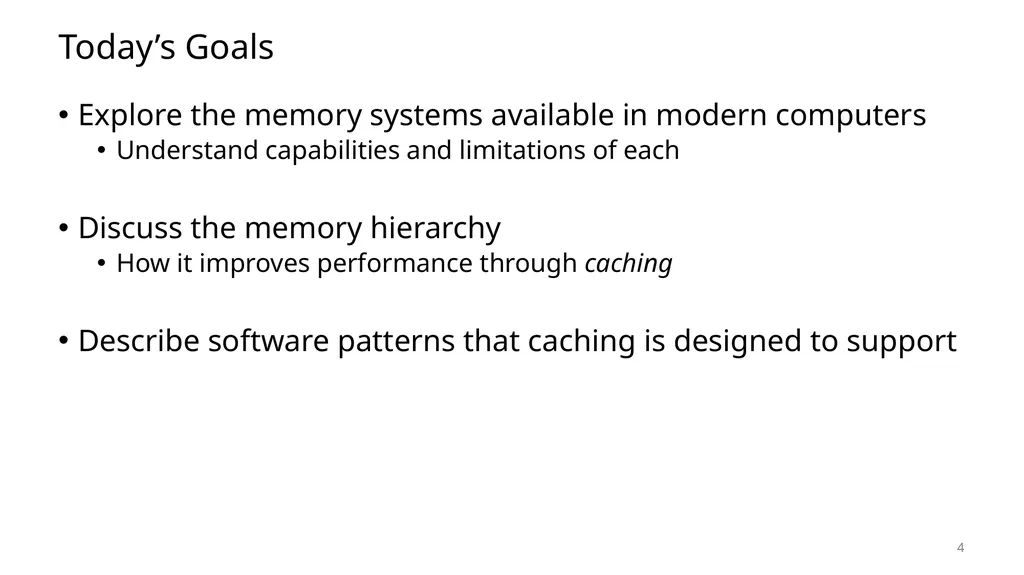
Today’s Goals Explore the memory systems available in modern computers
Understand capabilities and limitations of each
Discuss the memory hierarchy
How it improves performance through caching
Describe software patterns that caching is designed to support 4<br>
Understand capabilities and limitations of each
Discuss the memory hierarchy
How it improves performance through caching
Describe software patterns that caching is designed to support 4<br>
05
5 Technologies and Trends
Memory Hierarchy
Caches
Locality of Reference Outline<br>
Memory Hierarchy
Caches
Locality of Reference Outline<br>
06
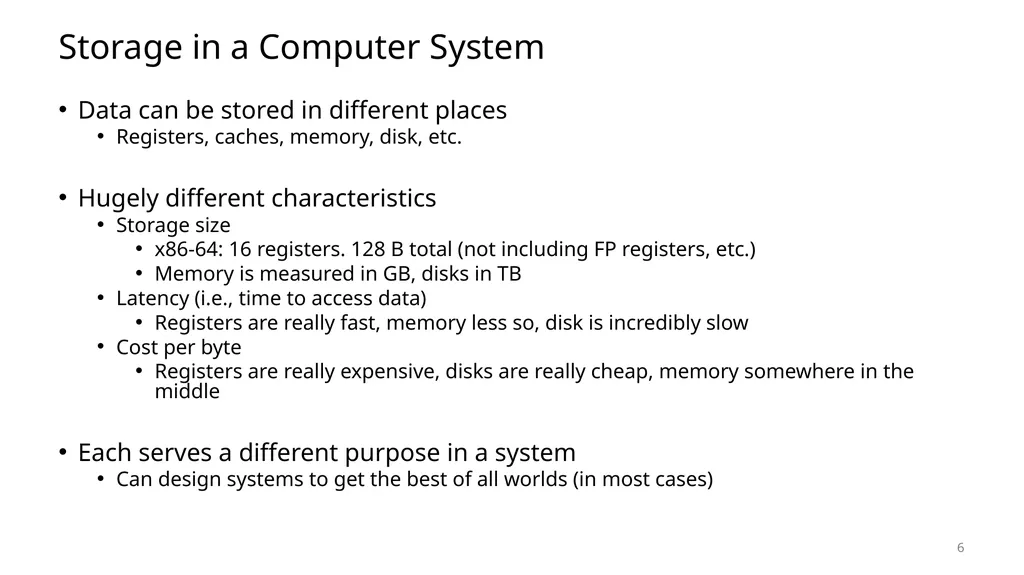
Storage in a Computer System Data can be stored in different places
Registers, caches, memory, disk, etc.
Hugely different characteristics
Storage size
x86-64: 16 registers. 128 B total (not including FP registers, etc.)
Memory is measured in GB, disks in TB
Latency (i.e., time to access data)
Registers are really fast, memory less so, disk is incredibly slow
Cost per byte
Registers are really expensive, disks are really cheap, memory somewhere in the middle
Each serves a different purpose in a system
Can design systems to get the best of all worlds (in most cases) 6<br>
Registers, caches, memory, disk, etc.
Hugely different characteristics
Storage size
x86-64: 16 registers. 128 B total (not including FP registers, etc.)
Memory is measured in GB, disks in TB
Latency (i.e., time to access data)
Registers are really fast, memory less so, disk is incredibly slow
Cost per byte
Registers are really expensive, disks are really cheap, memory somewhere in the middle
Each serves a different purpose in a system
Can design systems to get the best of all worlds (in most cases) 6<br>
07
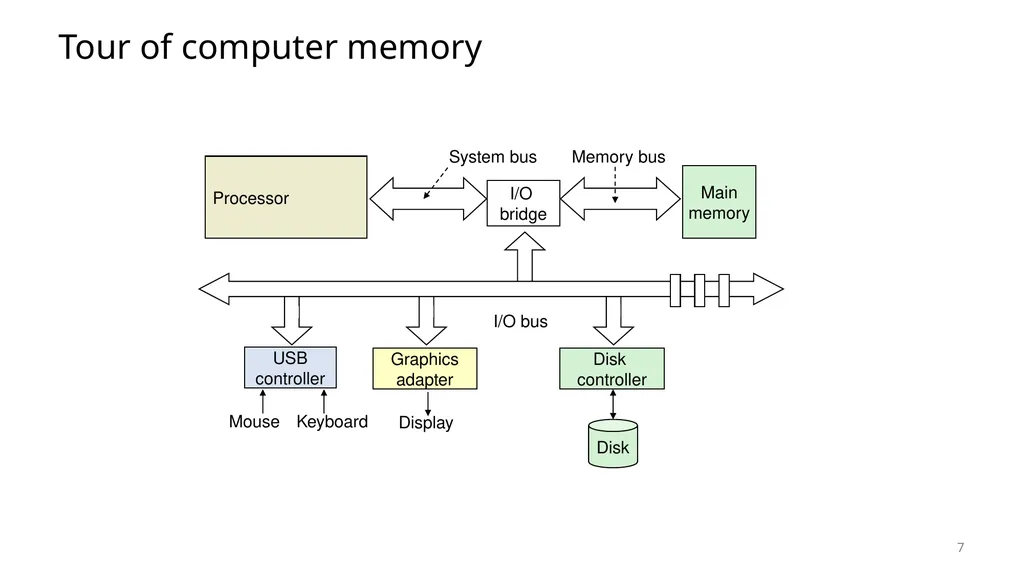
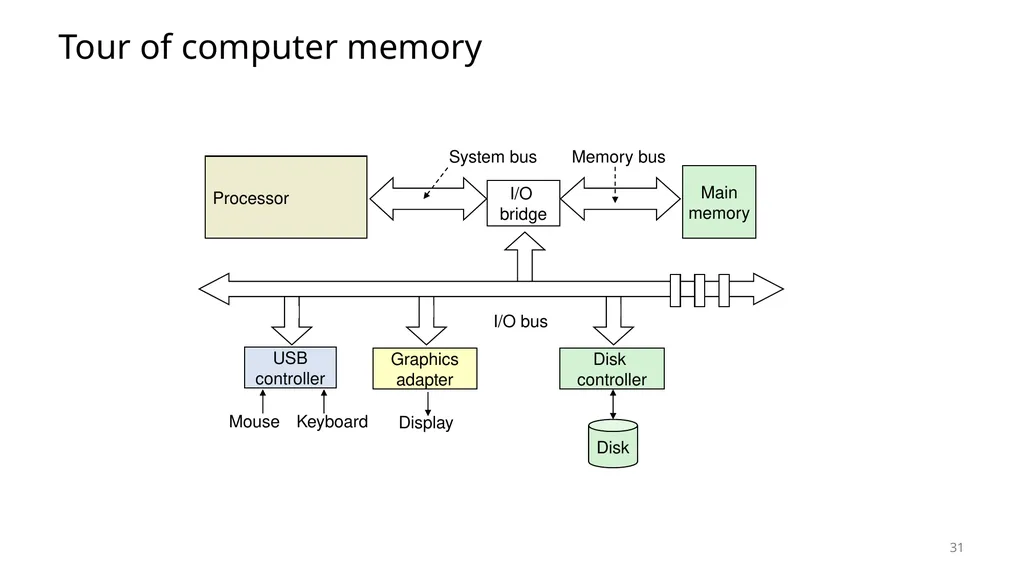
Tour of computer memory 7<br>
08
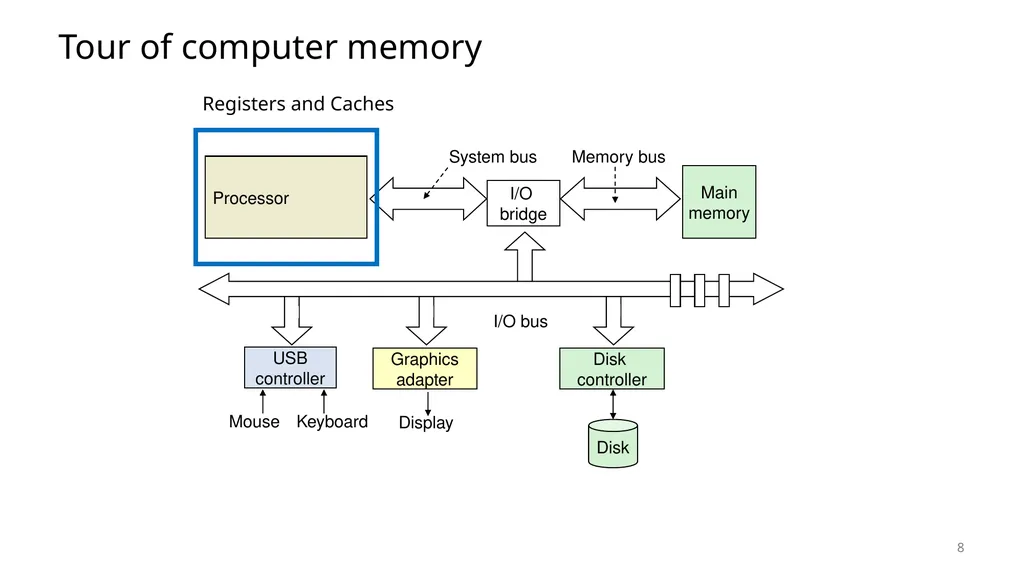
Tour of computer memory 8 Registers and Caches<br>
09
Register storage x86-64
16 registers (general-purpose) with 8 bytes each
32 registers (special-purpose) with up to 64 bytes each
Plus some other odds and ends (%rip, flags, segments, etc.)
128 bytes for general purpose registers
Order 2-3 kB for everything
Accesses are very fast. Within a single processor cycle
Usually, 0.25-4 cycles per instruction 9<br>
16 registers (general-purpose) with 8 bytes each
32 registers (special-purpose) with up to 64 bytes each
Plus some other odds and ends (%rip, flags, segments, etc.)
128 bytes for general purpose registers
Order 2-3 kB for everything
Accesses are very fast. Within a single processor cycle
Usually, 0.25-4 cycles per instruction 9<br>
10
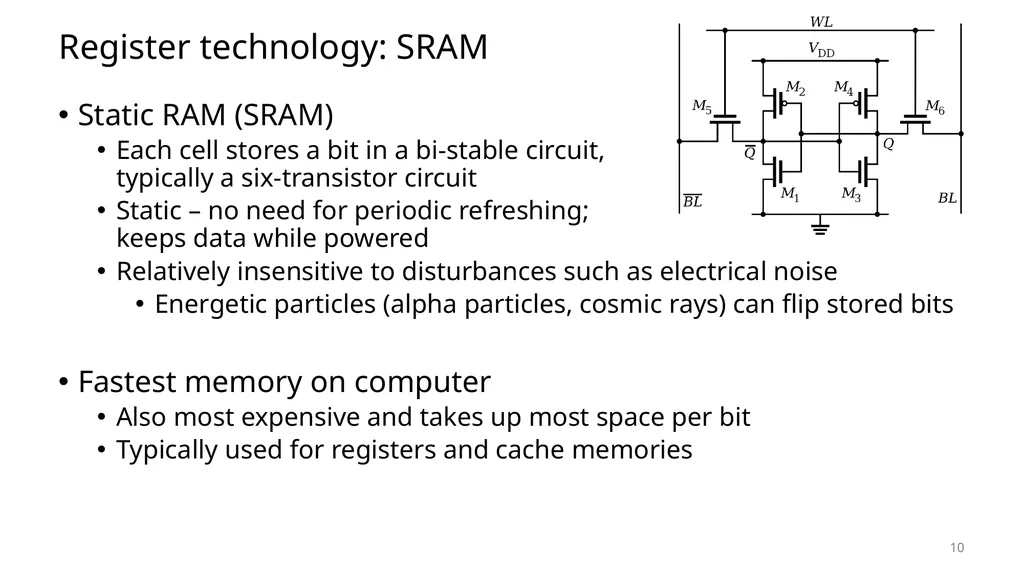
Register technology: SRAM Static RAM (SRAM)
Each cell stores a bit in a bi-stable circuit, typically a six-transistor circuit
Static – no need for periodic refreshing; keeps data while powered
Relatively insensitive to disturbances such as electrical noise
Energetic particles (alpha particles, cosmic rays) can flip stored bits
Fastest memory on computer
Also most expensive and takes up most space per bit
Typically used for registers and cache memories 10<br>
Each cell stores a bit in a bi-stable circuit, typically a six-transistor circuit
Static – no need for periodic refreshing; keeps data while powered
Relatively insensitive to disturbances such as electrical noise
Energetic particles (alpha particles, cosmic rays) can flip stored bits
Fastest memory on computer
Also most expensive and takes up most space per bit
Typically used for registers and cache memories 10<br>
11
Caches Memory in the processor that duplicates portions of RAM
Goal: speed up accesses to frequently used data
Complicated part: what’s in the cache at any given moment
Many configurations to try to improve the “hit rate” on data
Not general-purpose memory
Can’t be directly accessed and doesn’t have memory addresses
Hardware automatically chooses what’s in the cache
Cache sizes
Kilobytes to Megabytes of storage: ~1-10 MB total in modern processors 11<br>
Goal: speed up accesses to frequently used data
Complicated part: what’s in the cache at any given moment
Many configurations to try to improve the “hit rate” on data
Not general-purpose memory
Can’t be directly accessed and doesn’t have memory addresses
Hardware automatically chooses what’s in the cache
Cache sizes
Kilobytes to Megabytes of storage: ~1-10 MB total in modern processors 11<br>
12
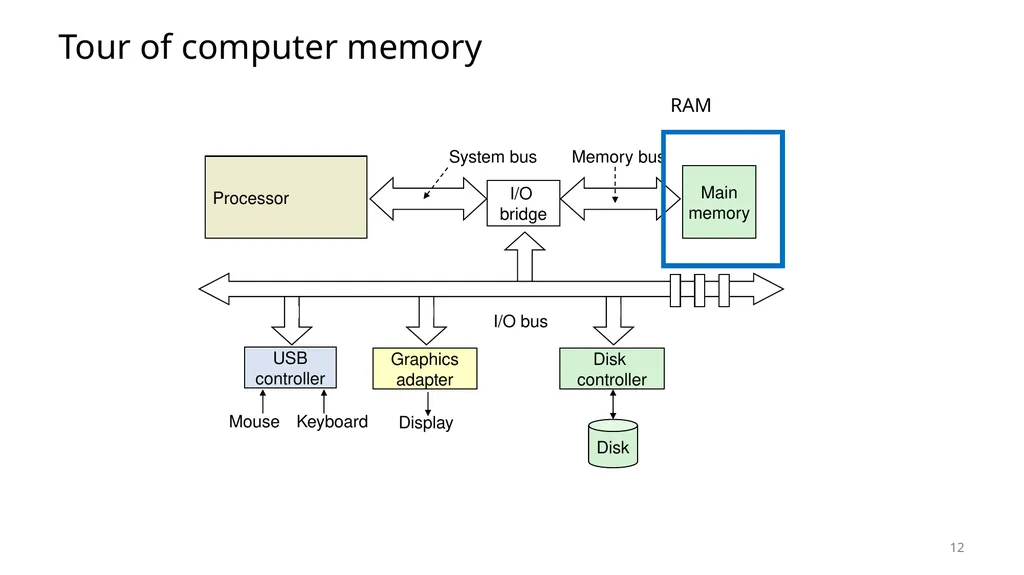
Tour of computer memory 12 RAM<br>
13
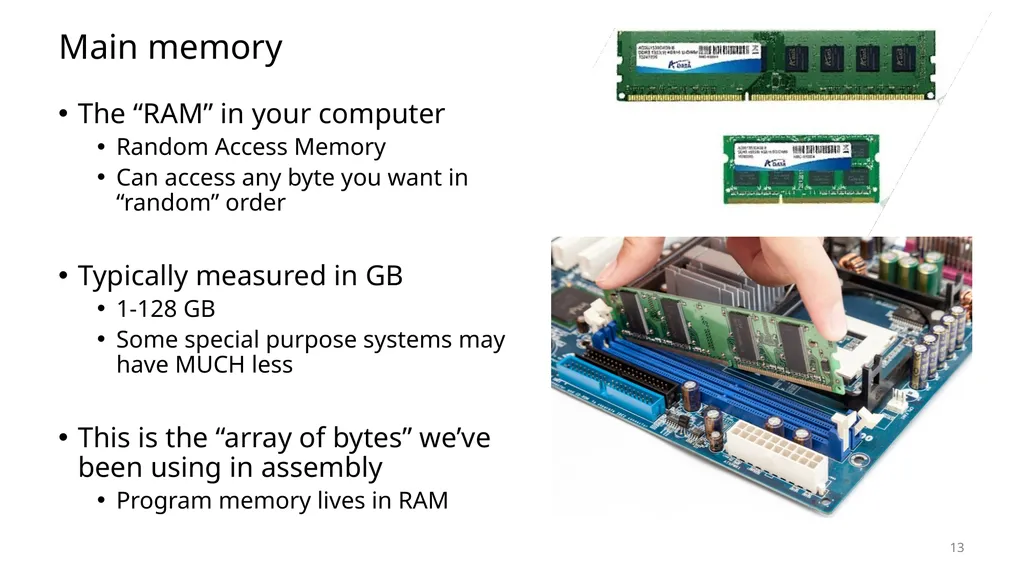
Main memory The “RAM” in your computer
Random Access Memory
Can access any byte you want in “random” order
Typically measured in GB
1-128 GB
Some special purpose systems may have MUCH less
This is the “array of bytes” we’ve been using in assembly
Program memory lives in RAM 13<br>
Random Access Memory
Can access any byte you want in “random” order
Typically measured in GB
1-128 GB
Some special purpose systems may have MUCH less
This is the “array of bytes” we’ve been using in assembly
Program memory lives in RAM 13<br>
14
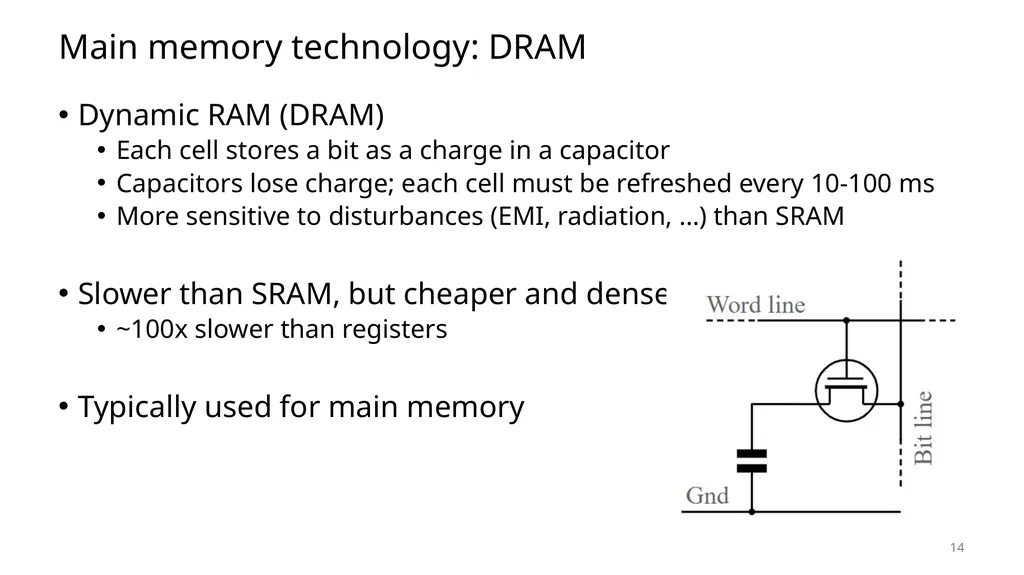
Main memory technology: DRAM Dynamic RAM (DRAM)
Each cell stores a bit as a charge in a capacitor
Capacitors lose charge; each cell must be refreshed every 10-100 ms
More sensitive to disturbances (EMI, radiation, …) than SRAM
Slower than SRAM, but cheaper and denser
~100x slower than registers
Typically used for main memory 14<br>
Each cell stores a bit as a charge in a capacitor
Capacitors lose charge; each cell must be refreshed every 10-100 ms
More sensitive to disturbances (EMI, radiation, …) than SRAM
Slower than SRAM, but cheaper and denser
~100x slower than registers
Typically used for main memory 14<br>
15
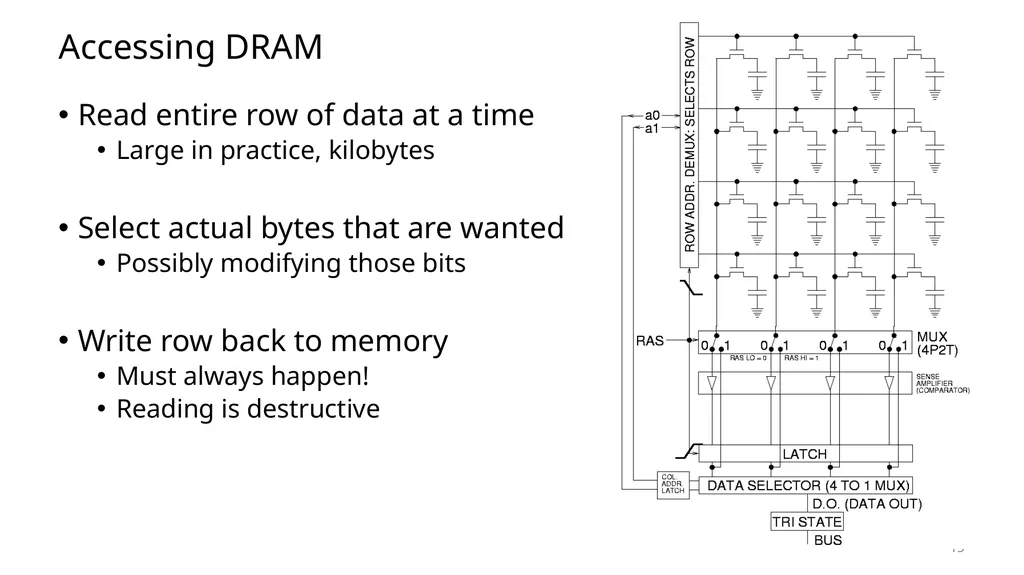
Accessing DRAM Read entire row of data at a time
Large in practice, kilobytes
Select actual bytes that are wanted
Possibly modifying those bits
Write row back to memory
Must always happen!
Reading is destructive 15<br>
Large in practice, kilobytes
Select actual bytes that are wanted
Possibly modifying those bits
Write row back to memory
Must always happen!
Reading is destructive 15<br>
16
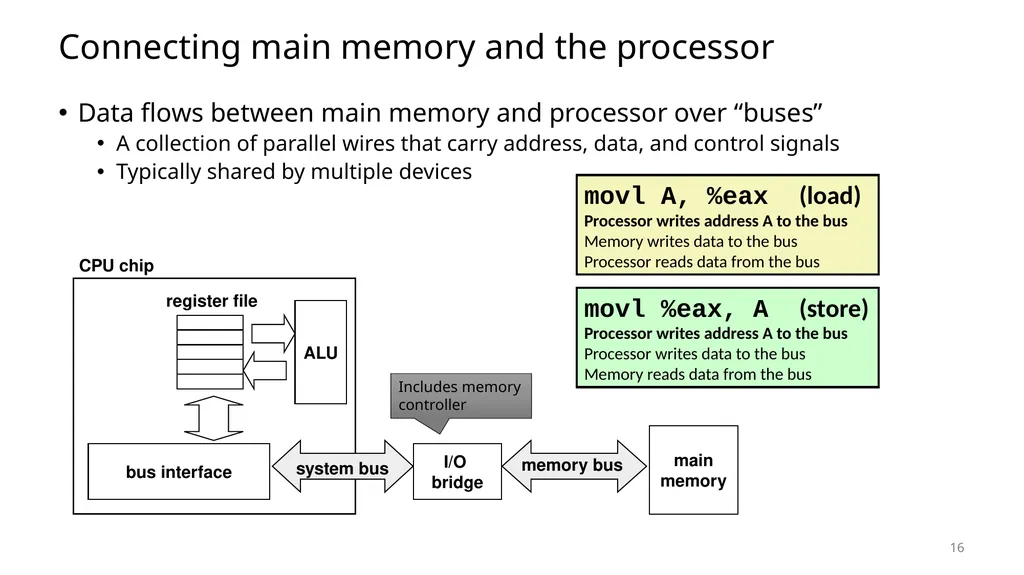
Connecting main memory and the processor Data flows between main memory and processor over “buses”
A collection of parallel wires that carry address, data, and control signals
Typically shared by multiple devices main
memory I/O
bridge bus interface ALU register file CPU chip memory bus Includes memory controller movl A, %eax (load)
Processor writes address A to the bus
Memory writes data to the bus
Processor reads data from the bus movl %eax, A (store)
Processor writes address A to the bus
Processor writes data to the bus
Memory reads data from the bus 16 system bus<br>
A collection of parallel wires that carry address, data, and control signals
Typically shared by multiple devices main
memory I/O
bridge bus interface ALU register file CPU chip memory bus Includes memory controller movl A, %eax (load)
Processor writes address A to the bus
Memory writes data to the bus
Processor reads data from the bus movl %eax, A (store)
Processor writes address A to the bus
Processor writes data to the bus
Memory reads data from the bus 16 system bus<br>
17
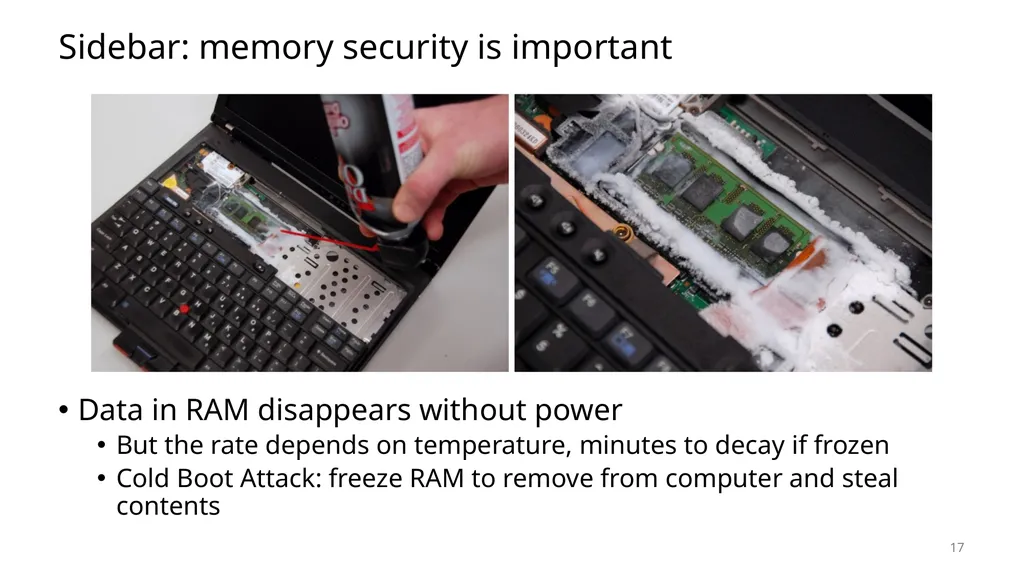
Sidebar: memory security is important Data in RAM disappears without power
But the rate depends on temperature, minutes to decay if frozen
Cold Boot Attack: freeze RAM to remove from computer and steal contents 17<br>
But the rate depends on temperature, minutes to decay if frozen
Cold Boot Attack: freeze RAM to remove from computer and steal contents 17<br>
18
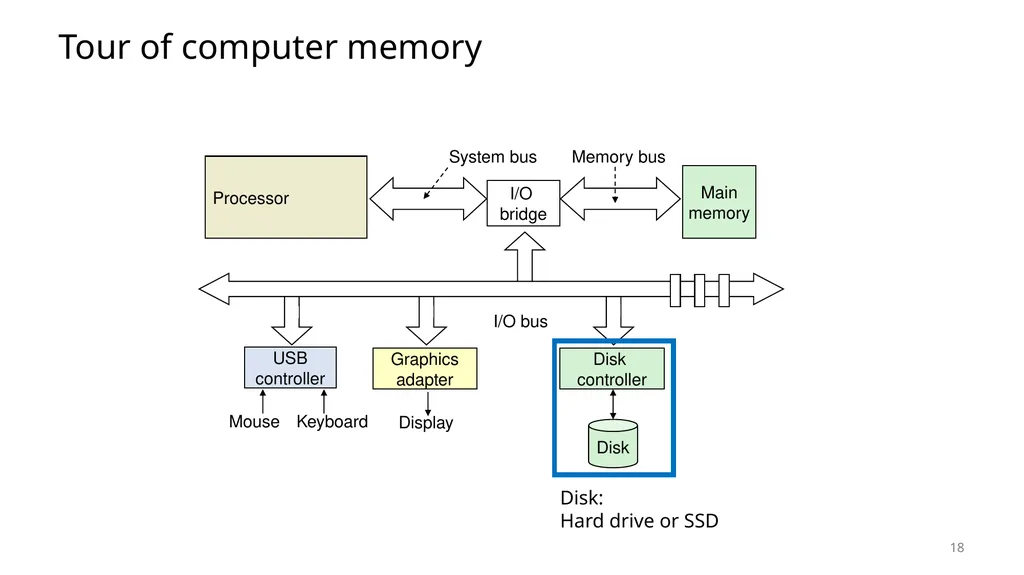
Tour of computer memory 18 Disk:
Hard drive or SSD<br>
19
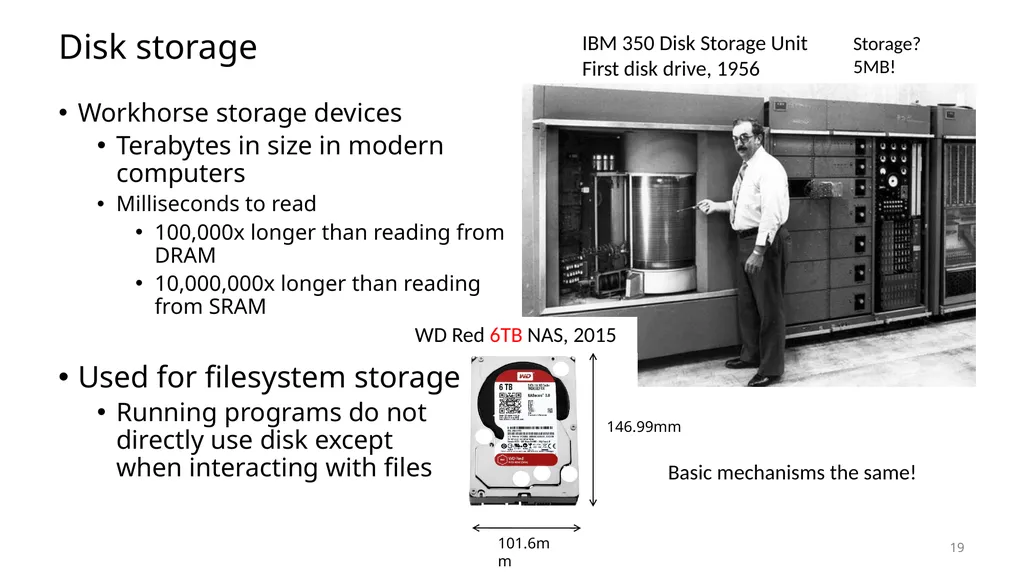
Disk storage Workhorse storage devices
Terabytes in size in modern computers
Milliseconds to read
100,000x longer than reading from DRAM
10,000,000x longer than reading from SRAM
Used for filesystem storage
Running programs do not directly use disk except when interacting with files IBM 350 Disk Storage Unit
First disk drive, 1956 WD Red 6TB NAS, 2015 101.6mm 146.99mm Storage?
5MB! Basic mechanisms the same! 19<br>
Terabytes in size in modern computers
Milliseconds to read
100,000x longer than reading from DRAM
10,000,000x longer than reading from SRAM
Used for filesystem storage
Running programs do not directly use disk except when interacting with files IBM 350 Disk Storage Unit
First disk drive, 1956 WD Red 6TB NAS, 2015 101.6mm 146.99mm Storage?
5MB! Basic mechanisms the same! 19<br>
20
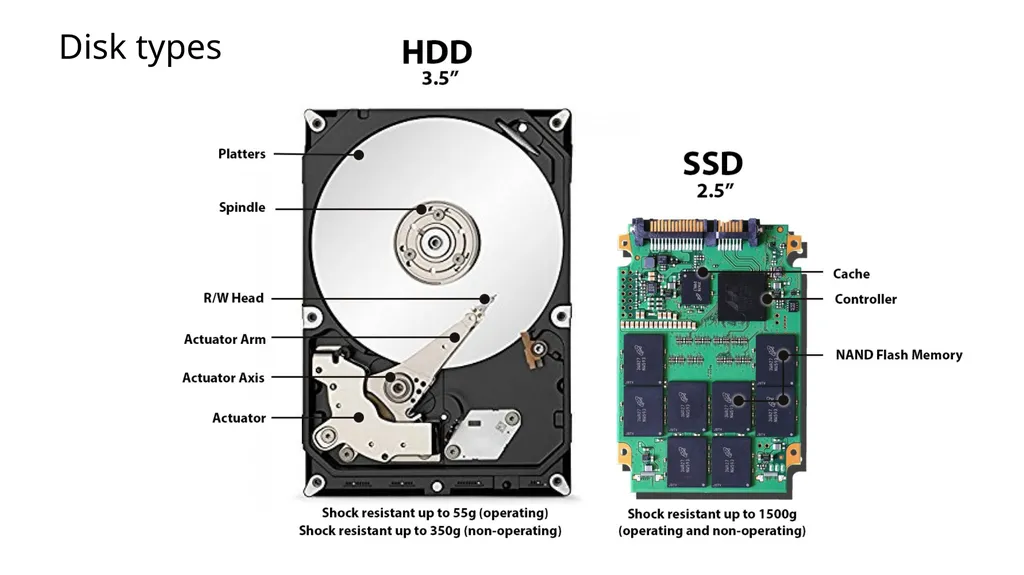
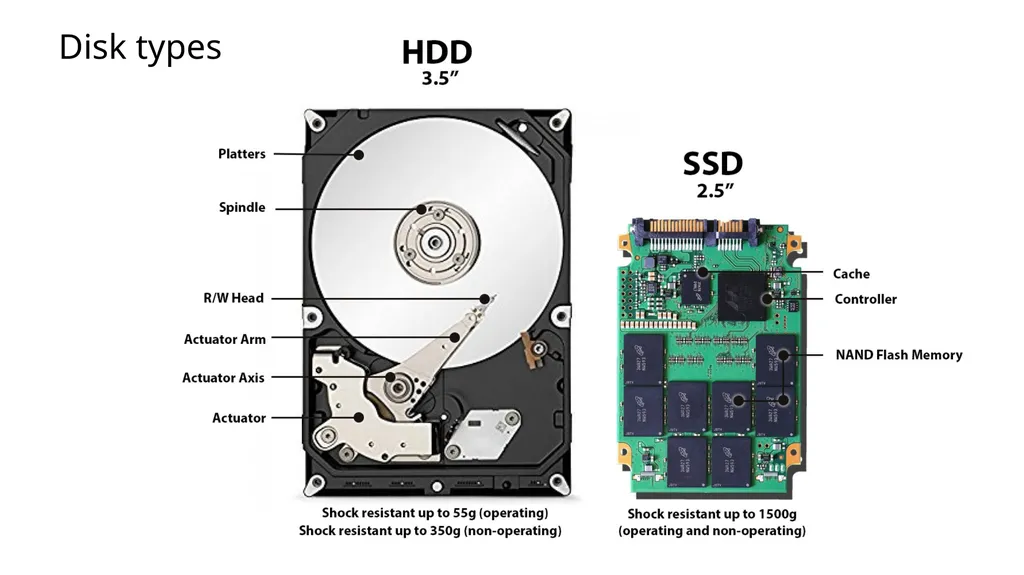
Disk types 20<br>
21
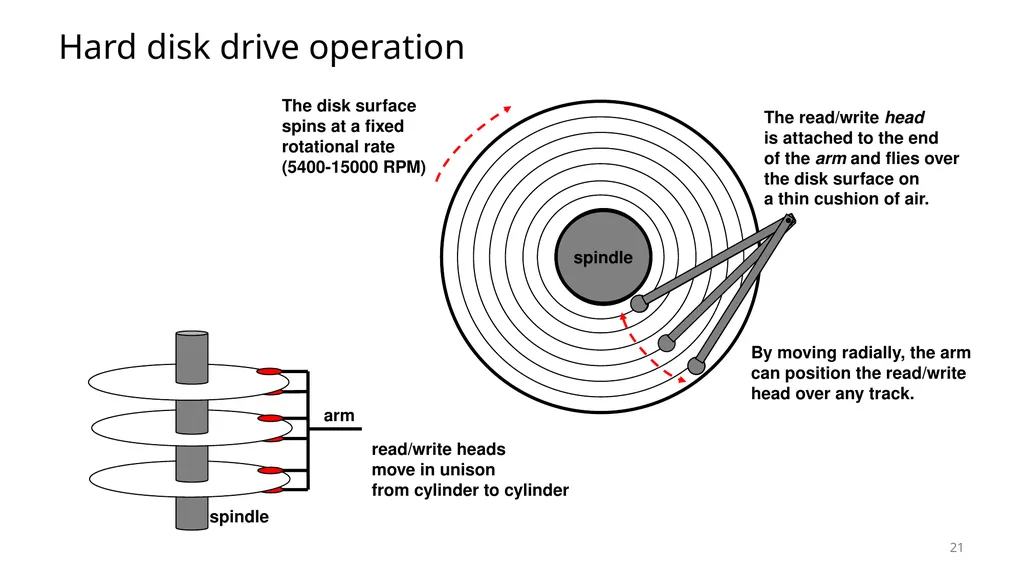
Hard disk drive operation 21 The disk surface
spins at a fixed
rotational rate
(5400-15000 RPM) spindle spindle spindle spindle spindle<br>
spins at a fixed
rotational rate
(5400-15000 RPM) spindle spindle spindle spindle spindle<br>
22
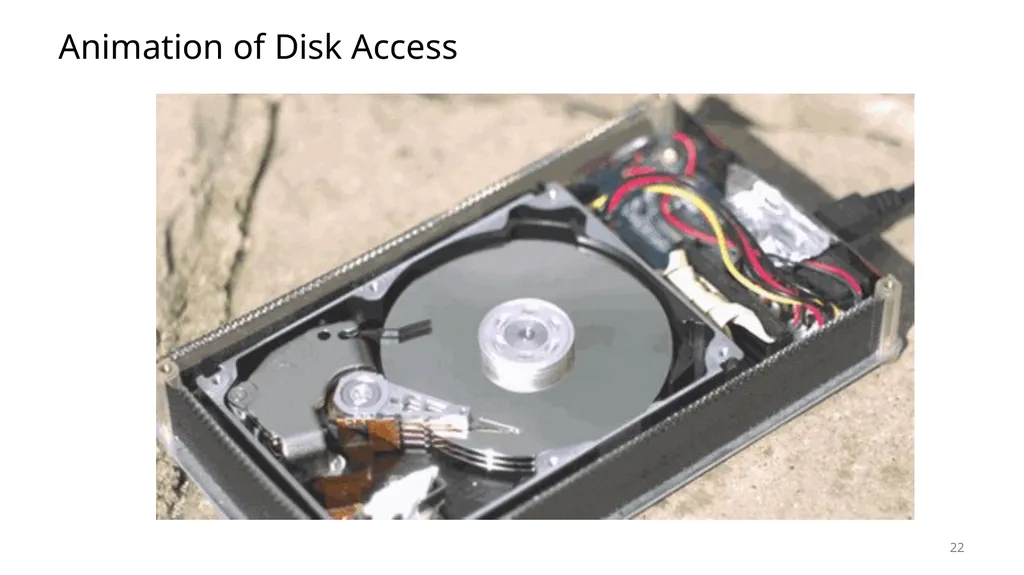
Animation of Disk Access 22<br>
23
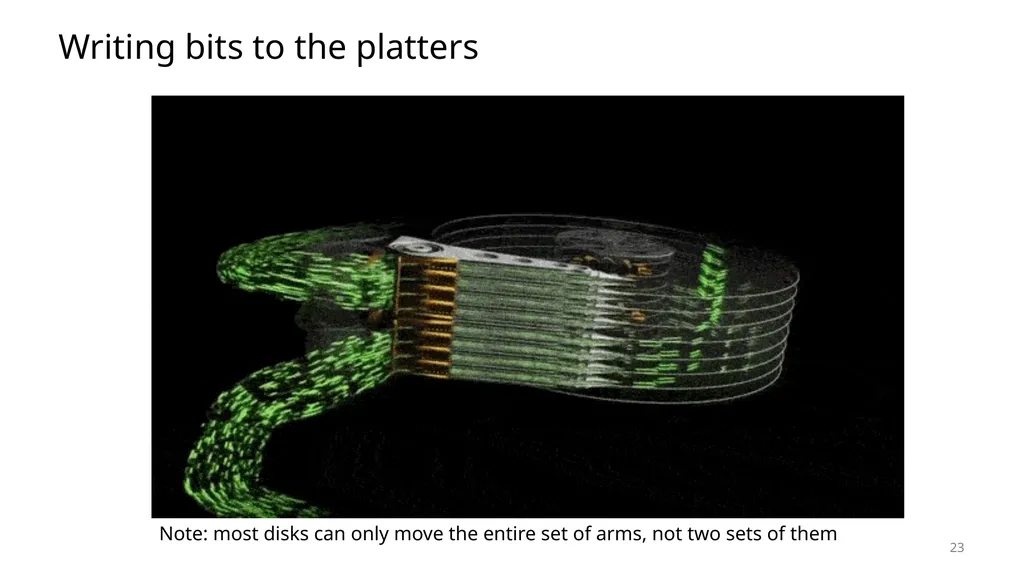
Writing bits to the platters 23 Note: most disks can only move the entire set of arms, not two sets of them<br>
24
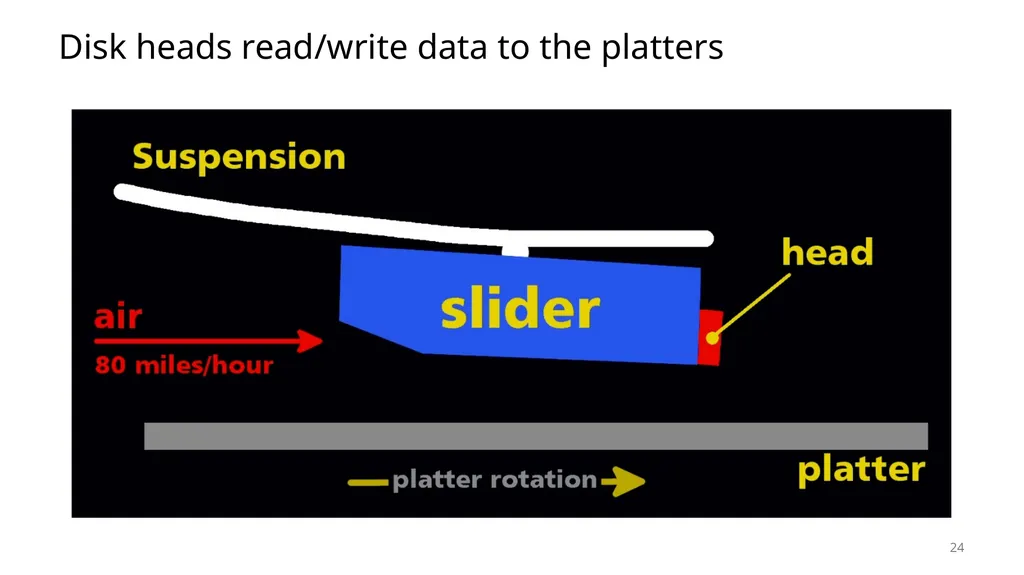
Disk heads read/write data to the platters 24<br>
25
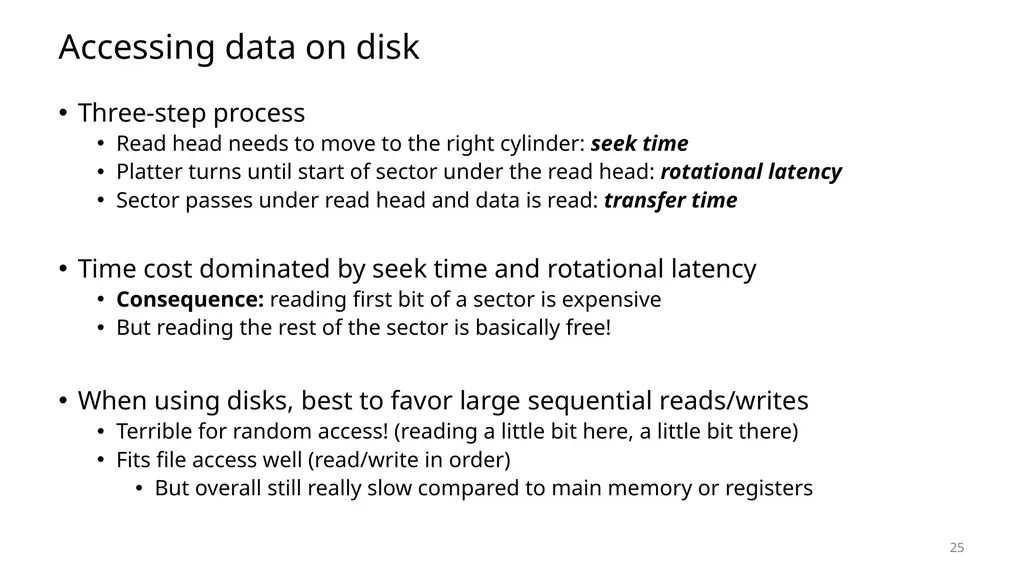
Accessing data on disk Three-step process
Read head needs to move to the right cylinder: seek time
Platter turns until start of sector under the read head: rotational latency
Sector passes under read head and data is read: transfer time
Time cost dominated by seek time and rotational latency
Consequence: reading first bit of a sector is expensive
But reading the rest of the sector is basically free!
When using disks, best to favor large sequential reads/writes
Terrible for random access! (reading a little bit here, a little bit there)
Fits file access well (read/write in order)
But overall still really slow compared to main memory or registers 25<br>
Read head needs to move to the right cylinder: seek time
Platter turns until start of sector under the read head: rotational latency
Sector passes under read head and data is read: transfer time
Time cost dominated by seek time and rotational latency
Consequence: reading first bit of a sector is expensive
But reading the rest of the sector is basically free!
When using disks, best to favor large sequential reads/writes
Terrible for random access! (reading a little bit here, a little bit there)
Fits file access well (read/write in order)
But overall still really slow compared to main memory or registers 25<br>
26
Disk types 26<br>
27
Floating-gate transistors Concept behind transistor-based non-volatile memory
EPROM, EEPROM, and Flash
High voltage on control gate creates charge on floating gate
Charge on floating gate activates/deactivates transistor
High voltage degrades structure, leading it to eventually fail after enough writes 27<br>
EPROM, EEPROM, and Flash
High voltage on control gate creates charge on floating gate
Charge on floating gate activates/deactivates transistor
High voltage degrades structure, leading it to eventually fail after enough writes 27<br>
28
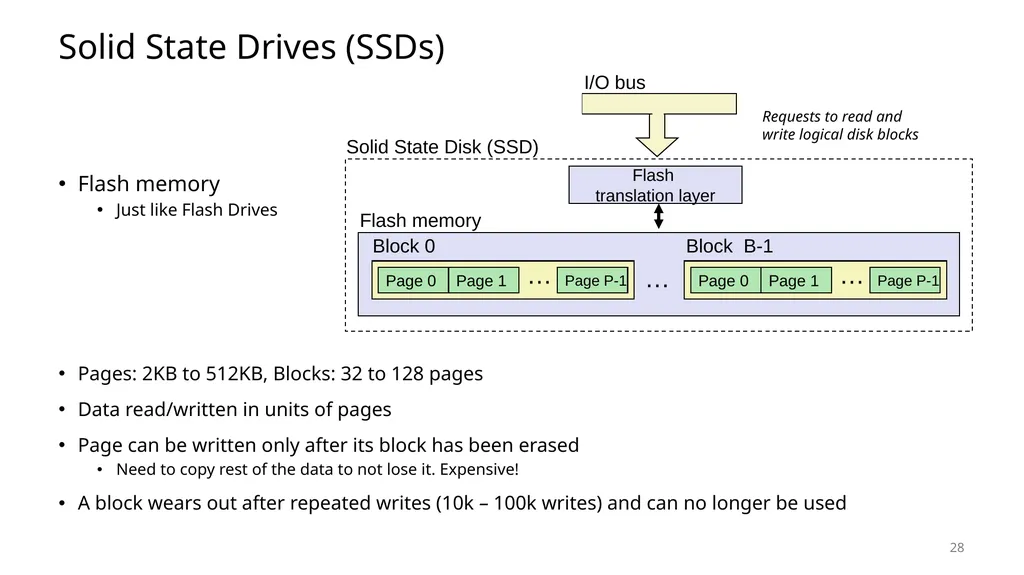
Solid State Drives (SSDs) Flash memory
Just like Flash Drives
Pages: 2KB to 512KB, Blocks: 32 to 128 pages
Data read/written in units of pages
Page can be written only after its block has been erased
Need to copy rest of the data to not lose it. Expensive!
A block wears out after repeated writes (10k – 100k writes) and can no longer be used Flash
translation layer I/O bus Page 0 Page 1 Page P-1 … Block 0 … Page 0 Page 1 Page P-1 … Block B-1 Flash memory Solid State Disk (SSD) Requests to read and
write logical disk blocks 28<br>
Just like Flash Drives
Pages: 2KB to 512KB, Blocks: 32 to 128 pages
Data read/written in units of pages
Page can be written only after its block has been erased
Need to copy rest of the data to not lose it. Expensive!
A block wears out after repeated writes (10k – 100k writes) and can no longer be used Flash
translation layer I/O bus Page 0 Page 1 Page P-1 … Block 0 … Page 0 Page 1 Page P-1 … Block B-1 Flash memory Solid State Disk (SSD) Requests to read and
write logical disk blocks 28<br>
29
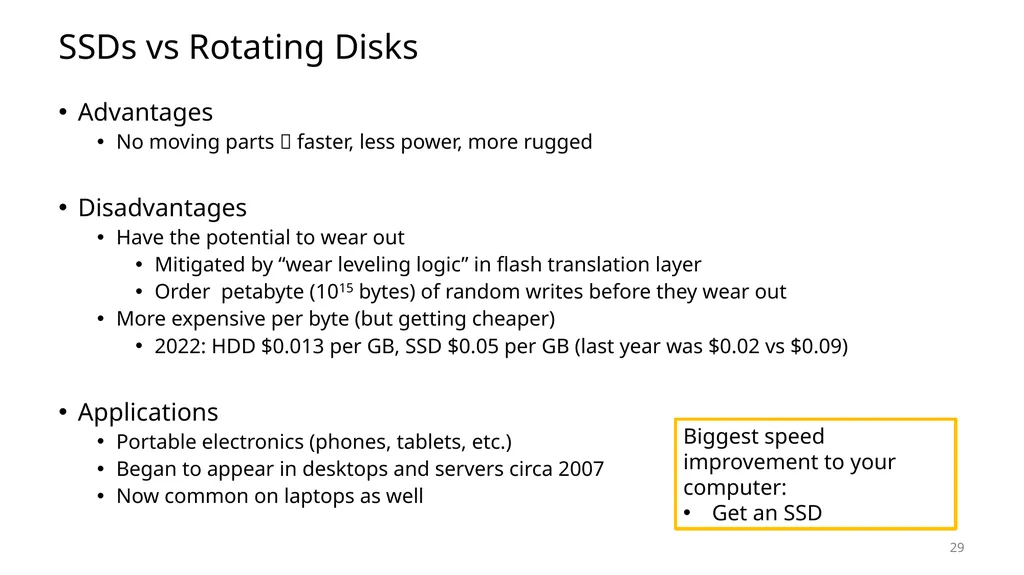
SSDs vs Rotating Disks Advantages
No moving parts faster, less power, more rugged
Disadvantages
Have the potential to wear out
Mitigated by “wear leveling logic” in flash translation layer
Order petabyte (1015 bytes) of random writes before they wear out
More expensive per byte (but getting cheaper)
2022: HDD $0.013 per GB, SSD $0.05 per GB (last year was $0.02 vs $0.09)
Applications
Portable electronics (phones, tablets, etc.)
Began to appear in desktops and servers circa 2007
Now common on laptops as well 29 Biggest speed improvement to your computer:
Get an SSD<br>
No moving parts faster, less power, more rugged
Disadvantages
Have the potential to wear out
Mitigated by “wear leveling logic” in flash translation layer
Order petabyte (1015 bytes) of random writes before they wear out
More expensive per byte (but getting cheaper)
2022: HDD $0.013 per GB, SSD $0.05 per GB (last year was $0.02 vs $0.09)
Applications
Portable electronics (phones, tablets, etc.)
Began to appear in desktops and servers circa 2007
Now common on laptops as well 29 Biggest speed improvement to your computer:
Get an SSD<br>
30
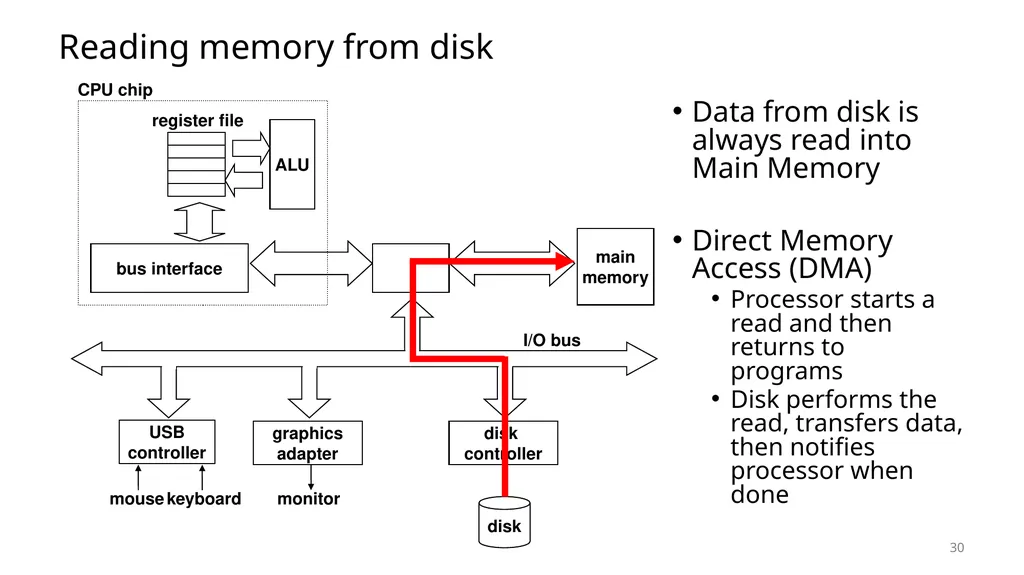
Reading memory from disk Data from disk is always read into Main Memory
Direct Memory Access (DMA)
Processor starts a read and then returns to programs
Disk performs the read, transfers data, then notifies processor when done 30 main
memory ALU register file CPU chip disk
controller graphics
adapter USB
controller mouse keyboard monitor disk I/O bus bus interface<br>
Direct Memory Access (DMA)
Processor starts a read and then returns to programs
Disk performs the read, transfers data, then notifies processor when done 30 main
memory ALU register file CPU chip disk
controller graphics
adapter USB
controller mouse keyboard monitor disk I/O bus bus interface<br>
31
Tour of computer memory 31<br>
32
Break + Question How do you make an SSD with a longer lifetime (more writes)?
Without changing any of the physics of how it works 32<br>
Without changing any of the physics of how it works 32<br>
33
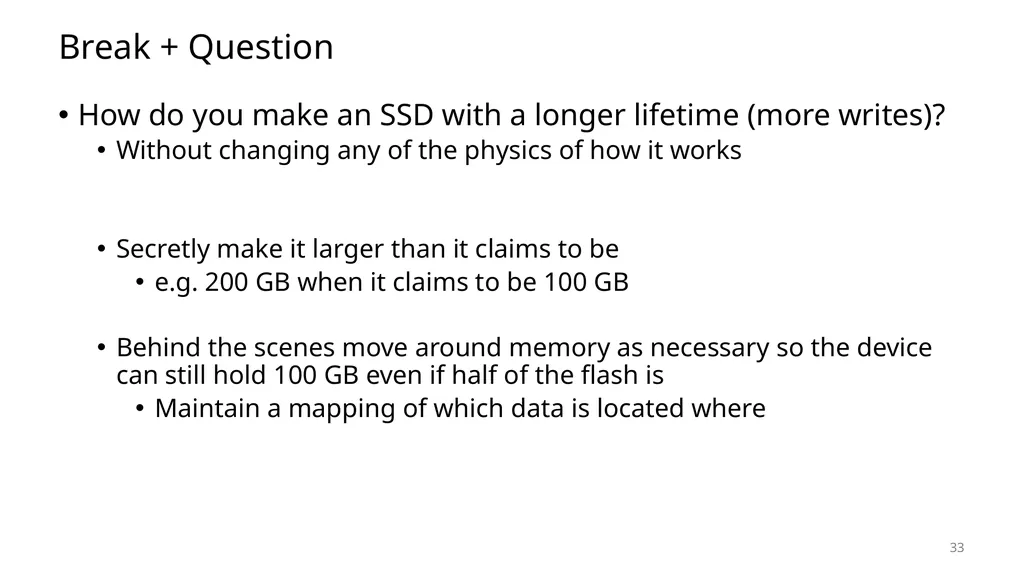
Break + Question How do you make an SSD with a longer lifetime (more writes)?
Without changing any of the physics of how it works
Secretly make it larger than it claims to be
e.g. 200 GB when it claims to be 100 GB
Behind the scenes move around memory as necessary so the device can still hold 100 GB even if half of the flash is
Maintain a mapping of which data is located where 33<br>
Without changing any of the physics of how it works
Secretly make it larger than it claims to be
e.g. 200 GB when it claims to be 100 GB
Behind the scenes move around memory as necessary so the device can still hold 100 GB even if half of the flash is
Maintain a mapping of which data is located where 33<br>
34
34 Technologies and Trends
Memory Hierarchy
Caches
Locality of Reference Outline<br>
Memory Hierarchy
Caches
Locality of Reference Outline<br>
35
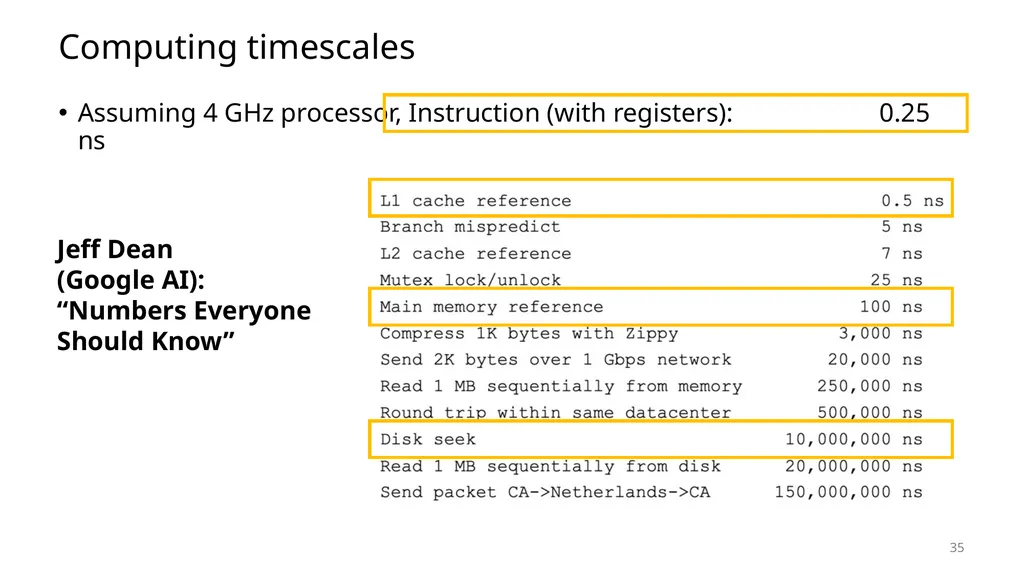
Computing timescales Assuming 4 GHz processor, Instruction (with registers): 0.25 ns 35 Jeff Dean
(Google AI):
“Numbers Everyone Should Know”<br>
36
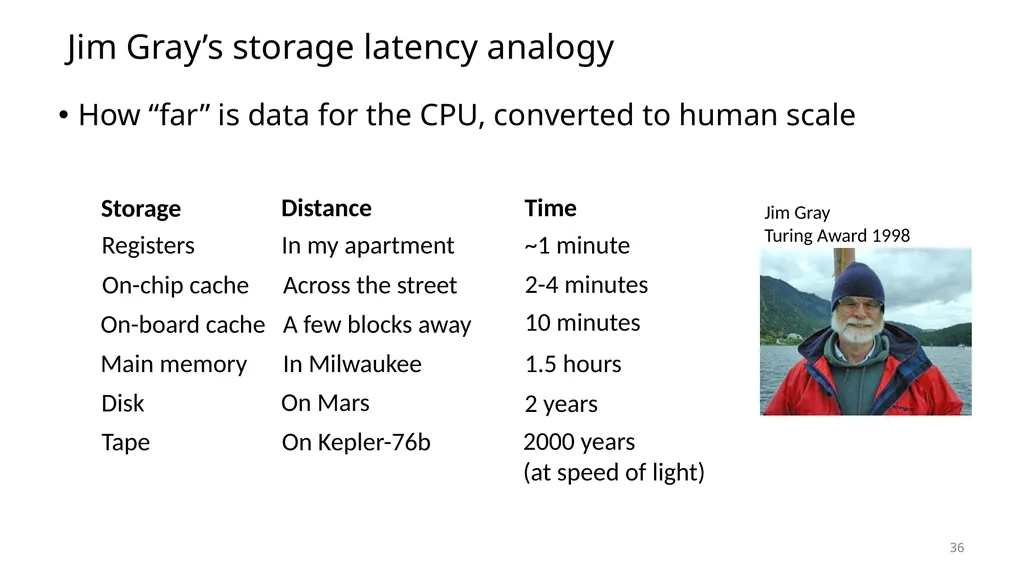
Jim Gray’s storage latency analogy How “far” is data for the CPU, converted to human scale Storage Distance Time Registers On-chip cache On-board cache Main memory Disk Tape In my apartment Across the street A few blocks away In Milwaukee On Mars On Kepler-76b ~1 minute 2-4 minutes 10 minutes 1.5 hours 2 years 2000 years
(at speed of light) Jim Gray
Turing Award 1998 36<br>
Turing Award 1998 36<br>
37
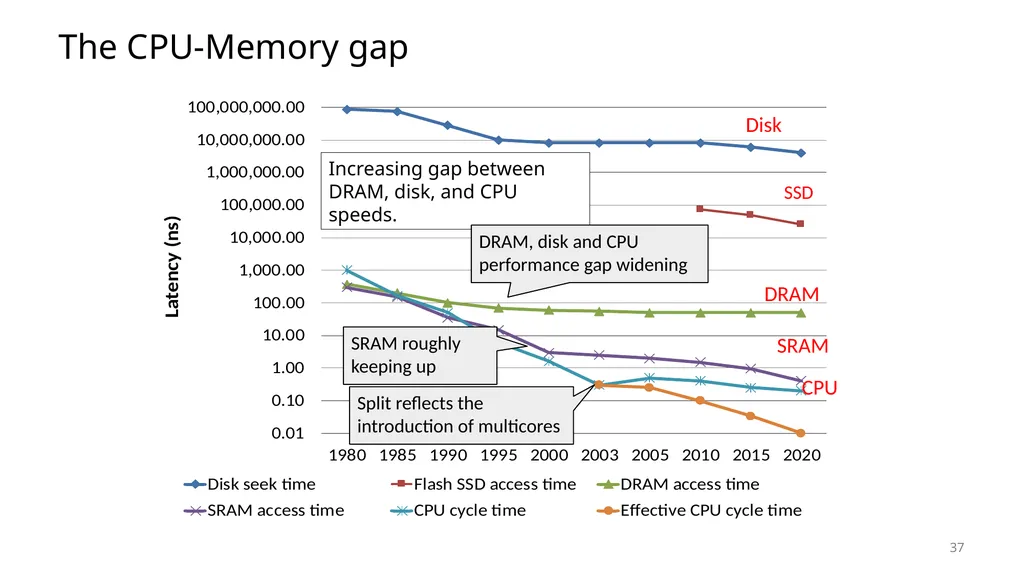
The CPU-Memory gap Increasing gap between DRAM, disk, and CPU speeds. SRAM roughly
keeping up DRAM, disk and CPU
performance gap widening Split reflects the introduction of multicores Disk DRAM CPU SSD SRAM 37<br>
performance gap widening Split reflects the introduction of multicores Disk DRAM CPU SSD SRAM 37<br>
38
The CPU-Memory Gap CPUs outspeed memory
But they can’t compute on data they don’t have!
If the CPU has to wait for data to reach it, it just sits idle!
All these GHz don’t look so useful anymore, do they?
Challenge: get data to the CPU despite “slow” memory
So the CPU can work at full speed, without waiting for data
Two-pronged strategy
Memory hierarchy: keep data we need closer to the CPU
Locality of reference: predict which data we’re likely to need 38<br>
But they can’t compute on data they don’t have!
If the CPU has to wait for data to reach it, it just sits idle!
All these GHz don’t look so useful anymore, do they?
Challenge: get data to the CPU despite “slow” memory
So the CPU can work at full speed, without waiting for data
Two-pronged strategy
Memory hierarchy: keep data we need closer to the CPU
Locality of reference: predict which data we’re likely to need 38<br>
39
Memory hierarchy Some fundamental and enduring properties of systems
The faster the storage, the more expensive ($) it is
The faster the storage, the smaller (capacity) it is
The gap between processor and main memory speed is widening
Key idea: keep the data you need the most in fast memory!
Data you only need from time to time can be in slow memory, no big deal
Most used data goes in registers
Least used data goes to disk
Analogy: kitchen ingredients I use
Salt, all the time: it sits out on the counter
Oregano, frequently: front of the cabinet
Onion powder, occasionally: back of the cabinet
Brown sugar, sometimes: somewhere in the pantry
Saffron, never: I can go buy some if I do need it 39<br>
The faster the storage, the more expensive ($) it is
The faster the storage, the smaller (capacity) it is
The gap between processor and main memory speed is widening
Key idea: keep the data you need the most in fast memory!
Data you only need from time to time can be in slow memory, no big deal
Most used data goes in registers
Least used data goes to disk
Analogy: kitchen ingredients I use
Salt, all the time: it sits out on the counter
Oregano, frequently: front of the cabinet
Onion powder, occasionally: back of the cabinet
Brown sugar, sometimes: somewhere in the pantry
Saffron, never: I can go buy some if I do need it 39<br>
40
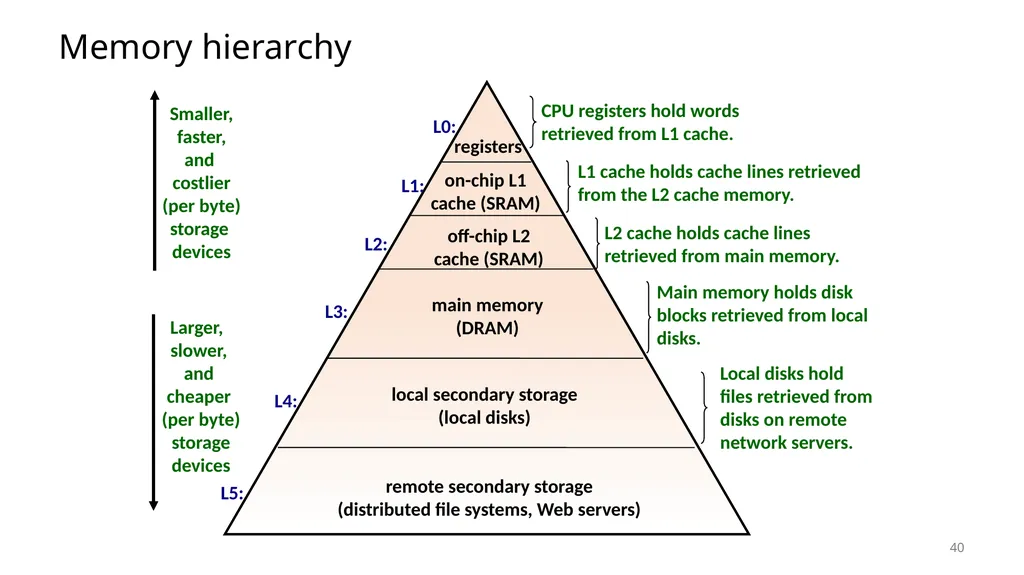
Memory hierarchy registers on-chip L1
cache (SRAM) main memory
(DRAM) local secondary storage
(local disks) Larger,
slower,
and
cheaper
(per byte)
storage
devices remote secondary storage
(distributed file systems, Web servers) off-chip L2
cache (SRAM) L0: L1: L2: L3: L4: L5: Smaller,
faster,
and
costlier
(per byte)
storage
devices 40<br>
cache (SRAM) main memory
(DRAM) local secondary storage
(local disks) Larger,
slower,
and
cheaper
(per byte)
storage
devices remote secondary storage
(distributed file systems, Web servers) off-chip L2
cache (SRAM) L0: L1: L2: L3: L4: L5: Smaller,
faster,
and
costlier
(per byte)
storage
devices 40<br>
41
41 Technologies and Trends
Memory Hierarchy
Caches
Locality of Reference Outline<br>
Memory Hierarchy
Caches
Locality of Reference Outline<br>
42
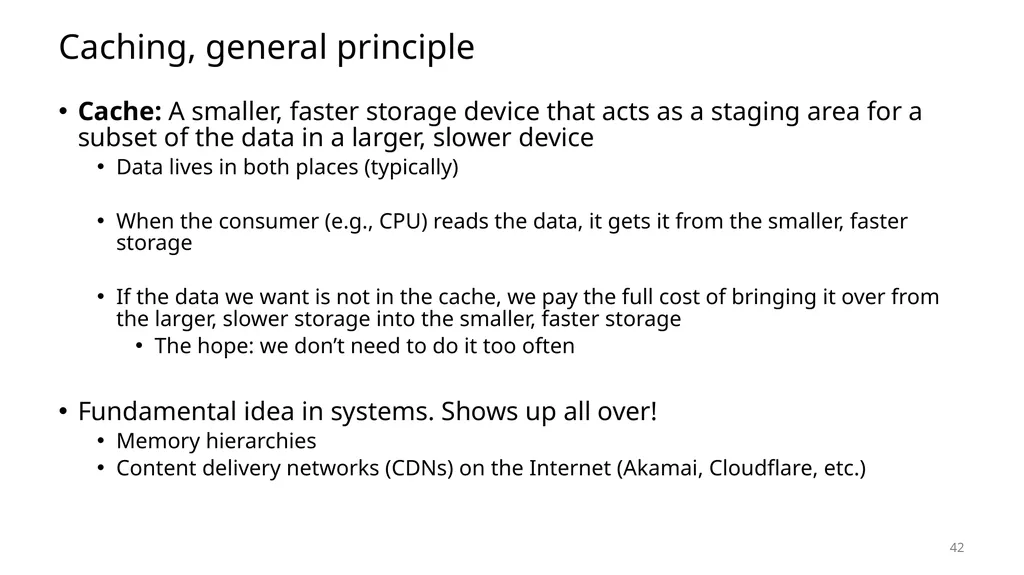
Caching, general principle Cache: A smaller, faster storage device that acts as a staging area for a subset of the data in a larger, slower device
Data lives in both places (typically)
When the consumer (e.g., CPU) reads the data, it gets it from the smaller, faster storage
If the data we want is not in the cache, we pay the full cost of bringing it over from the larger, slower storage into the smaller, faster storage
The hope: we don’t need to do it too often
Fundamental idea in systems. Shows up all over!
Memory hierarchies
Content delivery networks (CDNs) on the Internet (Akamai, Cloudflare, etc.) 42<br>
Data lives in both places (typically)
When the consumer (e.g., CPU) reads the data, it gets it from the smaller, faster storage
If the data we want is not in the cache, we pay the full cost of bringing it over from the larger, slower storage into the smaller, faster storage
The hope: we don’t need to do it too often
Fundamental idea in systems. Shows up all over!
Memory hierarchies
Content delivery networks (CDNs) on the Internet (Akamai, Cloudflare, etc.) 42<br>
43
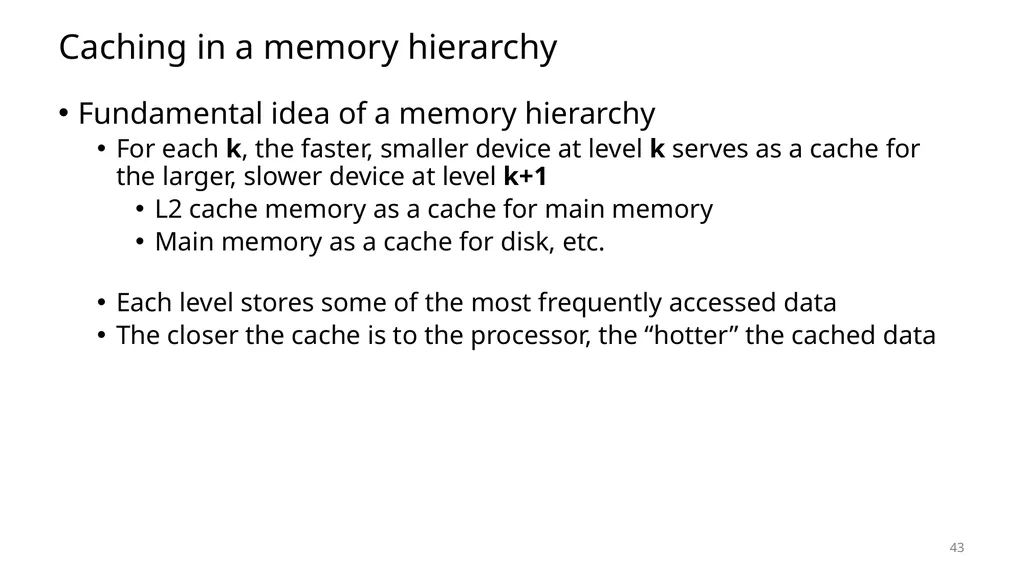
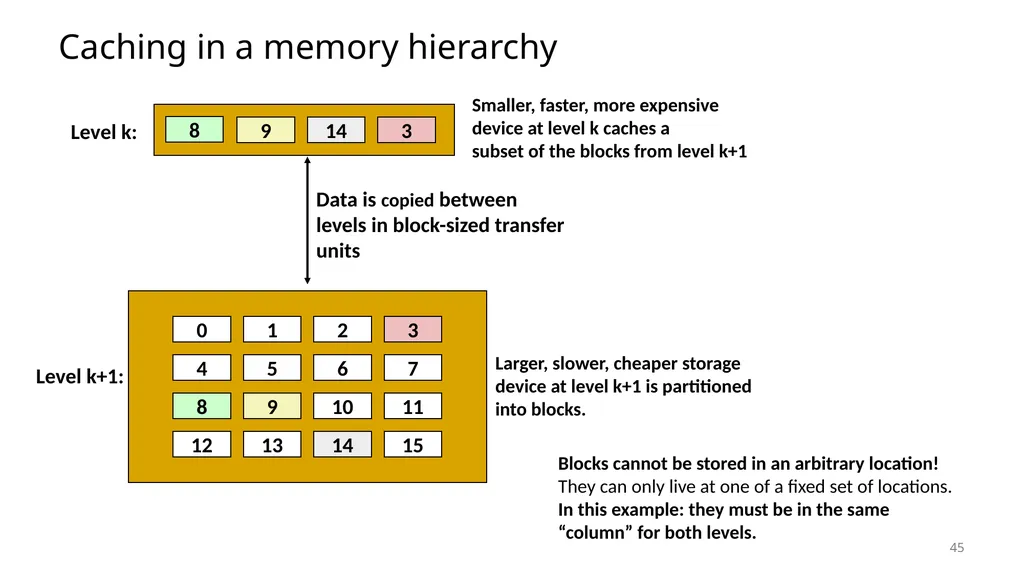
Caching in a memory hierarchy Fundamental idea of a memory hierarchy
For each k, the faster, smaller device at level k serves as a cache for the larger, slower device at level k+1
L2 cache memory as a cache for main memory
Main memory as a cache for disk, etc.
Each level stores some of the most frequently accessed data
The closer the cache is to the processor, the “hotter” the cached data 43<br>
For each k, the faster, smaller device at level k serves as a cache for the larger, slower device at level k+1
L2 cache memory as a cache for main memory
Main memory as a cache for disk, etc.
Each level stores some of the most frequently accessed data
The closer the cache is to the processor, the “hotter” the cached data 43<br>
44
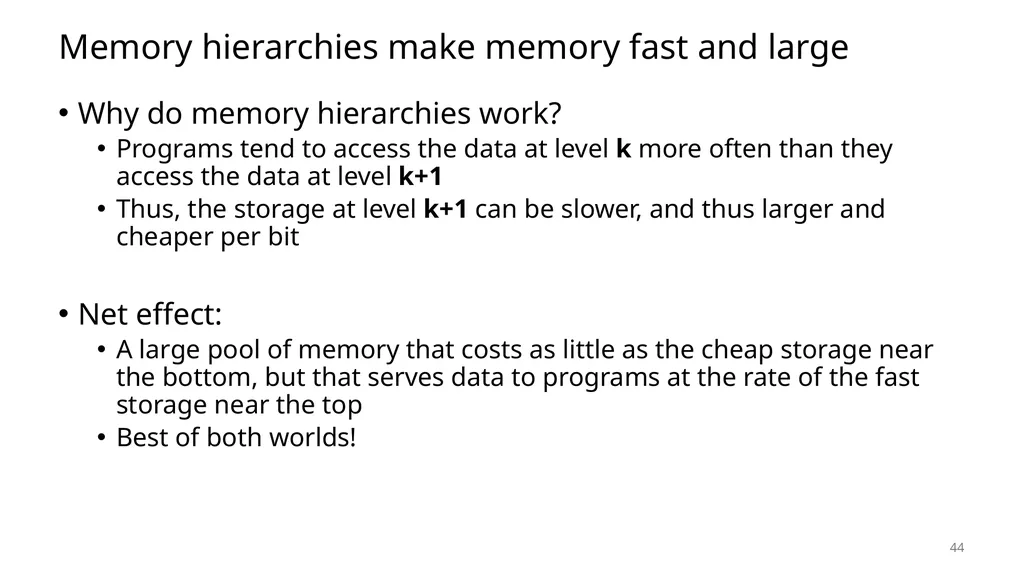
Memory hierarchies make memory fast and large Why do memory hierarchies work?
Programs tend to access the data at level k more often than they access the data at level k+1
Thus, the storage at level k+1 can be slower, and thus larger and cheaper per bit
Net effect:
A large pool of memory that costs as little as the cheap storage near the bottom, but that serves data to programs at the rate of the fast storage near the top
Best of both worlds! 44<br>
Programs tend to access the data at level k more often than they access the data at level k+1
Thus, the storage at level k+1 can be slower, and thus larger and cheaper per bit
Net effect:
A large pool of memory that costs as little as the cheap storage near the bottom, but that serves data to programs at the rate of the fast storage near the top
Best of both worlds! 44<br>
45
Caching in a memory hierarchy 0 1 2 3 4 5 6 7 8 9 10 11 12 13 14 15 Larger, slower, cheaper storage
device at level k+1 is partitioned
into blocks. Level k+1: Blocks cannot be stored in an arbitrary location!
They can only live at one of a fixed set of locations.
In this example: they must be in the same “column” for both levels. 45<br>
device at level k+1 is partitioned
into blocks. Level k+1: Blocks cannot be stored in an arbitrary location!
They can only live at one of a fixed set of locations.
In this example: they must be in the same “column” for both levels. 45<br>
46
Request
14 General caching concepts 9 3 0 1 2 3 4 5 6 7 8 9 10 11 12 13 14 15 Level
k: Level
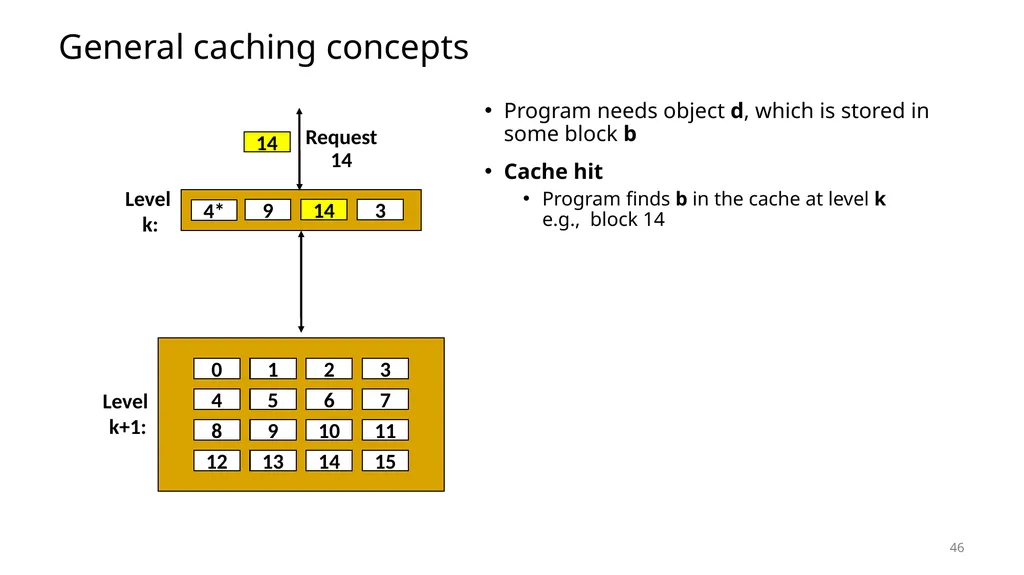
k+1: 14 14 14 4* 46 Program needs object d, which is stored in some block b
Cache hit
Program finds b in the cache at level k e.g., block 14<br>
14 General caching concepts 9 3 0 1 2 3 4 5 6 7 8 9 10 11 12 13 14 15 Level
k: Level
k+1: 14 14 14 4* 46 Program needs object d, which is stored in some block b
Cache hit
Program finds b in the cache at level k e.g., block 14<br>
47
12 Request
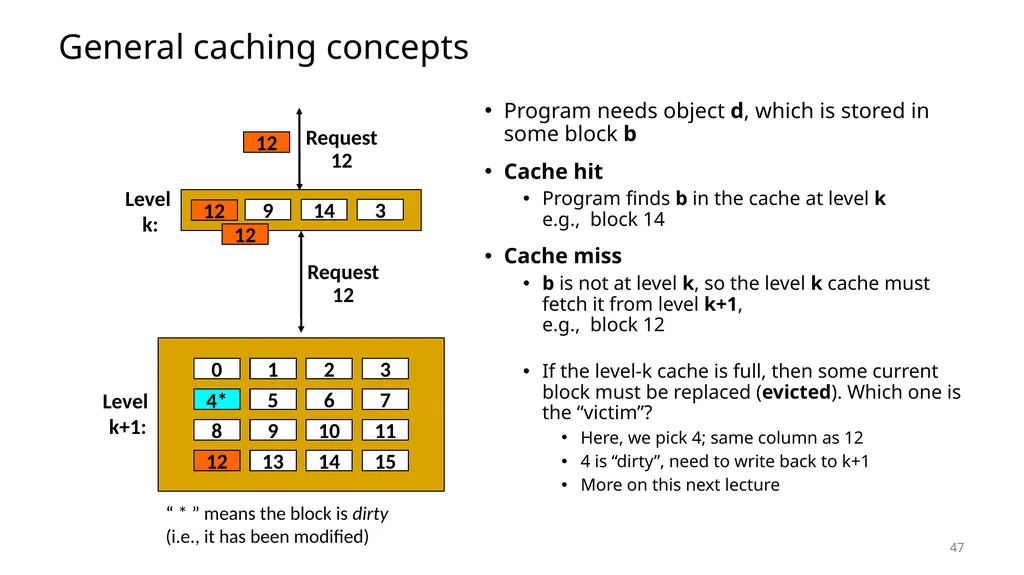
12 General caching concepts Program needs object d, which is stored in some block b
Cache hit
Program finds b in the cache at level k e.g., block 14
Cache miss
b is not at level k, so the level k cache must fetch it from level k+1, e.g., block 12
If the level-k cache is full, then some current block must be replaced (evicted). Which one is the “victim”?
Here, we pick 4; same column as 12
4 is “dirty”, need to write back to k+1
More on this next lecture 9 3 0 1 2 3 4 5 6 7 8 9 10 11 12 13 14 15 Level
k: Level
k+1: 14 12 4* Request
12 4* 4* 12 12 “ * ” means the block is dirty (i.e., it has been modified) 47<br>
12 General caching concepts Program needs object d, which is stored in some block b
Cache hit
Program finds b in the cache at level k e.g., block 14
Cache miss
b is not at level k, so the level k cache must fetch it from level k+1, e.g., block 12
If the level-k cache is full, then some current block must be replaced (evicted). Which one is the “victim”?
Here, we pick 4; same column as 12
4 is “dirty”, need to write back to k+1
More on this next lecture 9 3 0 1 2 3 4 5 6 7 8 9 10 11 12 13 14 15 Level
k: Level
k+1: 14 12 4* Request
12 4* 4* 12 12 “ * ” means the block is dirty (i.e., it has been modified) 47<br>
48
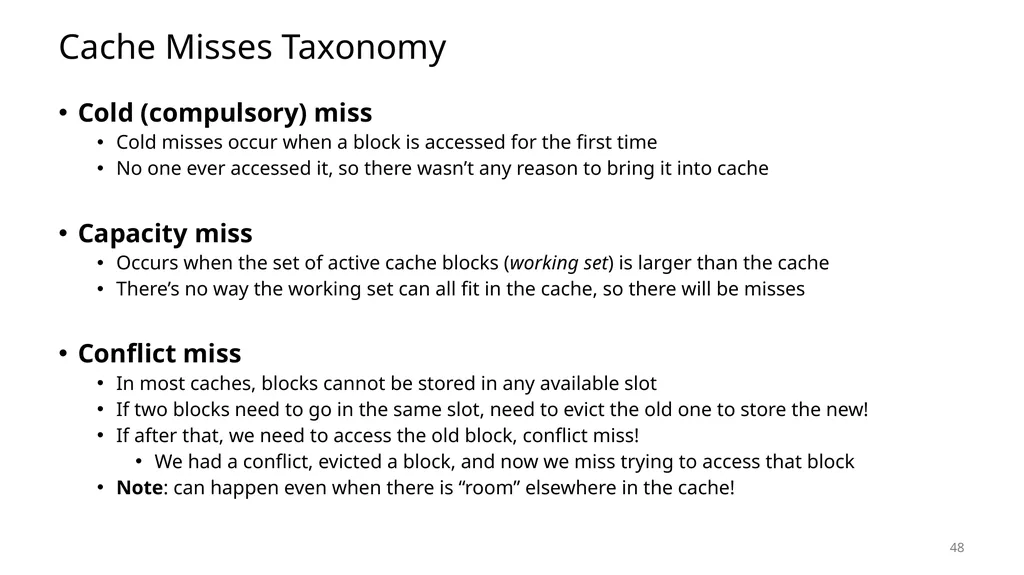
Cache Misses Taxonomy Cold (compulsory) miss
Cold misses occur when a block is accessed for the first time
No one ever accessed it, so there wasn’t any reason to bring it into cache
Capacity miss
Occurs when the set of active cache blocks (working set) is larger than the cache
There’s no way the working set can all fit in the cache, so there will be misses
Conflict miss
In most caches, blocks cannot be stored in any available slot
If two blocks need to go in the same slot, need to evict the old one to store the new!
If after that, we need to access the old block, conflict miss!
We had a conflict, evicted a block, and now we miss trying to access that block
Note: can happen even when there is “room” elsewhere in the cache! 48<br>
Cold misses occur when a block is accessed for the first time
No one ever accessed it, so there wasn’t any reason to bring it into cache
Capacity miss
Occurs when the set of active cache blocks (working set) is larger than the cache
There’s no way the working set can all fit in the cache, so there will be misses
Conflict miss
In most caches, blocks cannot be stored in any available slot
If two blocks need to go in the same slot, need to evict the old one to store the new!
If after that, we need to access the old block, conflict miss!
We had a conflict, evicted a block, and now we miss trying to access that block
Note: can happen even when there is “room” elsewhere in the cache! 48<br>
49
Break + Video How do you remember which cache miss is which?
Mr. Bean can help you tell the difference! (video) 49<br>
Mr. Bean can help you tell the difference! (video) 49<br>
50
50 Technologies and Trends
Memory Hierarchy
Caches
Locality of Reference Outline<br>
Memory Hierarchy
Caches
Locality of Reference Outline<br>
51
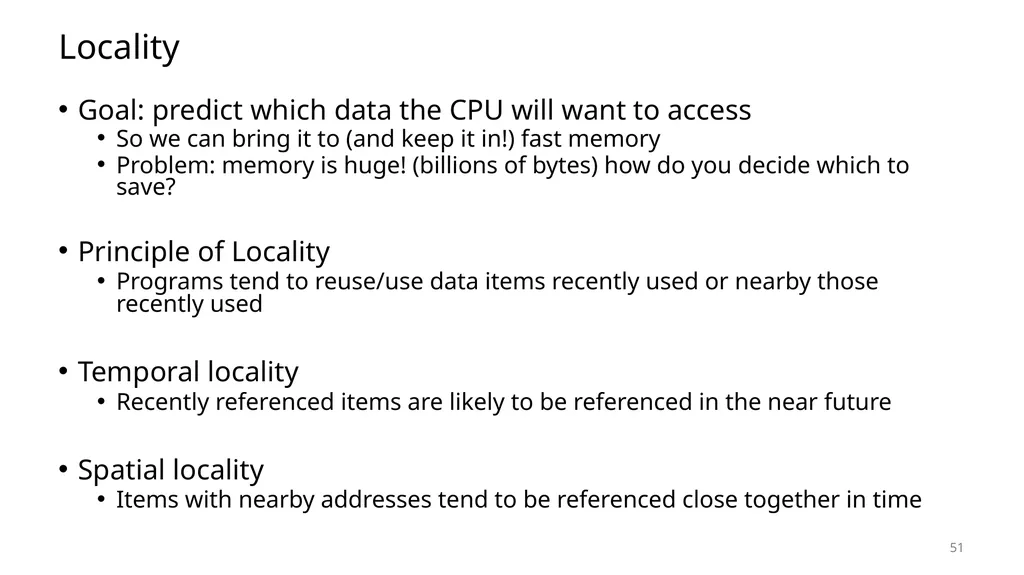
Locality Goal: predict which data the CPU will want to access
So we can bring it to (and keep it in!) fast memory
Problem: memory is huge! (billions of bytes) how do you decide which to save?
Principle of Locality
Programs tend to reuse/use data items recently used or nearby those recently used
Temporal locality
Recently referenced items are likely to be referenced in the near future
Spatial locality
Items with nearby addresses tend to be referenced close together in time 51<br>
So we can bring it to (and keep it in!) fast memory
Problem: memory is huge! (billions of bytes) how do you decide which to save?
Principle of Locality
Programs tend to reuse/use data items recently used or nearby those recently used
Temporal locality
Recently referenced items are likely to be referenced in the near future
Spatial locality
Items with nearby addresses tend to be referenced close together in time 51<br>
52
Types of locality practice Temporal locality
Recently referenced items are likely to be referenced in the near future
Spatial locality
Items with nearby addresses tend to be referenced close together in time
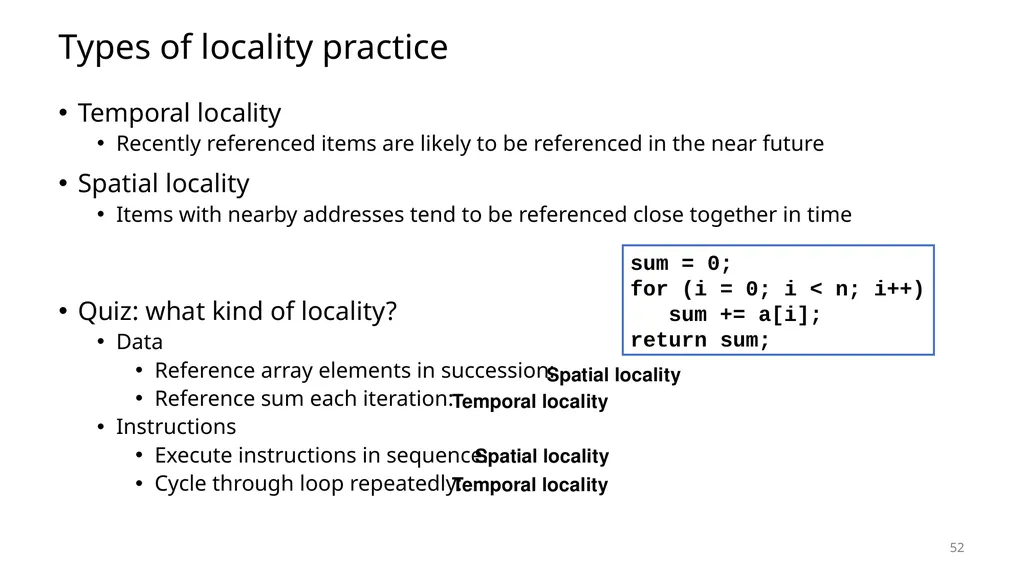
Quiz: what kind of locality?
Data
Reference array elements in succession:
Reference sum each iteration:
Instructions
Execute instructions in sequence:
Cycle through loop repeatedly: 52 sum = 0;
for (i = 0; i < n; i++)
sum += a[i];
return sum; Spatial locality Spatial locality Temporal locality Temporal locality<br>
Recently referenced items are likely to be referenced in the near future
Spatial locality
Items with nearby addresses tend to be referenced close together in time
Quiz: what kind of locality?
Data
Reference array elements in succession:
Reference sum each iteration:
Instructions
Execute instructions in sequence:
Cycle through loop repeatedly: 52 sum = 0;
for (i = 0; i < n; i++)
sum += a[i];
return sum; Spatial locality Spatial locality Temporal locality Temporal locality<br>
53
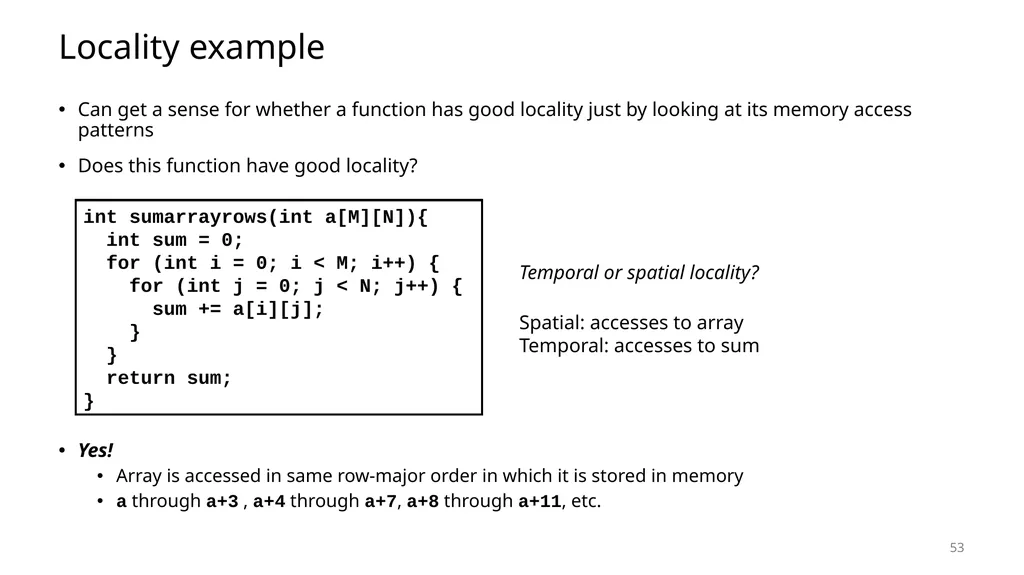
Locality example Can get a sense for whether a function has good locality just by looking at its memory access patterns
Does this function have good locality?
Yes!
Array is accessed in same row-major order in which it is stored in memory
a through a+3 , a+4 through a+7, a+8 through a+11, etc. int sumarrayrows(int a[M][N]){
int sum = 0;
for (int i = 0; i < M; i++) {
for (int j = 0; j < N; j++) {
sum += a[i][j];
}
}
return sum;
} Temporal or spatial locality? 53 Spatial: accesses to array
Temporal: accesses to sum<br>
Does this function have good locality?
Yes!
Array is accessed in same row-major order in which it is stored in memory
a through a+3 , a+4 through a+7, a+8 through a+11, etc. int sumarrayrows(int a[M][N]){
int sum = 0;
for (int i = 0; i < M; i++) {
for (int j = 0; j < N; j++) {
sum += a[i][j];
}
}
return sum;
} Temporal or spatial locality? 53 Spatial: accesses to array
Temporal: accesses to sum<br>
54
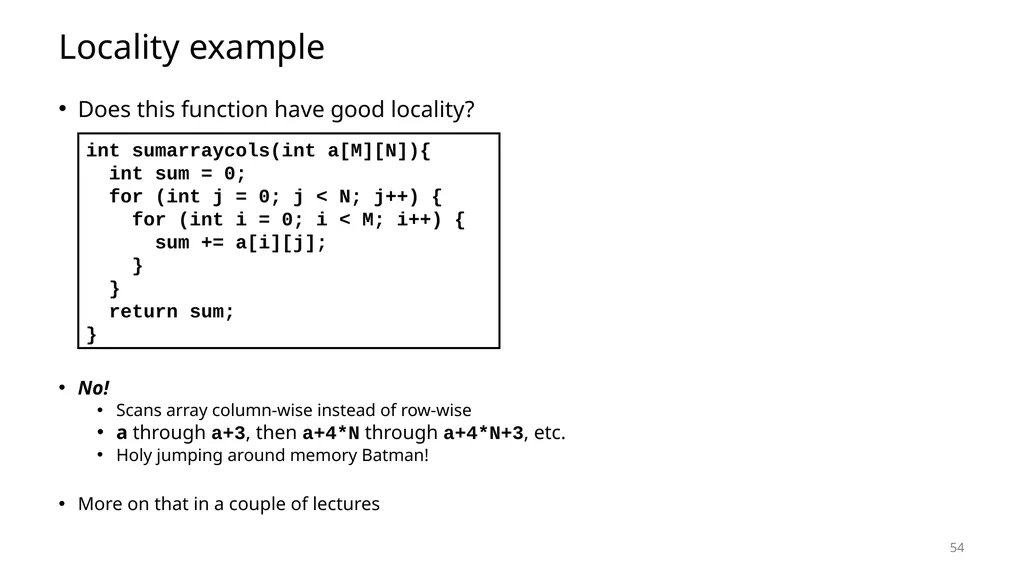
Locality example Does this function have good locality?
No!
Scans array column-wise instead of row-wise
a through a+3, then a+4*N through a+4*N+3, etc.
Holy jumping around memory Batman!
More on that in a couple of lectures int sumarraycols(int a[M][N]){
int sum = 0;
for (int j = 0; j < N; j++) {
for (int i = 0; i < M; i++) {
sum += a[i][j];
}
}
return sum;
} 54<br>
No!
Scans array column-wise instead of row-wise
a through a+3, then a+4*N through a+4*N+3, etc.
Holy jumping around memory Batman!
More on that in a couple of lectures int sumarraycols(int a[M][N]){
int sum = 0;
for (int j = 0; j < N; j++) {
for (int i = 0; i < M; i++) {
sum += a[i][j];
}
}
return sum;
} 54<br>
55
Locality to the Rescue! How can we exploit locality to bridge the CPU-memory gap?
Use it to determine which data to put in a cache!
Spatial locality
When level k needs a byte from level k+1, don’t just bring one byte
Bring neighboring bytes as well!
Good chances we’ll need them too in the near future
Temporal locality
When you bring something into the cache, try to keep it there
Good chances we’ll need it again in the near future
Result: most accesses should be cache hits!
Memory system: size of largest memory, with speed close to that of fastest memory
We’ll see how that works in detail next time 55<br>
Use it to determine which data to put in a cache!
Spatial locality
When level k needs a byte from level k+1, don’t just bring one byte
Bring neighboring bytes as well!
Good chances we’ll need them too in the near future
Temporal locality
When you bring something into the cache, try to keep it there
Good chances we’ll need it again in the near future
Result: most accesses should be cache hits!
Memory system: size of largest memory, with speed close to that of fastest memory
We’ll see how that works in detail next time 55<br>
56
56 Technologies and Trends
Memory Hierarchy
Caches
Locality of Reference Outline<br>
Memory Hierarchy
Caches
Locality of Reference Outline<br>